How to enable and configure AgentWatch
In brief: Enable AgentWatch in Studio Settings, choose cadence and agents, clear the QA baseline gate, then review and approve proposed story and scenario updates.
Enable AgentWatch
- Open TestChimp Studio and select the project whose local folders are mapped.
- Open Settings → AgentWatch.
- Check Enable AgentWatch.
Studio starts the local AgentsView daemon (provisioned and pinned with Studio). The first start may take a few minutes while sessions sync. Daemon status appears at the bottom of the settings pane—use Refresh status or Restart daemon if needed.
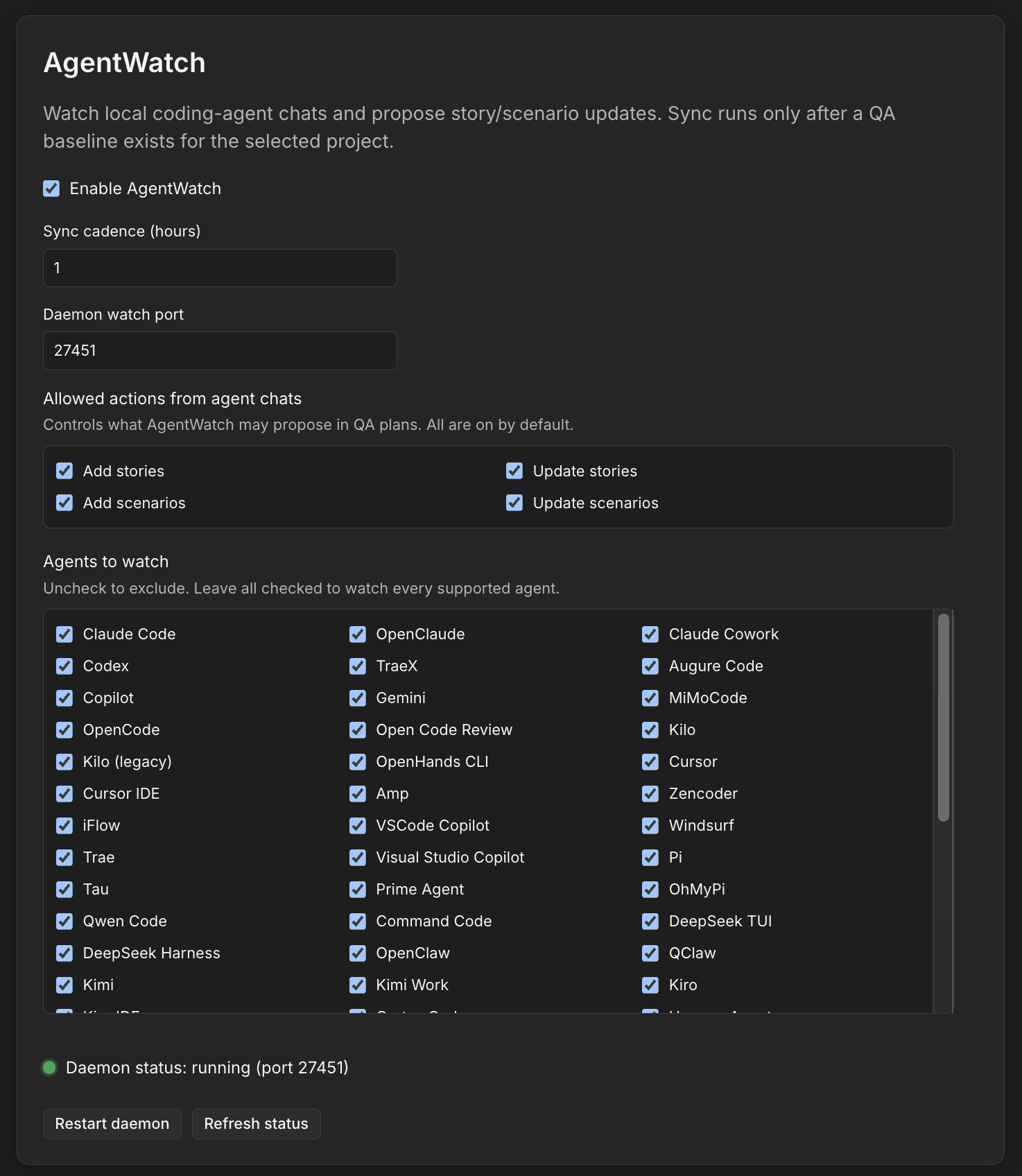
Settings reference
| Setting | What it does | Default |
|---|---|---|
| Enable AgentWatch | Starts/stops the AgentsView daemon and BAU sync loop | Off |
| Sync cadence (hours) | How often Studio polls mapped agent sessions for new product decisions | 1 (minimum 1) |
| Daemon watch port | Preferred local port for the AgentsView HTTP API | 27451 |
| Allowed actions | Whether plans may add / update stories and add / update scenarios | All on |
| Agents to watch | Which coding-agent providers to include (Cursor, Claude Code, Codex, and many more) | All supported agents |
Settings are global on the Studio install. Eligibility (baseline, folder mapping) is evaluated per project on each cadence tick.
Agents to watch
Uncheck providers you do not want indexed. Supported providers come from the pinned AgentsView release (Cursor, Claude Code, Codex, Copilot, Gemini, Windsurf, OpenHands, and dozens more). Empty selection means “all supported.”
Allowed actions
Tighten AgentWatch if you only want scenario upkeep, or only story adds:
- Add stories / Update stories
- Add scenarios / Update scenarios
Disabled actions are not proposed in the generated plan.
Baseline
Day-to-day AgentWatch sync (checkpoints, Jev filtering, plan authoring) runs for a project only after a QA baseline exists:
- ≥ 10 stories or ≥ 20 scenarios (not both required)
Until then, enabling AgentWatch does not process that project’s sessions.
Getting a baseline
| Path | When to use it |
|---|---|
| Import from Jira / Linear / TestRail (Plans tab) | Recommended for an existing backlog |
| Bootstrap from local specs | Studio can author an initial plan from local .md specs / agent-authored plans when no baseline exists and a folder is mapped |
| Thin corpus after bootstrap execute | If counts remain below threshold after you execute a bootstrap plan, BAU sync is still allowed |
Import and bootstrap details live in Studio’s enable flow and the Plans → Import path (“Bootstrap from local specs” on desktop).
What happens on each sync tick
Once enabled and baseline-ready for the selected / mapped projects:
- Studio lists recent agent sessions (activity in roughly the last 90 days).
- Sessions are mapped to a TestChimp project via workspace path / cwd affinity with your mapped folders.
- Ongoing chats are skipped until quiet (heuristic: last message older than ~5 minutes), unless a large unprocessed backlog needs draining.
- New chat content since the last checkpoint is chunked and scored.
- High-signal sessions are batched into an AgentWatch plan (or an existing pending plan is updated).
- You get a Studio notification when a plan is ready.
At most one pending AgentWatch plan per project on a Studio install. Approve or reject before a new one is authored for that project.
Review and approve
- Open the pending plan from the Studio notification (or your workflow plans under the AgentWatch / autocontext path).
- Review proposed story and scenario adds/updates.
- Approve to execute, or reject to dismiss.
- Raise a PR with the
plans/changes so the rest of the team—and downstream workflows—see the updated QA surface.
How filtering works
Agent chats are long. Most chunks are implementation chatter, not durable product guidance. AgentWatch therefore:
- Queries your project’s shared semantic embedding space for story / scenario neighbours closest to the chat chunk (Semantic Canvas is the visual surface of that same space).
- Sends the chat summary + chunk + neighbour titles/descriptions to Jev—TypeSafe’s System One decision model—to score whether the chunk contains decisions that should hit the QA surface, which neighbours are affected, and whether a new story/scenario should be authored.
- Only filtered hits go to an LLM to draft the update plan.
Jev’s tighter context budget (~32K for state + longest question) is why neighbour retrieval matters: stuffing every story and scenario into the filter is infeasible; closest neighbours keep the score accurate and cheap enough to run across every developer’s agents.
Related tools (same problem space)
People searching for agent-session memory or history tooling often land on adjacent products. AgentWatch’s job is different—turn agent decisions into governed QA plans—but these are useful neighbours if you are comparing approaches:
| Tool | Role |
|---|---|
| AgentsView | Local-first multi-agent session index (powers AgentWatch’s watch layer) |
aise (aise) | Fast local search / MCP over coding-agent sessions |
| Callimachus | Local hybrid search + recall over agent threads |
| Prism | Persistent session / knowledge memory for coding agents |
Troubleshooting
| Symptom | What to check |
|---|---|
| Daemon not running | Settings → AgentWatch → enable; Restart daemon; confirm port is free |
| No plans appearing | Baseline met? Folder mapped? Agents selected? Cadence waited? Sessions older than ~5 minutes since last message? |
| Plans never update a project | Confirm session cwd / workspace path falls under that project’s mapped folders |
| Too many / too few proposals | Adjust Allowed actions; keep cadence ≥ 1 hour; remember Jev prefers false negatives over noisy updates |
Learn more
FAQ
Where do I enable AgentWatch?
In TestChimp Studio: Settings → AgentWatch → Enable AgentWatch. That starts the AgentsView daemon.
What is sync cadence?
How often Studio polls mapped agent sessions for new product decisions. Default is 1 hour; minimum is 1 hour.
What baseline is required?
Day-to-day sync runs after roughly ≥ 10 stories or ≥ 20 scenarios. Until then, import from Jira/Linear/TestRail or bootstrap from local specs.
Can I limit what AgentWatch may change?
Yes. Allowed actions independently toggle add/update for stories and add/update for scenarios.