Operation Detail View
Short answer
Open any row on the APIs list to see operation detail: summary metadata, overall covering tests, request schema, query parameters, and response schemas by status code. Uncovered fields and response codes offer Create issue, Create test, and Ignore gap—the same governance kit as the list, scoped to the hole you clicked.
Open an operation
From APIs, click an operation row or path. Breadcrumbs show APIs → service → METHOD /path.
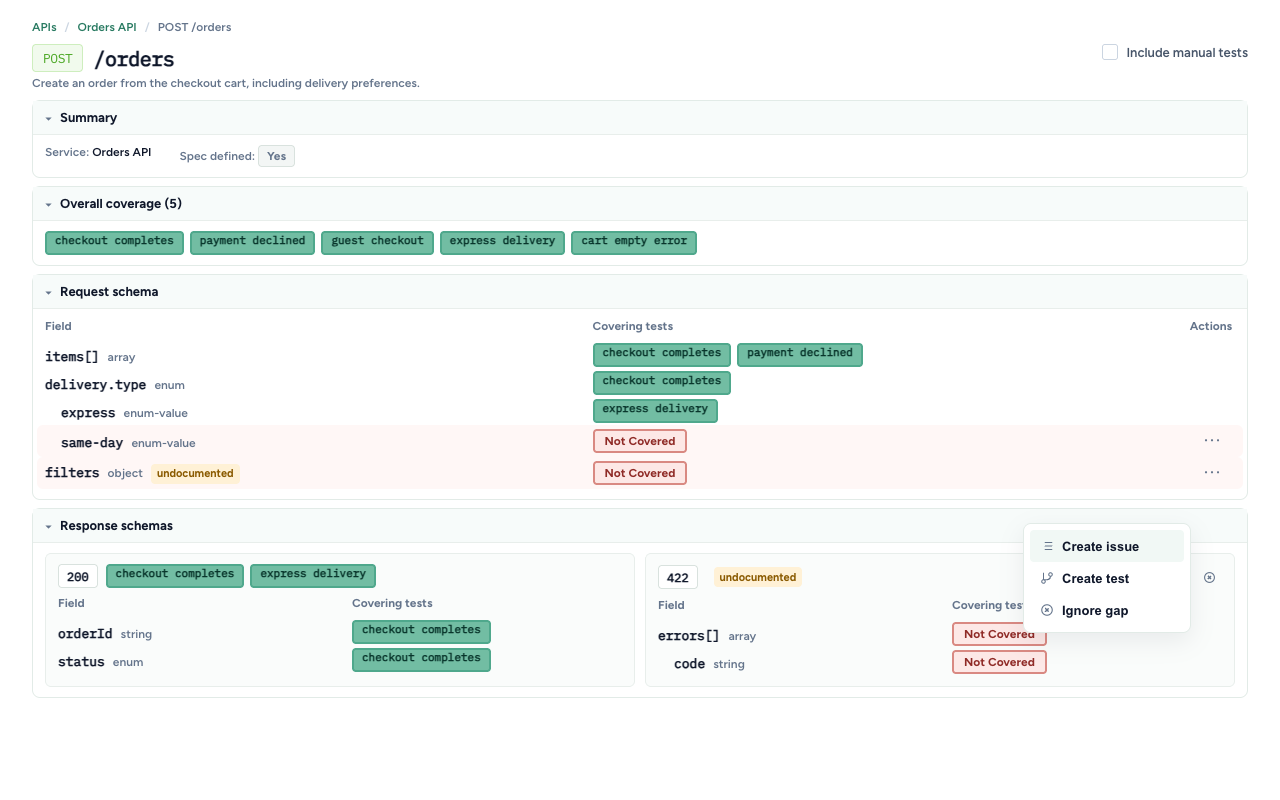
Toggle Include manual tests to include manual-session attribution in covering-test lists (same as the list page).
Sections
The page is a set of expandable panels (open by default):
Summary
- Service display name
- Spec defined — Yes/No for the operation as a whole
Overall coverage
Chips for every SmartTest that hit this operation (click through to the test). Empty means no attributed automation yet—govern from the list or wait for a capture-enabled run.
Request schema
Tree of request-body fields observed and/or declared:
| Column | Meaning |
|---|---|
| Field | Name / JSON pointer, type, optional undocumented tag |
| Covering tests | Tests that exercised this field |
| Actions | Gap menu when uncovered |
Nested fields indent by JSON-pointer depth.
Query parameters
Same layout as request schema, labeled as parameters.
Response schemas
Nested by response code. Each code shows:
- Spec-defined vs undocumented
- Covering tests for that status code
- Gap actions when the code itself is uncovered
- A field tree for the body under that code
Govern schema and response gaps
Uncovered fields, query parameters, and response codes expose:
| Action | Outcome |
|---|---|
| Create issue | Pre-filled issue for the field or response code (Missing coverage: METHOD /path — field or — response NNN), including operation id and OpenAPI root when known |
| Create test | Copyable agent prompt scoped to that field or response code for /testchimp create tests |
| Ignore gap | Acknowledge this field/code as intentionally out of scope without filing or authoring |
On fields, actions live in the row ⋯ menu when uncovered. On response codes, create issue / create test (and ignore gap) appear beside the covering-tests header when that code has no covering tests.
How to use — practical plays
| Situation | Play |
|---|---|
| Happy path covered; error body never hit | Open Response schemas → uncovered 4xx/5xx → Create test for that code |
| Optional filter object never sent | Request schema → uncovered nested fields → Create test or Create issue |
| Enum value never exercised | Expand enum leaves; govern the missing value (for example same-day delivery) |
| Traffic shows a field not in the spec | Note the undocumented tag; either update the OpenAPI root or Ignore gap / file an issue for contract drift |
| Whole response code is noise | Ignore gap on that code so triage focuses on product-critical paths |
Agent prompts from Create test use the for TestChimp operation id … (and field / response-code) forms described in Create tests.
Undocumented vs uncovered
| Signal | Meaning |
|---|---|
| undocumented tag | Seen in traffic (or denorm) but not declared in the OpenAPI root |
| Empty covering tests / Not covered | Declared or observed, but no SmartTest attributed yet |
| Spec defined No (operation) | Entire method/path missing from the spec |
Both matter for governance: undocumented surface is contract drift; uncovered surface is test debt.
Related documentation
Frequently asked questions
What does undocumented mean on a field?
The field was observed in captured traffic but is not declared in the configured OpenAPI root—often a sign the spec is behind the implementation.
Can I govern a single response code?
Yes. Expand Response schemas, find the status code with no covering tests, and use Create issue, Create test, or Ignore gap for that code—or drill into its field tree.
Do Create test prompts only create api/ specs?
No. Agents may update existing UI or API SmartTests to close the gap; the prompt scopes the operation (and optional field/response code) rather than mandating a folder.
Why is a field tree empty?
No fields have been observed yet for that section—run capture-enabled tests that hit the operation, or ensure the OpenAPI schema declares the body/parameters you expect.
Govern the branches behind every endpoint
Drill from method/path into fields and response codes—then file, author, or ignore with the same actions you use on the list.
FAQ
What trees are shown?
Request schema, query parameters, and response schemas by status code—with uncovered fields and codes actionable.
Can I ignore a specific field gap?
Yes—Ignore gap works at field and response-code scope, same as endpoint-level ignores on the list.