Operations List View
Short answer
The APIs list is the portfolio view of your HTTP contract. Pick a service (OpenAPI root), skim the coverage summary, then scan the operations table for method/path, whether the operation is spec-defined, coverage score, latency, and covering tests. Click a row for detail. Uncovered operations expose Create issue, Create test, and Ignore gap.
Open the list
From the main sidebar, open APIs. If OpenAPI roots are not configured yet, follow setup first.
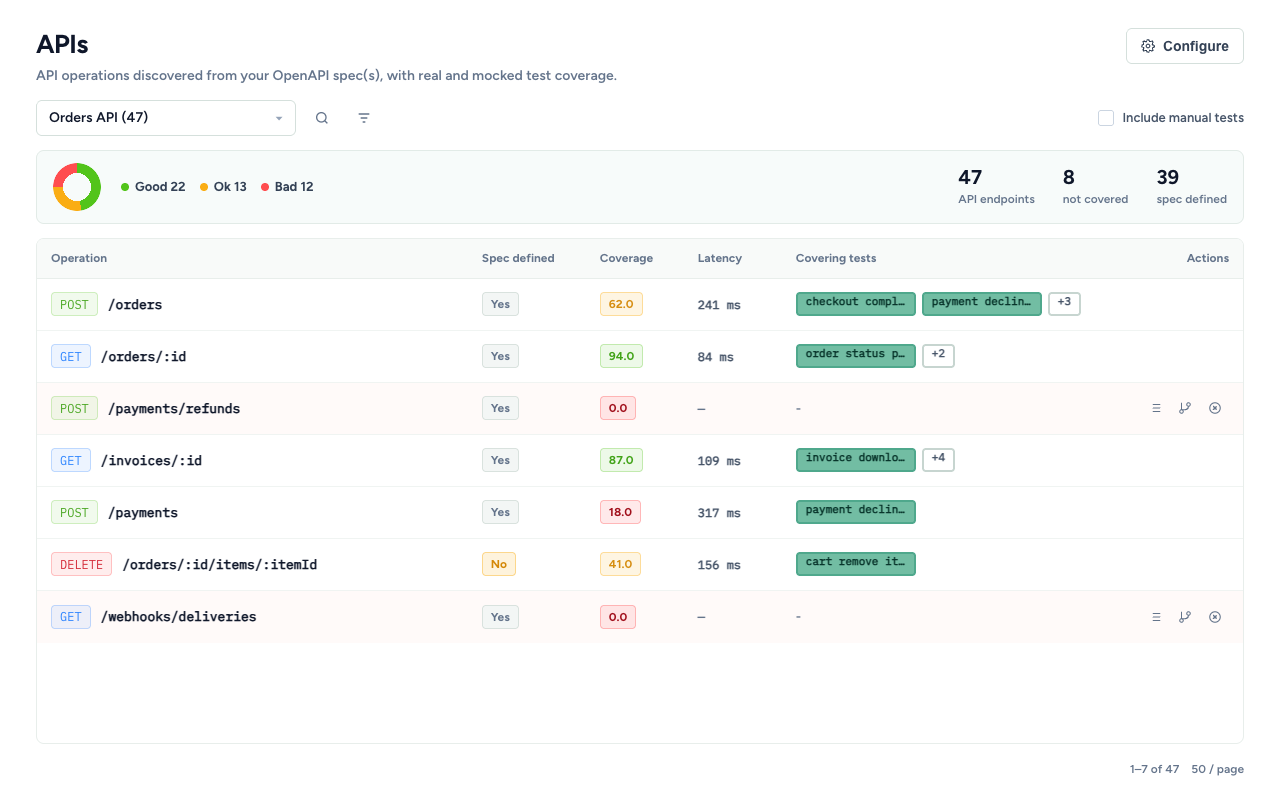
Page chrome
| Control | What it does |
|---|---|
| Service select | Switch among synced OpenAPI roots / services |
| Search | Filter by path or operationId |
| Tag filter | Narrow by operation tags from the spec |
| Include manual tests | Count Chrome-extension / manual session attribution in covering tests |
| Configure | OpenAPI roots, URL regex, payload tracking (setup) |
Coverage summary
Above the table, a collapsible coverage summary rolls up the current (filtered) list:
- Score-band breakdown (Good / Ok / Bad / unknown)
- Mapped (spec-defined) vs unmapped counts
- Operations with no covering tests
Use it to answer “how healthy is this service?” before diving into rows.
Coverage score bands
Scores combine request-field, response-field, and response-code coverage for the operation (tooltip shows the fractions). Bands:
| Band | Score |
|---|---|
| Bad | < 20 |
| Ok | 20–70 |
| Good | > 70 |
Operations table
| Column | Meaning |
|---|---|
| Operation | HTTP method tag + path template (or operationId) |
| Spec defined | Yes if present in the OpenAPI root; No if only observed in traffic |
| Coverage | Aggregate score tag (hover for field/code breakdown) |
| Latency | Mean observed latency; hover for min/max/sample count |
| Covering tests | Chips linking into SmartTests (+N expands overflow) |
| Actions | Gap governance when the operation has no covering tests |
Click a row (outside buttons/links) to open the operation detail page. Paths are also clickable.
Sort by path, spec-defined, coverage (default descending), latency, or covering-test count. Pagination supports 20–200 rows per page.
Govern uncovered operations
When an operation has no covering tests, the Actions column shows:
| Action | Outcome |
|---|---|
| Create issue | Opens Create Issue with a pre-filled title/description (Missing coverage: METHOD /path, service, TestChimp operation id, covering-test count) |
| Create test | Opens a copyable agent prompt scoped to the operation (and OpenAPI root path when known)—paste into /testchimp create tests |
| Ignore gap | Marks the endpoint gap as intentionally ignored so it no longer demands triage attention without filing work or authoring tests |
Covered operations hide these actions—governance focuses on holes.
Typical list triage recipes
| Goal | How |
|---|---|
| Find untested endpoints | Sort by covering tests ascending, or use the summary’s not-covered count |
| Raise debt tickets | Create issue on critical paths with empty covering tests |
| Close gaps with agents | Create test → run create-tests with the operation id scope |
| Quiet known exceptions | Ignore gap for deprecated or out-of-scope operations |
| Hunt weak contracts | Sort by coverage ascending; open detail for field-level holes even when some tests exist |
| Prioritize by production impact | Among coverage gaps, prefer high-RPM or high-error operations; use p95 latency to nominate performance-test work |
Runtime metrics are prioritization evidence, not coverage. Check the persisted window and sync status before comparing rows; missing telemetry means unknown, not zero. See Observability in API Contract Governance.
From list to detail
Click any operation to inspect request schema, query parameters, response codes, and per-field covering tests—where the same governance actions apply at finer grain. See detail view.
Related documentation
Frequently asked questions
What does Spec defined mean?
Yes means the operation exists in the configured OpenAPI root. No means TestChimp observed traffic for a method/path that is not declared in the spec—useful for spotting undocumented APIs.
Why are Actions empty on some rows?
Row actions appear only when the operation has no covering tests. Partially covered operations still show a score; drill into detail to govern individual fields or response codes.
What does Include manual tests change?
When checked, covering-test attribution also includes tests from manual session capture, not only automated SmartTests.
How do covering-test chips work?
Each chip opens the SmartTest in the IDE. Overflow uses +N with a hover list of additional covering tests.
Scan the contract portfolio in one table
Filter a service, sort by coverage or covering tests, and turn empty rows into issues, tests, or deliberate ignores.
FAQ
What does the list show per operation?
Method/path, whether it is spec-defined, coverage score, latency, and covering tests—plus governance actions when uncovered.
How do I open field-level detail?
Click an operation row to open operation detail with request/query/response schema trees.
How should I prioritize uncovered operations?
Among coverage gaps, prefer fresh high-volume or high-error operations. Use p95 latency to nominate performance-test work, and treat missing telemetry as unknown rather than zero.