Set Up API Contract Governance
Short answer
API contract governance needs two inputs: OpenAPI root file(s) in your connected repository (so TestChimp can discover operations), and SmartTest runs with API capture enabled (so traffic maps onto those operations). Configure roots from APIs → Configure; set TESTCHIMP_ENABLE_API_CAPTURE=1 when running Playwright.
Prerequisites
| Requirement | Why |
|---|---|
| Git connected | OpenAPI roots are picked from the project’s connected GitHub or GitLab repository |
| OpenAPI / Swagger file(s) | JSON or YAML root files that describe your HTTP API(s) |
@testchimp/playwright ≥ 0.2.17 | Runtime + reporter support for API operation capture |
installTestChimp on the web page fixture | Capture attaches to the page network path used by UI SmartTests |
See also: Playwright runtime plugin and Run SmartTests in CI.
1. Configure OpenAPI root paths
- Open APIs in the main sidebar.
- Click Configure.
- Under OpenAPI spec root paths, add one or more root files from the connected repo (file picker filters to
.json/.yaml/.yml). - Optionally set:
- URL capture regex — server-side allow-list for which request URLs are stored/matched (complements the client-side regex below).
- Disable payload tracking in tests — keep operation hit signals without storing request/response bodies when policy requires it.
- Save. TestChimp enqueues an OpenAPI parse/sync. A banner shows while operations are discovered.
Multi-root setups map to multiple services in the list service picker (one root file per service key).
If no roots are configured, the APIs page shows a warning banner and an empty table until you configure them.
2. Enable API capture when running tests
API capture is off by default so ordinary runs stay light. Opt in per shell or CI job:
export TESTCHIMP_ENABLE_API_CAPTURE=1
# then run your Playwright / SmartTest command
In GitHub Actions (or similar), add the env on the job that executes tests:
env:
  TESTCHIMP_API_KEY: ${{ secrets.TESTCHIMP_API_KEY }}
  TESTCHIMP_ENABLE_API_CAPTURE: "1"
Optional client-side tuning:
| Variable | Default | Purpose |
|---|---|---|
TESTCHIMP_ENABLE_API_CAPTURE | off | Master switch (1 / true / yes) |
TESTCHIMP_API_COVERAGE_URL_REGEX | (none) | Only matching request URLs are captured in the browser |
TESTCHIMP_API_COVERAGE_BODY_TIMEOUT_MS | 1500 | Cap per-response body read |
TESTCHIMP_API_COVERAGE_DRAIN_TIMEOUT_MS | 5000 | Cap for draining in-flight captures at page teardown |
Full detail: runtime plugin — API operation capture.
What gets attributed
- Real traffic from UI journeys (browser network).
- Mocked traffic when your tests mock HTTP in a way the runtime still observes (covering-test chips distinguish attribution where available).
Coverage denormalization runs on batch completion and an hourly sweep—not on every single ingest—so scores may lag a short time after a run finishes.
3. Verify the loop
- Confirm OpenAPI sync finished (banner clears; services appear in the picker).
- Run a SmartTest suite that hits your API with capture enabled.
- Refresh APIs — operations should show covering-test chips and non-empty coverage scores where traffic matched.
- If operations exist but coverage is empty, the page hints to set
TESTCHIMP_ENABLE_API_CAPTURE=1and check the Playwright package version.
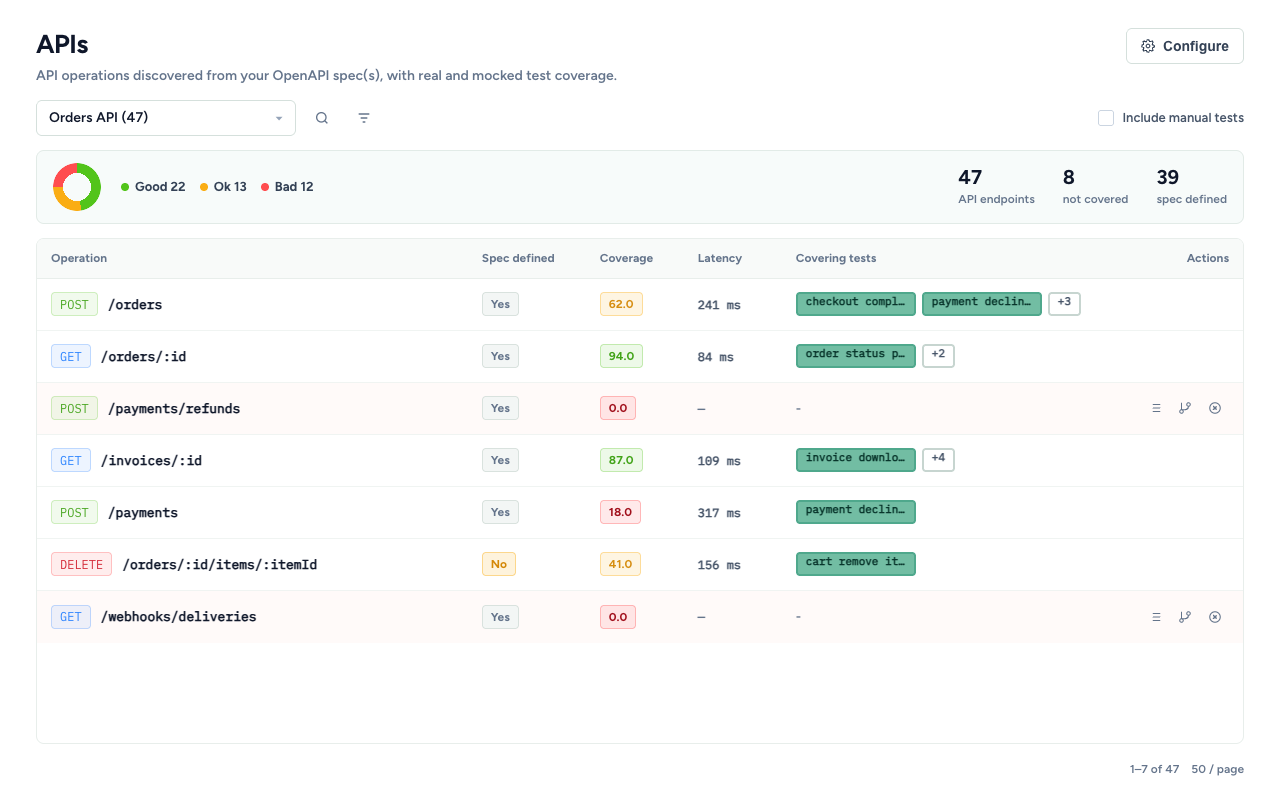
Typical setup checklist
- GitHub/GitLab connected and repository selected
- OpenAPI root path(s) saved under APIs → Configure
- Spec parse succeeded (services + operations visible)
- Local/CI env includes
TESTCHIMP_ENABLE_API_CAPTURE=1when you want Operations coverage -
@testchimp/playwright≥ 0.2.17 andinstallTestChimpon the page fixture - Optional URL regexes aligned (client env + project Configure) so third-party noise is filtered
Next steps
- Browse and filter the operations list
- Drill into operation detail for schema-field gaps
- Use Create issue / Create test / Ignore gap to govern uncovered surface
Frequently asked questions
Where do I point TestChimp at my OpenAPI file?
Open APIs → Configure and select one or more OpenAPI/Swagger root files from your connected git repository. Saving enqueues a parse that discovers services and operations.
Is API capture always on?
No. Set TESTCHIMP_ENABLE_API_CAPTURE=1 (or true/yes) to opt in. Leaving it unset keeps runs lighter—no page network listeners or payload ingest for Operations.
Can I avoid storing payloads?
Yes. In APIs → Configure, enable Disable payload tracking in tests. You can also tighten URL capture regexes so only first-party API hosts are ingested.
Why do I see operations but zero covering tests?
The OpenAPI sync only discovers the contract. Covering tests appear after SmartTest batches run with API capture enabled and traffic matches operation paths.
Wire the contract, then capture the traffic
Configure OpenAPI roots once, enable capture on the runs that matter, and the APIs surface becomes your continuous contract audit.
FAQ
Where do I point OpenAPI roots?
From APIs → Configure, select OpenAPI/Swagger JSON or YAML roots in your connected GitHub or GitLab repo.
How do I enable capture?
Set TESTCHIMP_ENABLE_API_CAPTURE=1 (or true) on Playwright runs with @testchimp/playwright ≥ 0.2.17 and installTestChimp on the page fixture.
Can I exclude noisy URLs?
Yes—configure URL filters and optionally disable payload storage while still tracking operation hits.