AgentWatch: Capture Tribal Knowledge from Coding-Agent Chats

TL;DR: We shipped AgentWatch in TestChimp Studio—it watches local coding-agent chats (Cursor, Claude Code, Codex, and 20+ others), spots when business rules, UX expectations, or constraints get decided, and proposes story/scenario updates so your QA surface evolves with development across the whole team. Filtering at scale uses Jev plus our semantic embedding neighbours; you approve a plan and raise a PR. Docs: AgentWatch · How to.
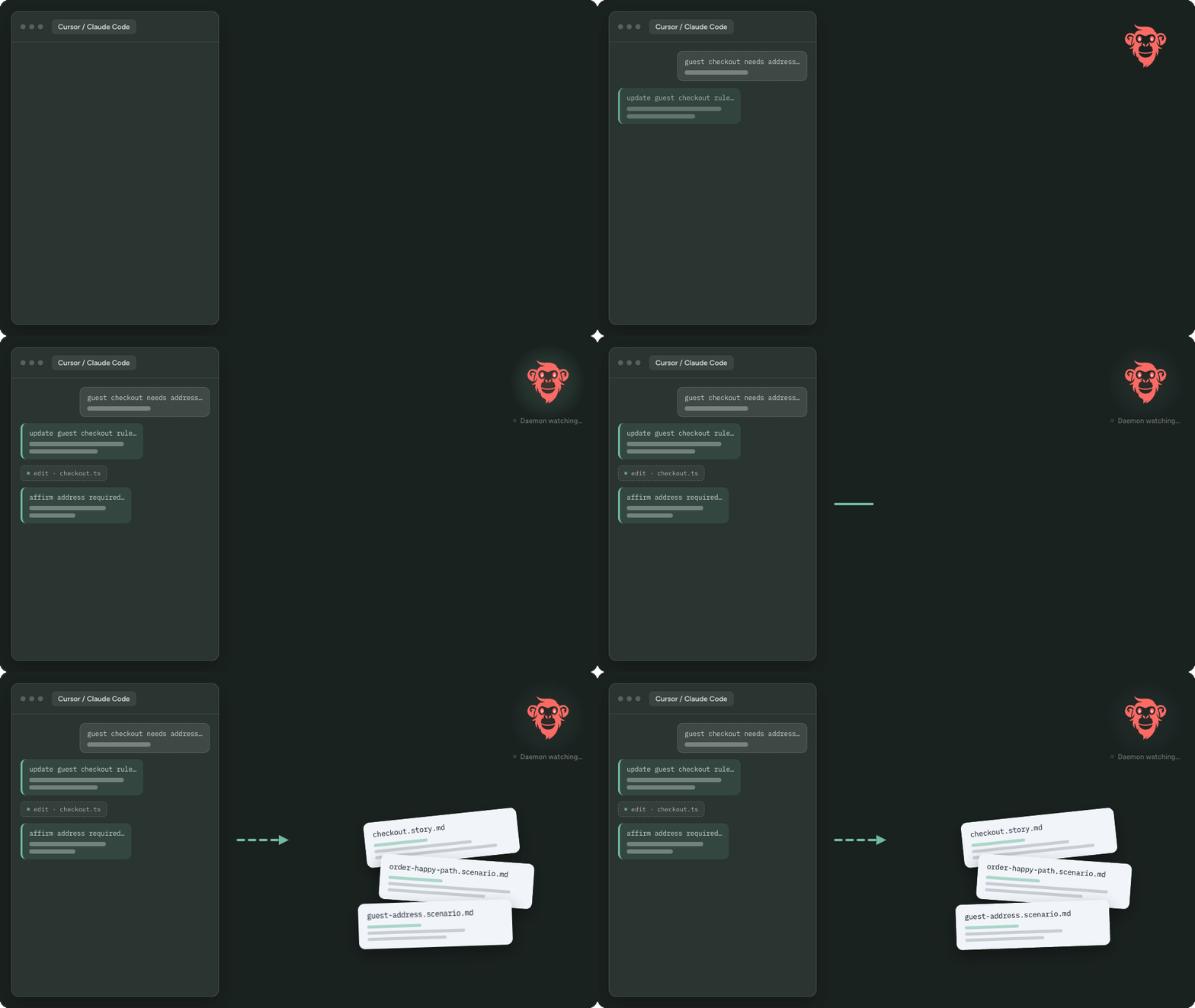
The tribal knowledge problem did not go away
Tribal knowledge—the discussion with a colleague over coffee—was often the hardest part of the SDLC to capture. Specs, tickets, and test plans lag behind what the team actually agreed.
Whether you like it or not, with the transition to agents those conversations have been repeated almost verbatim with coding agents: same product rules, same UX expectations, same edge-case constraints—usually a bit better filtered. That makes agent threads a near-perfect capture point for the knowledge that used to evaporate in hallways.
Meeting tools still miss the desk. Meeting Bots capture what is said in the call. AgentWatch captures what is decided while you build.
What AgentWatch does
AgentWatch watches your agent interactions and identifies when:
- new business rules are decided
- UX expectations are finalized
- finer-grained constraints get defined
…then proposes updates to user stories, and adds or updates scenarios—so your QA surface stays aligned with product reality across all your developers, not only the person who had the chat.
Core loop:
- Work normally in your coding agent
- Studio’s watch daemon indexes sessions for mapped projects
- On cadence, high-signal decisions are filtered and batched
- You get a plan → approve → stories/scenarios update → raise a PR
- Downstream QA workflows course-correct from the updated surface
Full product walkthrough: AgentWatch docs. Setup: How to enable.
Why this became feasible now: Jev as the filter
Agent conversations are verbose. Most chunks are tooling noise, not durable product guidance—requirements, expectations, acceptance-worthy constraints.
That is an awkward job for a full LLM on every chunk, for every developer, all day. It is a natural job for Jev—TypeSafe’s System One model built to answer typed decision questions with calibrated scores, not to write essays. Talk about timing: AgentWatch needs high-volume, low-latency “is this product-relevant?” judgments. Jev fits.
One practical limit of Jev is the tighter context window (~32K for state + the longest question). Stuffing all stories and scenarios into every classify call is infeasible. This is where TestChimp’s shared-space semantic embedding canvas earns its keep:
- Query the closest story / scenario neighbours to the conversation chunk (Semantic Canvas is how humans explore that same space)
- Feed those neighbours—plus chat summary and chunk—to Jev
- Jev scores likelihood of impact per related story/scenario, and whether a new story should be authored
- Only the filtered hits go to an LLM to suggest updates and draft new stories
- You get a PR-shaped plan; you confirm; QA workflows follow
Jev is a means. The product is AgentWatch: tribal knowledge → governed QA surface.
Where AgentWatch sits among agent-history tools
A wave of local tools now index coding-agent sessions so you can search or recall past threads—useful when you ask “what did we decide about auth last month?” Examples people already search for:
- AgentsView — multi-agent session browser / index (AgentWatch uses it as the watch layer)
- aise — ultra-fast local session search + MCP
- Callimachus — hybrid keyword + semantic recall over agent history
- Prism — persistent session memory and knowledge graph for agents
Those tools help you find the thread. AgentWatch’s bet is different: when a decision should change what QA monitors, it should land in stories and scenarios—versioned, reviewable, and wired into the same workflows and QA Brain you already run—not stay buried in a searchable chat archive.
The DevX we optimized for
No new ritual. No “paste this transcript into TestChimp.”
| You do | AgentWatch does |
|---|---|
| Enable once in Settings → AgentWatch | Runs AgentsView, maps sessions to projects |
| Keep coding in Cursor / Claude Code / Codex / … | Filters on cadence; prefers false negatives over spam |
| Approve the plan when notified | Updates plans/ stories and scenarios |
| Raise the PR | Downstream QA posture stays current |
Configure cadence, which agents to watch, and whether add/update is allowed for stories and scenarios—details in the how-to.
Why this belongs in TestChimp
We already argued that skills are SaaS distribution, that Studio collapses the stitching tax on the desktop, and that Meeting Bots put product intelligence in the call.
Agent chats were the remaining tribal channel: rich decisions, thin structured memory, specs that lag the product.
AgentWatch closes that channel—so the hours your team already spends directing agents become fuel for a living QA surface, not another forgotten scrollback.
Get started
- Install TestChimp Studio and map a local folder to your project.
- Open Settings → AgentWatch → enable.
- Import or bootstrap a QA baseline if you do not have one yet.
- Keep working in your agents. Review the first plan when it lands. Raise the PR.
Docs: AgentWatch · How to configure · Semantic Canvas · Meeting Bots.
Frequently asked questions
Which agents are supported?
Cursor, Claude Code, Codex, and 20+ others via the pinned AgentsView provider set. Pick which ones to watch in Settings.
Does every chat create a plan?
No. Jev filters for decided, verifiable product guidance. Implementation chatter is ignored by design.
Do I need a baseline first?
Yes for day-to-day sync—roughly ≥ 10 stories or ≥ 20 scenarios—or bootstrap / import first. See baseline.
Is this the same as searching my agent history?
No. Search tools help you recall threads. AgentWatch proposes governed updates to the QA surface your team shares.