Nuwan Samarasekera
Founder & CEO, TestChimp
View all authors

SKILLs are becoming SaaS’s best distribution hack (here’s why)

· 3 min read
Nuwan Samarasekera
Founder & CEO, TestChimp

For years, the hardest part of selling a complex technical product was not the demo—it was the learning curve. Buyers had to internalize workflows, edge cases, and “the right way” to use each feature before they could reliably get value.

That is changing fast. Agent Skills—portable folders of instructions, checklists, and resources that teach an AI agent how to work with your product—are starting to look like one of the most attractive distribution mechanisms for technical SaaS. Instead of hoping every customer reads the docs in the right order, you ship a repeatable operating procedure the agent can follow on demand.

A skill turns every “new user” into a “power user”​

A well-designed Agent Skill effectively turns every user into a power user: one that knows which workflows to follow, how to use the product correctly, and how to extract maximum value from every feature.

That compresses time-to-value—the path to the “aha moment”—because the agent is not improvising from vague prompts; it is executing your intended playbook.

What we are seeing at TestChimp​

We have been seeing this firsthand since launching the TestChimp Agent Skill.

For teams, the workflow is intentionally simple:

  1. Author a few user stories (or import from Jira).
  2. Install the TestChimp skill on your coding agent.
  3. After each PR, simply say /testchimp test.

The skill teaches Claude how to coordinate with TestChimp to:

  • instrument the app for TrueCoverage,
  • fetch and interpret coverage gaps,
  • write tests that addresses the gaps and link them to scenarios correctly,
  • run targeted exploratory testing to catch UX issues,
  • and use AI-native test steps in tests where they help.

The upgrade loop: your perfect user ships with your product​

The best part is what happens when you ship new features.

With a properly designed, self-updating TestChimp Agent Skill, your "user" continuously learns your latest workflows, capabilities, and best practices—and applies them the way you intended. Your agent-side “instruction manual” can move as fast as your product, without requiring every human user to re-read release notes and learn every new capability you ship.

If you are building technical SaaS in the agent era, the product surface area is no longer only your UI and APIs. It is also the skill: the packaged expertise that turns your users in to power users.


References and further reading​

Authoritative guides and registries for Agent Skills (format, discovery, and ecosystem):

Boiling the lake - QA style

· 3 min read
Nuwan Samarasekera
Founder & CEO, TestChimp

Boil the lake - credits: https://garryslist.org/posts/boil-the-ocean

Garry Tan recently introduced a simple but powerful idea: The old adage “don’t boil the ocean” is bad advice in the AI agent era. Well - at the very least, “lakes” are now very much “boilable”.

The core insight is: AI compresses certain work by orders of magnitude. That doesn’t just make things faster - it fundamentally changes what’s feasible.

Most people ask the wrong question:

“What existing human workflows can we speed up with AI?”

That’s incremental thinking. The real leverage comes from asking:

“What powerful workflows did we avoid entirely because they were too expensive to do with humans?”

Those are your “lakes”. And with AI, many of them go from infeasible → trivial.


The QA lake​

In QA - making “test authoring faster” is akin to the former. The bigger ROI lies in the granular workflows that get unlocked now that agents can take autonomy in your test automation.

The Big Idea:

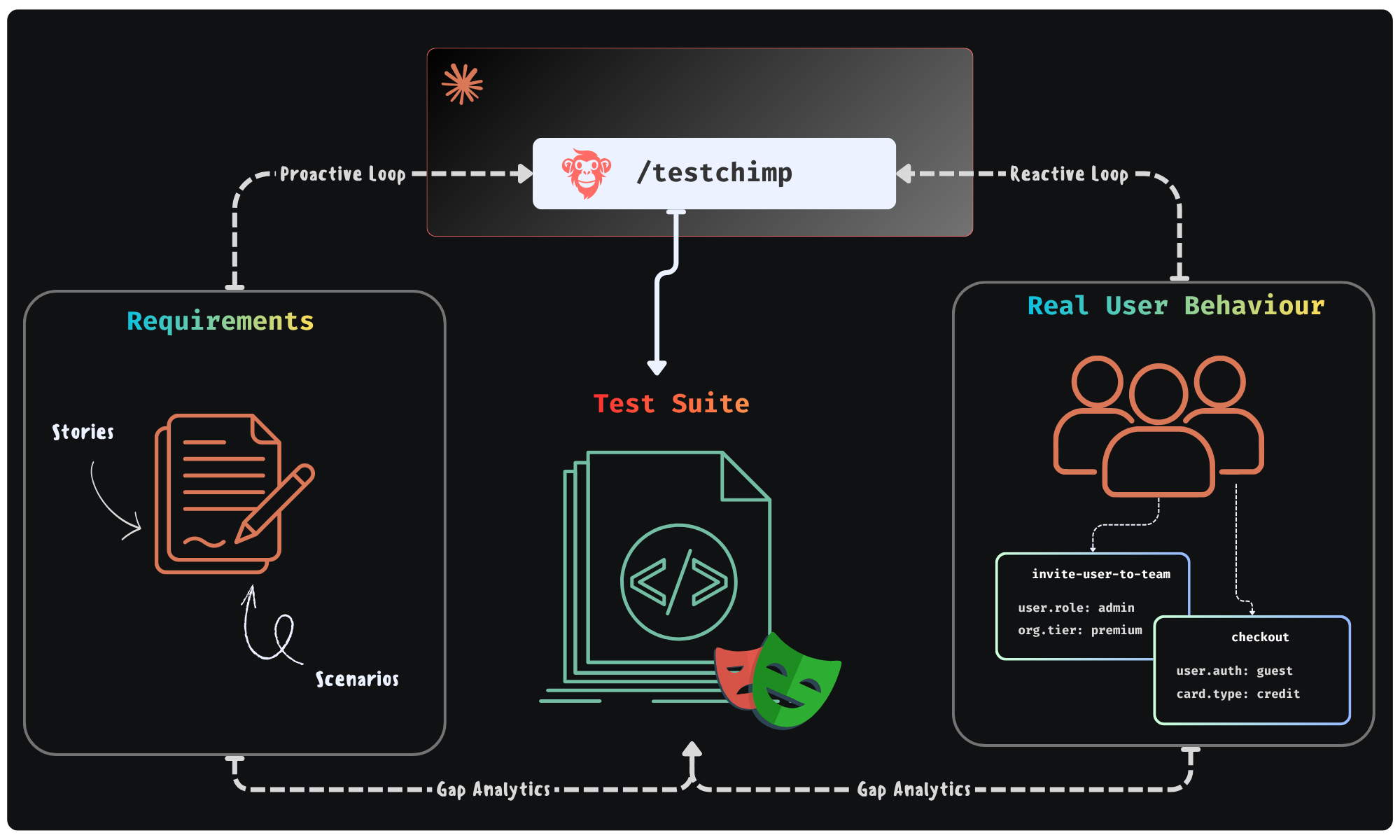
Could agents execute a workflow - where they continuously monitor “planned reality” (user stories / scenarios) and “production reality” (real user behaviour patterns) to improve the “tested reality” (test suite + test infra) - in a continuous feedback loop. All of it done in the background - looping you in for approval of plans it makes.

Feedback Loop enabled by TestChimp

This is exactly the future we were building TestChimp for - where agents participate in each phase of QA; where agents access real world insights / plan artifacts to self-direct its work strategically.


Claude + TestChimp​

Today, we are adding the final piece of the puzzle: A SKILL that you can install on Claude / Cursor that enables just that.

  • In TestChimp, test plans are already maintained as Markdowns in repo - directly accessible to agents.
  • Requirements are linked to tests via in-code comments - that Agents can author.
  • Test executions are auto-tracked by our Playwright plugin
  • Event ingests are tracked across prod and test - to generate TrueCoverage insights.

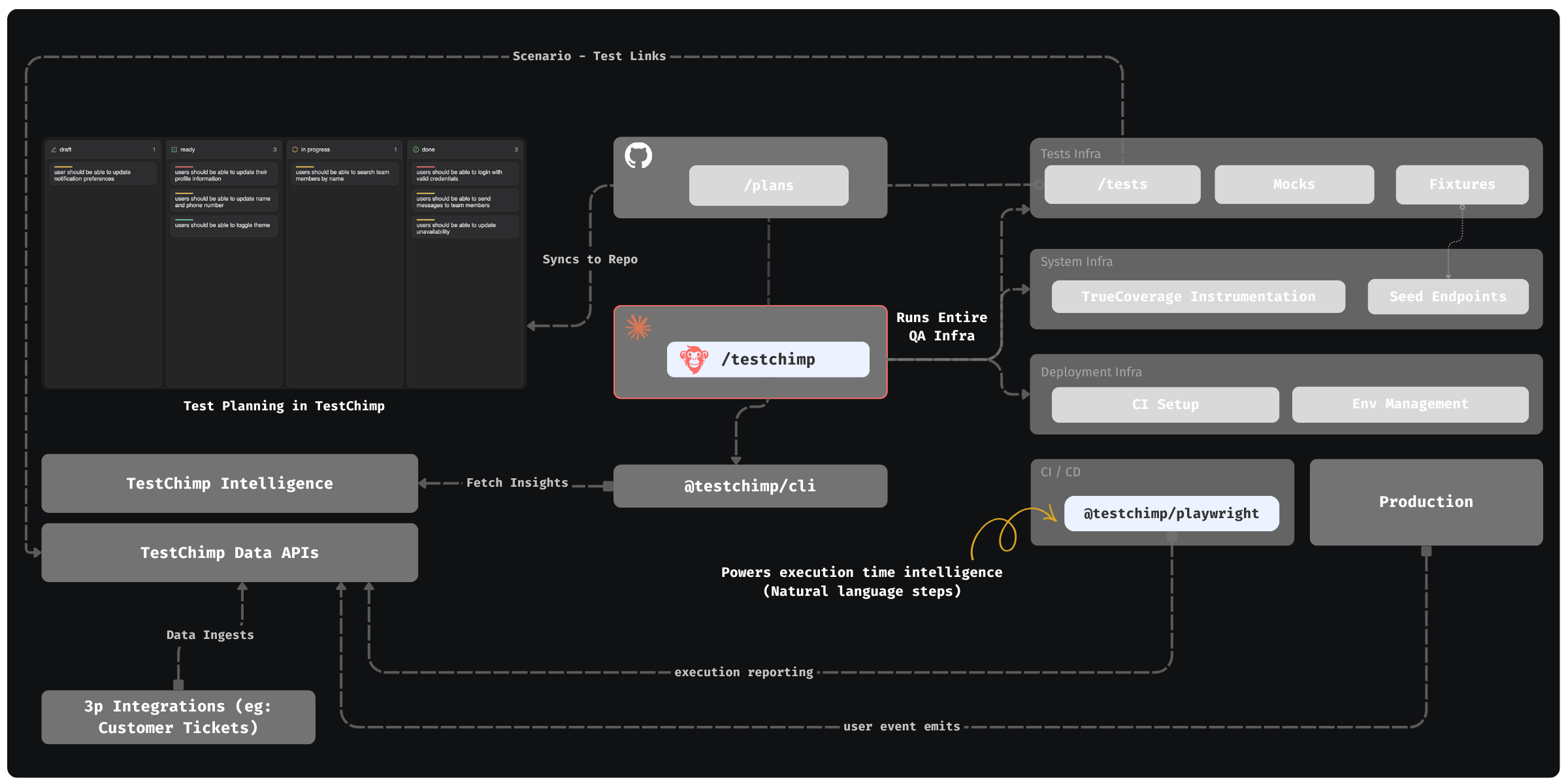
The Skill “upskills” Claude to read those insights via our CLI / MCP, to plan and execute the entire QA workflow:

  • Understand coverage gaps, prioritize (using signals exposed by TestChimp) and plan
  • Author fixtures that emulate real-world situations observed
  • Update test infrastructure (seed / probe endpoints) as needed
  • Author tests - (provisioning PR-local envs to test in and validating tests work)
  • Update instrumentations to learn about real user behaviour (for future cycles - covering new user journeys introduced)

QA workflow orchestrated by TestChimp - Overview


The best part: All of this is condensed to just 2 commands - enabling a frictionless DevX:

  • /testchimp test -> (Run after each PR) Updates plans, authors seeds / fixtures, author tests, validate them in PR scoped isolated environments, instrument code for TrueCoverage

  • /testchimp evolve -> (Run periodically / on deploy) Audits test coverage aligned with requirements and real-user insights, to “evolve” your QA infra & test suite to cover critical under-tested areas and do corrective actions & run targeted exploratory runs.


Claude can write tests. With the right feedback loop, it can fully manage an effective, self-evolving QA posture that de-risks your product continuously. This is what TestChimp enables, by making each phase of QA agent-native, informed by requirements and real user behaviour insights, in a tight feedback loop.

Fixtures - the 'unsung hero' in agentic test automation

· 4 min read
Nuwan Samarasekera
Founder & CEO, TestChimp

In E2E tests, Page Object Models (POMs) were the “popular kids”. Everyone knew them, everyone praised them. Yet not many knew of (or extensively used) "fixtures".

While there are many use cases of fixtures, a prominent one is - they let you pipe pre-created entities to tests that represent specific situations (a user with a valid subscription, a premium tier org etc.).

Ok - before we go into why it matters, let's back off a bit.

Arranging the world-state for the test​

Every functional test boils down to 3 steps (the 3A's):

Arrange -> Act -> Assert

In plain terms:

Given a situation (e.g. a user with an expired credit card),
When a set of actions are done (attempting checkout),
Expect a defined outcome (error message, no order created).

Here’s where things went sideways for a long time.

Phase change with CC test authoring

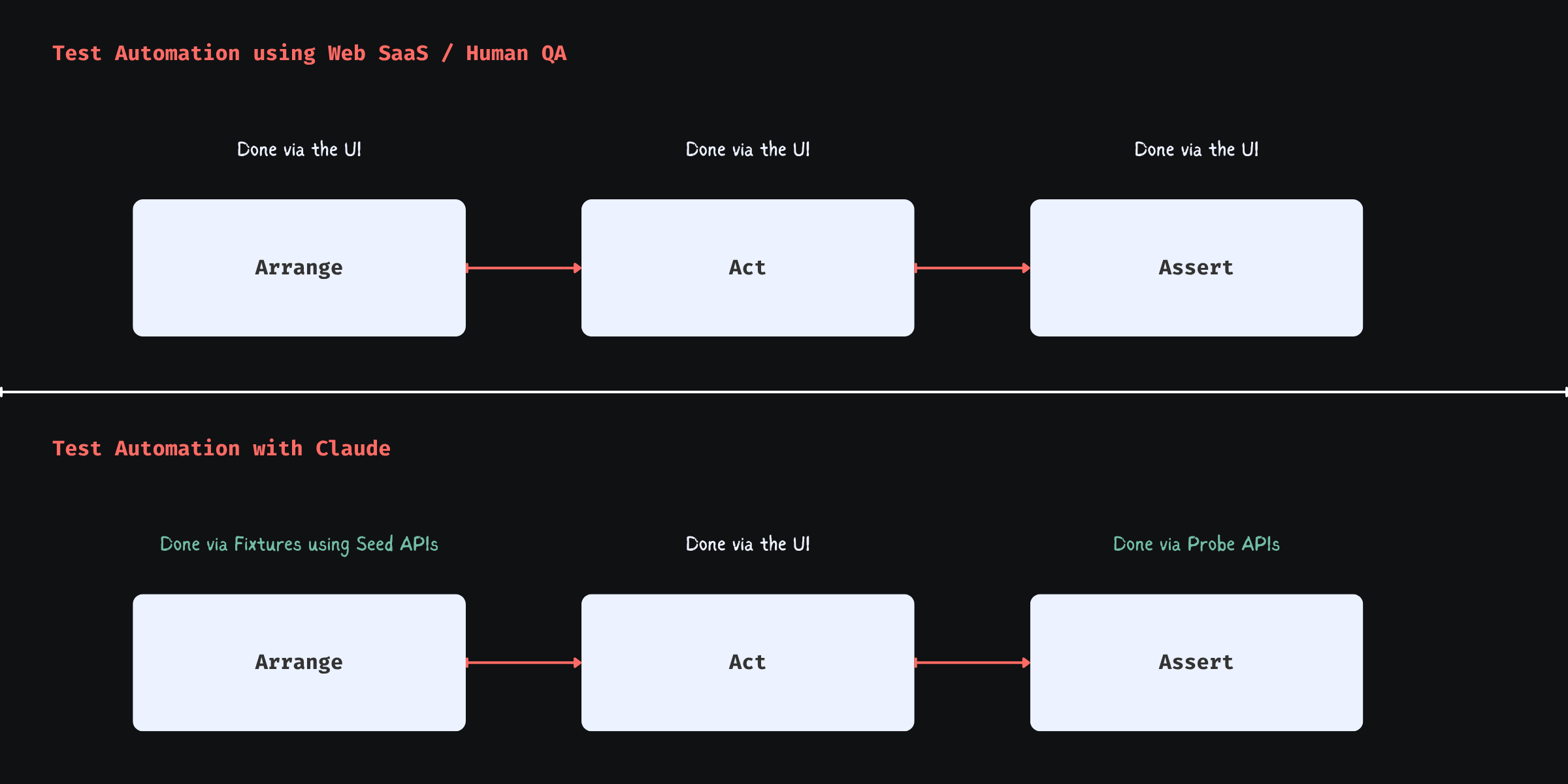
When humans were authoring tests - especially using web-based SaaS / No-code tools - they were constrained to the UI layer, due to a couple of reasons:

  1. Tools operated outside of the system
  2. QA lacked coding skills / were not allowed to work with system code due to organizational frictions

So everything had to be set up through the UI (or live system APIs), which made POMs the “sexy abstraction”: they made UI-driven setup bearable.

But that setup was never the ideal. It was the workaround.

Arriving at the situation is not the test. It is incidental complexity introduced by tooling and human limitations.

The Shape Shift in Test Automation with Claude​

When Claude is authoring, it is not bound by that restriction. It has the full context of your codebase and can operate across layers. It can author seed / probe endpoints, generate data, and construct precise system states directly.

This is where fixtures shine.

Fixtures expose these pre-built states as reusable, composable building blocks:

  • “User with expired card”
  • “Account with failed payment retries”
  • “Cart with out-of-stock item”

More importantly, fixtures provision those entities with full data-isolation per test run (so that parallel workers running tests, retries etc. don’t interfere with each other). This removes many anti-patterns common in pure UI-layer test authoring - such as depending on order of tests (one to create the entities, one to update, another to delete - each depending on prior).

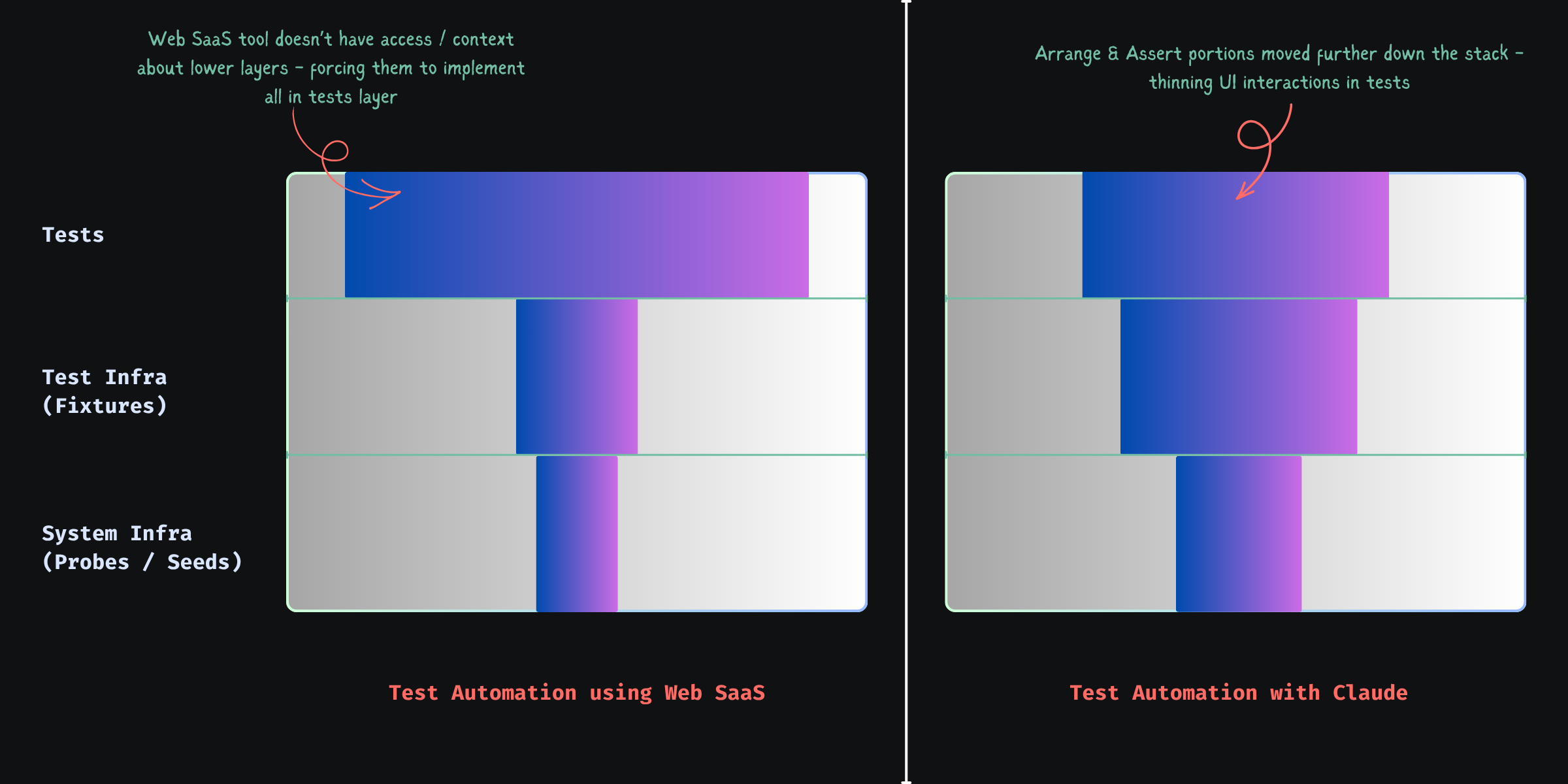
Shape Shifting of Test Automation Work with CC

Now your tests change shape:

  • Arrange → mostly handled via reusable, API-backed fixtures
  • Act → only the actions that actually matter
  • Assert → UI checks plus direct state validation via probe endpoints

The result: faster tests, more reliable tests, and far less noise.

TrueCoverage - Write fixtures that mirror real-world​

Here’s where things get even more interesting:

What if Claude could learn what situations occur in the real world? Then, it can author fixtures that emulate them - prioritized by impact - resulting in coverage that actually de-risks your product against real user behaviour.

Production informed feedback loop for fixtures + tests

This is exactly what TestChimps’ TrueCoverage unlocks: a feedback loop - where agents can continuously learn from production insights and generate fixtures that mirror real-world situations.

  • Not guessed. Not happy-path-heavy assumptions.
  • Actual situations your users experience.

That’s when your test suite stops being synthetic - and starts becoming representative of “what your users experience”.

POMs helped us survive UI-driven testing.

Fixtures unlock systemic scenario coverage in the agentic automation era.

Further reading​

The Real Reason Claude Beats Every UI Testing Tool

· 5 min read
Nuwan Samarasekera
Founder & CEO, TestChimp

Web-based test authoring hits a structural ceiling against Claude / Cursor-class tooling—not because those agents are “smarter at clicking,” but because test automation is not UI steps.

It cuts across system infra, test infra, and the test layer. Treat it as UI-only and you get slow, flaky suites.

Phase change with CC test authoring


A Simple Example: Checkout with an Expired Card​

Scenario: checkout with an expired card.

What most UI-driven tests look like​

Via UI you often:

  • create a new user
  • sign up
  • verify email
  • add a card
  • manipulate expiry (if even possible)
  • add items to cart
  • navigate to checkout

Then:

  • click “checkout”
  • assert error message

Long, brittle, and mostly setup, not the behavior you care about.


What a Well-Structured Test Looks Like​

Arrange → Act → Assert, applied properly.

Arrange (system + test infra)​

Build state directly instead of simulating it through the product UI.

POST /test/seed/user
{
plan: "premium",
paymentMethod: {
status: "expired"
}
}

This is a seed endpoint — a test-specific API that creates the exact state you need.


Fixture (test infra abstraction)​

Wrap seeds in fixtures so tests stay readable:

const user = await createUserFixture({
paymentStatus: "expired"
}, testInfo);

Fixtures hide setup details and scope isolation for parallel runs and retries.


Act (test layer)​

await page.goto("/checkout");
await checkout(user);

Only the UI you need for the behavior under test.

Assert (UI + system validation)​

UI:

await expect(errorBanner).toContain("Payment method expired");

Probe the system too:

GET /test/probe/order-status?userId=...

Validate:

  • no order was created
  • payment was not processed

UI can lie; backend state usually doesn’t.


Seed & Probe: The System infra for testing​

“API testing” is the wrong mental bucket. You want two test-shaped capabilities:

Seed endpoints​

  • construct state directly
  • bypass irrelevant flows
  • deterministic

Probe endpoints​

  • verify backend state
  • confirm side effects
  • act as your test oracle

Without both: slow (UI-heavy setup) or shallow (UI-only asserts).


Why API Support Alone Doesn’t Solve This​

Record-and-play “API steps” in Mabl/Katalon-style tools still hit production-shaped APIs: multi-step flows, side effects, and no way to create impossible-but-needed states (e.g. a coupon that expired yesterday). Chaining those calls simulates state; it does not give you deterministic seed/probe primitives.


The Real Limitation of No-Code Platforms​

Platforms like Mabl or Katalon operate outside your system.

They cannot:

  • introduce seed endpoints
  • define probe endpoints
  • evolve system-level test primitives
  • share abstractions with backend code

So they are constrained to:

“Whatever the system already exposes”

Which forces:

  • UI-driven setup
  • or fragile API chains

The model stays step flows, not state definitions—test-layer only, while serious automation cuts through system + test infra + tests.

Shape Shifting of Test Automation Work with CC


Fixture Design: Where Reliability Comes From​

Fixtures are what make suites parallel, retry-safe, and deterministic.

A bad fixture:

user@example.com

This breaks when:

  • tests run in parallel
  • retries reuse polluted state

A good fixture uses runtime context:

const uniqueId = `${testInfo.testId}-${testInfo.retry}`;
const email = `user-${uniqueId}@example.com`;

That pattern is the difference between stable and flaky at scale.


Why This Matters More Now​

No-code tools optimized for “what can be done from the outside?” because QA rarely owned system changes. Agents in the repo do own them—adding seed/probe routes, fixtures, and tests is now cheap in engineering time, not a special project.


A Better Mental Model​

Ask what state, how to build it fastest, how to prove it in the system—not “how do I click through the app to get there.”

seed → fixture → minimal UI → probe


Safety Considerations​

Seed and probe routes must be test-only: right environment, authenticated, disabled or guarded in production—by design, not bolted on later.


Caveat: Claude-authored scripts are still selector-bound​

Agents excel at emitting Playwright—locators, waits, structure—but that still freezes intent → selector at author time. Shipping UI brings selector drift, variance (themes, experiments, i18n, hydration), and layout noise—the same flake class, just produced faster.

Products like Spur and Momentic often move intent vs live UI to execution time (where “smart” stability lives), but frequently inside proprietary authoring—awkward next to git-native tests.

Split the work: Claude keeps seed → fixture → stable UI → probe explicit; reserve execution-time resolution for the messy spans via optional intelligent steps—not a fully opaque “magic” suite.

TestChimp’s Playwright runtime (@testchimp/playwright / ai-wright, e.g. ai.act, ai.verify) does exactly that: execution-time smarts where selectors fail you, without giving up versioned repo tests—mostly scripts, selectively runtime-resolved UI.


TestChimp: helping Claude write the right tests​

The harder problem than syntax is what to test—and whether plan, runs, and production still line up. Without a bridge, they drift.

TestChimp connects planned (stories, scenarios, plans), tested (runs, requirement coverage, artifacts), and production (real usage / TrueCoverage-style signals) realities. We turn that into actionable context for agents—gaps, scenarios to tighten, seeds/probes/fixtures to add—not vanity dashboards.

Claude can write tests really well. TestChimp creates the feedback loop that helps Claude write the right tests.

Code-native authoring plus planned → tested → production gives Claude a tight feedback loop to learn from and optimize over time; optional AI steps (above) handle selector pain where it concentrates.


Final Thought​

UI-scripting automation buys slowness, flake, and churn. State orchestration—seed → fixture → minimal UI → probe—buys speed, reliability, and clearer reasoning. E2E can approach lower-layer discipline when the stack cooperates; tools that never touch system + test infra will not get you there by themselves.

TrueCoverage for agentic QA: learn how users really behave, then evolve tests on purpose

· 11 min read
Nuwan Samarasekera
Founder & CEO, TestChimp

If you are an autonomous QA agent, your hardest problem is not syntax. It is prioritization under uncertainty: which journeys matter, which world-states recur in the wild, and which gaps actually de-risk the product. If you are a human delegating QA to an agent, your hardest problem is trust: how do you know the agent is not optimizing for easy coverage while the business burns on paths real users depend on?
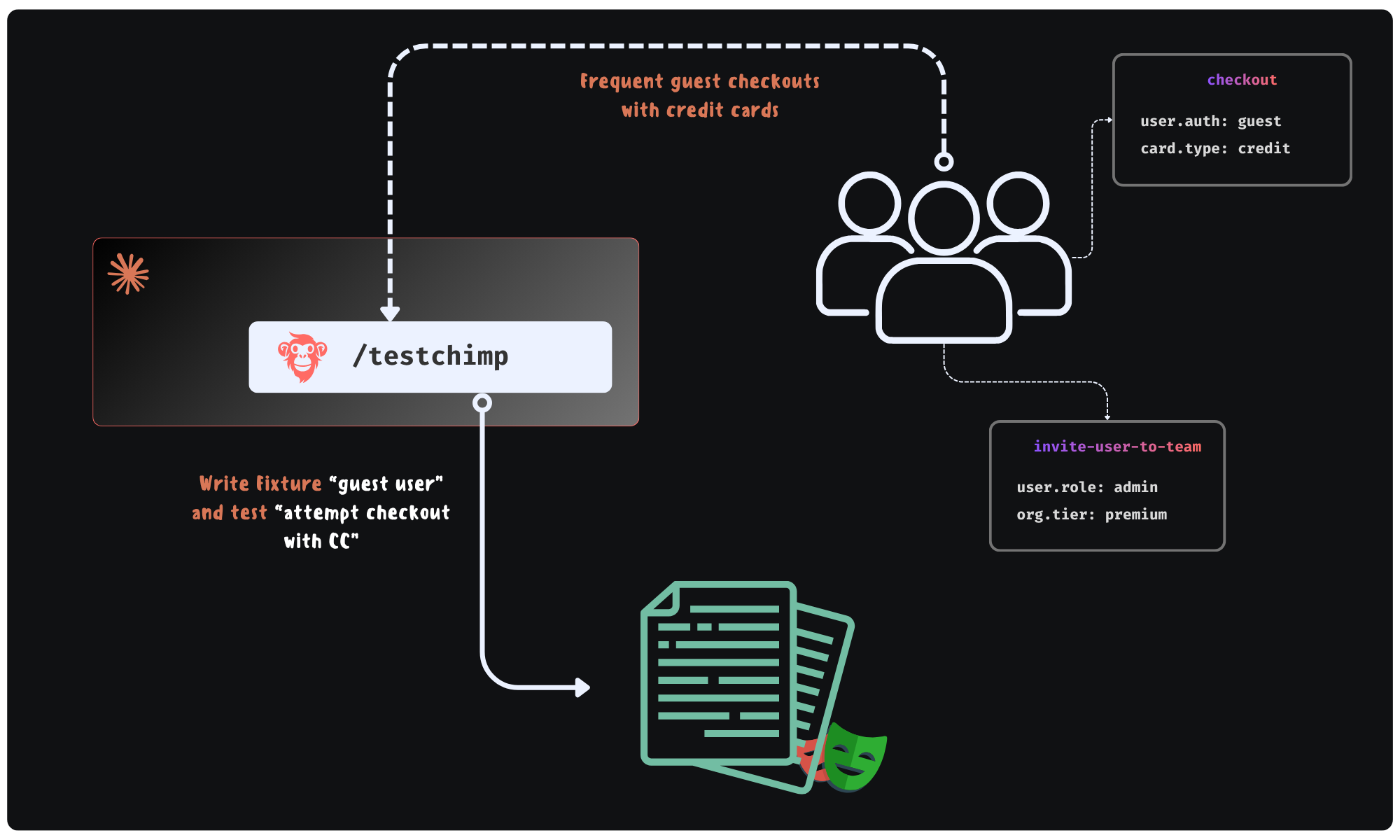
Production Feedback Loop enabled by TestChimp

TrueCoverage is a way to ground both sides in the same signal: what production traffic is trying to tell you, expressed in a form tests can participate in. This post is framed in two layers:

  1. Concept and utility — what TrueCoverage means independent of any vendor, why it fits the agentic era, and what becomes feasible once you have it.
  2. How TestChimp implements it — how @testchimp/rum-js, and @testchimp/playwright plugin, and summarized analytics APIs close the loop so agents (and humans supervising them) can learn, decide, and evolve QA continuously.

Part I — The idea: production as the curriculum for QA​

What “TrueCoverage” means as a concept​

Classical coverage answers: did my code execute? That is necessary and insufficient. It does not tell you whether the behaviors users rely on are the behaviors your suite exercises under conditions that resemble reality.

TrueCoverage, means:

  • You observe meaningful user-journey steps in production (not every click—semantic steps that map to product risk: checkout started, export completed, permission denied, and so on).
  • You observe the same vocabulary during automated test runs, with a way to know which tests produced which events.
  • You compare the two streams so you can see demand, sequencing, friction, and slices of the real world (roles, entitlements, cart shape) where real usage and automated coverage diverge.

The outcome is not a bigger dashboard. It is a closed feedback loop: production teaches you what “normal” and “important” mean for this product; tests and fixtures prove you still protect those paths after every change.

Why this approach matches how good agents already work​

Agents that ship useful QA behave like scientists with a budget: they form hypotheses (“checkout without a saved payment method might be undertested”), gather evidence, run a targeted experiment (a test + fixture), and update the model. The weak link is almost always evidence. Product specs are incomplete. Ticket backlogs are biased. Code coverage is blind to which user stories matter.

Production behavior is imperfect—sampling, seasonality, and product experiments all apply—but it is ground truth for impact ordering. When an agent can query “how often does this situation occur?” and “what usually happens next?”, it stops guessing which regressions would hurt the most.

The elephant in the room: instrumentation used to be expensive​

For years, the honest reason teams did not do this everywhere was operational cost:

  • Designing event names and metadata so they are stable, low-cardinality, and privacy-safe is skilled work.
  • Plumbing init, helpers, env-specific keys, and batching behavior across a large frontend is tedious.
  • Maintaining that layer across refactors—without breaking analytics or leaking identifiers—is ongoing tax.
  • Interpreting raw event lakes often required a data partner, not a QA engineer.

So the idea of aligning tests with real journeys was always sensible; the implementation and upkeep were the barrier. Teams defaulted to intuition, bug history, and line coverage because those scaled with human attention spans.

Why that burden collapses in the agentic era​

Agentic coding changes the economics:

  • Boilerplate (init wrappers, typed emit helpers, progress trackers, event documentation) is exactly the sort of work models do quickly and consistently.
  • Refactor propagation—rename a flow, split a route, move state—becomes a task you can assign: “keep emitCheckoutProgress aligned with the new module boundaries.”
  • Governance at scale—dot-scoped metadata keys, cardinality rules, “no raw IDs in metadata”—can be enforced as repeatable policies in code review and in agent instructions, not as tribal memory.

What becomes feasible once agents can “see” real usage​

Below are some capabilities that gets unlocked when an agent can pull summarized production-test deltas on demand.

1. Fixtures that mimic real-world situations—not demo data​

Suppose checkout emits a semantic event checkout_attempted with bounded metadata such as user.has_fop (form of payment on file: true / false). Production aggregates might show that a large share of attempts happen with user.has_fop=false, while your automated runs almost always hit true because the seed user is “too perfect.”

An agent can:

  • Treat that skew as a coverage gap on a risk-bearing slice, not a vanity metric.
  • Author or extend a Playwright fixture (or API seed flow) that creates a user without FOP, then add a test that asserts the expected behavior (validation, alternate payment path, error copy, telemetry).
  • Document the event slice in repo-local knowledge (plans/events/*.event.md style) so the next agent does not reinvent the schema.

The point is not “more metadata.” The point is metadata that matches how the product branches in reality, so fixture work is evidence-backed.

2. Journey prioritization from sequences, not screenshots​

Agents excel at graph-like reasoning when you give them a graph. TrueCoverage-style child event trees and transition summaries answer questions humans ask in war rooms—“after someone opens the importer, what do they actually do next?”—without watching session replays for hours.

Example: production might show that after import_started, the modal next step is usually mapping_confirmed, but a non-trivial fraction goes to import_cancelled within seconds. If tests always march the happy path to mapping_confirmed, you may be blind to early abandonment bugs (performance, confusing copy, default file type issues).

An agent can prioritize a short journey test for the high-drop branch, or an instrumentation pass if the “cancel” events are too coarse to explain why.

3. Using Demand, Duration, Drop-off, and Depth as a shared prioritization language​

TrueCoverage analytics align well with a compact strategy: the 4Ds (how TrueCoverage metrics work)—Demand (how often something shows up), Duration (dwell and pacing), Drop-off (abandonment and terminal sessions), Depth (where a step sits in the funnel). Depth is especially important for prioritization because top-of-funnel steps guard everything downstream: if sign-up, workspace creation, or the first checkout screen is flaky, slow, or wrong, users and sessions never reach the deeper flows your suite might obsess over—so automation that skips straight to “step seven” can look green while production is bleeding at the door.

Together the 4Ds steer agents away from covering easy code and toward protecting painful journeys.

Concrete prioritization examples:

  • High demand + absent in test-tagged traffic → add or extend regression coverage soon.
  • Early funnel (shallow depth) + high demand or high drop-off → harden entry paths first: stronger tests, fixtures, and instrumentation for the gate events; defer deep-journey expansion until those steps are reliably exercised—otherwise you optimize coverage for journeys most real sessions never complete.
  • High drop-off + shallow tests → add negative paths, resilience, and performance-aware checks.
  • High duration → broaden scenarios (large payloads, slow networks) rather than a single happy-path click-through.

This is the difference between an agent that writes “a test” and an agent that writes the test the business would have asked for if it had perfect memory of last month’s traffic.

4. Continuous “evolve QA” instead of annual suite audits​

When digestible analytics are API-accessible, QA improvement becomes a loop aligned with shipping:

Analyze aggregated production vs automated scopes → Plan instrumentation/tests/fixtures → Execute in the repo → Verify in CI → repeat on the next meaningful traffic shift.

Humans stay in control of goals and risk appetite; agents handle volume, consistency, and follow-through.


Part II — How TestChimp turns the concept into an agent-ready system​

The conceptual loop needs three mechanical pieces: emit in the app, tag during automation, compare in a platform. TestChimp wires all three and exposes the result as summaries agents can consume without becoming data engineers.
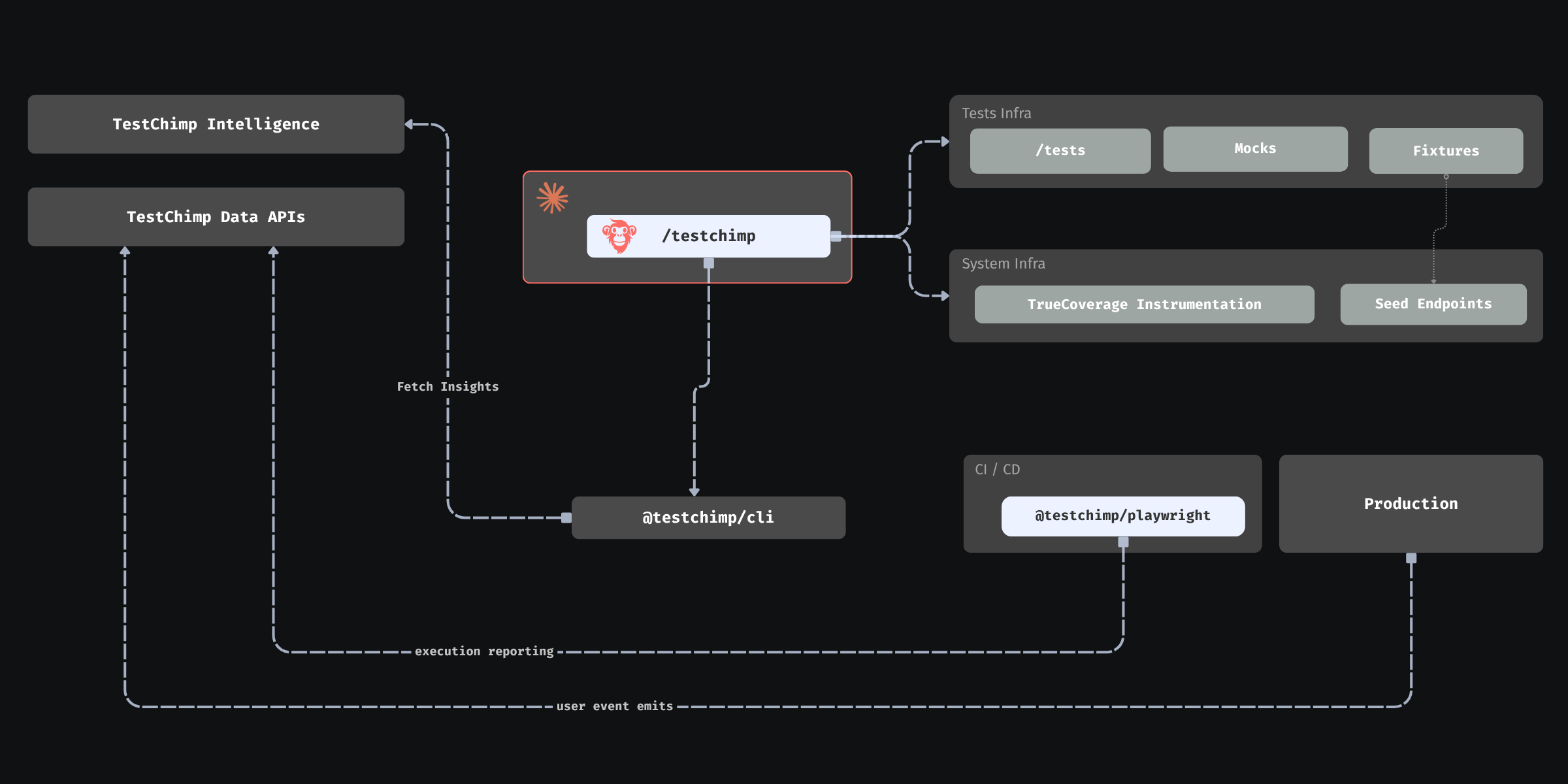
TrueCoverage powered agentic QA loop in TestChimp

1. @testchimp/rum-js: production speaks the same language as tests​

The application under test integrates @testchimp/rum-js (see the library README for init, emit, flush, configuration, and event constraints). Typical practice:

  • Call testchimp.init() once at bootstrap with projectId, apiKey, and an environment tag (for example production vs staging).
  • Prefer a single helper (for example emitProductEvent) wrapping testchimp.emit({ title, metadata }) so event names and metadata stay consistent.
  • Control volume through config (caps per session, repeats per title, batching intervals, kill switches)—agents can tune this deliberately instead of flooding pipelines.

Agent-relevant discipline: keep titles semantic (subscription_renewed) rather than noisy (blue_button_clicked). Keep metadata low-cardinality and non-identifying—think user.role, org.plan_tier, cart.is_empty—not raw IDs or free text. That is how the platform can return per-value coverage without privacy explosions. Dot-scoped keys like user.has_fop help agents map analytics slices directly to fixture dimensions.

Product overview: TrueCoverage intro.

2. Playwright reporter: the same events, tagged with test identity​

Automated runs are only comparable to production if tests emit the same event titles (or a deliberate, documented mapping) and the platform can tell automation apart from anonymous traffic. TestChimp’s Playwright integration—@testchimp/playwright—tags RUM events with test identity during runs so coverage comparisons can answer: “Did this suite actually exercise checkout_attempted in the last seven days of CI?”

That is what makes “coverage” mean behavioral coverage of real journeys, not merely “we ran N tests.”

3. Execution scopes: compare apples to apples, on purpose​

Agents should treat scopes as first-class inputs (see TrueCoverage workflow docs in your agent instructions). In practice:

  • A base scope anchored on the environment that best reflects real users (often production) drives funnel-relative metrics: frequency, transitions, terminal behavior, session counts.
  • A comparison scope (often QA or staging) answers what automation (or a specific branch/release) is doing in the same vocabulary.
  • automationEmitsOnly on comparison or child-tree scopes is how you ensure “covered” means test-tagged emits, not a manual tester clicking around on the same environment.

Getting this wrong is how teams accidentally overstate coverage. Getting it right is how agents earn trust from humans who offload QA.

4. Data APIs and MCP tools: digested signal for decisioning​

TestChimp exposes TrueCoverage through APIs mirrored in MCP tools (for example list-rum-environments, get-truecoverage-events, get-truecoverage-event-details, get-truecoverage-child-event-tree, transition and time-series endpoints, metadata key discovery). The agent workflow is intentionally summary-first:

  1. List environments → pick stable tags for base vs comparison.
  2. Fetch event summaries → find high-impact titles with weak or absent coverage status vs the comparison scope.
  3. Drill into details → metadata distributions, example sessions, next-event trees.
  4. Translate gaps → SmartTests, fixtures, seed endpoints, or new emits if the product changed but telemetry did not.

Because payloads are aggregated—frequencies, histograms, coverage badges—agents can make informed plans without pulling raw session oceans into the context window.

5. Closing the loop: from insight to repo changes to measurable improvement​

The full agentic story looks like this in practice:

  1. Instrument with rum-js using repo conventions (shared helper, env-based keys, documented events).
  2. Run Playwright suites with the reporter so emits carry test identity.
  3. Query TrueCoverage summaries after meaningful windows (release, marketing push, seasonal spike).
  4. Decide using 4Ds + transitions + metadata slices what to add or fix.
  5. Implement tests and fixtures; optionally evolve instrumentation when new risk-bearing branches appear in the UI.
  6. Re-query to confirm the comparison scope now hits the slices that production demanded.

That is autonomous QA with a compass: still bounded by human policy (privacy, release priorities, acceptable sampling), but no longer guessing whether the suite matches reality.


Who this is for​

  • Agents: treat TrueCoverage as your grounding layer—the bridge from “what humans wrote in tickets” to “what the world actually does.” Use it to prioritize fixtures, journeys, and instrumentation before you spend budget on breadth nobody needs.
  • Humans offloading QA: ask for scopes, metadata discipline, and before/after dashboards—simple checks that the agent is optimizing production-aligned risk, not arbitrary line counts.

Accountable product and compliance choices still sit with people; TrueCoverage cheapens the cost of being well-informed—for agents reasoning over code and humans steering risk—which, in the agentic era, is the difference between automation that merely runs and automation that continuously earns the right to ship.


Further reading​

Prioritize Test Cases based on Real User Behaviour - TrueCoverage

· 3 min read
Nuwan Samarasekera
Founder & CEO, TestChimp

Most testing strategies are built in isolation from how users actually use a product.

Teams typically decide what to test based on:

  • feature specifications
  • developer intuition
  • past bugs

But production tells a different story.

Some features get heavy usage.
Some interactions are part of critical journeys.
Some screens are where users consistently drop off.

If your testing strategy doesn’t account for this, QA effort is being optimized in the dark.

This is the problem TrueCoverage solves.

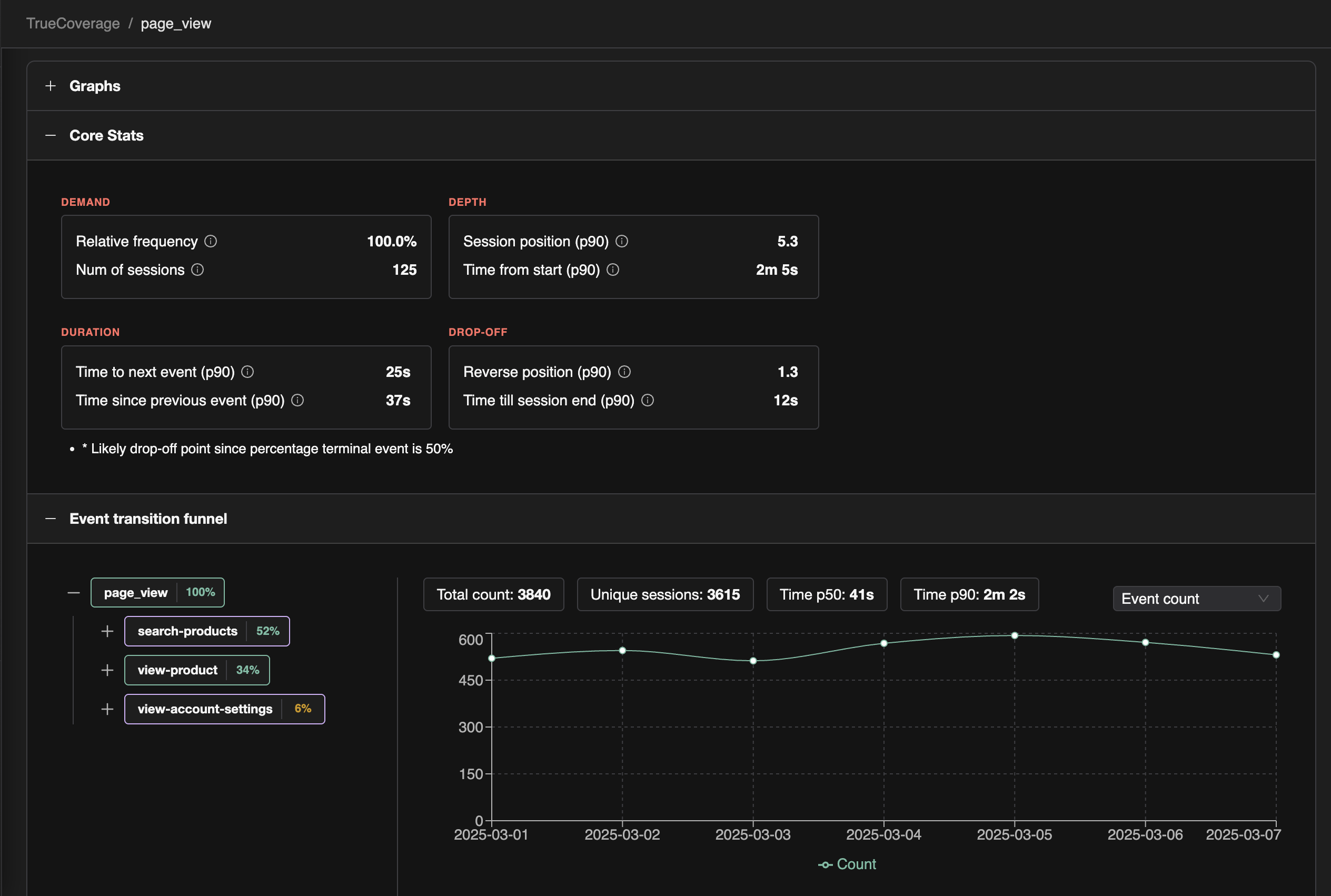
TrueCoverage UI


Start With Real User Behaviour​

TrueCoverage analyzes event data from production alongside events generated during test runs.

Instead of only measuring which tests executed, it looks at how users actually move through your product.

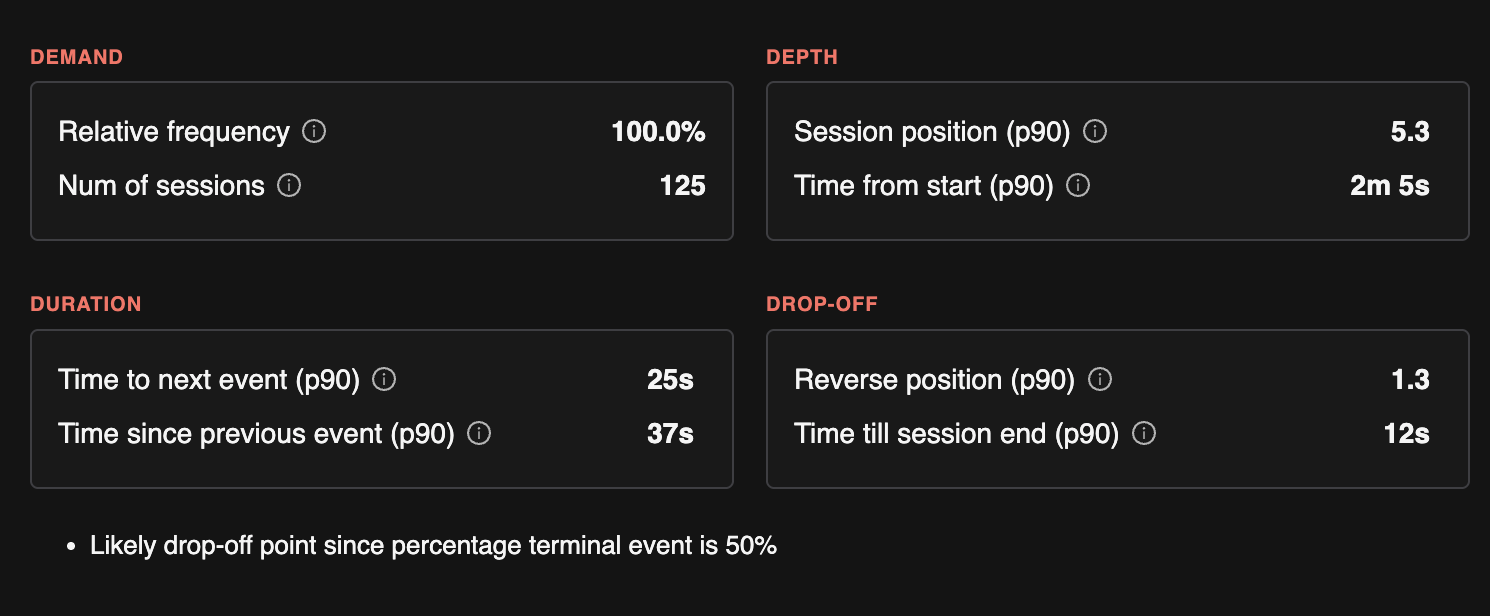
From this data, TestChimp derives four signals — what we call the 4Ds — to guide smarter QA planning.


The 4Ds of Product Behaviour​

Event core stats

Demand​

How frequently an event or interaction occurs.

High-demand interactions represent the most commonly used parts of your product.

Ensuring these features are covered in regression tests delivers the highest ROI by protecting the core capabilities of your application.


Depth​

Where an interaction occurs in the user journey.

Depth distinguishes top-of-funnel interactions from deeper product workflows.

Early interactions often influence:

  • onboarding success
  • activation rates
  • user satisfaction

Testing depth helps ensure your QA strategy protects the critical entry points of your product.


Duration​

How much time users spend interacting with a feature.

High duration often indicates either complex workflows or user friction.

Both require deeper testing. These areas benefit from:

  • scenario-based tests across different paths
  • validation of edge cases and error conditions
  • robustness testing for complex flows

Duration highlights where more thorough testing is needed beyond the happy path.


Drop-off​

Where users exit a journey.

Drop-off points are some of the highest-value areas for testing.

If many users abandon the product at a particular step, that interaction deserves attention.

Testing around drop-off points helps uncover:

  • hidden bugs
  • validation issues
  • confusing UX
  • performance bottlenecks

Turning Behaviour Into QA Strategy​

The 4Ds transform production behaviour into actionable testing insights.

For example:

  • High demand events → prioritize regression coverage
  • Top-of-funnel interactions → ensure reliability and stability
  • High drop-off points → investigate bugs or UX issues
  • Long duration flows → add scenario tests covering variations

Instead of guessing where to invest testing effort, teams can align QA with real product usage.


TrueCoverage​

TrueCoverage compares:

  • event sequences from production
  • event sequences from test runs

This reveals the gap between:

  • what users actually do
  • what your tests actually cover

When that gap becomes visible, improving coverage becomes far more targeted.

Not more tests, but better tests aligned with real user behaviour.


Because ultimately, quality isn’t defined by how many tests you run.

It’s defined by how well your tests protect the journeys your users depend on.

In testing theory, this approach is referred to as "Signals Based Testing" - coined by Wayne Roseberry of Microsoft, and cited on leading books on Testing such as Taking Testing Seriously.

Your E2E tests are unreliable? Here's why

· 6 min read
Nuwan Samarasekera
Founder & CEO, TestChimp

End-to-end tests are a necessary evil: they are the last line of defense that something actually works in a real browser—but they break often enough that the suite becomes a burden instead of a trustworthy signal.

There are three main sources of variance that make E2E tests unreliable. Understanding them is the first step toward a suite you can actually rely on.

1. World-state variance​

This is what happens when your tests run in a different world-state than the one they were written against. A common cause is a shared environment where manual testing and automated runs both happen. The world changes between runs; the next run fails for reasons that have nothing to do with the code under test.

This kind of variance does more than flake tests. It also slows feedback: if those environments only get updates after PRs merge to main, you get weaker root-cause isolation and more expensive triage when something breaks.

2. System variance​

These are variances built into the stack itself: network latency, transient failures, UI paint timing, and so on. Mature frameworks like Playwright address a lot of this with built-in waiting, auto-waiting locators, and expect polling—so a big slice of “flakiness” is really tooling and patterns, not fate.

3. Product variance​

Even in a steady state (with no product change) — modern web apps are not as simple as calculators. Behavior can be inherently non-deterministic, and that is only more true now that AI often sits in the user journey (for example, a splash or offer that appears only sometimes). Much of that variance may be irrelevant to what a given test is trying to prove.

When tests are authored with a fragile, UI-selector-heavy approach, those product-level variances show up as broken steps. The test is coupled to incidental UI, not to intent.


Solve for these three kinds of variance, and you get a suite that is finally trustworthy.

World-state variance → controlled environments​

Use ephemeral environments loaded into known, predefined world-states, so each run matches the state the test was authored against as closely as possible.

System variance → solid automation primitives​

This is largely where mature frameworks shine. With Playwright, you get strong primitives for timing and stability—so you are not reinventing waits on every test.

Product variance → intent where the UI is messy​

This is where agentic steps in tests can help: natural-language instructions executed by an AI, instead of brittle coupling to selectors—only on the messy, flaky parts of the flow.

There is no free lunch: natural-language steps tend to be slower, costlier, and harder to debug than plain script. The goal is to use them surgically, not everywhere.

SmartTests: intent-based Playwright scripts​

That tradeoff is what TestChimp SmartTests are designed around: intent-based Playwright scripts.

They are still scripts for the most part, with an extra capability when you need flexibility—the parts of the app that fight selector-based automation.

Instead of:

await page.locator('.anticon.anticon-plus-square.ant-tree-switcher-line-icon > svg').nth(1).click();

Now you can write:

await ai.act('Expand the tree displayed in the left pane');

Only where you need it—the brittle, shifting UI—not for every line of the test.

Because the tests remain Playwright-based, system variance is handled by the same patterns and tooling you already trust. Run them in ephemeral environments with controlled world-states, and you have a test suite with all 3 variances accounted for - a suite that you can trust.

And yes, we are cooking up something on the ephemeral-environment side too. Stay tuned...

References​

The themes above—non-deterministic tests, UI-level flakiness, and mitigations—are well documented in both industry practice and research. These sources are a good starting point if you want to go deeper.

  1. Martin Fowler, Eradicating Non-Determinism in Tests — A widely cited overview of why tests become non-deterministic (including async and shared-state issues) and how to structure tests to get repeatable results.
    https://martinfowler.com/articles/nonDeterminism.html

  2. Google Testing Blog (George Pirocanac), Test Flakiness - One of the main challenges of automated testing (Dec 2020) — Describes categories of flakiness and why inconsistent automated tests slow development; follow-up posts in the same series expand on causes and responses.
    https://testing.googleblog.com/2020/12/test-flakiness-one-of-main-challenges.html

  3. Google Testing Blog (John Micco), Flaky Tests at Google and How We Mitigate Them (May 2016) — Early, concrete account of flaky tests at scale, including mitigation strategies and discussion of where UI tests skew flaky.
    https://testing.googleblog.com/2016/05/flaky-tests-at-google-and-how-we.html

  4. Wing Lam, Stefan Winter, Anjiang Wei, Tao Xie, Darko Marinov, Jonathan Bell, A Large-Scale Longitudinal Study of Flaky Tests, Proc. ACM Program. Lang. 4, OOPSLA, Article 202 (2020). Peer-reviewed study of when tests become flaky and how changes in code, tests, and dependencies contribute.
    https://doi.org/10.1145/3428270
    Conference entry: https://2020.splashcon.org/details/splash-2020-oopsla/78/A-Large-Scale-Longitudinal-Study-of-Flaky-Tests

  5. Microsoft Playwright, Auto-waiting (Actionability) — Official documentation for pre-action checks (visible, stable, receiving events, enabled, etc.) that reduce timing-driven failures.
    https://playwright.dev/docs/actionability

  6. Microsoft Playwright, Assertions — Describes auto-retrying assertions (expect) that wait until conditions hold, complementary to actionability for stable checks.
    https://playwright.dev/docs/test-assertions

  7. Heroku / 12factor, Dev/prod parity (The Twelve-Factor App) — Classic framing for keeping development, staging, and production sufficiently aligned so “works in my environment” mismatches show up earlier; relevant when reasoning about world-state and shared environments.
    https://12factor.net/dev-prod-parity

  8. Google Research (Diego Cavalcanti), De-Flake Your Tests: Automatically Locating Root Causes of Flaky Tests in Code at Google, ICSME 2020 — Empirical work on locating flaky-test root causes in code at Google scale; reports high accuracy for the proposed technique in their evaluation.
    https://research.google/pubs/de-flake-your-tests-automatically-locating-root-causes-of-flaky-tests-in-code-at-google/

Simplified View: No-Code Editor - Full Code Power

· 3 min read
Nuwan Samarasekera
Founder & CEO, TestChimp

TestChimp tests have always been plain Playwright under the hood — with extra capabilities like plain-English steps and lightweight scenario linking via code comments. That gives you fixtures, hooks, page objects, and the test organization you expect from a serious engineering setup.

Most QA teams are a mix of technical and non-technical teammates. Code-only authoring keeps contribution narrow. A separate no-code tool often means a second suite that drifts from the “real” tests and never gets the same CI treatment.

We added Simplified View in the web IDE so you do not have to choose.

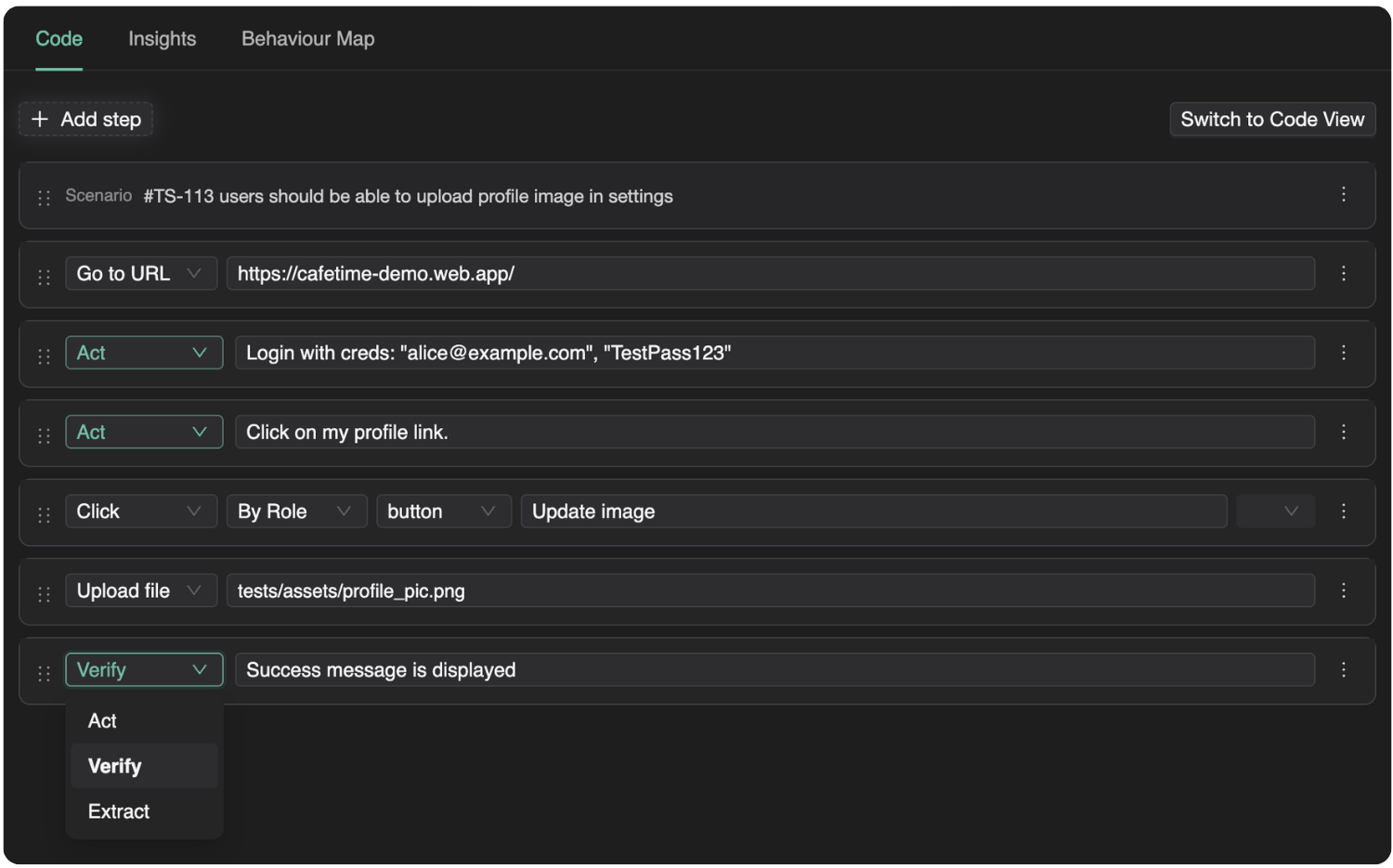
SmartTests Simplified View in the web IDE

What Simplified View Is​

Simplified View is a no-code surface for creating and editing SmartTests that still compiles to fully functional Playwright scripts. Everyone works on the same test; people just choose how they interact with the tests.

Your teammates can:

  • Add plain English steps - that are run agentically.
  • Use structured building blocks for common actions — less boilerplate and fewer syntax slips.
  • Drop in free-form code when you need it — custom waits, tricky selectors, helpers: full Playwright, no lock-in.

You pick the level of code per step and per person, not one rule for the whole team.

Why this matters​

Non-technical members can contribute directly to test automation — not only by filing tickets for engineers to translate later. They build and edit steps in Simplified View; the result is still Playwright your automation folks can refine, reuse, and run in the same pipelines as everything else.

That lifts throughput for the whole team: more people can ship checks in parallel, fewer scenarios sit in a queue waiting for a coder, and engineers spend time on structure and hard cases instead of retyping flows from docs. Underneath, it stays real Playwright — deterministic runs, familiar debugging, ExploreChimp, CI, and Git workflows you already rely on.

Getting Started​

Open a SmartTest in the web IDE and switch to Simplified View to author or edit steps. When you need the full script, switch to code view; both views stay aligned with the same underlying test.

For more on creating and editing SmartTests, see Creating Smart Tests.

Further Reading​

If you’re interested in how no-code and low-code approaches impact QA team velocity and collaboration in general, these resources provide useful perspectives:

Shift-Left with Git Branch-Aware Testing

· 4 min read
Nuwan Samarasekera
Founder & CEO, TestChimp

The traditional QA bottleneck is a well-known pain point for modern development teams. For years, the industry has pushed to "shift-left" – to move testing earlier in the development lifecycle. However, a major technical hurdle has always remained: the environment gap.

When QA happens on a global "staging" environment or only after code merges to the main branch, the feedback loop is too slow. Bugs found post-merge cause expensive context-switching for developers and delay releases.

Today, we’re bridging that gap. We’ve added full branch awareness to the TestChimp platform, enabling true shift-left testing at the PR level.

Shift-Left Git Testing

Why Branch-Aware Testing?​

Branch-aware testing means your QA process mirrors your Git workflow. Instead of testing "the app," you test the "feature-in-progress."

1. Test Authoring at the Feature Level​

You can now switch between repository feature branches directly within TestChimp. File versions are maintained per branch, allowing QAs to sync with branch-specific remote content.

Most importantly, QAs can author tests and raise Pull Requests from TestChimp that merge directly into the feature branch. This ensures that by the time a developer is ready to merge their code, the corresponding tests are already part of the PR.

[!TIP] Security & Outsourcing: Our new GitHub App-based approach means you don't need to give external QA resources full repository access. They can work exclusively on the tests and plans folders (with PRs raised via TestChimp platform), maintaining a tight security posture.

2. Branch-Specific Test Execution​

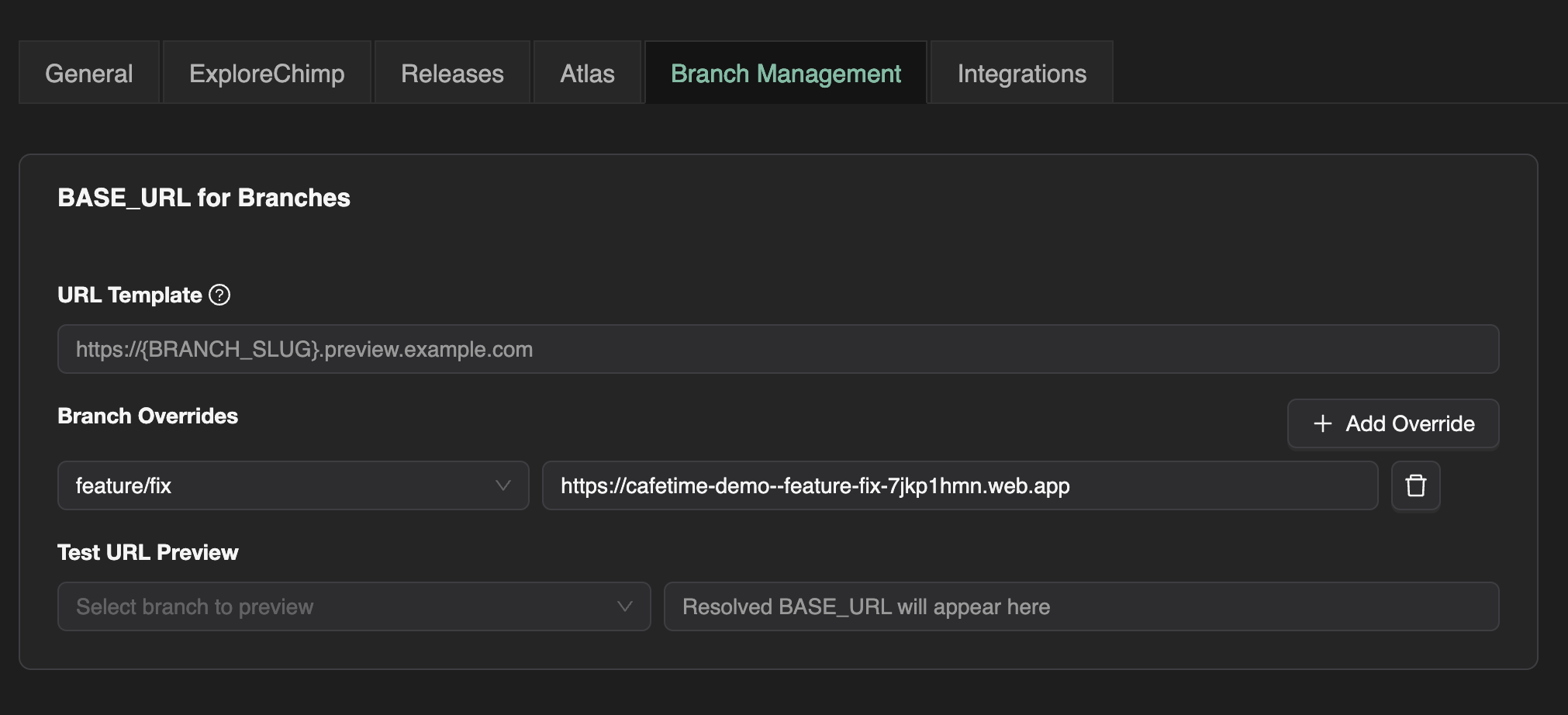
Gone are the days of manually pointing tests at different URLs. In your project settings, you can now configure a template string for branch-specific deployment URLs (e.g., Vercel or Netlify preview URLs).

When you run tests on a branch, TestChimp resolves the correct URL and injects it as a BASE_URL environment variable. Your scripts simply consume process.env.BASE_URL, ensuring they always target the correct preview deployment.

Branch Management UI

3. Exploratory Testing & Smart Bug Diffing​

Exploratory testing is no longer a "post-release" activity. All exploratory runs can now be executed against the branch-specific deployment.

Our agents are now smart enough to report only new bugs found on the feature branch compared to the default branch. This allows you to instantly see what UX, performance, accessibility, or internationalization issues were introduced by a specific PR – before they ever touch production.

4. QA Intelligence: Sliced by Branch​

In the Atlas page, you can now filter results by branch to see exactly how a specific screen or flow was affected by a PR. This level of granularity allows teams to answer the questions that actually matter during code review:

  • "What user stories are breaking in this PR?"
  • "Are unrelated scenarios being affected by these changes?"

Seamless CI Integration​

If you already have a CI pipeline that generates preview URLs, TestChimp fits right in. Simply pass that preview URL as the BASE_URL environment variable in your CI action, and your tests will execute against the live branch deployment with zero extra configuration.

Strategic Planning, Tactical Execution​

While test authoring and execution are now branch-aware, we’ve intentionally kept Test Planning artifacts product-scoped.

Strategy should be stable. Planning artifacts continue to sync with the repo's default branch, ensuring your high-level test coverage goals remain consistent even as individual features are developed and tested in parallel branches.

The Future is Shift-Left​

By moving QA participation closer to the development phase, you’re not just catching bugs – you’re preventing them from ever reaching the main branch. Branch-aware testing turns QA from a gatekeeper into a core part of the feature development engine.

UX Bug Traceability: Translating Bugs to Business Impact

· 2 min read
Nuwan Samarasekera
Founder & CEO, TestChimp
  • Which bugs are slowing down your checkout flow?
  • Are there localization issues in onboarding causing drop-off?

Most QA setups fall short of answering such questions that matter to the business.

The Gap Between QA and Business Impact​

Traditional QA workflows surface issues --- broken buttons, layout glitches, validation errors, performance slowdowns. But when leadership asks:

  • How is this affecting conversion?
  • Is onboarding friction hurting activation?
  • Which workflow is most at risk?

The connection between bugs and business outcomes is often missed entirely - resulting in QA being perceived as a cost center, than what it really is - revenue protection.

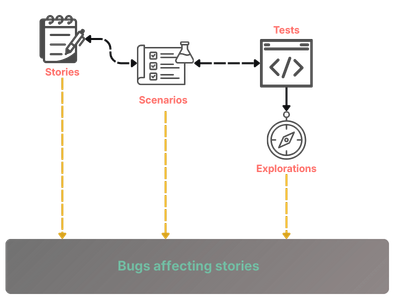
That's the gap we're addressing today by adding UX bug traceability to our QA intelligence layer.

Guided Exploration, Not Random Crawling​

Our secret sauce: Our exploratory agents don't wander randomly.

They use your existing automation tests as guides. Because tests are already linked to scenarios (via structured code comments), that same traceability naturally extends to exploratory runs and their findings.

This means every discovered issue can be traced back to:

  • The scenario
  • The user story
  • The business objective behind it

Exploration becomes business-contextual --- not isolated.

UX Bug Traceability Linkage

Structured for Insight at Any Level​

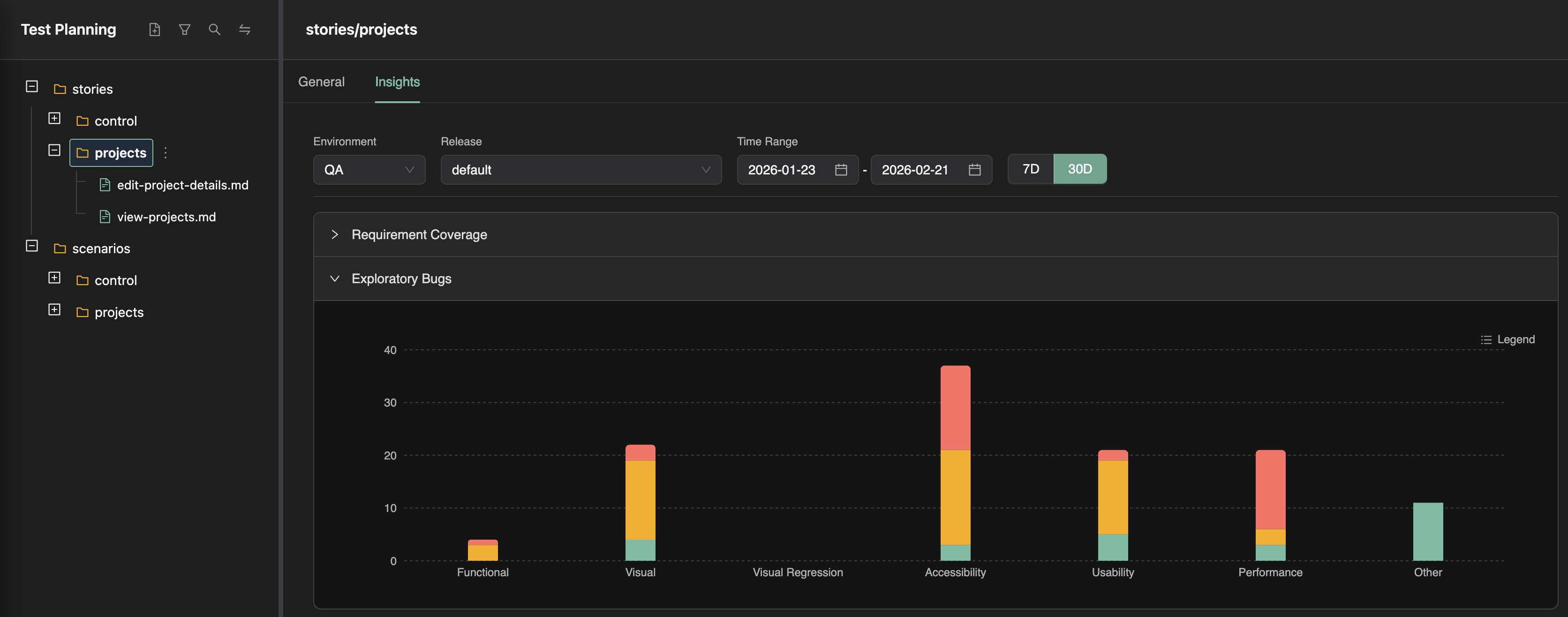
In TestChimp, user stories are organized in nested folders. That structure becomes powerful when paired with traceable exploratory results.

Insights roll up automatically:

  • By area of the application
  • By workflow
  • By product surface
  • By team ownership

You can zoom in to a single scenario or zoom out to understand impact across an entire product area.

UX Bug Traceability Screenshot

Beyond a Floating Bug List​

Instead of maintaining a detached list of issues, you gain visibility into:

  • Which flows are degrading user experience
  • Which exact bugs are causing latency in key user journeys - that mater to your revenue
  • Where UX friction is tied to user retention

It's no longer just about "bugs found."

It's about translating them understanding what is hurting your revenue --- and prioritizing accordingly.