Test Runs: Turn Testing Into Release Confidence

TL;DR: TestChimp now has Test Runs—named validation campaigns that roll up scenario progress across manual sessions and automation batches. If you have used test runs in TestRail, Qase, or PractiTest, the concept will feel familiar. What is different is that scope, progress, and drill-down inherit the folder structure of your test plan—not a flat, manually curated case list copied into yet another container.
What is a test run?
In software testing, a test run is the execution of a defined set of tests against a specific version or build of the system under test. The ISTQB glossary defines it as “the execution of a test suite on a specific version of the test object.” Test execution—the process of running those tests and recording outcomes—is a core part of the fundamental test process described in ISO/IEC/IEEE 29119.
In practice, teams use test runs to answer a release question: Given the scenarios we committed to validate for this sprint or version, how far along are we—and what is still failing?
Traditional test management systems such as TestRail and Qase model a run as a container: selected test cases, assignees, pass/fail/blocked status, and often milestone or environment context. TestRail’s guidance notes that runs are typically created per sprint or release so managers can track progress in real time.
Test Runs in TestChimp preserve that coordination purpose while changing what sits underneath—the plan, the executions, and how progress rolls up.
The gap test runs are meant to close
Most teams already know the shape of a release cycle:
- a defined set of scenarios to validate
- manual testers working through critical paths
- automation running in CI on every build
- a lead asking, “Are we done yet?”
Traditional tools answer the last question with a run—but the artifacts rarely stay connected.
User stories often live in Jira or similar issue trackers. Scenarios live in a TMS. Manual evidence sits in screenshots and Slack. Automation results sit in GitHub Actions, Jenkins, or a Playwright CI report. Requirement traceability—linking requirements to verifying tests, as described in ISO/IEC/IEEE 29148—is often maintained in spreadsheets or a test traceability matrix that goes stale.
The run becomes another manually curated list, disconnected from how the product is organized and how work actually happens.
We built Test Runs in TestChimp to close that loop without duplicating your plan in a flat case catalog.
Same concept, different foundation
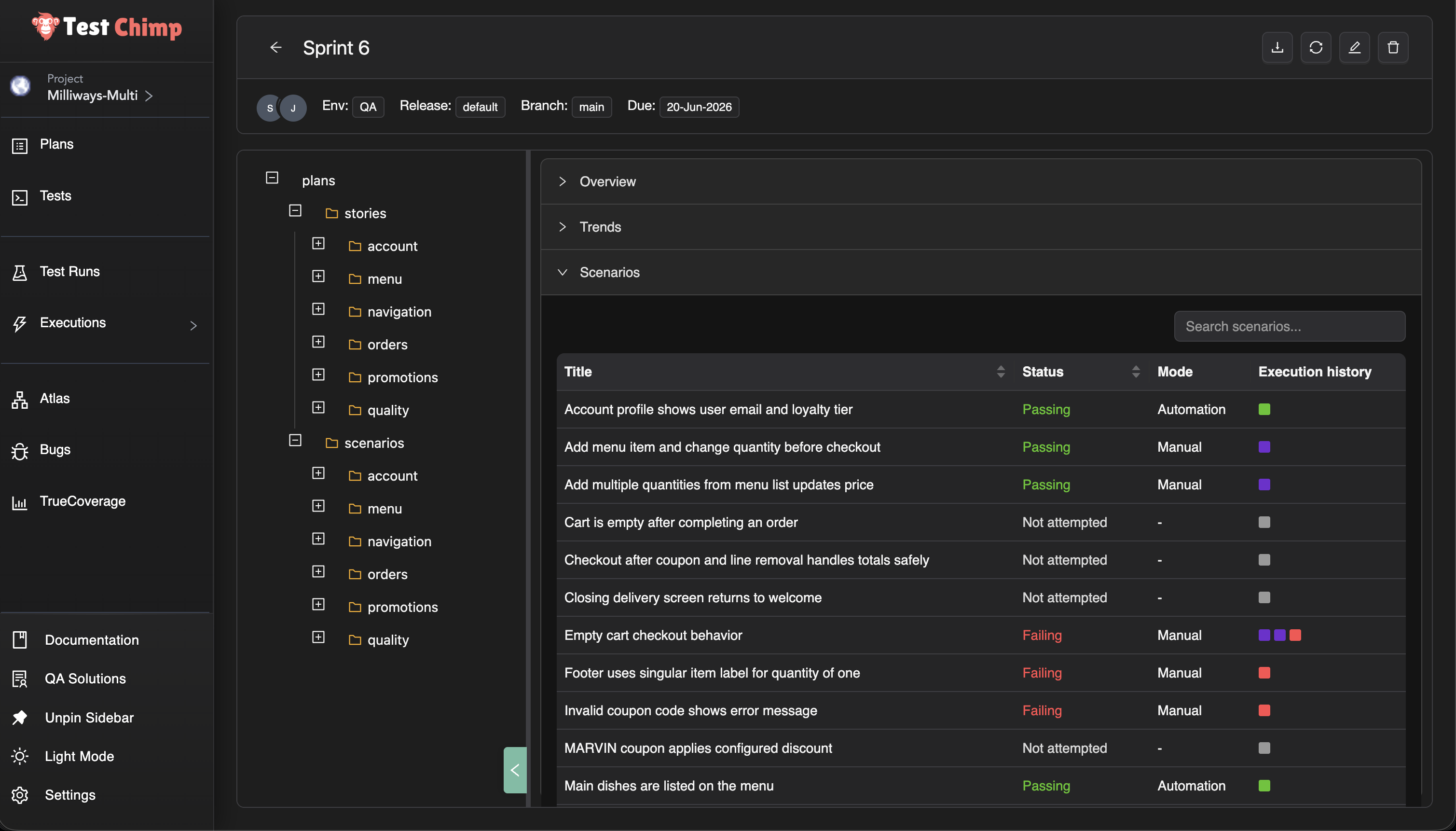
A Test Run in TestChimp is still a time-bound validation campaign: a title, optional environment and release context, collaborators, a due date, and a scope of scenarios to validate.
What changes is everything underneath.
| Traditional TMS test run | TestChimp Test Run |
|---|---|
Flat list of test cases copied into the run (TestRail add_run) | Scope selected from your plans folder tree (stories and scenarios) |
| Manual results entered in the TMS UI | Manual sessions linked from the Chrome extension or web UI—with step evidence |
| Automation results imported via API or re-entered (TestRail result import) | Automation batches linked after CI Playwright runs; no duplicate result entry |
| Progress is case-by-case checkboxes | Progress is scenario status (passing / failing / not attempted) from the latest linked execution |
| Roll-up is a fixed “suite” or “section” | Roll-up follows any folder in your plan—checkout today, authentication tomorrow |
You are not maintaining a parallel catalog. You are pointing a run at the test plan you already have.
One run, both execution types
The most common fracture in enterprise QA is two parallel tracks:
- manual validation tracked in a test management tool
- automated validation tracked in CI or a vendor dashboard
Qase’s own documentation describes the tension: auto-generated CI run names pile up quickly, and teams need runs that “tell a story at a glance” when reviewing overnight failures before a release.
A Test Run in TestChimp is deliberately execution-type agnostic. Link a manual session from exploratory regression. Link tonight’s Playwright batch. Link both to the same run. Scenario status reflects the latest relevant execution—whether a human marked a session passed or CI reported a SmartTest failure.
That is the same unified coverage story we told with manual testing and traceability—now packaged for release-scale questions instead of only folder-level requirement traceability insights.
Folder-based progress, not flat lists
Because TestChimp organizes stories and scenarios as markdown files in folders (Test Planning as Code), a test run inherits something traditional tools struggle to offer: scoped views at any granularity.
Select the root of the run and see overall progress for the whole release. Select checkout/ and see only checkout scenarios. Select a single story file and see exactly what is left on that requirement.
No re-tagging. No re-grouping cases into ad hoc suites every sprint. The folder structure you already use for planning becomes the structure you use for reporting—the same principle as coverage at any folder level in Test Planning.
That matters when:
- feature teams own folders, not individual case IDs
- a release spans several modules but not the entire backlog
- you need a standup answer for one area without re-filtering a 2,000-row grid
Trend charts in the run viewer show how passing, failing, and not-attempted counts move over time—useful for daily readouts without exporting to a spreadsheet.
Why this fits the agentic era
Test runs are not a throwback to heavyweight process. They are a lightweight coordination layer on top of artifacts agents can already read.
Your scenarios are files. Your tests link with scenario annotations (requirement traceability in code). Executions feed the same traceability graph whether they are manual or automated. A test run simply names the campaign—“Sprint 42 regression”, “v2.1 sign-off”—and gives humans a place to see progress while agents keep authoring against the same plan.
We are not replacing CI dashboards or extension manual capture. We are giving product and QA leads a single pane for this validation cycle, grounded in requirements rather than orphaned case records.
See it in action
For step-by-step setup—creating a run, defining scope, linking batches and sessions, reading the viewer—see Test Runs in the docs.
Frequently asked questions
What is a test run in software testing?
A test run is a structured execution of a selected set of tests against a specific build, release, or milestone. The ISTQB glossary defines it as running a test suite on a particular version of the system under test. Teams use runs to track who tested what, record pass/fail outcomes, and report release readiness.
How is a TestChimp Test Run different from a TestRail or Qase test run?
The coordination goal is the same: scope a set of tests, track progress, report status. The foundation is different. Traditional tools copy flat test cases into a run container (TestRail runs, Qase test runs). TestChimp scopes runs from your existing plans folder tree and aggregates results from linked manual sessions and automation batches—without maintaining a duplicate case list.
Can one test run include both manual testing and test automation?
Yes. TestChimp Test Runs are execution-type agnostic. Link manual sessions captured via the Chrome extension and automation batches from Playwright CI to the same run. Each scenario’s status reflects the latest linked execution, whether the outcome came from a human or from CI.
Do I need to duplicate test cases to create a test run?
No. You select scope from folders and files already in Test Planning. Scenarios remain the same markdown artifacts your team authors and version-controls; the run is a pointer and progress lens, not a second catalog.
What is folder-based test run progress?
Because stories and scenarios live in a nested folder structure (Test Planning as Code), the test run viewer lets you drill into any folder or file and see passing, failing, and not-attempted counts for just that subtree. Root shows the full run; authentication/ shows auth only—without re-tagging cases or rebuilding suites each sprint.
How do Test Runs relate to requirement traceability?
Requirement traceability links requirements and scenarios to executions over time—supporting the verification relationships described in standards such as ISO/IEC/IEEE 29148. Test Runs add a named campaign layer: a due date, collaborators, explicit scope, and release-oriented progress for one validation cycle. Traceability is ongoing product health; test runs are this regression or this release sign-off.
When should we use test runs vs Test Planning insights alone?
Use Test Planning insights when you want continuous coverage visibility for a folder, environment, and time range. Use Test Runs when you need a time-bound campaign with assigned collaborators, a due date, and a dedicated dashboard fed by executions you link during that cycle—similar to how teams use TestRail test runs per sprint, but unified across manual and automated work.
Can we link executions to a test run after they complete?
Yes. Automation batches can be linked from Executions → Automation Batches (list or batch viewer). Manual sessions can be linked at capture time in the extension or afterward from the manual session viewer. Many-to-many linking is supported—a batch or session can belong to multiple active runs.
Try it
Open Test Runs from the TestChimp sidebar, create a run scoped to the folder your team owns, and link the next manual session or automation batch you execute.
If you are comparing approaches, our requirement traceability post explains the foundation; this feature adds the campaign layer on top when you need to track a specific release or regression cycle end to end.
We are iterating on collaborator workflows, PDF reporting, and deeper agent integration. Feedback welcome—especially from teams migrating off TestRail-style run models.
Further reading
TestChimp
- Test Runs (documentation)
- Test Planning as Code
- Requirement traceability
- Manual test session capture
- Run SmartTests in CI (Playwright)
Test management & QA concepts
- ISTQB: test run
- ISTQB: test execution
- TestRail: test runs and results (best practices)
- TestRail: importing automated test results
- Qase: test runs concepts
- Requirements traceability (overview)
- ISO/IEC/IEEE 29148 — requirements engineering
- ISO/IEC/IEEE 29119 — software testing standard
Automation & CI
Related posts