Multi-platform test automation: one test codebase for web and mobile

· 11 min read
Nuwan Samarasekera
Founder & CEO, TestChimp

TL;DR: If your product ships both a web app and native mobile apps, you are probably maintaining two automation codebases that repeat the same Arrange logic—users, listings, payments, feature flags—before any UI step runs. TestChimp Multi-Platform Projects put Playwright (web), Mobilewright (iOS/Android), and API tests in one Git-connected scaffold, with shared business logic for world-state setup and platform-specific UI tests, coverage, and UX analytics. UI interactions stay platform-specific; test infrastructure does not have to—and neither does your requirements, TrueCoverage, or Atlas view of quality.
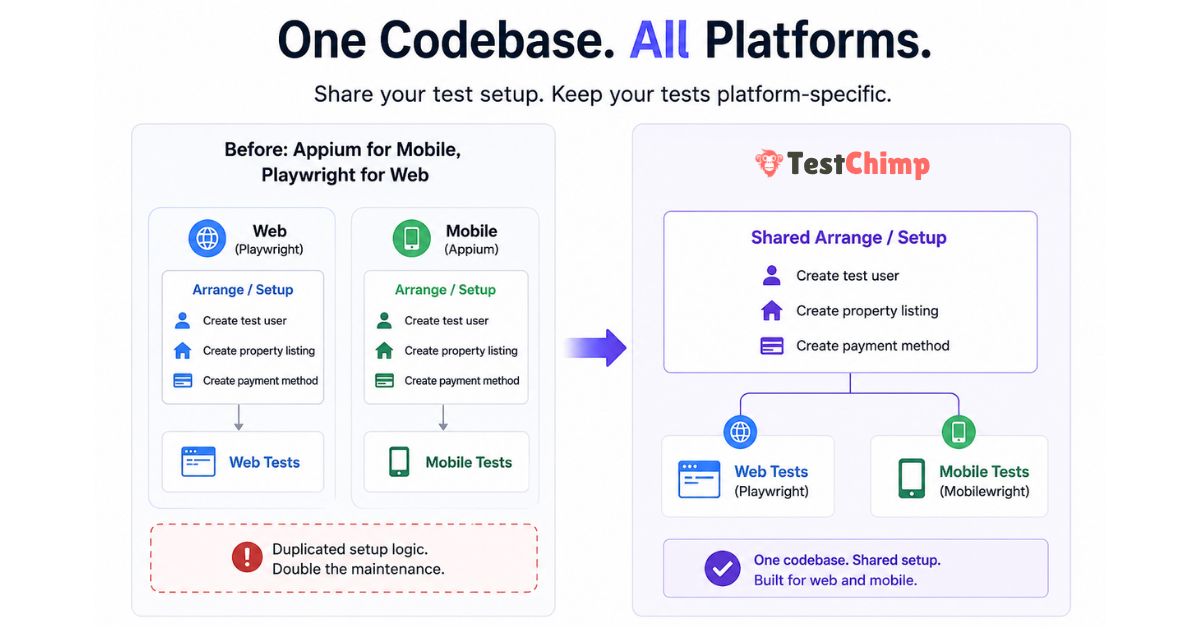
TestChimp Multi-Platform project: shared test codebase with Web, iOS, and Android coverage


The hidden cost of “Appium for mobile, Playwright for web”​

Cross-platform products rarely differ at the data layer. A booking marketplace needs the same primitives whether the customer taps Book in Safari or in your iOS app:

  • A test user with a known identity
  • Inventory (for example, a few property listings)
  • A valid payment method linked to that user
  • Whatever else your domain requires before the flow under test is meaningful

None of that is inherently web or mobile. It is application state—the Arrange phase in the classic Arrange → Act → Assert model (Martin Fowler on Given-When-Then).

Yet the dominant split for years has been:

LayerTypical tooling
Web UIPlaywright
Native mobile UIAppium (often with WebDriver-style clients)
Shared setupDuplicated across two repos or two top-level trees

Teams end up with parallel helper libraries, duplicate seed scripts, and drift—web tests create users one way, mobile tests another, and failures become “which stack is wrong?” instead of “did we break the product?”

The Act and Assert steps should differ by surface: selectors, gestures, and viewport behaviour are platform-specific. The Arrange layer often should not.


Why Mobilewright changes the consolidation story​

Mobilewright brings native iOS and Android automation closer to the Playwright mental model: async tests, auto-waiting, project matrices in config, and fixtures that feel familiar if you already run npx playwright test.

That alignment matters for multi-platform engineering, not only for “mobile testing” as an isolated workstream:

  • Same language and patterns (commonly TypeScript/JavaScript in one repo)
  • Same CI habits (config projects, parallel workers, artifact uploads)
  • Same opportunity to share code for factories, API clients, and database seeding

TestChimp already extended the plan → repo → agent → CI loop to native mobile (native mobile testing announcement). Multi-Platform Projects are the next step: one TestChimp project type and one tests tree for teams that ship web and mobile together.


What TestChimp Multi-Platform Projects provide​

When you create a TestChimp project with type Multi-Platform, the platform scaffolds a single tests/ directory that includes:

  • web/ — browser SmartTests via Playwright (playwright.config.js, web/e2e/, web/pages/, web/fixtures/)
  • mobile/ — native UI tests via Mobilewright (mobilewright.config.ts, mobile/e2e/common|ios|android/, mobile/pages/, mobile/fixtures/)
  • api/ — platform-agnostic HTTP specs (often the fastest way to Arrange and to assert backend state)
  • shared/ — cross-suite helpers and fixture factories (seed users, auth builders)—excluded from test discovery, intended for reuse
  • setup/ — global setup run once before suites in both configs

Platform-specific UI code lives in platform-specific folders. Business logic that creates entities and prepares situations can live in shared/, api/fixtures/, or factories imported by both web and mobile specs.

tests/
setup/
shared/ ← shared Arrange logic (users, listings, payments, flags)
api/
fixtures/
mobile/
fixtures/
pages/
e2e/
common/
ios/
android/
web/
fixtures/
pages/
e2e/
playwright.config.js
mobilewright.config.ts

Result for QA and platform teams:

  • Less duplicated infrastructure — one place to update “premium user with saved card”
  • Less maintenance — fix seeding once; web and mobile suites consume the same factories
  • More consistency — the same world-state definitions drive cross-platform regression

Smart Steps (ai.act, ai.verify) remain web-only today; native mobile continues to use standard Mobilewright APIs for UI Act steps. For platform capabilities and CI notes, see Mobile testing.


One project, platform-specific coverage and UX intelligence​

Consolidating tests in one repo does not mean blending web and mobile into one misleading coverage number. Multi-Platform Projects keep one TestChimp project and one plans/tests Git mapping, while treating Web, iOS, and Android as first-class execution platforms everywhere insights matter.

Think of it as: shared requirements and shared Arrange code, sliced execution and analytics per surface.

AreaWhat stays unifiedWhat is platform-specific
Test plansMarkdown scenarios and user stories in plans/Coverage and execution history per platform
TrueCoverageSame project, env/release/branch scopeProduction RUM + test attribution per platform
AtlasSame product vocabulary (screens/states)SiteMap tree, bugs, and baselines per platform

Requirement traceability (Test Planning)​

Requirement traceability links scenarios in Git to SmartTest runs. On a Multi-Platform project, the Insights tab and scenario execution history respect an execution scope that includes platform alongside environment, release, branch, and time range.

  • Choose Web, iOS, or Android to see which scenarios passed or failed on that surface.
  • Drill into a user story to view execution history filtered to the platform you care about—useful when mobile lags web or when a shared scenario is covered by both web/e2e/ and mobile/e2e/ specs.
  • Folder roll-ups in Test Planning still work; the platform dimension answers questions like “Is checkout covered on iOS in QA this week?” without spinning up a second project.

Agents and CI should report runs with the correct platform identity (via @testchimp/playwright / Mobilewright reporter wiring) so linked scenario-annotated tests attribute to the right slice. Your plans can describe behaviour once; coverage status reflects where that behaviour is actually exercised.

TrueCoverage (production-informed gaps)​

TrueCoverage compares real user journeys (RUM) with automation coverage (test-tagged events). Each surface has its own instrumentation path—@testchimp/rum-js on web, testchimp-rum-ios and testchimp-rum-android on native—with TESTCHIMP_PROJECT_TYPE set to web, ios, or android as described in Instrumenting your app.

On Multi-Platform projects, the TrueCoverage execution scope offers the same Web / iOS / Android selector. That keeps comparisons honest:

  • Production events from the iOS app are not mixed with web test runs when you evaluate gaps.
  • Agents prioritizing fixtures and tests can target the platform where users actually hit the gap—for example high drop-off on Android checkout vs healthy web funnel.

Instrument every surface you ship; scope analytics one platform at a time when deciding what to automate next.

Atlas (UX bugs on the right surface)​

Atlas is TestChimp’s app-structure map: screens and states, with UX and non-functional bugs tagged where ExploreChimp or SmartTests observed them. For multi-platform products, the SiteMap is not a single blurred tree—you browse and triage per platform.

  • A platform selector (Web, iOS, Android) loads the screen-state tree for that execution platform.
  • Bugs discovered during exploration or annotated runs are associated with screen-state context on that platform, so a layout regression on mobile does not drown in unrelated web noise.
  • markScreenState checkpoints in web Playwright tests and mobile Mobilewright tests feed the vocabulary ExploreChimp and Atlas use; platform-specific folders keep Act steps separate while structure stays comparable across surfaces.

That matters for engineering leads reviewing quality: you open Atlas, pick iOS, and see UX issues on the iOS SiteMap—assign owners per screen, run targeted ExploreChimp from a node, and track fix status without conflating desktop-only flows.


Arrange vs Act: what to share (and what not to)​

PhaseWebMobileShare?
ArrangeAPI/fixtures/DB seedSame backendsYes — prefer api/, shared/, or backend fixtures
ActPlaywright locators & navigationMobilewright gestures & native selectorsNo — keep under web/ and mobile/
AssertDOM + optional API probesNative UI + optional API probesOften partial — API assertions can be shared; UI assertions stay local

This is the same insight as fixtures and Object Mother patterns in xUnit-style testing (xUnit Test Patterns — test fixture, Object Mother): push incidental complexity of setup out of the test body and into reusable, composable building blocks. Agents authoring tests benefit even more when Arrange is API-backed rather than repeated through slow UI clicks (fixtures in agentic automation).


How to get started​

  1. Sign in to TestChimp and open Add project.
  2. Choose project type Multi-Platform (web + native mobile in one codebase).
  3. Connect Git and map your plans/ and tests/ folders (same workflow as web-only projects).
  4. Run your usual agent workflow—for example /testchimp test after a PR—using the TestChimp skill on Claude or Cursor.

Docs to read next:

If your team already runs separate web and mobile automation repos, migrating Arrange into shared/ and api/ first—before moving UI specs—is usually the lowest-risk path. You keep platform runners; you stop duplicating the world behind them.


Frequently asked questions​

Is Multi-Platform the same as creating separate web and mobile TestChimp projects?​

No. Multi-Platform is one project and one scaffold where both Playwright and Mobilewright configs and folder layouts coexist. Separate Web and Mobile project types still exist when you only need one surface.

Do I have to abandon Appium to use this?​

TestChimp’s native path is Mobilewright, not Appium. Teams often adopt it when they want Playwright-like authoring and shared TypeScript with web suites. If you are standardized on Appium, compare effort to maintain duplicate Arrange code versus migrating Act layers over time while centralizing setup in API tests first.

Can API tests really replace UI for Arrange?​

For many domains, yes—and Playwright’s request context (and direct HTTP clients in api/*.spec.js) are the fastest, least flaky way to reach a given situation. UI Act remains necessary to validate what users see and tap; UI Arrange is usually optional once APIs or admin seeds exist (QA in production).

What’s the biggest win if we already have Playwright on web?​

The win is often consolidation of test infrastructure, not “another mobile runner.” Mobilewright lets mobile join the same repo conventions as web so agents and engineers maintain one mental model for fixtures, plans, and CI.

If plans and tests are in one repo, is coverage merged across web and mobile?​

No—not by default. Requirement coverage, TrueCoverage comparisons, and Atlas navigation use an explicit platform dimension on Multi-Platform projects (Web, iOS, Android). Shared scenarios in plans/ can be linked from both web/ and mobile/ tests; the platform scope shows where those links actually ran and passed.


Further reading​

TestChimp

Playwright & Mobilewright

Patterns & quality engineering

Try it

  • TestChimp — create a Multi-Platform project and connect your repository. Feedback welcome via your usual support channel or community touchpoints linked from the product.

Shipping both web and mobile? The duplication you feel in test automation is often in the Arrange layer—not in the product. Multi-Platform Projects let you maintain that layer once, run Playwright and Mobilewright where users actually interact, and still read requirements, TrueCoverage, and Atlas with clear per-platform signal.
TestChimp Partners with Bunnyshell

· 4 min read
Nuwan Samarasekera
Founder & CEO, TestChimp

As AI coding agents become more prevalent, they are changing more than just how code gets written.

They're changing when software should be tested.

Today, we're excited to announce our partnership with Bunnyshell to bring PR-scoped ephemeral environments directly into the AI-powered QA workflows executed by TestChimp.

This partnership solves a problem that is becoming increasingly common as organizations adopt AI-assisted development at scale.

Bunnyshell Partnership Announcement

The Hidden Challenge of AI-Driven Development​

AI dramatically increases PR volume.

Not only are there more pull requests being created, but those pull requests often contain substantially more changes than their human-authored counterparts.

Historically, many teams followed a workflow similar to this:

  1. Developers create PRs
  2. PRs are merged into the main branch
  3. A release is deployed to a shared staging environment at end of sprint
  4. QA validates the release

This workflow worked reasonably well when development velocity was constrained by human output.

However, as AI agents begin generating code continuously, several problems emerge:

  • More PRs are merged between testing cycles
  • Individual PRs contain more changes
  • Regressions become harder to isolate
  • Root-cause analysis becomes increasingly expensive

By the time QA identifies a problem in staging, the issue may have originated from one of dozens of recently merged pull requests.

  • Finding the offending change becomes a detective exercise.
  • Reverting safely becomes difficult.
  • Confidence in releases decreases.

The Solution: E2E tests in each PR​

What if every PR was E2E tested before it reaches the main branch?

Ideally, every PR should arrive with:

  • New end-to-end tests
  • Updates to existing affected tests
  • Validation that those tests pass
  • Evidence that the feature behaves as intended

This significantly reduces the amount of uncertainty that accumulates in shared environments.

The challenge, of course, is environment availability. To test a PR, you need an environment that actually contains the PR's changes. Note just a frontend (like what firebase / vercel provide) - but full-stack isolated environment.

For small applications, developers can often spin everything up locally. For larger systems, that quickly becomes impractical.

This is exactly where Bunnyshell shines - ephemeral environments, spun up at lightning speed - deployed on the cloud.

How Bunnyshell Solves the Environment Problem​

Bunnyshell allows teams to define their application infrastructure using a simple YAML specification.

Think of it as a blueprint describing everything required to run your application:

  • Frontend
  • Backend services
  • Databases
  • Networking
  • Environment variables
  • Dependencies between services

Once this blueprint exists, Bunnyshell can automatically provision isolated environments on demand - and deploy them to your K8s cluster. Don't worry - TestChimp SKILL transitively loads Bunnyshell skill and authors the YAML file for your infrastructure.

Instead of testing changes in a shared staging environment, every pull request receives its own dedicated clean environment for agents to work on.

  • No shared environment.
  • No interference from other testing work (manual testing / other test suites running etc.).
  • No waiting for deployment windows.

When you run "/testchimp test" workflow, TestChimp can now provision an ephemeral environment via your Bunnyshell config - scoped to the current PR, load up necessary test data through already defined fixtures, and execute testing on this environment.

Result: You can now merge your agent authored PR with confidence.

This partnership brings together two complementary capabilities crucial for QA shift-left paradigm:

Bunnyshell provides isolated, production-like environments for every pull request.

TestChimp provides AI-powered exploration, validation, and automated test creation.

Together, they enable a workflow where every PR can be validated in isolation before it reaches main.

The icing on the cake: TestChimp users will get 15% off their Bunnyshell bills!

Simply use code: TESTCHIMP15 when signing up.

Manual Testing with Traceability

· 5 min read
Nuwan Samarasekera
Founder & CEO, TestChimp

:::tip Updated workflow Since this post, the extension also supports open-ended sessions (objective instead of scenario), Add bug on steps (deferred until session finish), and Atlas-backed screen/state selection. See the current guide: Manual test session capture. :::

Manual testing is still where teams catch the “this feels wrong” stuff:

  • confusing UX
  • copy bugs
  • edge-case flows
  • integration weirdness that doesn’t show up in clean scripted runs

But there’s a persistent problem: manual testing evidence doesn’t stay connected to what was planned.

Test plans live in one place. Notes and screenshots live in another. Pass/fail outcomes live in Slack threads or Jira comments. And the mapping back to the scenario is usually… memory.

Today we’re announcing a new workflow in TestChimp: Manual testing with traceability.


The idea​

If your team already does test planning (user stories → scenarios), then manual execution should be:

  • tied to a specific scenario
  • captured as step-by-step evidence
  • recorded with environment + release context
  • marked passed / failed
  • queryable later as execution history (not a dead document)

That’s what this feature does.


Manual Test Session Capture (in the Chrome extension)​

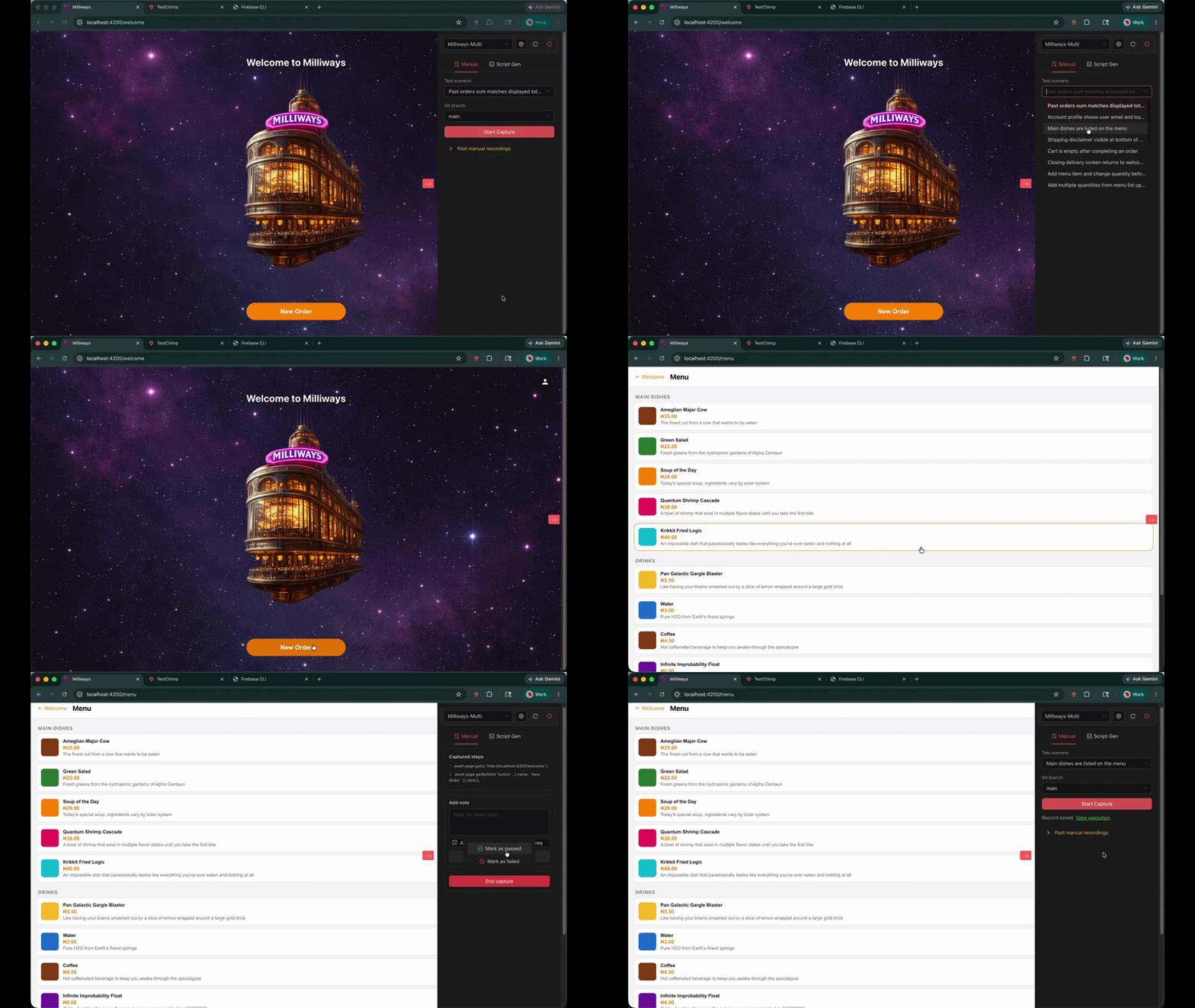
In the TestChimp Chrome extension, there’s now a Manual tab.

It lets a tester record a manual session while they execute a planned scenario, with traceability stored directly on the record.

Manual test session capture

What gets captured:

  • Steps: each interaction is captured as a step
  • Screenshots: uploaded automatically
  • Notes: add notes to the latest step, optionally highlighting a UI element/area
  • Outcome: mark the session as passed or failed
  • Context: environment + release (and optional git branch context)

How it works (quick walkthrough)​

  1. Open the Chrome extension and switch to the Manual tab
  2. Click Create Manual Test Record
  3. Select the test scenario you’re executing (required)
  4. (Optional) pick the git branch context
  5. Click Start Capture and run the test as usual
  6. Add notes when needed (with optional element/area attachments)
  7. Click End capture, then mark passed or failed
  8. Open View execution to see the full record in TestChimp

If you want the full documentation, see Manual Test Session Capture.


Why this matters (beyond “we captured a GIF”)​

Manual testing isn’t going away. But it needs to stop being unstructured.

With scenario-linked manual records, you can answer real questions without archaeology:

  • Which scenarios were manually executed for this release?
  • Where are we relying on manual validation because automation doesn’t exist yet?
  • What’s the evidence behind a “pass” when something regresses later?
  • What’s failing on a specific branch or environment?

It’s manual testing… but operationalized.


Unified coverage: manual + automated, in one view​

The bigger win is what happens after you capture manual execution.

Because manual sessions are linked to the same scenarios as your SmartTests, TestChimp can provide unified requirement coverage insights across:

  • Automated runs (SmartTests in CI or in the Web IDE)
  • Manual runs (scenario-linked manual sessions with evidence + pass/fail)

So instead of two separate worlds (a test management tool for manual, and CI dashboards for automation), you get one requirement-centric view:

  • scenario coverage status
  • recent execution history (pass/fail)
  • evidence trail for manual validation
  • clear gaps where scenarios have no automated coverage yet

This is the foundation for keeping your suite honest: manual validation is visible and it doesn’t get conflated with “we have automation”.


How coding agents consume this to prioritize test authoring​

Once coverage and history are unified at the scenario layer, agents can treat it as an ordered backlog—especially in workflows like /testchimp test (PR-level) and /testchimp evolve (portfolio-level).

In practice, the agent pulls:

  • Requirement coverage (what scenarios are covered vs missing tests)
  • Execution history (what’s failing or flaky right now)
  • (Optionally) TrueCoverage signals (what real users do most, where they drop off)

Then it prioritizes authoring work where it has the highest leverage:

  • uncovered high-priority scenarios first
  • gaps in the exact folder/feature area the team owns
  • high-traffic paths with low coverage (when TrueCoverage is enabled)

The end result is a tighter loop: manual + automated executions feed the same insights, and those insights drive agents toward the most important missing tests—rather than “write more tests” as a generic goal.


Manual capture vs SmartTest authoring​

Manual capture creates an auditable execution record (pass/fail, notes, screenshots). To turn that session into a Playwright SmartTest, use Copy test generate prompt after capture and paste it into your TestChimp-skilled agent (creating SmartTests from the browser).


Try it​

  • Install the Chrome extension
  • Plan scenarios in Test Planning
  • Run your next manual regression session through the extension

If you have feedback on what would make manual execution records more useful (branch/release filtering, richer notes, better rollups), we’re actively iterating.

TestChimp now supports native mobile testing

· 4 min read
Nuwan Samarasekera
Founder & CEO, TestChimp

TL;DR: TestChimp now supports native mobile app testing on both iOS and Android. This brings the same seamless workflow we unlock for your web testing - just say "/testchimp test".

TestChimp native mobile testing support


What shipped​

Mobile is not a separate product bolted on the side. It is the same plan → repo → agent → CI loop you use for web SmartTests, extended to native apps via Mobilewright—a Playwright-style API and toolchain for iOS and Android.

Create a TestChimp project with project type iOS or Android, connect Git for your plans and tests folders, install the TestChimp skill on Claude or Cursor, and after each PR say /testchimp test. The platform keeps doing what you expect: wiring RUM, reading scenarios, closing coverage gaps, and surfacing analytics—now on screens that live inside your app, not only in the browser.

For setup details and parity tables, see Mobile testing (iOS and Android).


Five value props for Claude-based test authoring—four are live on mobile​

TestChimp’s agentic QA model rests on five pillars. On native mobile, four are fully supported today:

Value propWhat it gives youMobile status
Requirement traceabilityPlans ↔ tests feedback loop; scenarios stay linked to coverageSupported
TrueCoverageReal user behaviour ↔ tests feedback loop; production informs what to automateSupported
QA workflow executionSeed/probe endpoints, fixtures for reusable world-states, test authoring, scenario linkingSupported
ExploreChimpAnalytics on screenshots, logs, and network from exploratory runsSupported
Smart StepsIntent-based steps in test scripts (ai.act, ai.verify, …)Not yet

Smart Steps remain web-only for now. Native mobile tests use standard Mobilewright APIs for UI interaction—the same deterministic, async execution model you know from Playwright, without the intent-comment layer on top.

Everything else—the closed loops between requirements, production behaviour, fixtures, and tests—carries over.


The same seamless workflow as web​

You do not need a new playbook. The habit stays the same:

  1. Install the TestChimp skill on Claude or Cursor.
  2. After each PR, run /testchimp test (or your team’s equivalent in the agent host).

TestChimp then orchestrates the work you would otherwise stitch together manually:

  • RUM libraries — Wire up testchimp-rum-ios and testchimp-rum-android so production and test runs speak the same event vocabulary.
  • Instrumentation — Understand real user behaviour: segments, interaction flows, and scenarios—not just “the app launched.”
  • Plans and stories — Read markdown scenarios, pull requirement traceability insights, and see what is still untested.
  • Test authoring — Author Mobilewright tests to cover gaps, with traceability annotations where your plan expects them.
  • Spot analytics — Run ExploreChimp-style analysis on new screens: visuals, logs, network.

You still get continuous transparency of QA posture in one platform—requirements, coverage, failures, and exploration—whether the surface is a browser tab or a native view controller.


Familiar tests, less flakiness​

Mobile tests are authored in a Playwright-familiar style via Mobilewright: auto-waits, async execution, and fixtures that behave like the ecosystem you already trust on web. That consistency matters when agents (and humans) move between repos that ship both web and mobile.

Fair credit where it is due: the reliability characteristics of that execution model come from Mobilewright—and we are grateful they exist. Mobilewright moved our timeline for serious native support forward by at least a year. If you need cloud-hosted real devices in CI, Mobile Use integrates with the same stack.


What to do next​

If you are already on TestChimp for web, create an iOS or Android project, point Git at your plans and tests folders, and run /testchimp test on your next mobile PR. Smart Steps will follow; the feedback loops you care about for shipping quality are already there.

Why Test Plans in Code if Jira can expose an MCP?

· 2 min read
Nuwan Samarasekera
Founder & CEO, TestChimp

Why Store Test Plans in Code if Jira can expose an MCP?

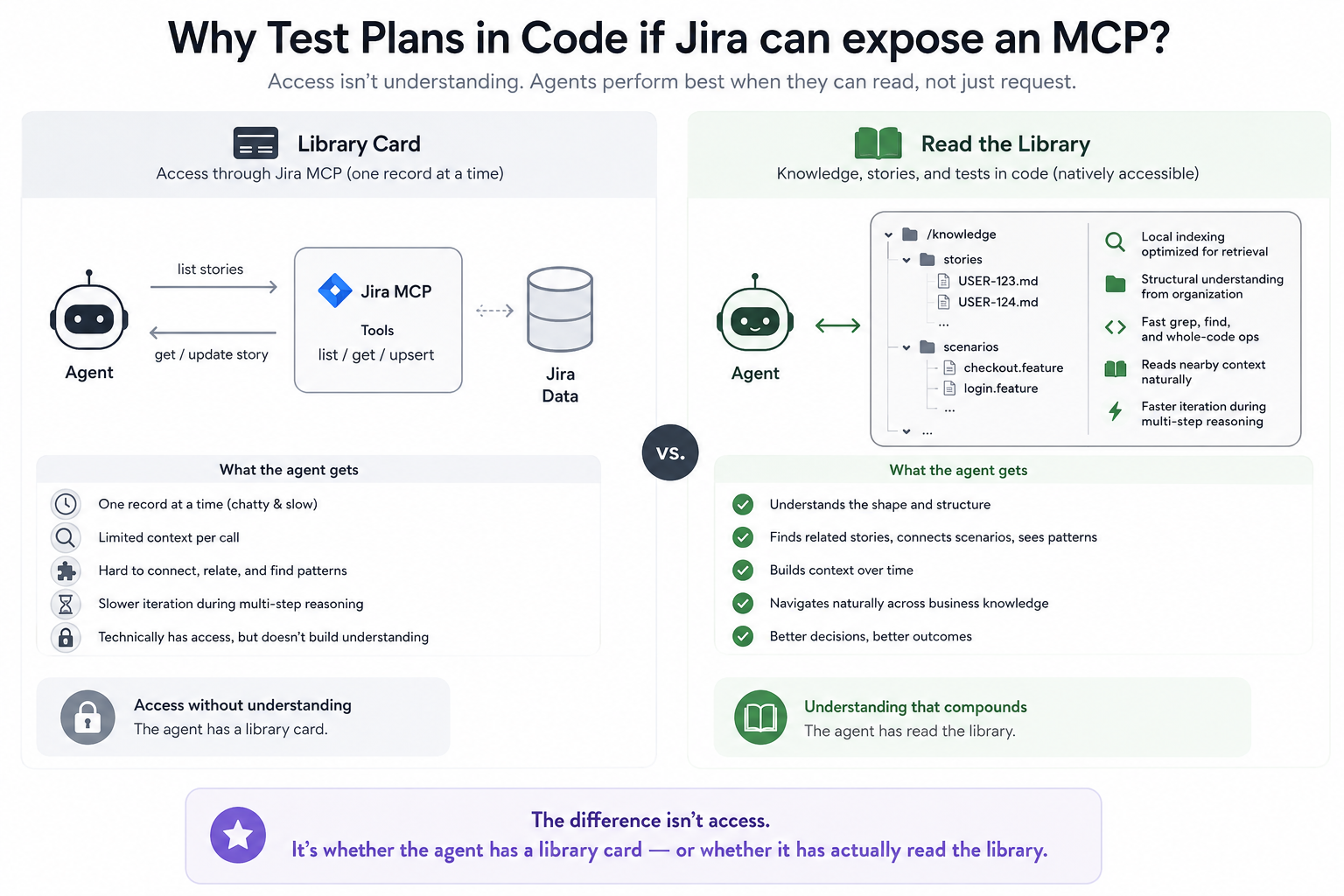
If Jira can expose an MCP to fetch a list of stories, and another call to fetch or update each story — is there an advantage in maintaining them in code instead (what we enable with TestChimp)?

This question comes up often when teams try to retrofit agents into existing workflows. And there are legitimate reasons for doing that — switching costs are real. But if you’re in a greenfield-ish project, the upside of a code-first approach can be significant.

The difference is akin to comparing someone who has read the entire library to someone who has a library card.

Why Jira MCP isnt a substitute

Technically, the person with the library card also has access to everything. But access and understanding are not the same thing.

Apply the same idea to your codebase. Theoritically, you could store your code in some remote SaaS as individual files and expose three MCP tools:

  • list_files
  • read_file
  • upsert_file

Your agent would technically have “full access” to the codebase.

But that would be massively inefficient. Having the code available as colocated local files gives agents advantages that cannot be replicated through API calls:

  • Local indexing optimized for agentic retrieval
  • Structural understanding through folder organization
  • Faster whole-code operations like grep and find
  • Reading surrounding context naturally
  • Faster iteration during multi-step reasoning (Chain of thought)

The agent doesn’t just access the code - it starts to understand the shape of it.

Now imagine extending those same advantages beyond code. What if your knowledge base, user stories, and test scenarios lived in a form the agent could access natively?

Now your agent has business context about your product (similar to how it has code context). Not through a tool called one record at a time, but as something it can index, understand in aggregate, capture structural relationships from, and navigate naturally. It can find related stories. Connect scenarios. Understand patterns. Build context over time.

The difference isn’t access.

It’s whether the agent has a library card - or whether it has actually read the library.

To build or to buy - that is thy question

· 2 min read
Nuwan Samarasekera
Founder & CEO, TestChimp

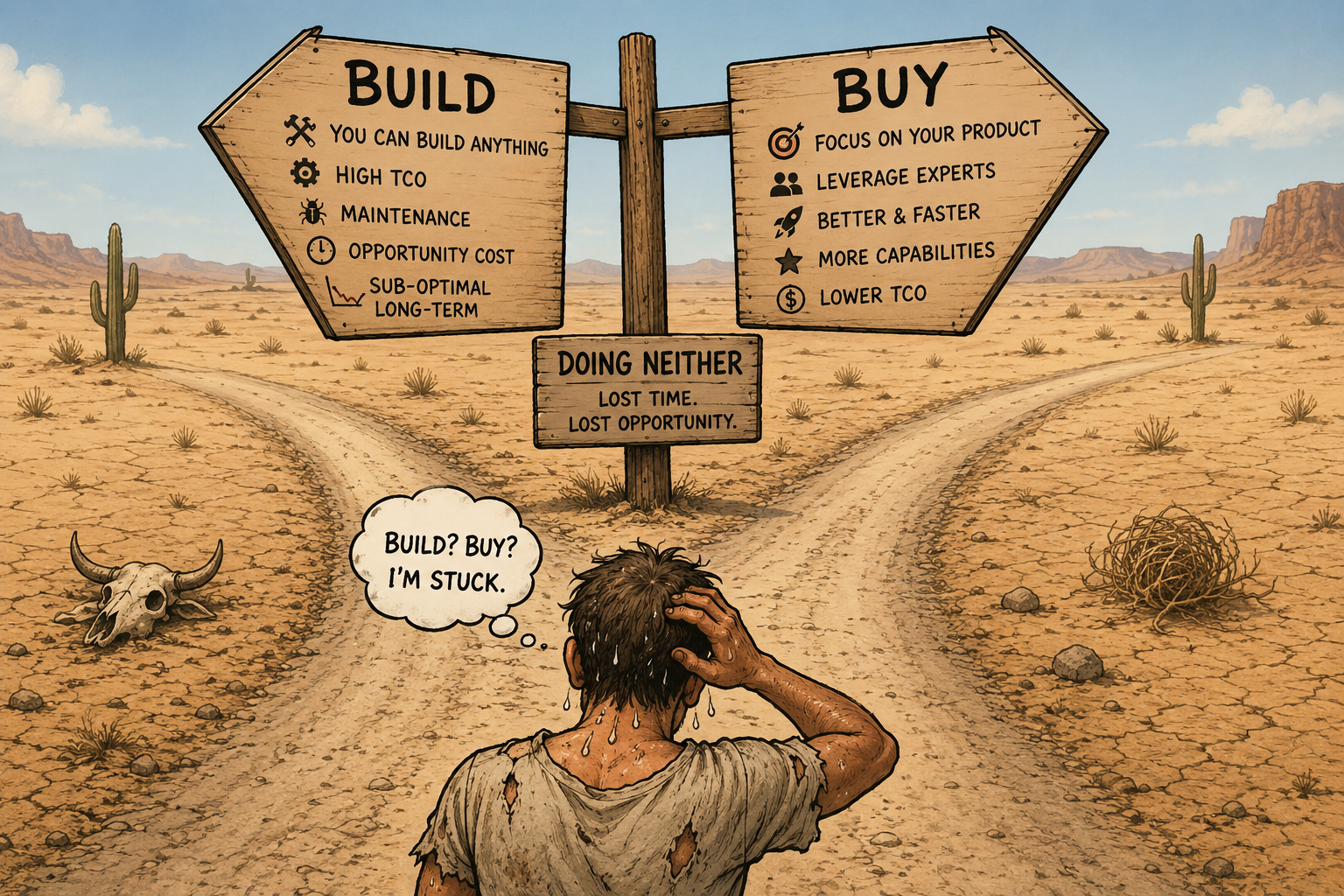
"To build or to buy - that is thy question". In the era of LLMs, many teams seem stuck in a strange middle ground: doing neither.

Build vs Buy Illustration

When you can - theoretically - build it, purchasing, suddenly feels icky. Pre-LLM era, teams often bought things because building them was hard, expensive, or outside their expertise. Now that math feels different:

“You can build ANYTHING.”

However, many teams misread that as:

“You can build EVERYTHING.”

Those are two very different statements. Say there are 4 products you could spend time building: A, B, C and D. You can build any of them. The catch: if you choose to build A, that takes away focus from B, C and D. Try building all 4, and you end up with sub-optimal versions of each.

So what SHOULD you build? Your business. Your product. The thing that translates directly into revenue.

You can technically build a CRM, a Slack clone, and everything in between. But that comes at the cost of focusing on your own product.

Secondly, teams often heavily discount TCO (Total Cost of Ownership), which is very different from build cost:

  • Cost of upkeep - fixing bugs, maintaining infra, adding features, monitoring, testing
  • Opportunity cost - time spent maintaining non-core systems is time not spent improving your actual product
  • Loss of potential capabilities - your internal CRM probably won’t be as feature-rich as HubSpot. Their team wakes up every day thinking about making CRM better. You don’t. Your competition that chose to buy - they get to leverage all of those present and future capabilities while you are stuck living with your barebones version.

Yes - you CAN build ANYTHING. The new game is choosing which ones you build vs buy - carefully doing the math on the ROI based on TCO.

#BuildOrBuy #SaaS #BuildInPublic #StartupLife #AgenticAI

SKILLs are becoming SaaS’s best distribution hack (here’s why)

· 3 min read
Nuwan Samarasekera
Founder & CEO, TestChimp

For years, the hardest part of selling a complex technical product was not the demo—it was the learning curve. Buyers had to internalize workflows, edge cases, and “the right way” to use each feature before they could reliably get value.

That is changing fast. Agent Skills—portable folders of instructions, checklists, and resources that teach an AI agent how to work with your product—are starting to look like one of the most attractive distribution mechanisms for technical SaaS. Instead of hoping every customer reads the docs in the right order, you ship a repeatable operating procedure the agent can follow on demand.

A skill turns every “new user” into a “power user”​

A well-designed Agent Skill effectively turns every user into a power user: one that knows which workflows to follow, how to use the product correctly, and how to extract maximum value from every feature.

That compresses time-to-value—the path to the “aha moment”—because the agent is not improvising from vague prompts; it is executing your intended playbook.

What we are seeing at TestChimp​

We have been seeing this firsthand since launching the TestChimp Agent Skill.

For teams, the workflow is intentionally simple:

  1. Author a few user stories (or import from Jira).
  2. Install the TestChimp skill on your coding agent.
  3. After each PR, simply say /testchimp test.

The skill teaches Claude how to coordinate with TestChimp to:

  • instrument the app for TrueCoverage,
  • fetch and interpret coverage gaps,
  • write tests that addresses the gaps and link them to scenarios correctly,
  • run targeted exploratory testing to catch UX issues,
  • and use AI-native test steps in tests where they help.

The upgrade loop: your perfect user ships with your product​

The best part is what happens when you ship new features.

With a properly designed, self-updating TestChimp Agent Skill, your "user" continuously learns your latest workflows, capabilities, and best practices—and applies them the way you intended. Your agent-side “instruction manual” can move as fast as your product, without requiring every human user to re-read release notes and learn every new capability you ship.

If you are building technical SaaS in the agent era, the product surface area is no longer only your UI and APIs. It is also the skill: the packaged expertise that turns your users in to power users.


References and further reading​

Authoritative guides and registries for Agent Skills (format, discovery, and ecosystem):

Boiling the lake - QA style

· 3 min read
Nuwan Samarasekera
Founder & CEO, TestChimp

Boil the lake - credits: https://garryslist.org/posts/boil-the-ocean

Garry Tan recently introduced a simple but powerful idea: The old adage “don’t boil the ocean” is bad advice in the AI agent era. Well - at the very least, “lakes” are now very much “boilable”.

The core insight is: AI compresses certain work by orders of magnitude. That doesn’t just make things faster - it fundamentally changes what’s feasible.

Most people ask the wrong question:

“What existing human workflows can we speed up with AI?”

That’s incremental thinking. The real leverage comes from asking:

“What powerful workflows did we avoid entirely because they were too expensive to do with humans?”

Those are your “lakes”. And with AI, many of them go from infeasible → trivial.


The QA lake​

In QA - making “test authoring faster” is akin to the former. The bigger ROI lies in the granular workflows that get unlocked now that agents can take autonomy in your test automation.

The Big Idea:

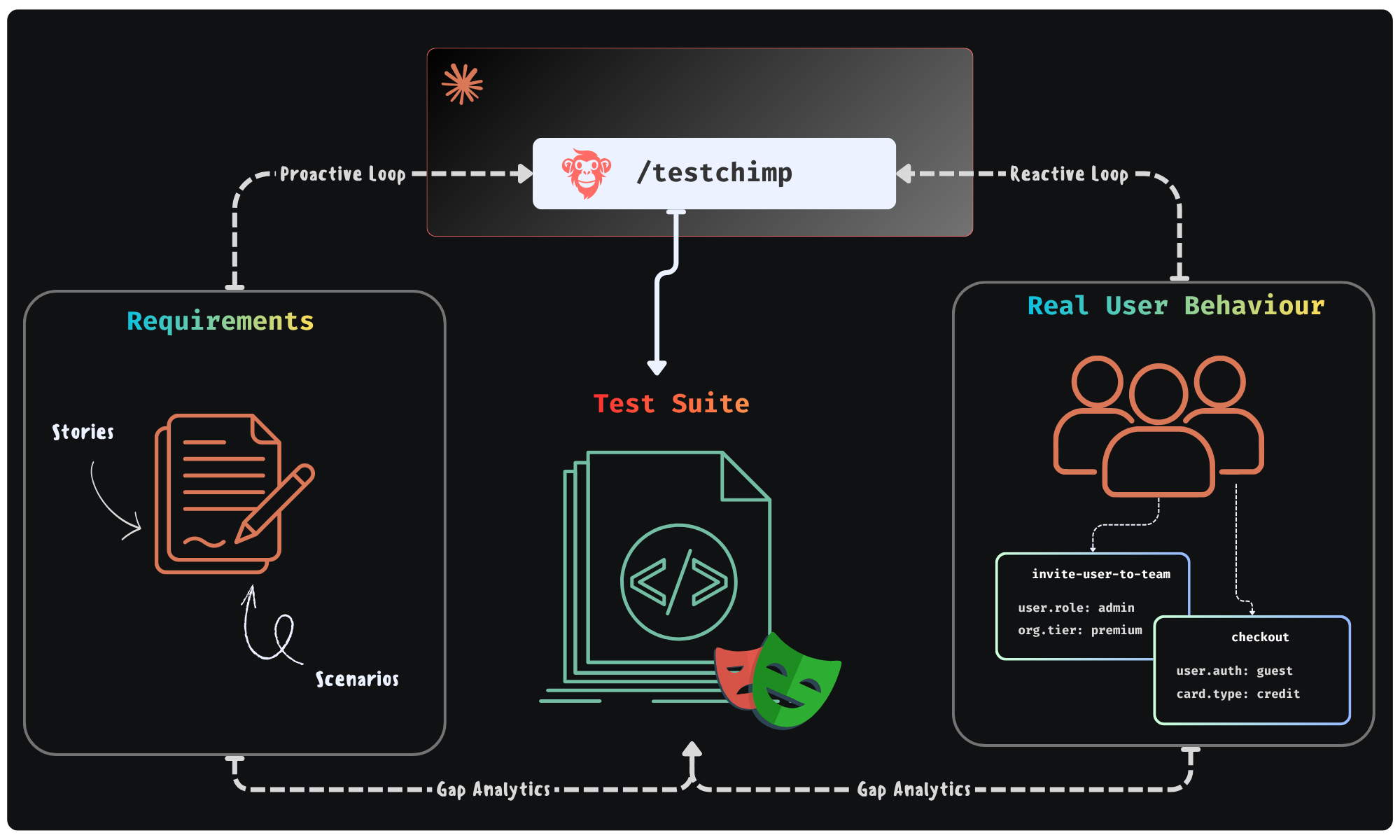
Could agents execute a workflow - where they continuously monitor “planned reality” (user stories / scenarios) and “production reality” (real user behaviour patterns) to improve the “tested reality” (test suite + test infra) - in a continuous feedback loop. All of it done in the background - looping you in for approval of plans it makes.

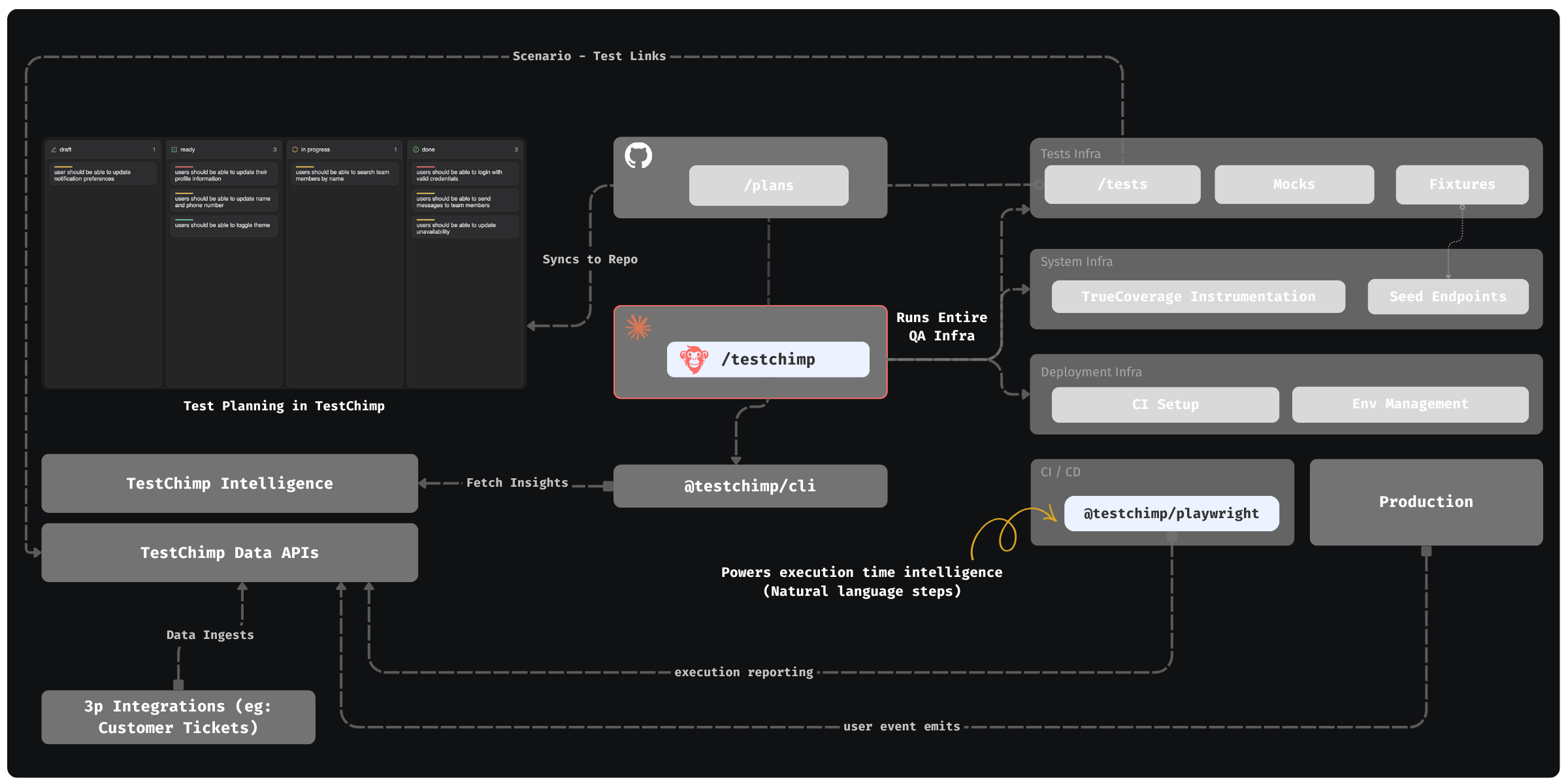
Feedback Loop enabled by TestChimp

This is exactly the future we were building TestChimp for - where agents participate in each phase of QA; where agents access real world insights / plan artifacts to self-direct its work strategically.


Claude + TestChimp​

Today, we are adding the final piece of the puzzle: A SKILL that you can install on Claude / Cursor that enables just that.

  • In TestChimp, test plans are already maintained as Markdowns in repo - directly accessible to agents.
  • Requirements are linked to tests via in-code comments - that Agents can author.
  • Test executions are auto-tracked by our Playwright plugin
  • Event ingests are tracked across prod and test - to generate TrueCoverage insights.

The Skill “upskills” Claude to read those insights via our CLI / MCP, to plan and execute the entire QA workflow:

  • Understand coverage gaps, prioritize (using signals exposed by TestChimp) and plan
  • Author fixtures that emulate real-world situations observed
  • Update test infrastructure (seed / probe endpoints) as needed
  • Author tests - (provisioning PR-local envs to test in and validating tests work)
  • Update instrumentations to learn about real user behaviour (for future cycles - covering new user journeys introduced)

QA workflow orchestrated by TestChimp - Overview


The best part: All of this is condensed to just 2 commands - enabling a frictionless DevX:

  • /testchimp test -> (Run after each PR) Updates plans, authors seeds / fixtures, author tests, validate them in PR scoped isolated environments, instrument code for TrueCoverage

  • /testchimp evolve -> (Run periodically / on deploy) Audits test coverage aligned with requirements and real-user insights, to “evolve” your QA infra & test suite to cover critical under-tested areas and do corrective actions & run targeted exploratory runs.


Claude can write tests. With the right feedback loop, it can fully manage an effective, self-evolving QA posture that de-risks your product continuously. This is what TestChimp enables, by making each phase of QA agent-native, informed by requirements and real user behaviour insights, in a tight feedback loop.

Fixtures - the 'unsung hero' in agentic test automation

· 4 min read
Nuwan Samarasekera
Founder & CEO, TestChimp

In E2E tests, Page Object Models (POMs) were the “popular kids”. Everyone knew them, everyone praised them. Yet not many knew of (or extensively used) "fixtures".

While there are many use cases of fixtures, a prominent one is - they let you pipe pre-created entities to tests that represent specific situations (a user with a valid subscription, a premium tier org etc.).

Ok - before we go into why it matters, let's back off a bit.

Arranging the world-state for the test​

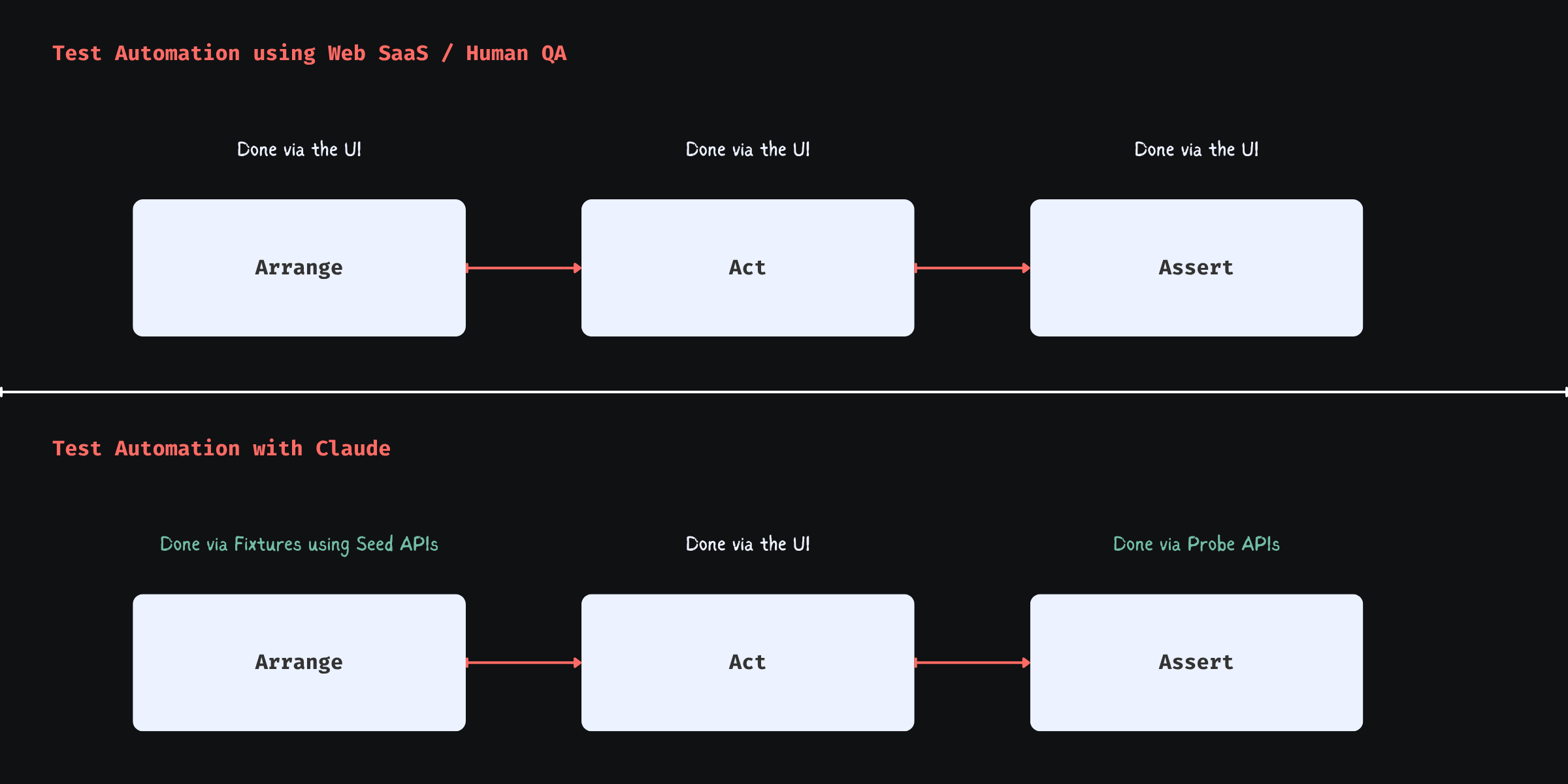
Every functional test boils down to 3 steps (the 3A's):

Arrange -> Act -> Assert

In plain terms:

Given a situation (e.g. a user with an expired credit card),
When a set of actions are done (attempting checkout),
Expect a defined outcome (error message, no order created).

Here’s where things went sideways for a long time.

Phase change with CC test authoring

When humans were authoring tests - especially using web-based SaaS / No-code tools - they were constrained to the UI layer, due to a couple of reasons:

  1. Tools operated outside of the system
  2. QA lacked coding skills / were not allowed to work with system code due to organizational frictions

So everything had to be set up through the UI (or live system APIs), which made POMs the “sexy abstraction”: they made UI-driven setup bearable.

But that setup was never the ideal. It was the workaround.

Arriving at the situation is not the test. It is incidental complexity introduced by tooling and human limitations.

The Shape Shift in Test Automation with Claude​

When Claude is authoring, it is not bound by that restriction. It has the full context of your codebase and can operate across layers. It can author seed / probe endpoints, generate data, and construct precise system states directly.

This is where fixtures shine.

Fixtures expose these pre-built states as reusable, composable building blocks:

  • “User with expired card”
  • “Account with failed payment retries”
  • “Cart with out-of-stock item”

More importantly, fixtures provision those entities with full data-isolation per test run (so that parallel workers running tests, retries etc. don’t interfere with each other). This removes many anti-patterns common in pure UI-layer test authoring - such as depending on order of tests (one to create the entities, one to update, another to delete - each depending on prior).

Shape Shifting of Test Automation Work with CC

Now your tests change shape:

  • Arrange → mostly handled via reusable, API-backed fixtures
  • Act → only the actions that actually matter
  • Assert → UI checks plus direct state validation via probe endpoints

The result: faster tests, more reliable tests, and far less noise.

TrueCoverage - Write fixtures that mirror real-world​

Here’s where things get even more interesting:

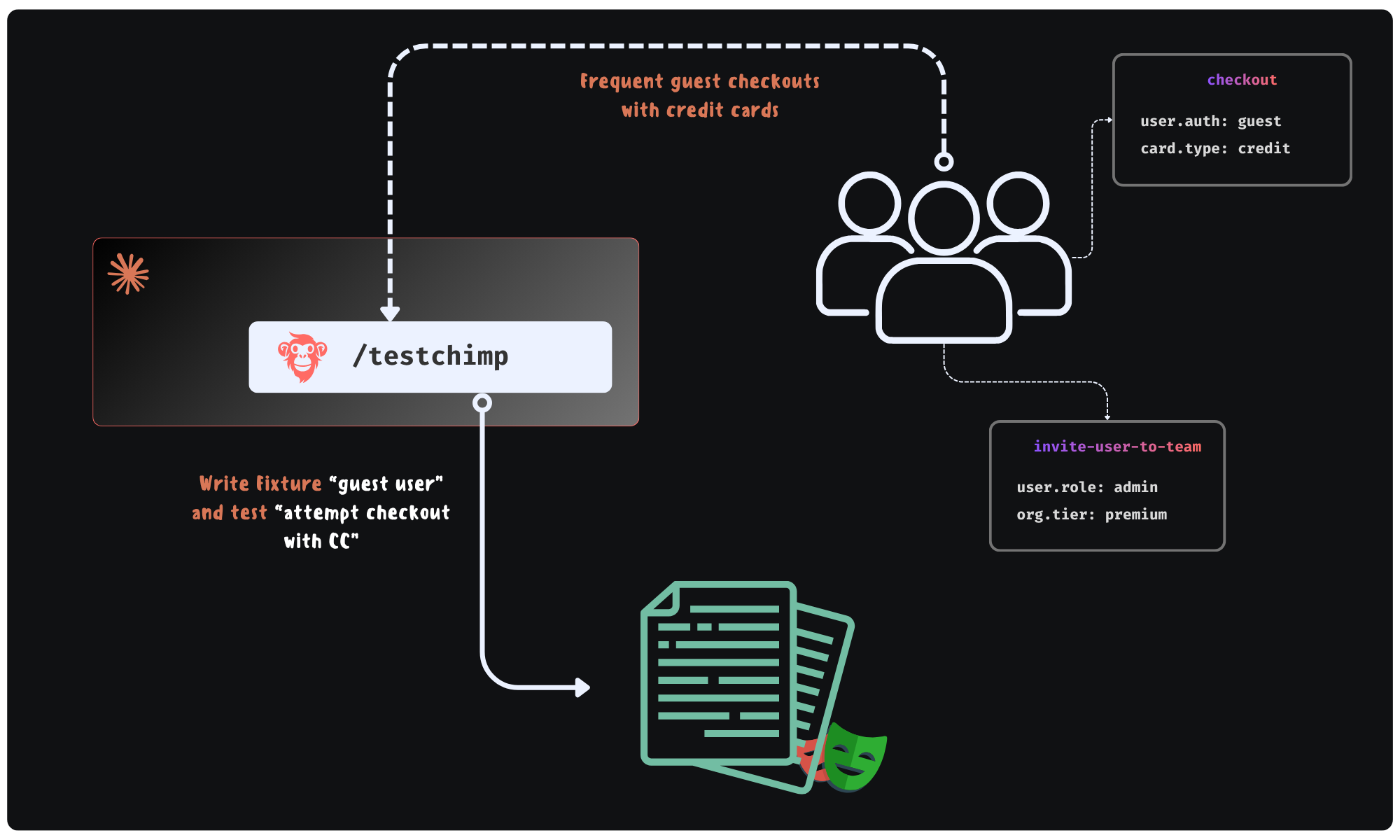
What if Claude could learn what situations occur in the real world? Then, it can author fixtures that emulate them - prioritized by impact - resulting in coverage that actually de-risks your product against real user behaviour.

Production informed feedback loop for fixtures + tests

This is exactly what TestChimps’ TrueCoverage unlocks: a feedback loop - where agents can continuously learn from production insights and generate fixtures that mirror real-world situations.

  • Not guessed. Not happy-path-heavy assumptions.
  • Actual situations your users experience.

That’s when your test suite stops being synthetic - and starts becoming representative of “what your users experience”.

POMs helped us survive UI-driven testing.

Fixtures unlock systemic scenario coverage in the agentic automation era.

Further reading​

The Real Reason Claude Beats Every UI Testing Tool

· 5 min read
Nuwan Samarasekera
Founder & CEO, TestChimp

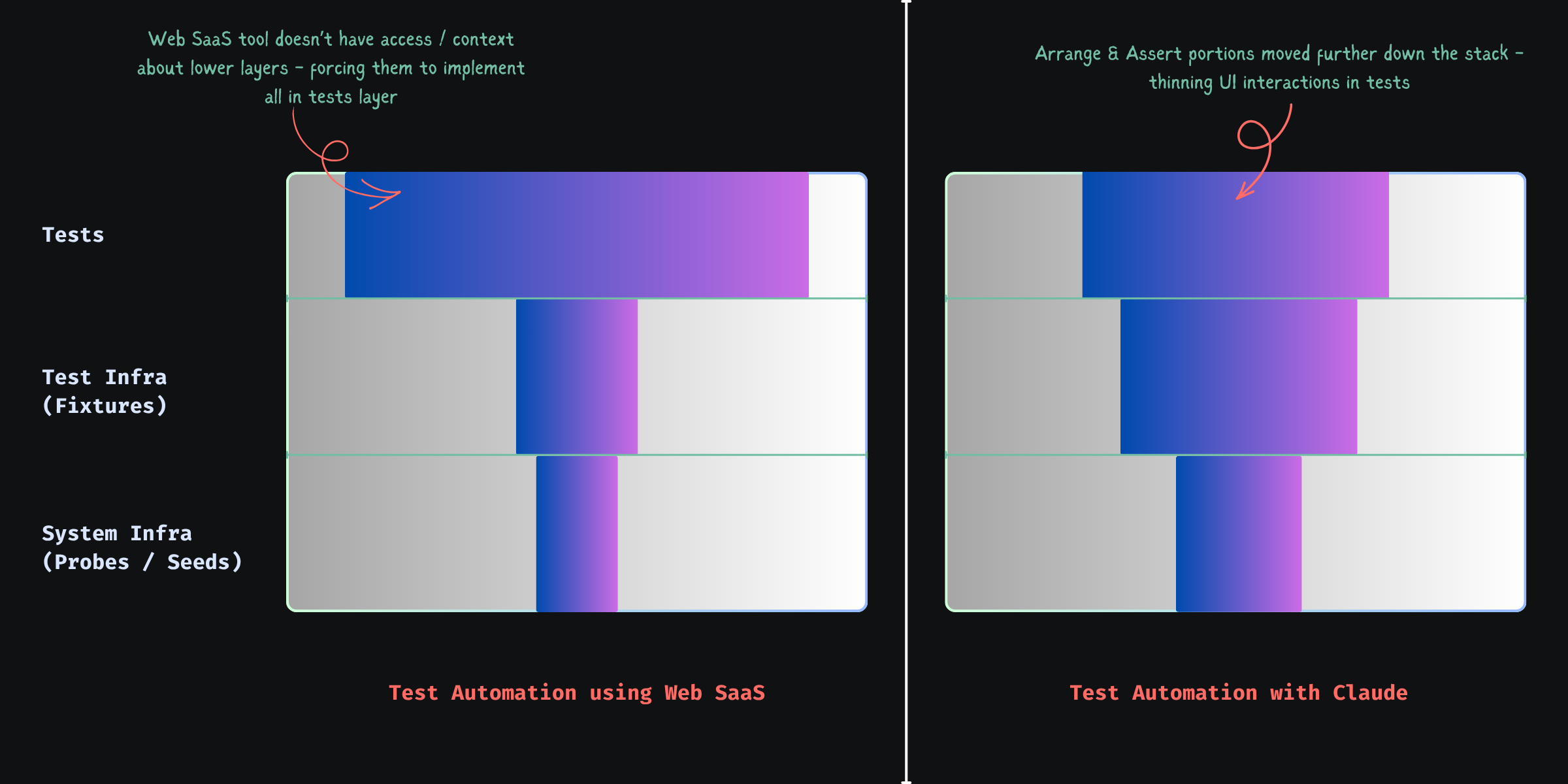
Web-based test authoring hits a structural ceiling against Claude / Cursor-class tooling—not because those agents are “smarter at clicking,” but because test automation is not UI steps.

It cuts across system infra, test infra, and the test layer. Treat it as UI-only and you get slow, flaky suites.

Phase change with CC test authoring


A Simple Example: Checkout with an Expired Card​

Scenario: checkout with an expired card.

What most UI-driven tests look like​

Via UI you often:

  • create a new user
  • sign up
  • verify email
  • add a card
  • manipulate expiry (if even possible)
  • add items to cart
  • navigate to checkout

Then:

  • click “checkout”
  • assert error message

Long, brittle, and mostly setup, not the behavior you care about.


What a Well-Structured Test Looks Like​

Arrange → Act → Assert, applied properly.

Arrange (system + test infra)​

Build state directly instead of simulating it through the product UI.

POST /test/seed/user
{
plan: "premium",
paymentMethod: {
status: "expired"
}
}

This is a seed endpoint — a test-specific API that creates the exact state you need.


Fixture (test infra abstraction)​

Wrap seeds in fixtures so tests stay readable:

const user = await createUserFixture({
paymentStatus: "expired"
}, testInfo);

Fixtures hide setup details and scope isolation for parallel runs and retries.


Act (test layer)​

await page.goto("/checkout");
await checkout(user);

Only the UI you need for the behavior under test.

Assert (UI + system validation)​

UI:

await expect(errorBanner).toContain("Payment method expired");

Probe the system too:

GET /test/probe/order-status?userId=...

Validate:

  • no order was created
  • payment was not processed

UI can lie; backend state usually doesn’t.


Seed & Probe: The System infra for testing​

“API testing” is the wrong mental bucket. You want two test-shaped capabilities:

Seed endpoints​

  • construct state directly
  • bypass irrelevant flows
  • deterministic

Probe endpoints​

  • verify backend state
  • confirm side effects
  • act as your test oracle

Without both: slow (UI-heavy setup) or shallow (UI-only asserts).


Why API Support Alone Doesn’t Solve This​

Record-and-play “API steps” in Mabl/Katalon-style tools still hit production-shaped APIs: multi-step flows, side effects, and no way to create impossible-but-needed states (e.g. a coupon that expired yesterday). Chaining those calls simulates state; it does not give you deterministic seed/probe primitives.


The Real Limitation of No-Code Platforms​

Platforms like Mabl or Katalon operate outside your system.

They cannot:

  • introduce seed endpoints
  • define probe endpoints
  • evolve system-level test primitives
  • share abstractions with backend code

So they are constrained to:

“Whatever the system already exposes”

Which forces:

  • UI-driven setup
  • or fragile API chains

The model stays step flows, not state definitions—test-layer only, while serious automation cuts through system + test infra + tests.

Shape Shifting of Test Automation Work with CC


Fixture Design: Where Reliability Comes From​

Fixtures are what make suites parallel, retry-safe, and deterministic.

A bad fixture:

user@example.com

This breaks when:

  • tests run in parallel
  • retries reuse polluted state

A good fixture uses runtime context:

const uniqueId = `${testInfo.testId}-${testInfo.retry}`;
const email = `user-${uniqueId}@example.com`;

That pattern is the difference between stable and flaky at scale.


Why This Matters More Now​

No-code tools optimized for “what can be done from the outside?” because QA rarely owned system changes. Agents in the repo do own them—adding seed/probe routes, fixtures, and tests is now cheap in engineering time, not a special project.


A Better Mental Model​

Ask what state, how to build it fastest, how to prove it in the system—not “how do I click through the app to get there.”

seed → fixture → minimal UI → probe


Safety Considerations​

Seed and probe routes must be test-only: right environment, authenticated, disabled or guarded in production—by design, not bolted on later.


Caveat: Claude-authored scripts are still selector-bound​

Agents excel at emitting Playwright—locators, waits, structure—but that still freezes intent → selector at author time. Shipping UI brings selector drift, variance (themes, experiments, i18n, hydration), and layout noise—the same flake class, just produced faster.

Products like Spur and Momentic often move intent vs live UI to execution time (where “smart” stability lives), but frequently inside proprietary authoring—awkward next to git-native tests.

Split the work: Claude keeps seed → fixture → stable UI → probe explicit; reserve execution-time resolution for the messy spans via optional intelligent steps—not a fully opaque “magic” suite.

TestChimp’s Playwright runtime (@testchimp/playwright / ai-wright, e.g. ai.act, ai.verify) does exactly that: execution-time smarts where selectors fail you, without giving up versioned repo tests—mostly scripts, selectively runtime-resolved UI.


TestChimp: helping Claude write the right tests​

The harder problem than syntax is what to test—and whether plan, runs, and production still line up. Without a bridge, they drift.

TestChimp connects planned (stories, scenarios, plans), tested (runs, requirement coverage, artifacts), and production (real usage / TrueCoverage-style signals) realities. We turn that into actionable context for agents—gaps, scenarios to tighten, seeds/probes/fixtures to add—not vanity dashboards.

Claude can write tests really well. TestChimp creates the feedback loop that helps Claude write the right tests.

Code-native authoring plus planned → tested → production gives Claude a tight feedback loop to learn from and optimize over time; optional AI steps (above) handle selector pain where it concentrates.


Final Thought​

UI-scripting automation buys slowness, flake, and churn. State orchestration—seed → fixture → minimal UI → probe—buys speed, reliability, and clearer reasoning. E2E can approach lower-layer discipline when the stack cooperates; tools that never touch system + test infra will not get you there by themselves.