Release Governance: Ship When the Evidence Says So

TL;DR: We’ve shipped release governance in TestChimp—the workflow that answers one question before you deploy: has this version been tested enough, in the right places, with evidence we can audit? A release rolls up test runs, manual session captures, CI automation batches, release checks (UX + security), and release intelligence—so product, QA, and engineering share one readiness picture. CI and agents can gate on the same data via API.
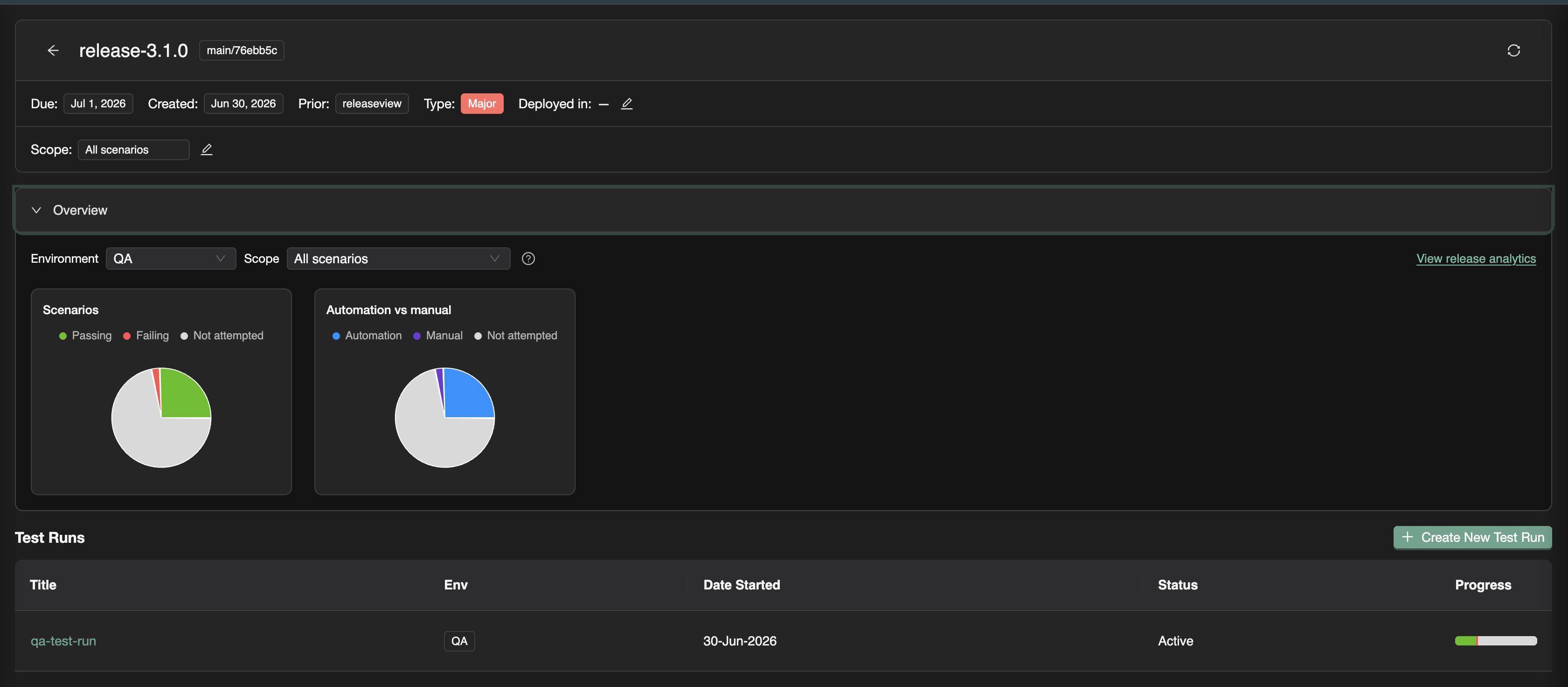
The release confidence problem
Shipping fast only works when you can trust what was validated.
Most teams already run plenty of QA. What they lack is a version-level contract:
| Failure mode | What goes wrong |
|---|---|
| Scattered evidence | Manual QA in Slack; CI green in another tab; no single view per version |
| Checkbox manual testing | “Mark as passed” with no steps, screenshots, or tester identity |
| Automation silos | Playwright batches exist, but nobody ties them to the ship candidate |
| Unknown scope | “We tested checkout”—but not which scenarios or requirements |
| Blind deploys | Code merged without knowing what plans, tests, or RUM events changed |
Release governance is not bureaucracy. It is the shortest path to deploy confidence when stakeholders need a shared, auditable answer—not a status emoji in #releases.
What is release governance?
In software delivery, release governance is how a team decides a version is ready to ship: what was in scope, what was tested, what risk remains, and who can prove it.
Industry practice usually spans test planning, requirement traceability, regression campaigns (test runs), security review, and a release gate—a pass/fail policy before production. Traditional tools often split that across a TMS, CI dashboards, a security scanner tab, and a spreadsheet.
Release governance in TestChimp keeps that decision on one surface: the release—a versioned milestone (for example v2.4.0) with git commit context, focus areas from your plan, test runs, checks, and analytics.
Full walkthrough: Release Management.
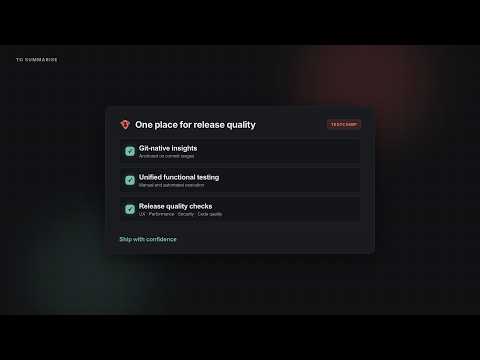
The TestChimp release model
If you’ve followed us, the pieces already exist as Test Planning as Code, Test Runs, and requirement traceability. Release governance is the campaign layer that binds them to a ship candidate.
| Element | Purpose |
|---|---|
| Release | Version, due date, git commit SHA, prior release, deployments per environment |
| Focus areas | Optional scope on your test plan—which story/scenario folders matter for this version |
| Test runs | Named validation campaigns (“Smoke on staging”, “Payment sign-off”) attached to the release |
| Execution evidence | Manual sessions + automation batches linked to those runs |
| Release Checks | UX (ExploreChimp) and security scans scoped to the candidate |
| Release intelligence | Delta analytics, requirement coverage, ExploreChimp findings, TrueCoverage changes |
Open Releases in the sidebar → create a version → create test runs from the release viewer. Progress, checks, and analytics stay anchored to that label and commit range.
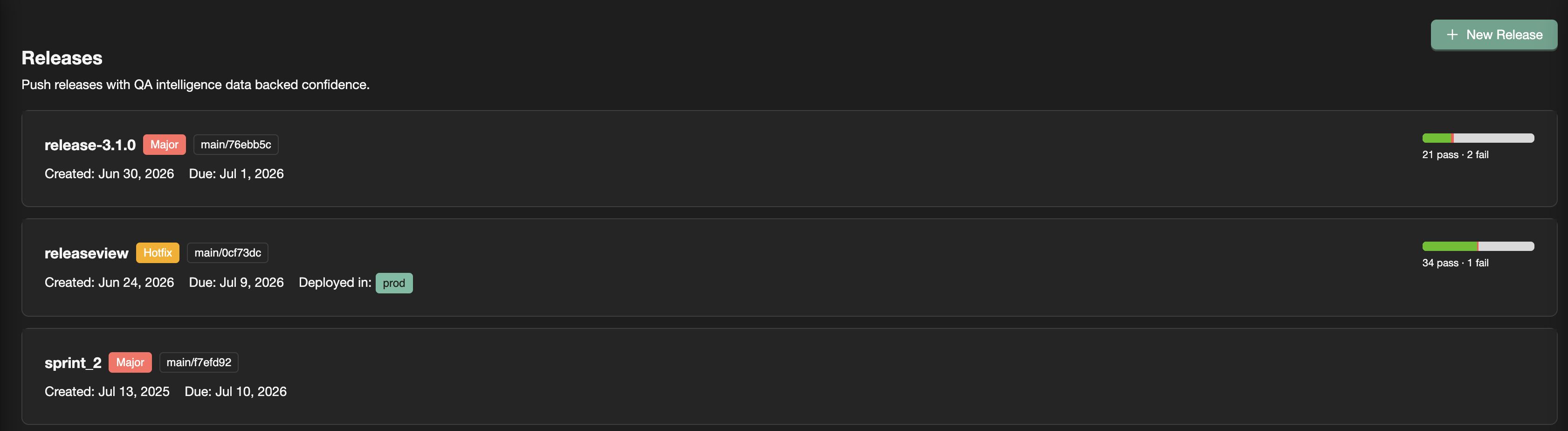
Evidence that rolls up: manual + automation
Auditable manual testing
Traditional TMS tools record an outcome. Release sign-off usually needs evidence.
With TestChimp, testers:
- Capture a session in the Chrome extension (or add a record in the test run viewer)
- Pick the active test run on the release
- Get steps, screenshots, notes, bugs, and tester identity rolled into release overview and requirement coverage
“QA said pass” becomes a reproducible session tied to the scenario and version. Details: Manual sessions to test runs.
CI that counts toward the release
Automation batches from the Playwright reporter show up under Executions. For release work, link them to a test run—especially from the Candidate Automation Execution Batches panel (batches between prior and current release commits).
Linking answers: Does this CI run count toward our sign-off campaign? Scenario status updates in the same progress view as manual work. Guide: Linking automation batches.
One release. One progress bar. Both execution types.
Release Checks: UX and security on the ship candidate
Test runs answer scenario pass/fail. Release Checks answer the adjacent ship questions—from the same release page:
| Question | Check | Engine |
|---|---|---|
| Did UX regress on paths this release touched? | UX Checks | ExploreChimp on SmartTests |
| Runtime web vulns on covered flows? | DAST | OWASP ZAP |
| Insecure code patterns in this range? | SAST | Semgrep |
| Secrets committed since baseline? | Secrets scan | Gitleaks |
| New dependency CVEs? | Dependency scan | Trivy |
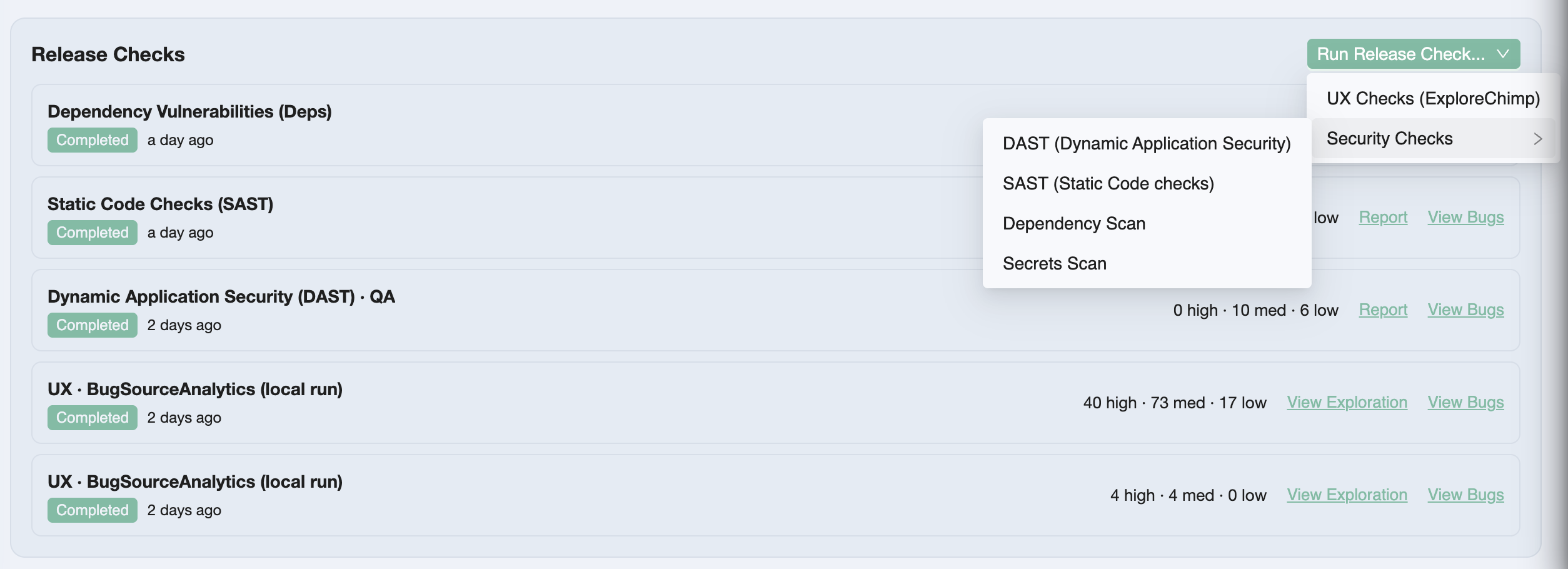
You queue a check from Run Release Check…, paste the /testchimp run… prompt into a TestChimp-upskilled agent, and triage Report / View Bugs beside test runs—not in a separate security silo.
Overview: Release Checks.
Release intelligence: beyond pass/fail counts
Release intelligence connects what changed since the prior release to what was tested and what exploratory work found.
| Insight | What it shows |
|---|---|
| Overview | Scenario pass / fail / not attempted; automation vs manual mix |
| Requirement coverage | Stories and scenarios mapped to linked executions for this candidate |
| Release delta analytics | Tests, stories, scenarios added/updated/deleted + commit graph |
| ExploreChimp findings | Explorations, new screens/states, bugs in the commit range |
| TrueCoverage | RUM event definitions added/updated—instrumentation drift risk |
Use Overview in standups. Drill into analytics when you need requirement-level proof or scope risk (“scenarios added in delta, still not attempted”). Refresh after new commits, linked batches, or manual sessions.
Full detail: Release intelligence.
Programmatic release gating
Governance that only lives in a UI is incomplete for agentic and CI-first teams.
get_release_details returns gate-oriented JSON for a version label: in-scope test aggregations per environment, open-issue stats, release-check summaries, and per-scenario detail. Your pipeline applies your policy—we don’t hard-code “block if any P0 failed.”
testchimp get-release-details --version '1.2.0'
Same data the release page shows—consumable by GitHub Actions, agents, or a custom quality gate. Docs: Programmatic release gating.
How this differs from a classic TMS release
| Dimension | TestRail-style TMS | TestChimp release governance |
|---|---|---|
| Plan source | Cases in a TMS database | Markdown stories/scenarios in Git |
| Manual result | Pass/fail checkbox | Captured session (or detailed record) with evidence |
| Automation | Import / plugin / re-entry | scenario annotations + batch link to test run |
| Security / UX | Separate tools | Release Checks on the version |
| Release view | Milestone + run summary | Release viewer + intelligence (delta, ExploreChimp, TrueCoverage) |
| CI gate | Often custom stitching | get_release_details |
We are not asking you to maintain a parallel TestRail library forever—import scenarios if you need to migrate, then keep Git as source of truth. Honest comparison: TestChimp vs TestRail.
Why this matters in the agentic era
Agents compress authoring and execution. They do not invent a shared definition of “ready to ship.”
Without release governance, you get faster green CI and louder Slack threads—still no auditable answer for this version. With it, the same agents that run /testchimp test and /testchimp run security scan feed a release surface humans and pipelines can gate on.
Requirements quality (DeFOSPAM governance) hardens the contract upstream. Release governance hardens the ship decision downstream. Together they close the loop we care about: planned reality → tested reality → production reality (boiling the QA lake).
Frequently asked questions
What is release governance in TestChimp?
Release governance is TestChimp’s workflow for validating a specific application version before deploy: create a release (version + git commit + optional plan scope), attach test runs, link manual sessions and CI batches, run release checks (UX and security), review release intelligence, and optionally gate CI with get_release_details.
What is the difference between a release and a test run?
A release is the version milestone (v2.4.0) with metadata, focus areas, checks, and rolled-up intelligence. A test run is a scoped validation campaign inside that release—selected scenario folders, collaborators, due date, and linked executions. One release typically has multiple test runs.
What are release checks?
Release Checks are QA activities launched from the release detail page: ExploreChimp UX Checks plus DAST (ZAP), SAST (Semgrep), secrets (Gitleaks), and dependency scans (Trivy). Reports and bugs stay scoped to the ship candidate next to test runs.
How do I know when a release is ready to ship?
Review overview metrics for the target environment, requirement coverage for focus areas, delta analytics for untested plan changes, release-check reports and bugs, and ExploreChimp / TrueCoverage warnings. When in-scope scenarios meet your bar with evidence attached, complete the test runs and deploy—or enforce the same bar in CI via the gating API.
Does TestChimp enforce a fixed release gate policy?
No. The UI and get_release_details expose the data. Your team (or pipeline) decides thresholds—for example zero failed P0 scenarios, no open critical security issues, or required completed scans.
Do manual results need to be linked to a test run?
For results to count in release overview and requirement coverage, link manual sessions to an active test run on that release—easiest at capture time in the Chrome extension. Unlinked sessions stay in execution history but do not roll up to release progress.
Try it
- Open Releases → New Release (set version, commit SHA, prior release, focus areas)
- Create New Test Run from the release viewer
- Capture a manual session or link a Playwright batch
- Queue a Release Check and run it with your agent
- Open View release analytics—then gate CI with
get-release-detailswhen you’re ready
Start here:
Ship when the evidence says so—not when the spreadsheet says “LGTM.”
Further reading
TestChimp
- Release Management
- Release Checks
- Release intelligence
- Manual sessions to test runs
- Linking automation batches
- Test Runs
- Release Management API Guide
Related posts
- Test Runs: Turn Testing Into Release Confidence
- Requirement quality governance (DeFOSPAM)
- Requirement traceability
- Boiling the QA lake
- Test planning as code
Concepts & standards