18 posts tagged with "Build in Public"

Building TestChimp in the open

View All Tags

Put QA on Auto-Pilot with Workflow Automations

· 8 min read
Nuwan Samarasekera
Founder & CEO, TestChimp

TL;DR: We've shipped Automations in TestChimp—event-driven runs of the same catalog workflows you already invoke with /testchimp. When an issue is created, a story moves to ready, a CI batch fails, or a release lifecycle status changes, TestChimp can hand the work to a cloud agent—today via ChimpHands (recommended), a labelled GitHub Issue, or a webhook. Aggregation collapses noisy bursts; optional human gates keep high-blast-radius runs under review. Local agents stay for interactive work. Automations cover the complementary case: the platform watches, then starts the agent for you.
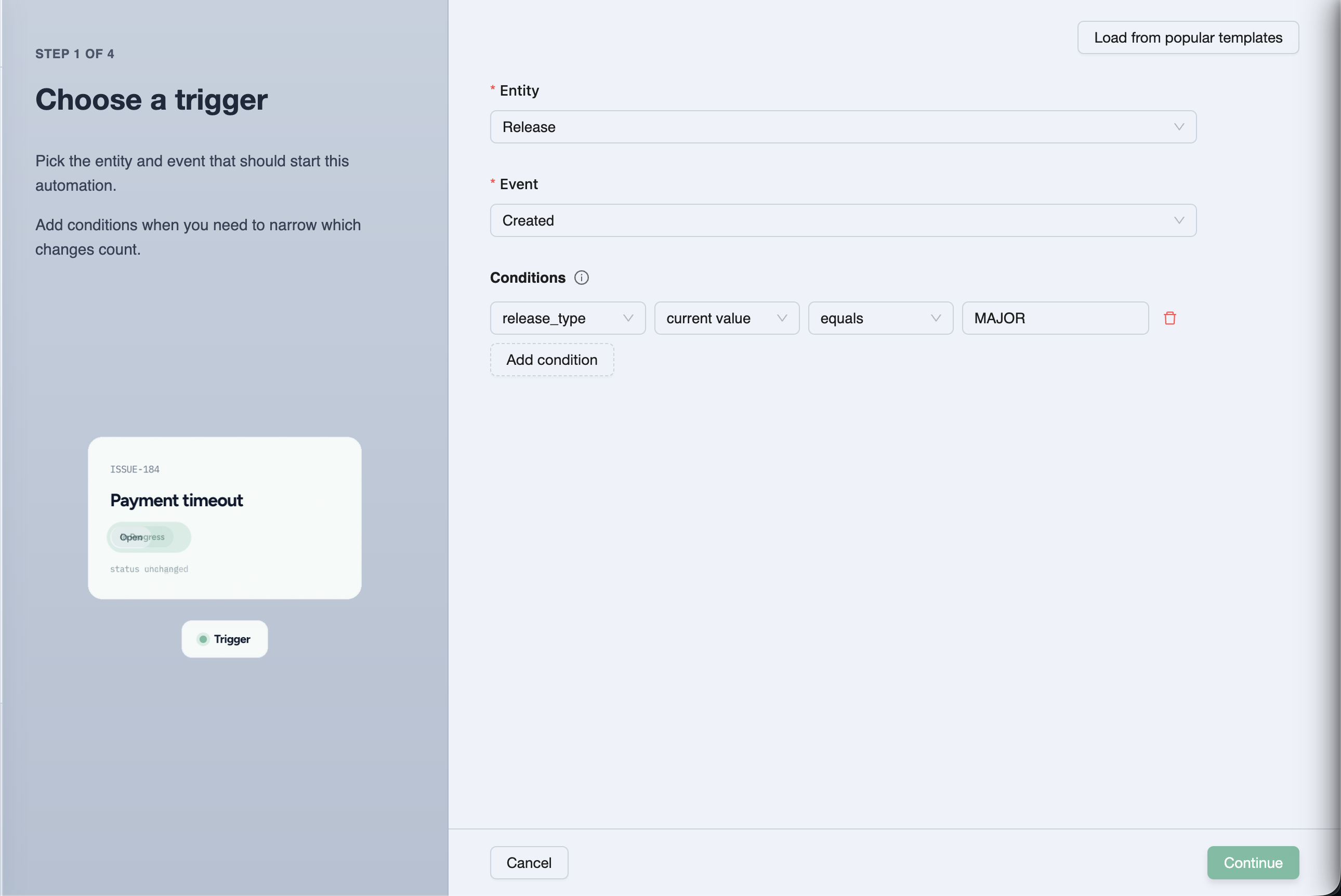
Configure an automation trigger — entity, event, and conditions


The prompt-pasting tax

If you've been living in the agentic QA loop, you already know the playbooks:

/testchimp fix issue BUG-1042
/testchimp implement US-181
/testchimp fix test execution …
/testchimp run QA

That works. It also creates a new bottleneck: someone has to notice the event and paste the prompt.

Failure modeWhat actually happens
LatencyHigh-severity bug sits until a human opens the IDE
InconsistencyDifferent people phrase the same job differently
Missed signalsFailed CI batch, ready story, release → Ready—none of them auto-start work
No audit trailChat history ≠ a tracked workflow execution with status and policy version
Noisy burstsTen related failures → ten agent sessions unless someone batches by hand

Agents compressed execution. They did not invent routing. Automations are that routing layer—on the same workflows, policies, and workflow-execution-id traceability you already use.

Full product docs: Automations.


What is a TestChimp automation?

An automation is three parts:

Trigger + Action + Config

PartAnswersExamples
TriggerWhen?Entity (issue, story, scenario, test execution, batch, release) + event + optional AND conditions
ActionWhat?Execute a catalog workflow with a task template, optional policy, and invocation strategy
ConfigHow loudly / how carefully?Aggregation (Immediate / Buffered / Windowed) + optional human approval before invoke and/or before plan execute

Policies stay *.policy.md in Git. Automations optionally attach them—the same files local /testchimp runs use. Workflows still define how the agent works. Automations define when that work starts and how the cloud agent is reached.

Project event → matching automation → aggregation window

workflow execution queued

(optional) human approve invoke / plan

ChimpHands on CI or labelled GitHub Issue or webhook

/testchimp <workflow> … --workflow-execution-id …

Ways to reach a cloud agent

Configure once under Project Settings → Automations (and ChimpHands setup for the native path), then pick a strategy per automation.

TestChimp dispatches your repo's chimphands.yml GitHub Actions workflow with the rendered /testchimp … prompt. The agent runs on your CI with full checkout context, streams progress to the ChimpHands UI, and opens a PR when done.

One-click setup: GitHub App + workflow file + TESTCHIMP_API_KEY secret. See ChimpHands and Meet ChimpHands.

Via GitHub Issue (bring-your-own agent)

TestChimp opens an issue on your mapped repo. Body = the full /testchimp … prompt (plus the workflow execution id). Labels always include testchimp, plus any extras you configure.

Point Copilot coding agent, Codex, Cursor Cloud, or your own runner at those labels. The agent checks out the repo, runs the prompt with the TestChimp skill + MCP, and reports back—so Executions → Workflow Executions stays current.

ChimpHandsVia GitHub Issue
Who starts the agentTestChimp (GitHub Actions dispatch)Your label-watching agent
NeedsGitHub App + ChimpHands workflow + API key secretTestChimp GitHub App + repo + BYO agent wiring
Continuation (plan → execute)Same session / re-dispatchComment on the same issue
FitDefault QA orchestration on your CICustom agent stacks you already operate

Deep dive: Cloud agents for automations.
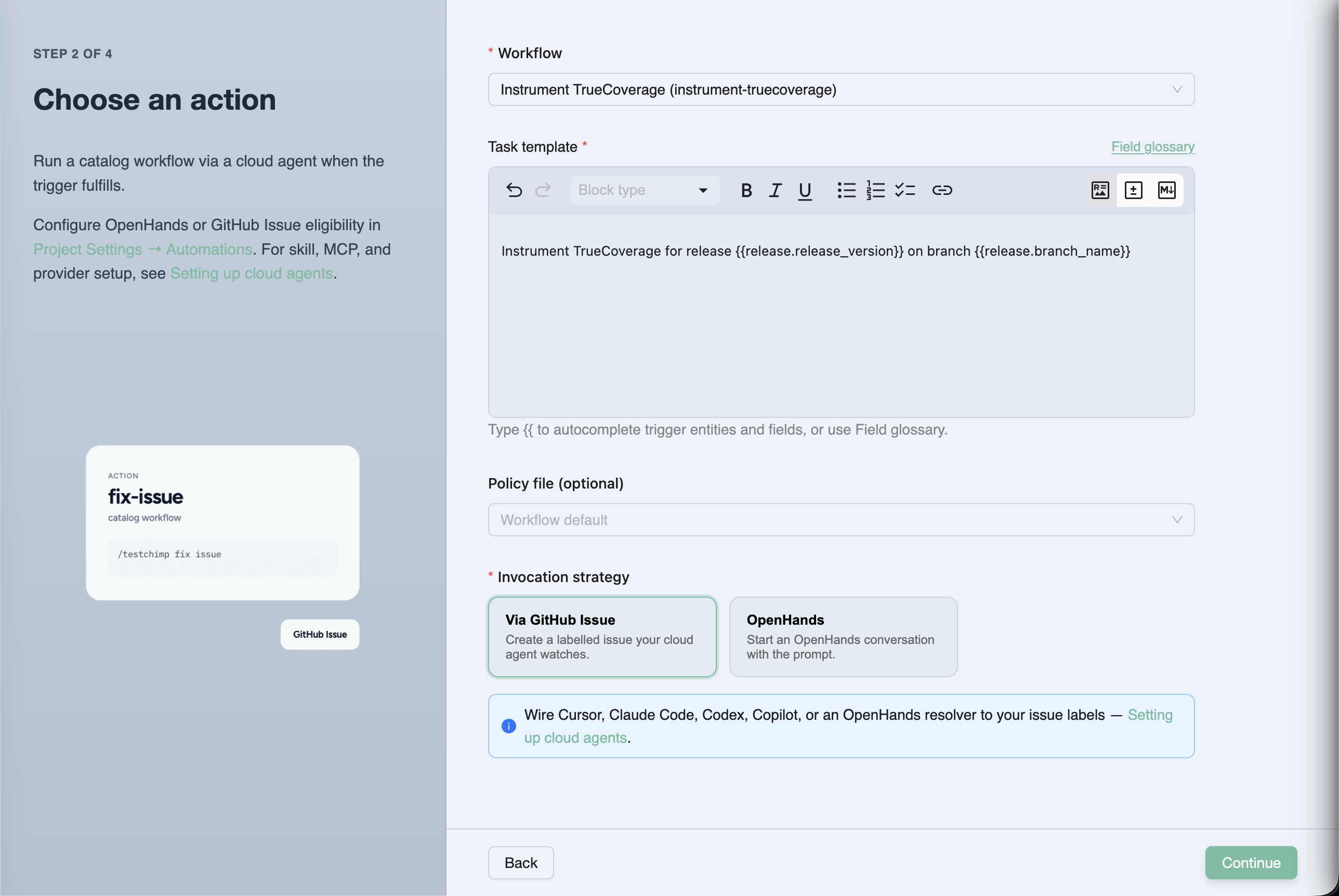
Configure the automation action — workflow, task template, policy, invocation strategy


Aggregation and human gates (because autonomy without brakes is chaos)

Matching events should not always mean "spawn an agent immediately."

PolicyBehaviour
ImmediateEvery match fulfills (still subject to the project hourly cap)
Buffered (default)Wait for a quiet period (≥ 5 minutes), bounded by max window / max event count
WindowedFulfill on fixed hour boundaries—digest style

Default rate limit: 5 cloud agent invocations per hour per project (shared). Over-cap runs stay Queued—not dropped.

Two independent human gates (off by default):

  1. Approve before invoke — review the rendered task before the cloud agent starts
  2. Approve before plan execute — agent plans first; you approve before execute

Pending work surfaces in Executions → Workflow Executions. You can also copy the prompt and run it locally—the workflow-execution-id keeps the timeline accurate either way.

Mechanics: How automations work.


Recipes teams actually want

SignalWorkflowNotes
High-severity issue created (not ExploreChimp noise)fix-issueImmediate or short buffer; start with invoke approval
Story / scenario → readyimplementBuffered; prefer plan-execute approval
Automation batch status → failedfix-test-execution / upkeepBuffered so one CI push → one agent run
Release → Readyrun-qa / run-release-checkImmediate; gate the composite
Steady drip of ready workupkeepWindowed hourly/daily digest

Task templates use {{issue.id}}, {{story.title}}, {{batch.failed_count}}, {{project.repo_url}}, and friends—with autocomplete in the wizard.

More starters: Typical automation setups.


Why this matters in the agentic era

We already argued that skills are SaaS distribution—the playbook travels with the agent. We argued that requirements must be governed before agents spend tokens. We argued that release governance is the ship decision, not a spreadsheet.

Automations close another gap: intent without attendance.

Without them, QA-on-autopilot still needs a human dispatcher. With them, the same /testchimp catalog becomes a control plane: events in → policy-backed workflow executions out → auditable status in the product. Local Claude / Cursor for interactive loops. ChimpHands and other cloud agents for the overnight and the "while you were in standup" cases.

That is how you boil the lake without standing next to the kettle (boiling the QA lake).


Frequently asked questions

What are TestChimp Automations?

Automations are event-driven rules that run TestChimp catalog workflows via a cloud agent when something changes in your project—issues, stories, scenarios, test executions, CI batches, or releases—optionally aggregated and gated by human approval.

How do Automations differ from Workflows?

Workflows define how an agent should work (skill playbook + optional policy). Automations define when that work starts and which cloud invocation path to use. Both share the same execution timeline and workflow-execution-id reporting.

ChimpHands vs GitHub Issue—which should I pick?

Use ChimpHands for the default path—native sessions on your GitHub Actions runner, platform chat, and QA-metered credits. Use GitHub Issue when you must keep an external label-watching agent (Copilot, Codex, custom bots) and already have the TestChimp GitHub App.

Will Automations spam my agents on every CI flake?

Not if you configure them well. Prefer Buffered aggregation for batches, exclude ExploreChimp reporters on auto-fix rules, use conditions (status = BATCH_INVOCATION_FAILED, severity = HIGH), and keep the project hourly invocation cap. High-risk workflows should start with human gates on.

Can I still run workflows locally?

Yes. Automations don't replace /testchimp in your IDE. From a pending execution you can also copy the prompt—including the workflow execution id—and run it with a local agent so status still updates in TestChimp.

Where do I create and monitor Automations?

Create under Workflows → Automations (or contextual Automations CTAs on Issues, Plans, batches, releases, and workflow pages). Configure strategies and rate limits in Project Settings → Automations. Monitor and approve under Executions → Workflow Executions.


Try it

  1. Connect GitHub and set up ChimpHands (or configure GitHub Issue / webhook under Project Settings → Automations)
  2. Open Workflows → Automations → Create Automation
  3. Pick a trigger (start from a popular condition template)
  4. Choose a workflow, task template, policy, and invocation strategy
  5. Leave Buffered aggregation on; add invoke or plan-execute approval for risky jobs
  6. Trigger a matching event—then watch Workflow Executions

Start here:

When something changes, the agent should already be working—not waiting for you to paste a prompt.


Further reading

TestChimp

Related posts

Concepts

Release Governance: Ship When the Evidence Says So

· 10 min read
Nuwan Samarasekera
Founder & CEO, TestChimp

TL;DR: We’ve shipped release governance in TestChimp—the workflow that answers one question before you deploy: has this version been tested enough, in the right places, with evidence we can audit? A release rolls up test runs, manual session captures, CI automation batches, release checks (UX + security), and release intelligence—so product, QA, and engineering share one readiness picture. CI and agents can gate on the same data via API.

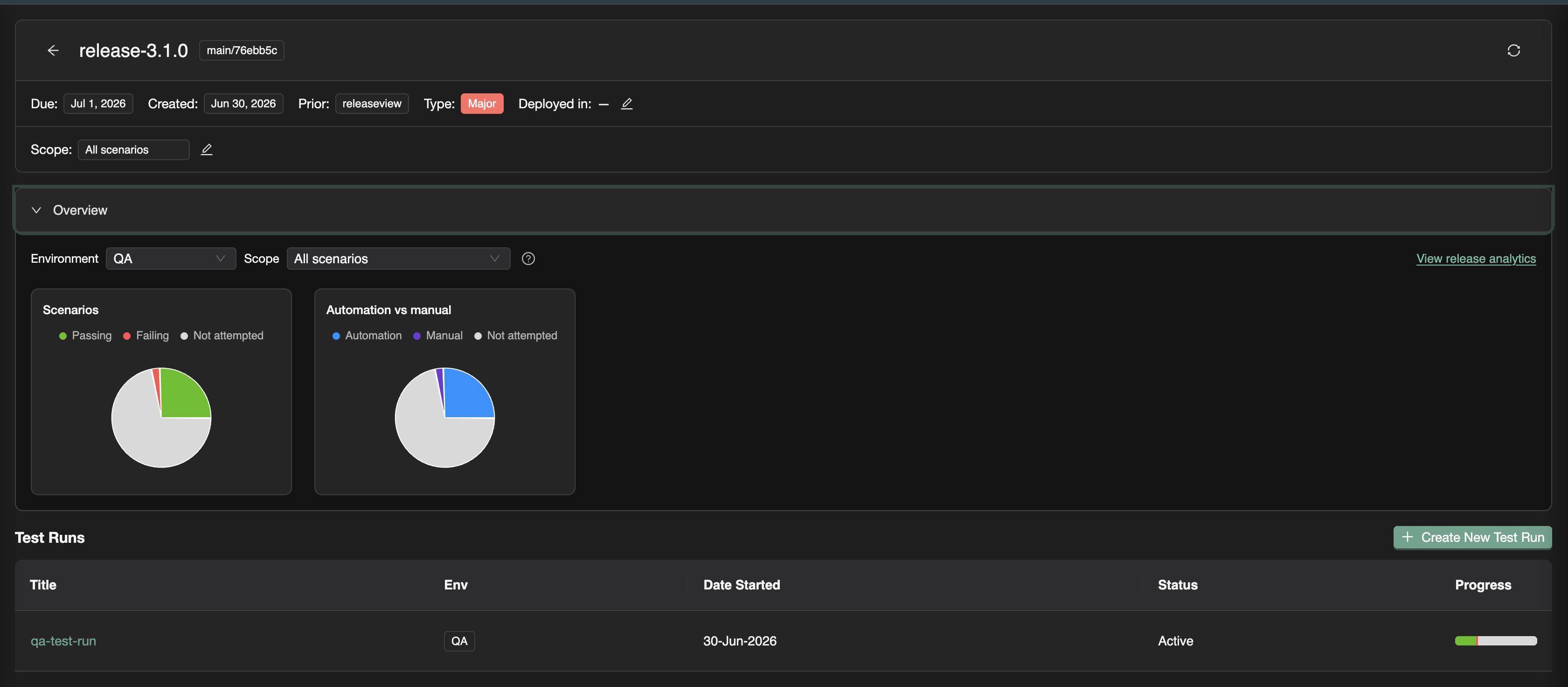
Release detail with overview charts and test runs


The release confidence problem

Shipping fast only works when you can trust what was validated.

Most teams already run plenty of QA. What they lack is a version-level contract:

Failure modeWhat goes wrong
Scattered evidenceManual QA in Slack; CI green in another tab; no single view per version
Checkbox manual testing“Mark as passed” with no steps, screenshots, or tester identity
Automation silosPlaywright batches exist, but nobody ties them to the ship candidate
Unknown scope“We tested checkout”—but not which scenarios or requirements
Blind deploysCode merged without knowing what plans, tests, or RUM events changed

Release governance is not bureaucracy. It is the shortest path to deploy confidence when stakeholders need a shared, auditable answer—not a status emoji in #releases.


What is release governance?

In software delivery, release governance is how a team decides a version is ready to ship: what was in scope, what was tested, what risk remains, and who can prove it.

Industry practice usually spans test planning, requirement traceability, regression campaigns (test runs), security review, and a release gate—a pass/fail policy before production. Traditional tools often split that across a TMS, CI dashboards, a security scanner tab, and a spreadsheet.

Release governance in TestChimp keeps that decision on one surface: the release—a versioned milestone (for example v2.4.0) with git commit context, focus areas from your plan, test runs, checks, and analytics.

Full walkthrough: Release Management.

Release Governance with TestChimp — video walkthrough


The TestChimp release model

If you’ve followed us, the pieces already exist as Test Planning as Code, Test Runs, and requirement traceability. Release governance is the campaign layer that binds them to a ship candidate.

ElementPurpose
ReleaseVersion, due date, git commit SHA, prior release, deployments per environment
Focus areasOptional scope on your test plan—which story/scenario folders matter for this version
Test runsNamed validation campaigns (“Smoke on staging”, “Payment sign-off”) attached to the release
Execution evidenceManual sessions + automation batches linked to those runs
Release ChecksUX (ExploreChimp) and security scans scoped to the candidate
Release intelligenceDelta analytics, requirement coverage, ExploreChimp findings, TrueCoverage changes

Open Releases in the sidebar → create a version → create test runs from the release viewer. Progress, checks, and analytics stay anchored to that label and commit range.

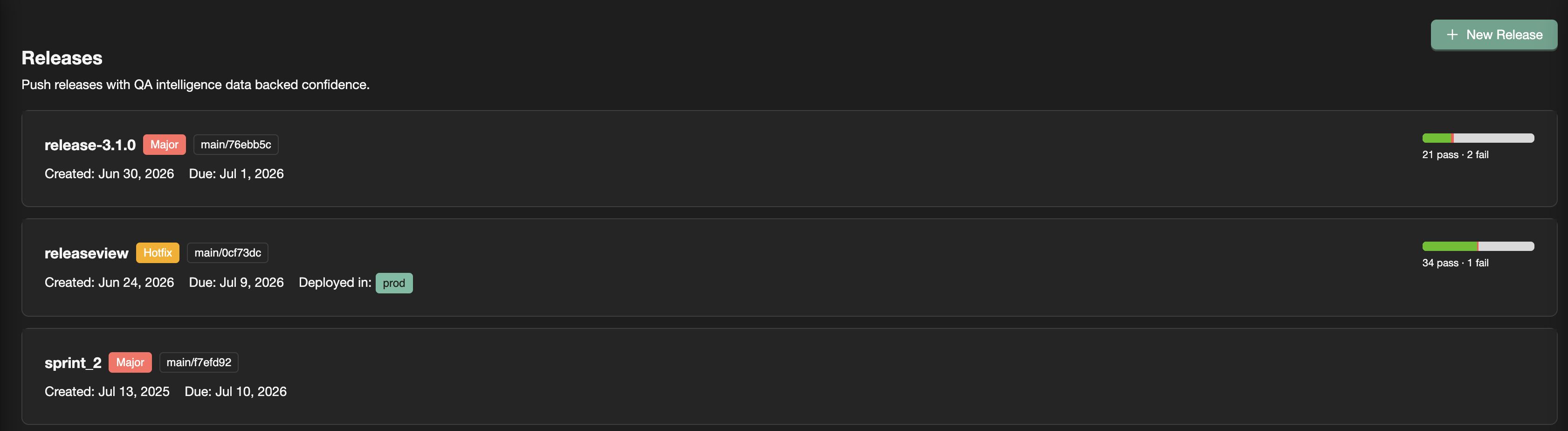
Releases list with progress bars


Evidence that rolls up: manual + automation

Auditable manual testing

Traditional TMS tools record an outcome. Release sign-off usually needs evidence.

With TestChimp, testers:

  1. Capture a session in the Chrome extension (or add a record in the test run viewer)
  2. Pick the active test run on the release
  3. Get steps, screenshots, notes, bugs, and tester identity rolled into release overview and requirement coverage

“QA said pass” becomes a reproducible session tied to the scenario and version. Details: Manual sessions to test runs.

CI that counts toward the release

Automation batches from the Playwright reporter show up under Executions. For release work, link them to a test run—especially from the Candidate Automation Execution Batches panel (batches between prior and current release commits).

Linking answers: Does this CI run count toward our sign-off campaign? Scenario status updates in the same progress view as manual work. Guide: Linking automation batches.

One release. One progress bar. Both execution types.


Release Checks: UX and security on the ship candidate

Test runs answer scenario pass/fail. Release Checks answer the adjacent ship questions—from the same release page:

QuestionCheckEngine
Did UX regress on paths this release touched?UX ChecksExploreChimp on SmartTests
Runtime web vulns on covered flows?DASTOWASP ZAP
Insecure code patterns in this range?SASTSemgrep
Secrets committed since baseline?Secrets scanGitleaks
New dependency CVEs?Dependency scanTrivy

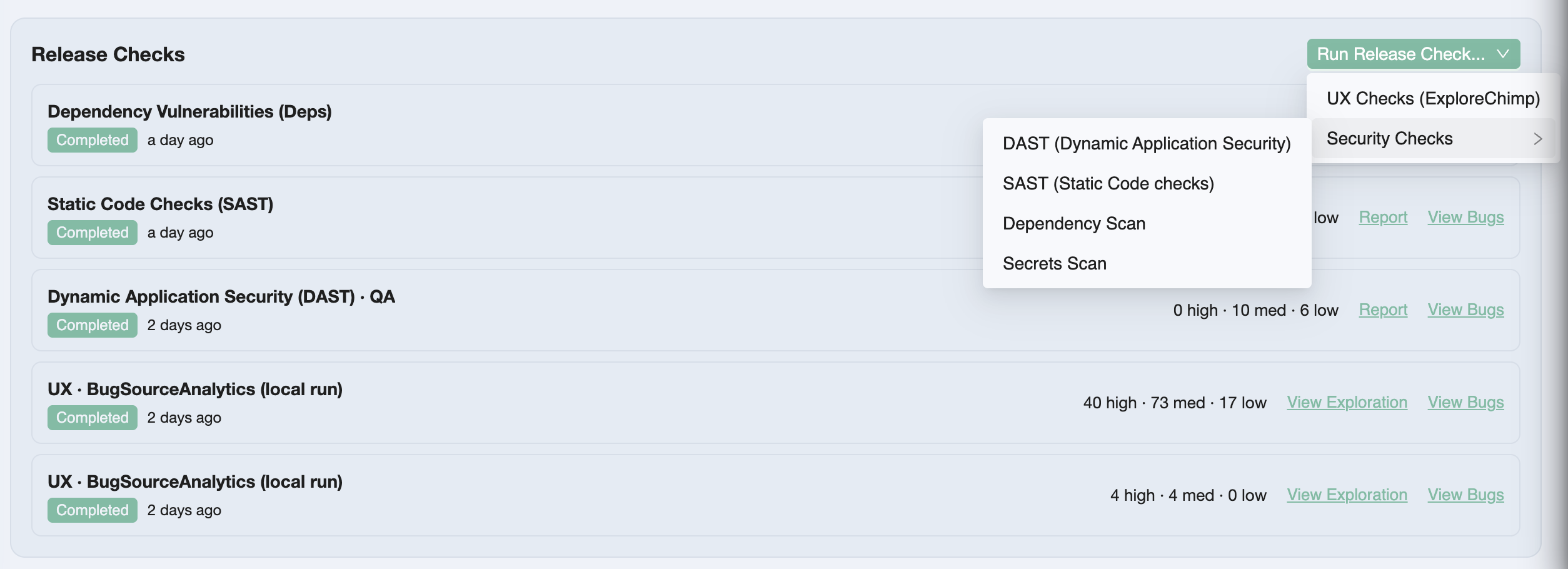
Release Checks list on the release detail page

You queue a check from Run Release Check…, paste the /testchimp run… prompt into a TestChimp-upskilled agent, and triage Report / View Bugs beside test runs—not in a separate security silo.

Overview: Release Checks.


Release intelligence: beyond pass/fail counts

Release intelligence connects what changed since the prior release to what was tested and what exploratory work found.

InsightWhat it shows
OverviewScenario pass / fail / not attempted; automation vs manual mix
Requirement coverageStories and scenarios mapped to linked executions for this candidate
Release delta analyticsTests, stories, scenarios added/updated/deleted + commit graph
ExploreChimp findingsExplorations, new screens/states, bugs in the commit range
TrueCoverageRUM event definitions added/updated—instrumentation drift risk

Use Overview in standups. Drill into analytics when you need requirement-level proof or scope risk (“scenarios added in delta, still not attempted”). Refresh after new commits, linked batches, or manual sessions.

Full detail: Release intelligence.


Programmatic release gating

Governance that only lives in a UI is incomplete for agentic and CI-first teams.

get_release_details returns gate-oriented JSON for a version label: in-scope test aggregations per environment, open-issue stats, release-check summaries, and per-scenario detail. Your pipeline applies your policy—we don’t hard-code “block if any P0 failed.”

testchimp get-release-details --version '1.2.0'

Same data the release page shows—consumable by GitHub Actions, agents, or a custom quality gate. Docs: Programmatic release gating.


How this differs from a classic TMS release

DimensionTestRail-style TMSTestChimp release governance
Plan sourceCases in a TMS databaseMarkdown stories/scenarios in Git
Manual resultPass/fail checkboxCaptured session (or detailed record) with evidence
AutomationImport / plugin / re-entryscenario annotations + batch link to test run
Security / UXSeparate toolsRelease Checks on the version
Release viewMilestone + run summaryRelease viewer + intelligence (delta, ExploreChimp, TrueCoverage)
CI gateOften custom stitchingget_release_details

We are not asking you to maintain a parallel TestRail library forever—import scenarios if you need to migrate, then keep Git as source of truth. Honest comparison: TestChimp vs TestRail.


Why this matters in the agentic era

Agents compress authoring and execution. They do not invent a shared definition of “ready to ship.”

Without release governance, you get faster green CI and louder Slack threads—still no auditable answer for this version. With it, the same agents that run /testchimp test and /testchimp run security scan feed a release surface humans and pipelines can gate on.

Requirements quality (DeFOSPAM governance) hardens the contract upstream. Release governance hardens the ship decision downstream. Together they close the loop we care about: planned reality → tested reality → production reality (boiling the QA lake).


Frequently asked questions

What is release governance in TestChimp?

Release governance is TestChimp’s workflow for validating a specific application version before deploy: create a release (version + git commit + optional plan scope), attach test runs, link manual sessions and CI batches, run release checks (UX and security), review release intelligence, and optionally gate CI with get_release_details.

What is the difference between a release and a test run?

A release is the version milestone (v2.4.0) with metadata, focus areas, checks, and rolled-up intelligence. A test run is a scoped validation campaign inside that release—selected scenario folders, collaborators, due date, and linked executions. One release typically has multiple test runs.

What are release checks?

Release Checks are QA activities launched from the release detail page: ExploreChimp UX Checks plus DAST (ZAP), SAST (Semgrep), secrets (Gitleaks), and dependency scans (Trivy). Reports and bugs stay scoped to the ship candidate next to test runs.

How do I know when a release is ready to ship?

Review overview metrics for the target environment, requirement coverage for focus areas, delta analytics for untested plan changes, release-check reports and bugs, and ExploreChimp / TrueCoverage warnings. When in-scope scenarios meet your bar with evidence attached, complete the test runs and deploy—or enforce the same bar in CI via the gating API.

Does TestChimp enforce a fixed release gate policy?

No. The UI and get_release_details expose the data. Your team (or pipeline) decides thresholds—for example zero failed P0 scenarios, no open critical security issues, or required completed scans.

Do manual results need to be linked to a test run?

For results to count in release overview and requirement coverage, link manual sessions to an active test run on that release—easiest at capture time in the Chrome extension. Unlinked sessions stay in execution history but do not roll up to release progress.


Try it

  1. Open ReleasesNew Release (set version, commit SHA, prior release, focus areas)
  2. Create New Test Run from the release viewer
  3. Capture a manual session or link a Playwright batch
  4. Queue a Release Check and run it with your agent
  5. Open View release analytics—then gate CI with get-release-details when you’re ready

Start here:

Ship when the evidence says so—not when the spreadsheet says “LGTM.”


Further reading

TestChimp

Related posts

Concepts & standards

How to Find Duplicate Tests in a Playwright Suite (Semantic Graph for Agentic QA)

· 10 min read
Nuwan Samarasekera
Founder & CEO, TestChimp

TL;DR: When coding agents can write dozens of Playwright tests in a single session, the bottleneck shifts from authoring to governance: are the new tests distinct and useful, or just near-duplicates of what you already have? Semantic Graph is a free, open-source CLI that scans your suite, embeds each test semantically, clusters related tests, and renders an interactive graph so you—and your agent—can spot redundancy before it compounds.

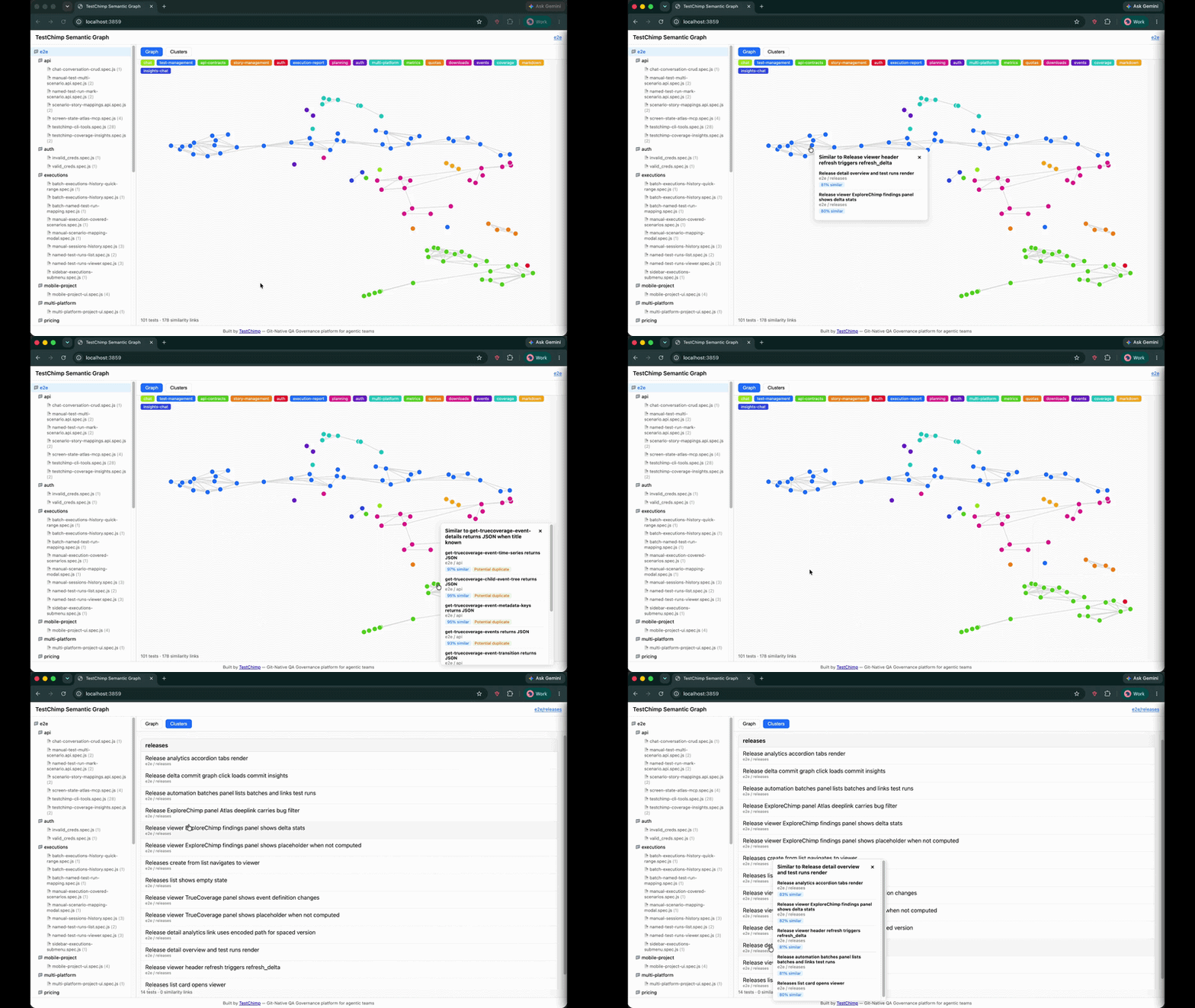
Semantic Graph visualization — folder tree, 2D similarity graph, and cluster list view


The new problem: agents author tests en masse

For most of the last decade, the hard part of E2E testing was throughput: humans could not write and maintain enough tests to keep up with product velocity.

That constraint is collapsing. With Claude Code, Cursor, and agent skills like the TestChimp skill, a single prompt can produce a folder of well-formed Playwright specs in minutes. Coverage gaps that used to take a sprint to close can shrink to an afternoon.

The bottleneck has moved.

EraPrimary constraintWhat "good" looked like
Manual QAAuthoring speedEnough tests to cover the happy path
Human + low-code toolsUI-layer setup frictionStable POMs, fewer flakes
Agentic QASuite quality at scaleDistinct, high-signal tests—not copies

When an agent is rewarded for adding tests—closing coverage gaps, responding to PR feedback, or filling in scenarios from a test plan—it has no innate sense of "this already exists, slightly reworded." Left unchecked, suites balloon with:

  • Duplicate tests that assert the same behaviour under different titles
  • Near-duplicates that differ only in fixture data or selector phrasing
  • Clustered redundancy where five tests all exercise the same checkout edge case
  • Invisible overlap across folders, because no human (and no agent) holds the entire suite in working memory

This is the QA equivalent of boiling the lake in the wrong direction: lots of heat, little new coverage. Worse, duplicate tests inflate CI time, confuse failure triage, and give a false sense of depth—your line count grows while your behavioural breadth stalls.

The question is no longer "Can we write more tests?" It is:

"Are we writing useful, distinct tests—or just duplicative ones?"

That question needs a semantic answer, not a filename diff.


What is Semantic Graph?

Semantic Graph is an open-source tool from TestChimp that maps your Playwright test suite by meaning, not syntax.

It is published as @testchimp/semantic-graph on npm and lives in the TestChimp/semantic-graph repository. Run one command against your tests directory; the CLI:

  1. Scans *.spec.ts, *.test.ts, and related Playwright files
  2. Parses each test's suite path, title, intent comments, scenario annotations, and body
  3. Embeds the canonical test text with an embedding model (OpenAI or Voyage AI)
  4. Clusters tests by semantic similarity using DBSCAN
  5. Lays out a 2D graph with UMAP so similar tests appear close together
  6. Names clusters with a lightweight LLM pass (e.g. "auth", "checkout", "api-contracts")
  7. Serves a local interactive UI at http://localhost:3859

No database. No TestChimp account required. Embeddings are computed in memory each run—ideal for local audits, pre-merge reviews, or giving an agent a structural view of the suite before it authors more tests.


How it works (the pipeline)

Understanding the pipeline helps you interpret the graph—and tune how agents use it.

1. Parse tests into embedding-ready text

The core library (@testchimp/semantic-graph-core) includes a vendored Playwright-aware parser. For each test it builds canonical text:

Suite: checkout > guest flow
Test: rejects expired coupon at payment step
Body:
Scenario: Guest checkout with invalid coupon
// intent: verify error copy and no charge created
await page.goto('/checkout');
...

Parsing captures intent comments and scenario annotations—the same metadata agents should be authoring anyway when following requirement traceability conventions. Two tests with different selectors but the same intent will land close together in embedding space.

2. Embed with cosine similarity

Each test's text is sent to an embedding API in batches (default model: text-embedding-3-small for OpenAI, voyage-4 for Voyage). The tool computes cosine similarity between vectors and applies configurable thresholds:

SignalDefault thresholdMeaning
Graph edge≥ 0.75Tests are semantically related
Similar≥ 0.80Worth reviewing together
Potential duplicate≥ 0.92Strong dedup candidate

These thresholds mirror how humans judge redundancy: not byte-identical, but "would a failure in one make the other pointless?"

3. Cluster with DBSCAN

Similar embeddings are grouped with DBSCAN density clustering—no need to pick k clusters upfront. Each cluster gets an LLM-generated label (e.g. "settings-page", "admin-tasks") so the legend is readable at a glance.

4. Visualize with UMAP + D3

A seeded UMAP projection maps high-dimensional embeddings to 2D coordinates. The bundled UI (built with D3.js) renders:

  • Graph view — nodes as tests, edges as similarity links; click a node to see nearest neighbours and duplicate flags
  • Clusters view — grouped list with colour-coded legend
  • Folder tree — scope the graph to a directory or single file

Zoom into tests/checkout/ before a refactor. Scan the whole suite before a release. Hand the URL to an agent and ask it to propose merges.


Why this matters for agentic QA workflows

Semantic Graph is not a replacement for TrueCoverage—production-informed prioritization—or requirement traceability. It solves a orthogonal problem: intra-suite redundancy.

Here is where it fits in a modern agent loop:

Before the agent writes

Run Semantic Graph and attach the cluster summary to the agent's context. Instructions become concrete:

"We already have four tests in the checkout cluster covering coupon validation. Do not add another unless you are testing a different failure mode."

This is cheaper and more reliable than asking the agent to grep test titles.

After the agent writes

Re-run the graph on the PR branch. New nodes that snap onto existing clusters—or spike duplicate scores above 0.92—are review flags. Pair with CI the same way you gate on lint or coverage deltas.

During suite health reviews

Quarterly "suite diet" sessions used to mean spreadsheets and gut feel. Now: filter to clusters with high internal similarity, merge or delete, and measure CI time recovered.

Complement to production signals

TrueCoverage tells you what behaviours users need tested. Semantic Graph tells you whether your existing tests are saying the same thing twice. Both are necessary for a suite that is broad and lean.


What you see in the UI

The demo above shows the full workflow:

  1. Left panel — folder tree mirroring your repo layout; click a folder or file to scope the view
  2. Graph mode — force-directed layout; proximate nodes are semantically alike
  3. Clusters mode — tests bucketed with named themes
  4. Popover — click any test to see top similar neighbours, similarity scores, and potential duplicate badges

The UI ships inside the npm package—no separate install. It is the same "freebie" static app published as @testchimp/semantic-graph-viz in the monorepo for anyone who wants to embed or fork it.


Try it yourself

Prerequisites

  • Node.js 18+
  • An API key for embeddings (and cluster naming):
    • OpenAI — one key covers embeddings + LLM, or
    • Anthropic + VoyageClaude for cluster labels, Voyage for embeddings (Anthropic does not ship an embedding API)

Quick start (OpenAI)

export PROVIDER=openai
export API_KEY=sk-...

npx @testchimp/semantic-graph visualize --tests-dir ./tests

Open the printed URL (default port 3859). Add --verbose for embedding progress and diagnostics.

Claude + Voyage

export PROVIDER=anthropic
export API_KEY=sk-ant-...
export VOYAGE_API_KEY=pa-...

npx @testchimp/semantic-graph visualize --tests-dir ./tests

All options

FlagDescription
--tests-dir <path>Root folder to scan (required)
--port <n>Listen port (default 3859)
--verbose / -vDiagnostics to stderr

See the README for environment variables, monorepo build instructions, and npm publish details.


Continuous governance with TestChimp

Semantic Graph is deliberately local and standalone—a flashlight you can shine on any Playwright repo, TestChimp customer or not.

For continuous duplicate detection, requirement traceability, release confidence, and keeping suites healthy as agents keep authoring, see TestChimp—the git-native QA governance platform built for agentic teams. Install the TestChimp Agent Skill and run /testchimp test after each PR to orchestrate coverage, exploration, and plan alignment in one loop.


FAQ

What test file types are supported?

The scanner picks up *.spec.ts, *.spec.js, *.test.ts, *.test.js, and .mjs / .cjs variants under your chosen root—standard Playwright test layouts.

Does it require a TestChimp account?

No. Semantic Graph runs entirely locally. You only need embedding (and optionally LLM) API keys.

How is this different from code coverage?

Code coverage measures which lines executed. Semantic Graph measures whether test intentions overlap. A suite can have high line coverage and still be full of redundant scenarios.

How is this different from duplicate detection by test name?

Titles lie. Agents especially love paraphrasing: "should reject invalid coupon" vs "guest user sees error for expired promo code." Embeddings capture the full body and intent, not the string on line one.

Can I use it in CI?

Today the primary interface is the local visualize command and JSON APIs (/api/graph, /api/similar). For CI gates, parse the API responses or run before review and archive the graph output. Continuous server-side governance is on the TestChimp platform roadmap.

What embedding models are supported?

Defaults: text-embedding-3-small (OpenAI) and voyage-4 (Voyage). Override with EMBEDDING_MODEL. LLM cluster naming defaults to gpt-5-nano or claude-3-5-haiku-latest.

Is the source code open?

Yes. MIT-licensed monorepo: github.com/TestChimp/semantic-graph. Packages: @testchimp/semantic-graph-core, @testchimp/semantic-graph, @testchimp/semantic-graph-viz.


Summary

Agentic QA solved test authoring at scale. The next discipline is test distinctness at scale—ensuring every new spec adds behavioural breadth, not noise.

Semantic Graph gives you a semantic map of your Playwright suite: embeddings for meaning, DBSCAN for clusters, UMAP for intuition, and a local UI for humans and agents alike. Run it before you merge agent-authored tests. Run it when CI gets slow. Run it when you suspect the lake is boiling but not reducing risk.

Get started: github.com/TestChimp/semantic-graph · npx @testchimp/semantic-graph visualize


References and further reading

Test Runs: Turn Testing Into Release Confidence

· 11 min read
Nuwan Samarasekera
Founder & CEO, TestChimp

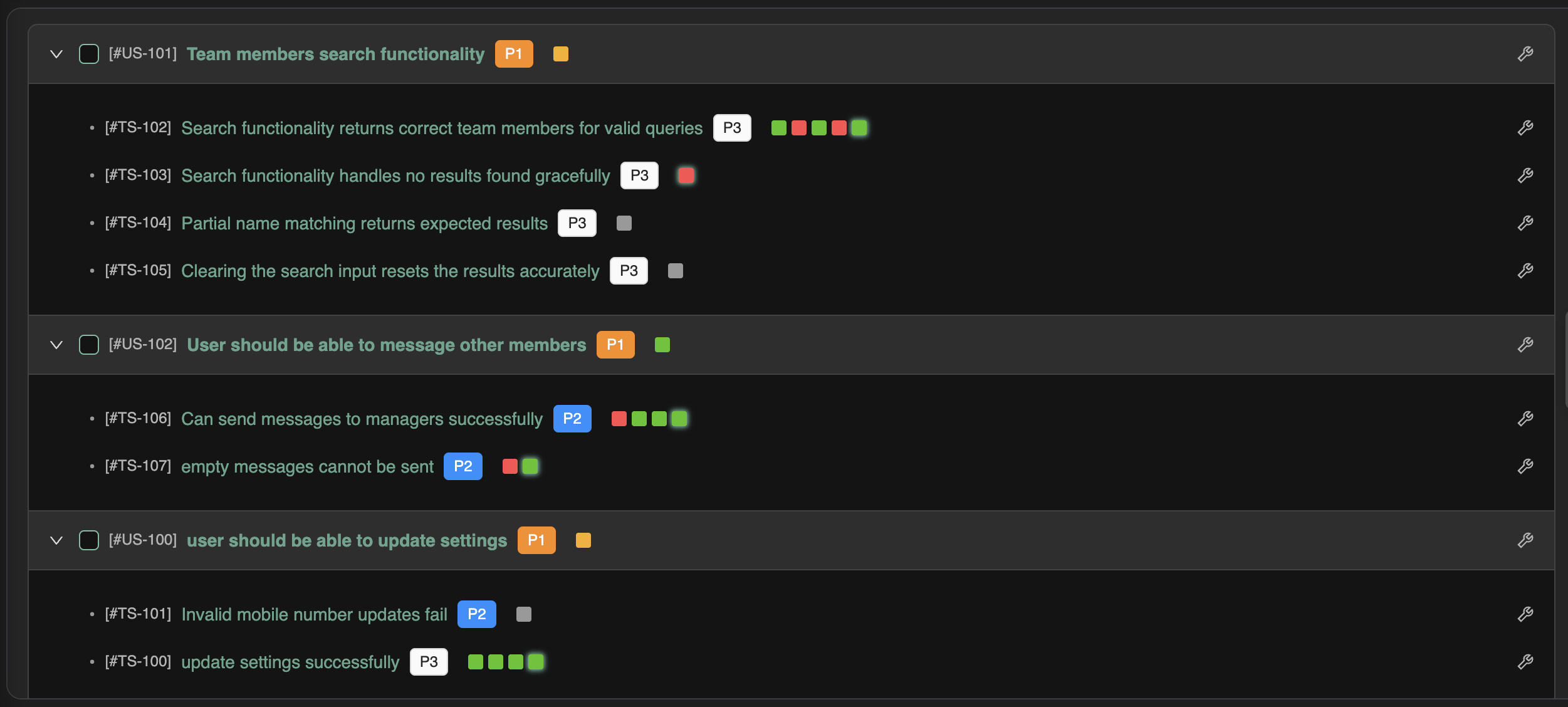
TL;DR: TestChimp now has Test Runs—named validation campaigns that roll up scenario progress across manual sessions and automation batches. If you have used test runs in TestRail, Qase, or PractiTest, the concept will feel familiar. What is different is that scope, progress, and drill-down inherit the folder structure of your test plan—not a flat, manually curated case list copied into yet another container.

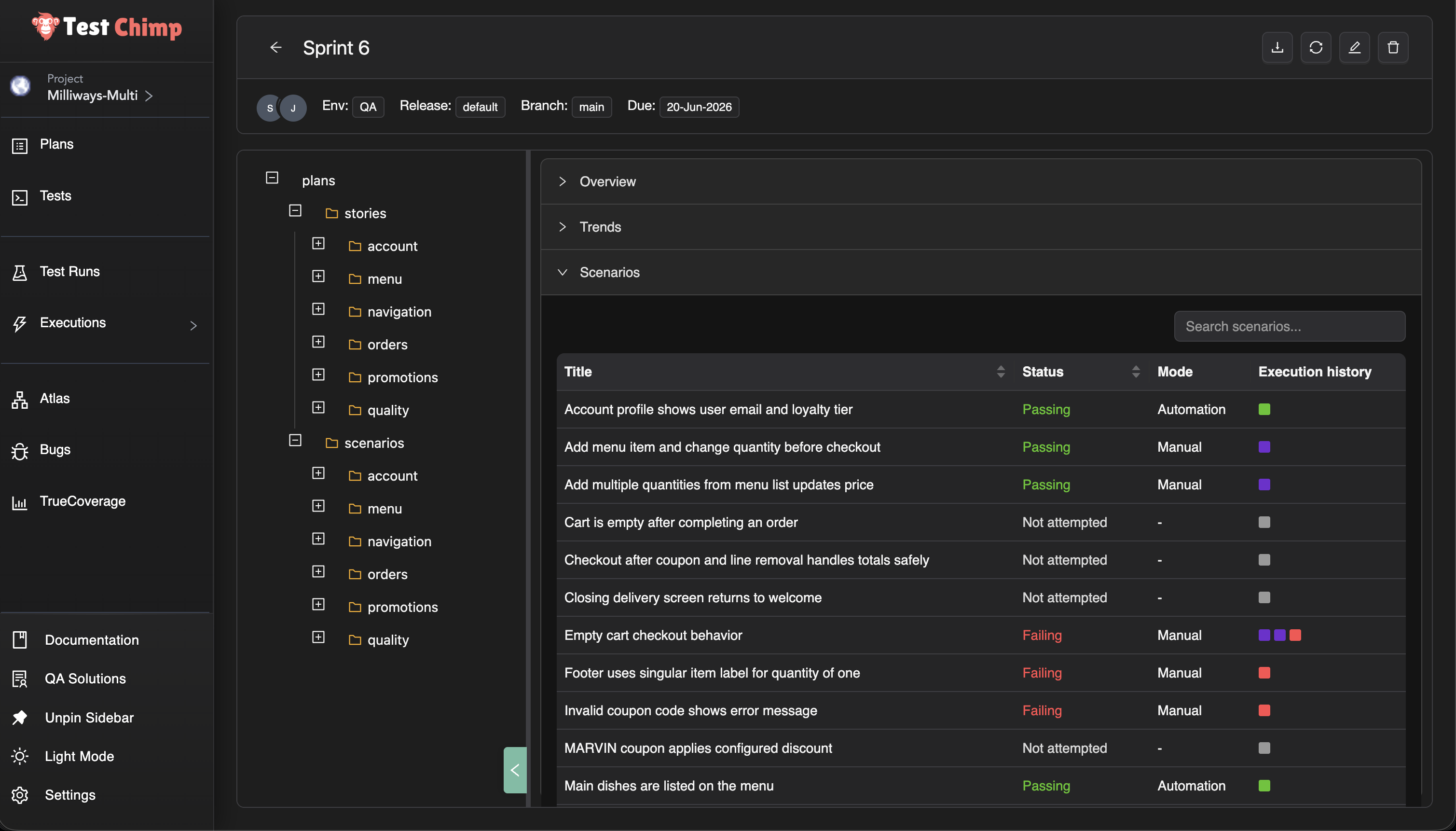
Test Run viewer — overview, trends, and folder-scoped scenario progress


What is a test run?

In software testing, a test run is the execution of a defined set of tests against a specific version or build of the system under test. The ISTQB glossary defines it as “the execution of a test suite on a specific version of the test object.” Test execution—the process of running those tests and recording outcomes—is a core part of the fundamental test process described in ISO/IEC/IEEE 29119.

In practice, teams use test runs to answer a release question: Given the scenarios we committed to validate for this sprint or version, how far along are we—and what is still failing?

Traditional test management systems such as TestRail and Qase model a run as a container: selected test cases, assignees, pass/fail/blocked status, and often milestone or environment context. TestRail’s guidance notes that runs are typically created per sprint or release so managers can track progress in real time.

Test Runs in TestChimp preserve that coordination purpose while changing what sits underneath—the plan, the executions, and how progress rolls up.


The gap test runs are meant to close

Most teams already know the shape of a release cycle:

  • a defined set of scenarios to validate
  • manual testers working through critical paths
  • automation running in CI on every build
  • a lead asking, “Are we done yet?”

Traditional tools answer the last question with a run—but the artifacts rarely stay connected.

User stories often live in Jira or similar issue trackers. Scenarios live in a TMS. Manual evidence sits in screenshots and Slack. Automation results sit in GitHub Actions, Jenkins, or a Playwright CI report. Requirement traceability—linking requirements to verifying tests, as described in ISO/IEC/IEEE 29148—is often maintained in spreadsheets or a test traceability matrix that goes stale.

The run becomes another manually curated list, disconnected from how the product is organized and how work actually happens.

We built Test Runs in TestChimp to close that loop without duplicating your plan in a flat case catalog.


Same concept, different foundation

A Test Run in TestChimp is still a time-bound validation campaign: a title, optional environment and release context, collaborators, a due date, and a scope of scenarios to validate.

What changes is everything underneath.

Traditional TMS test runTestChimp Test Run
Flat list of test cases copied into the run (TestRail add_run)Scope selected from your plans folder tree (stories and scenarios)
Manual results entered in the TMS UIManual sessions linked from the Chrome extension or web UI—with step evidence
Automation results imported via API or re-entered (TestRail result import)Automation batches linked after CI Playwright runs; no duplicate result entry
Progress is case-by-case checkboxesProgress is scenario status (passing / failing / not attempted) from the latest linked execution
Roll-up is a fixed “suite” or “section”Roll-up follows any folder in your plan—checkout today, authentication tomorrow

You are not maintaining a parallel catalog. You are pointing a run at the test plan you already have.


One run, both execution types

The most common fracture in enterprise QA is two parallel tracks:

  • manual validation tracked in a test management tool
  • automated validation tracked in CI or a vendor dashboard

Qase’s own documentation describes the tension: auto-generated CI run names pile up quickly, and teams need runs that “tell a story at a glance” when reviewing overnight failures before a release.

A Test Run in TestChimp is deliberately execution-type agnostic. Link a manual session from exploratory regression. Link tonight’s Playwright batch. Link both to the same run. Scenario status reflects the latest relevant execution—whether a human marked a session passed or CI reported a SmartTest failure.

That is the same unified coverage story we told with manual testing and traceability—now packaged for release-scale questions instead of only folder-level requirement traceability insights.


Folder-based progress, not flat lists

Because TestChimp organizes stories and scenarios as markdown files in folders (Test Planning as Code), a test run inherits something traditional tools struggle to offer: scoped views at any granularity.

Select the root of the run and see overall progress for the whole release. Select checkout/ and see only checkout scenarios. Select a single story file and see exactly what is left on that requirement.

No re-tagging. No re-grouping cases into ad hoc suites every sprint. The folder structure you already use for planning becomes the structure you use for reporting—the same principle as coverage at any folder level in Test Planning.

That matters when:

  • feature teams own folders, not individual case IDs
  • a release spans several modules but not the entire backlog
  • you need a standup answer for one area without re-filtering a 2,000-row grid

Trend charts in the run viewer show how passing, failing, and not-attempted counts move over time—useful for daily readouts without exporting to a spreadsheet.


Why this fits the agentic era

Test runs are not a throwback to heavyweight process. They are a lightweight coordination layer on top of artifacts agents can already read.

Your scenarios are files. Your tests link with scenario annotations (requirement traceability in code). Executions feed the same traceability graph whether they are manual or automated. A test run simply names the campaign—“Sprint 42 regression”, “v2.1 sign-off”—and gives humans a place to see progress while agents keep authoring against the same plan.

We are not replacing CI dashboards or extension manual capture. We are giving product and QA leads a single pane for this validation cycle, grounded in requirements rather than orphaned case records.


See it in action

Using Test Runs in TestChimp — video walkthrough

For step-by-step setup—creating a run, defining scope, linking batches and sessions, reading the viewer—see Test Runs in the docs.


Frequently asked questions

What is a test run in software testing?

A test run is a structured execution of a selected set of tests against a specific build, release, or milestone. The ISTQB glossary defines it as running a test suite on a particular version of the system under test. Teams use runs to track who tested what, record pass/fail outcomes, and report release readiness.

How is a TestChimp Test Run different from a TestRail or Qase test run?

The coordination goal is the same: scope a set of tests, track progress, report status. The foundation is different. Traditional tools copy flat test cases into a run container (TestRail runs, Qase test runs). TestChimp scopes runs from your existing plans folder tree and aggregates results from linked manual sessions and automation batches—without maintaining a duplicate case list.

Can one test run include both manual testing and test automation?

Yes. TestChimp Test Runs are execution-type agnostic. Link manual sessions captured via the Chrome extension and automation batches from Playwright CI to the same run. Each scenario’s status reflects the latest linked execution, whether the outcome came from a human or from CI.

Do I need to duplicate test cases to create a test run?

No. You select scope from folders and files already in Test Planning. Scenarios remain the same markdown artifacts your team authors and version-controls; the run is a pointer and progress lens, not a second catalog.

What is folder-based test run progress?

Because stories and scenarios live in a nested folder structure (Test Planning as Code), the test run viewer lets you drill into any folder or file and see passing, failing, and not-attempted counts for just that subtree. Root shows the full run; authentication/ shows auth only—without re-tagging cases or rebuilding suites each sprint.

How do Test Runs relate to requirement traceability?

Requirement traceability links requirements and scenarios to executions over time—supporting the verification relationships described in standards such as ISO/IEC/IEEE 29148. Test Runs add a named campaign layer: a due date, collaborators, explicit scope, and release-oriented progress for one validation cycle. Traceability is ongoing product health; test runs are this regression or this release sign-off.

When should we use test runs vs Test Planning insights alone?

Use Test Planning insights when you want continuous coverage visibility for a folder, environment, and time range. Use Test Runs when you need a time-bound campaign with assigned collaborators, a due date, and a dedicated dashboard fed by executions you link during that cycle—similar to how teams use TestRail test runs per sprint, but unified across manual and automated work.

Yes. Automation batches can be linked from Executions → Automation Batches (list or batch viewer). Manual sessions can be linked at capture time in the extension or afterward from the manual session viewer. Many-to-many linking is supported—a batch or session can belong to multiple active runs.


Try it

Open Test Runs from the TestChimp sidebar, create a run scoped to the folder your team owns, and link the next manual session or automation batch you execute.

If you are comparing approaches, our requirement traceability post explains the foundation; this feature adds the campaign layer on top when you need to track a specific release or regression cycle end to end.

We are iterating on collaborator workflows, PDF reporting, and deeper agent integration. Feedback welcome—especially from teams migrating off TestRail-style run models.


Further reading

TestChimp

Test management & QA concepts

Automation & CI

Related posts

TestChimp Partners with Bunnyshell

· 4 min read
Nuwan Samarasekera
Founder & CEO, TestChimp

As AI coding agents become more prevalent, they are changing more than just how code gets written.

They're changing when software should be tested.

Today, we're excited to announce our partnership with Bunnyshell to bring PR-scoped ephemeral environments directly into the AI-powered QA workflows executed by TestChimp.

This partnership solves a problem that is becoming increasingly common as organizations adopt AI-assisted development at scale.

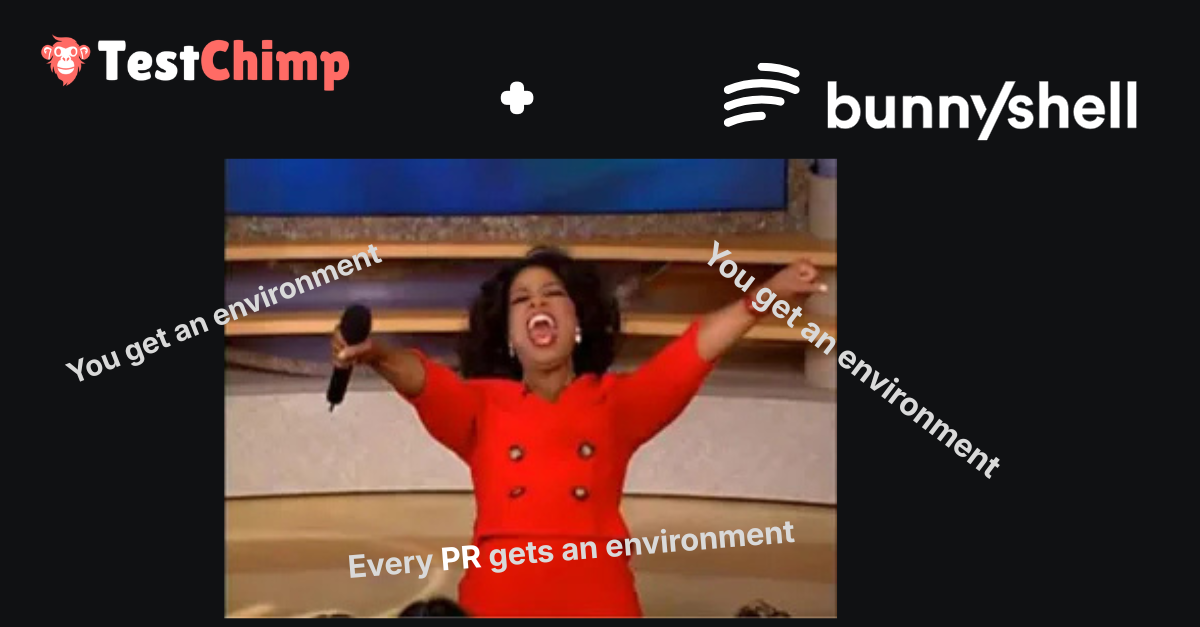
Bunnyshell Partnership Announcement

The Hidden Challenge of AI-Driven Development

AI dramatically increases PR volume.

Not only are there more pull requests being created, but those pull requests often contain substantially more changes than their human-authored counterparts.

Historically, many teams followed a workflow similar to this:

  1. Developers create PRs
  2. PRs are merged into the main branch
  3. A release is deployed to a shared staging environment at end of sprint
  4. QA validates the release

This workflow worked reasonably well when development velocity was constrained by human output.

However, as AI agents begin generating code continuously, several problems emerge:

  • More PRs are merged between testing cycles
  • Individual PRs contain more changes
  • Regressions become harder to isolate
  • Root-cause analysis becomes increasingly expensive

By the time QA identifies a problem in staging, the issue may have originated from one of dozens of recently merged pull requests.

  • Finding the offending change becomes a detective exercise.
  • Reverting safely becomes difficult.
  • Confidence in releases decreases.

The Solution: E2E tests in each PR

What if every PR was E2E tested before it reaches the main branch?

Ideally, every PR should arrive with:

  • New end-to-end tests
  • Updates to existing affected tests
  • Validation that those tests pass
  • Evidence that the feature behaves as intended

This significantly reduces the amount of uncertainty that accumulates in shared environments.

The challenge, of course, is environment availability. To test a PR, you need an environment that actually contains the PR's changes. Note just a frontend (like what firebase / vercel provide) - but full-stack isolated environment.

For small applications, developers can often spin everything up locally. For larger systems, that quickly becomes impractical.

This is exactly where Bunnyshell shines - ephemeral environments, spun up at lightning speed - deployed on the cloud.

How Bunnyshell Solves the Environment Problem

Bunnyshell allows teams to define their application infrastructure using a simple YAML specification.

Think of it as a blueprint describing everything required to run your application:

  • Frontend
  • Backend services
  • Databases
  • Networking
  • Environment variables
  • Dependencies between services

Once this blueprint exists, Bunnyshell can automatically provision isolated environments on demand - and deploy them to your K8s cluster. Don't worry - TestChimp SKILL transitively loads Bunnyshell skill and authors the YAML file for your infrastructure.

Instead of testing changes in a shared staging environment, every pull request receives its own dedicated clean environment for agents to work on.

  • No shared environment.
  • No interference from other testing work (manual testing / other test suites running etc.).
  • No waiting for deployment windows.

When you run "/testchimp test" workflow, TestChimp can now provision an ephemeral environment via your Bunnyshell config - scoped to the current PR, load up necessary test data through already defined fixtures, and execute testing on this environment.

Result: You can now merge your agent authored PR with confidence.

This partnership brings together two complementary capabilities crucial for QA shift-left paradigm:

Bunnyshell provides isolated, production-like environments for every pull request.

TestChimp provides AI-powered exploration, validation, and automated test creation.

Together, they enable a workflow where every PR can be validated in isolation before it reaches main.

The icing on the cake: TestChimp users will get 15% off their Bunnyshell bills!

Simply use code: TESTCHIMP15 when signing up.

Manual Testing with Traceability

· 5 min read
Nuwan Samarasekera
Founder & CEO, TestChimp

:::tip Updated workflow Since this post, the extension also supports open-ended sessions (objective instead of scenario), Add bug on steps (deferred until session finish), and Atlas-backed screen/state selection. See the current guide: Manual test session capture. :::

Manual testing is still where teams catch the “this feels wrong” stuff:

  • confusing UX
  • copy bugs
  • edge-case flows
  • integration weirdness that doesn’t show up in clean scripted runs

But there’s a persistent problem: manual testing evidence doesn’t stay connected to what was planned.

Test plans live in one place. Notes and screenshots live in another. Pass/fail outcomes live in Slack threads or Jira comments. And the mapping back to the scenario is usually… memory.

Today we’re announcing a new workflow in TestChimp: Manual testing with traceability.


The idea

If your team already does test planning (user stories → scenarios), then manual execution should be:

  • tied to a specific scenario
  • captured as step-by-step evidence
  • recorded with environment + release context
  • marked passed / failed
  • queryable later as execution history (not a dead document)

That’s what this feature does.


Manual Test Session Capture (in the Chrome extension)

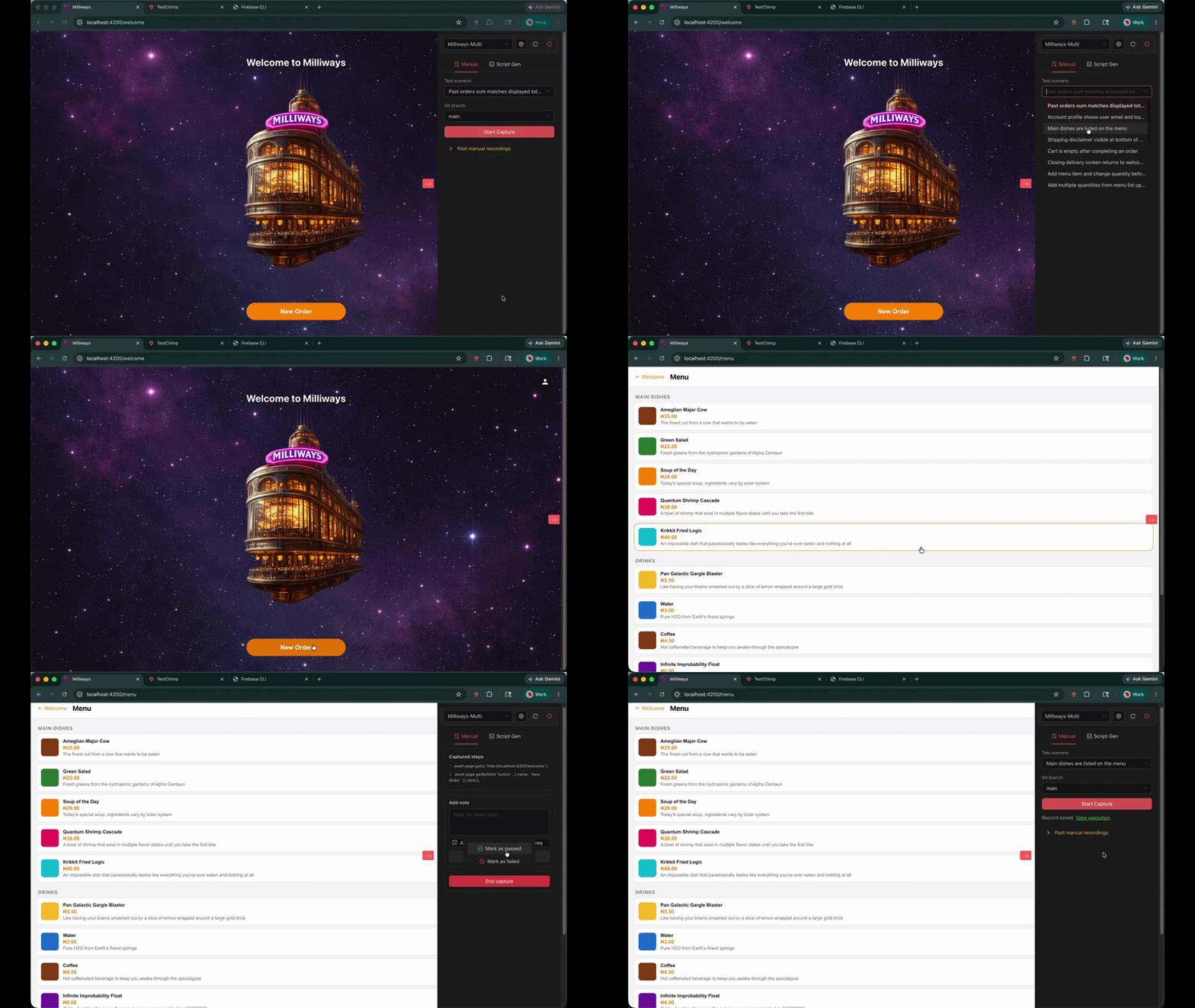
In the TestChimp Chrome extension, there’s now a Manual tab.

It lets a tester record a manual session while they execute a planned scenario, with traceability stored directly on the record.

Manual test session capture

What gets captured:

  • Steps: each interaction is captured as a step
  • Screenshots: uploaded automatically
  • Notes: add notes to the latest step, optionally highlighting a UI element/area
  • Outcome: mark the session as passed or failed
  • Context: environment + release (and optional git branch context)

How it works (quick walkthrough)

  1. Open the Chrome extension and switch to the Manual tab
  2. Click Create Manual Test Record
  3. Select the test scenario you’re executing (required)
  4. (Optional) pick the git branch context
  5. Click Start Capture and run the test as usual
  6. Add notes when needed (with optional element/area attachments)
  7. Click End capture, then mark passed or failed
  8. Open View execution to see the full record in TestChimp

If you want the full documentation, see Manual Test Session Capture.


Why this matters (beyond “we captured a GIF”)

Manual testing isn’t going away. But it needs to stop being unstructured.

With scenario-linked manual records, you can answer real questions without archaeology:

  • Which scenarios were manually executed for this release?
  • Where are we relying on manual validation because automation doesn’t exist yet?
  • What’s the evidence behind a “pass” when something regresses later?
  • What’s failing on a specific branch or environment?

It’s manual testing… but operationalized.


Unified coverage: manual + automated, in one view

The bigger win is what happens after you capture manual execution.

Because manual sessions are linked to the same scenarios as your SmartTests, TestChimp can provide unified requirement coverage insights across:

  • Automated runs (SmartTests in CI or in the Web IDE)
  • Manual runs (scenario-linked manual sessions with evidence + pass/fail)

So instead of two separate worlds (a test management tool for manual, and CI dashboards for automation), you get one requirement-centric view:

  • scenario coverage status
  • recent execution history (pass/fail)
  • evidence trail for manual validation
  • clear gaps where scenarios have no automated coverage yet

This is the foundation for keeping your suite honest: manual validation is visible and it doesn’t get conflated with “we have automation”.


How coding agents consume this to prioritize test authoring

Once coverage and history are unified at the scenario layer, agents can treat it as an ordered backlog—especially in workflows like /testchimp test (PR-level) and /testchimp evolve (portfolio-level).

In practice, the agent pulls:

  • Requirement coverage (what scenarios are covered vs missing tests)
  • Execution history (what’s failing or flaky right now)
  • (Optionally) TrueCoverage signals (what real users do most, where they drop off)

Then it prioritizes authoring work where it has the highest leverage:

  • uncovered high-priority scenarios first
  • gaps in the exact folder/feature area the team owns
  • high-traffic paths with low coverage (when TrueCoverage is enabled)

The end result is a tighter loop: manual + automated executions feed the same insights, and those insights drive agents toward the most important missing tests—rather than “write more tests” as a generic goal.


Manual capture vs SmartTest authoring

Manual capture creates an auditable execution record (pass/fail, notes, screenshots). To turn that session into a Playwright SmartTest, use Copy test generate prompt after capture and paste it into your TestChimp-skilled agent (creating SmartTests from the browser).


Try it

  • Install the Chrome extension
  • Plan scenarios in Test Planning
  • Run your next manual regression session through the extension

If you have feedback on what would make manual execution records more useful (branch/release filtering, richer notes, better rollups), we’re actively iterating.

Requirement Traceability, Without the Spreadsheet Circus

· 2 min read
Nuwan Samarasekera
Founder & CEO, TestChimp

Q: How do you currently get requirement traceability?
Which user stories and scenarios are covered by tests, and what’s failing?

A:
For most teams, it looks something like this:

User stories live in Jira.
Test cases live somewhere else.
The mapping between them lives in an Excel sheet that someone manually maintains.

That spreadsheet is periodically uploaded to a test management tool like PractiTest. Then test execution results are pushed via an API to get a view of coverage and failures.

It works—until it doesn’t.


The problem with today’s approach

This is how requirement traceability is typically achieved today: a hodgepodge of tools stitched together with process and hope.

  • Multiple sources of truth
  • Manually maintained spreadsheets that inevitably go stale
  • Fragile workflows that break as teams and test suites scale

No single system actually owns the full picture. Instead, teams spend time keeping artifacts in sync rather than improving product quality.


A simpler model with TestChimp

In TestChimp, requirement traceability isn’t an afterthought. It’s built in.

You already author detailed user stories and break them down into meaningful test scenarios directly in the platform - with AI assistance that understands your product through your existing test scripts and documentation.

Linking tests to those scenarios is intentionally simple. In your test script, add a comment:

scenario annotations <scenario title>

That’s it! TestChimp takes care of the rest:

  • Automatically links tests to scenarios
  • Tracks execution results across runs
  • Aggregates outcomes at scenario, story, and suite level

Requirement Traceability

You get clear, real-time dashboards that let you answer business relevant questions:

  • Which user stories are missing test coverage?
  • Which scenarios are currently failing?
  • Which tests are flaky or unstable?

All without juggling multiple tools or maintaining brittle Excel sheets.

One system, end to end

Instead of retrofitting traceability after the fact, TestChimp treats it as a first-class concept - connecting requirements, scenarios, and executions in one place.

  • No spreadsheets.
  • No manual syncing.
  • Just a single system that understands what you’re building, how it’s tested, and where the gaps are.

Building Agents? Watch Memento

· 2 min read
Nuwan Samarasekera
Founder & CEO, TestChimp

LLMs sound like humans – so we often end up instructing them as if they experience the world like us.

But there’s a subtle difference – especially when used as Agents.

👀 Humans experience a continuous stream of input and reasoning.

We build tiny hypotheses along the way:

“Let me hover over the tooltip to see what this button is for.”

It’s a loop of sense → reason → act, in continuity.

🧠 Agents, on the other hand, live in snapshots:

See screen → Decide → Act → See new screen.

Building Agents

They’re like a human who:

  • Looks at the screen
  • Writes a letter to a controller to perform an action
  • Closes their eyes while it’s happening ← VERY IMPORTANT
  • Opens their eyes to a new scene – with no memory of the past The only continuity? 📝

A notepad on the table – a few scribbled notes before they "blacked out".

So we asked ourselves:

“If this were me, how would I use that notepad?”

We’d been giving agents summaries of prior steps – but something was still missing.

So we made a small tweak to the prompt:

👉 “Write a note to your future self”

Result: the agent now jots down whatever it wants its future self to know, such as:

  • What hypothesis it’s testing
  • Why it chose this action
  • What to look for in the new state

So in the next iteration when it wakes up, it knows: “What was I thinking?”

That single line — “Write a note to your future self”

gave our agent a memory-like thread.

A small change. A big leap in clarity and navigation. 🚀

#AI #Agents #LLM #StartUp #BuildInPublic #AgenticAI