4 posts tagged with "Test Planning"

Test planning as code and related workflows

View All Tags

Release Governance: Ship When the Evidence Says So

· 10 min read
Nuwan Samarasekera
Founder & CEO, TestChimp

TL;DR: We’ve shipped release governance in TestChimp—the workflow that answers one question before you deploy: has this version been tested enough, in the right places, with evidence we can audit? A release rolls up test runs, manual session captures, CI automation batches, release checks (UX + security), and release intelligence—so product, QA, and engineering share one readiness picture. CI and agents can gate on the same data via API.

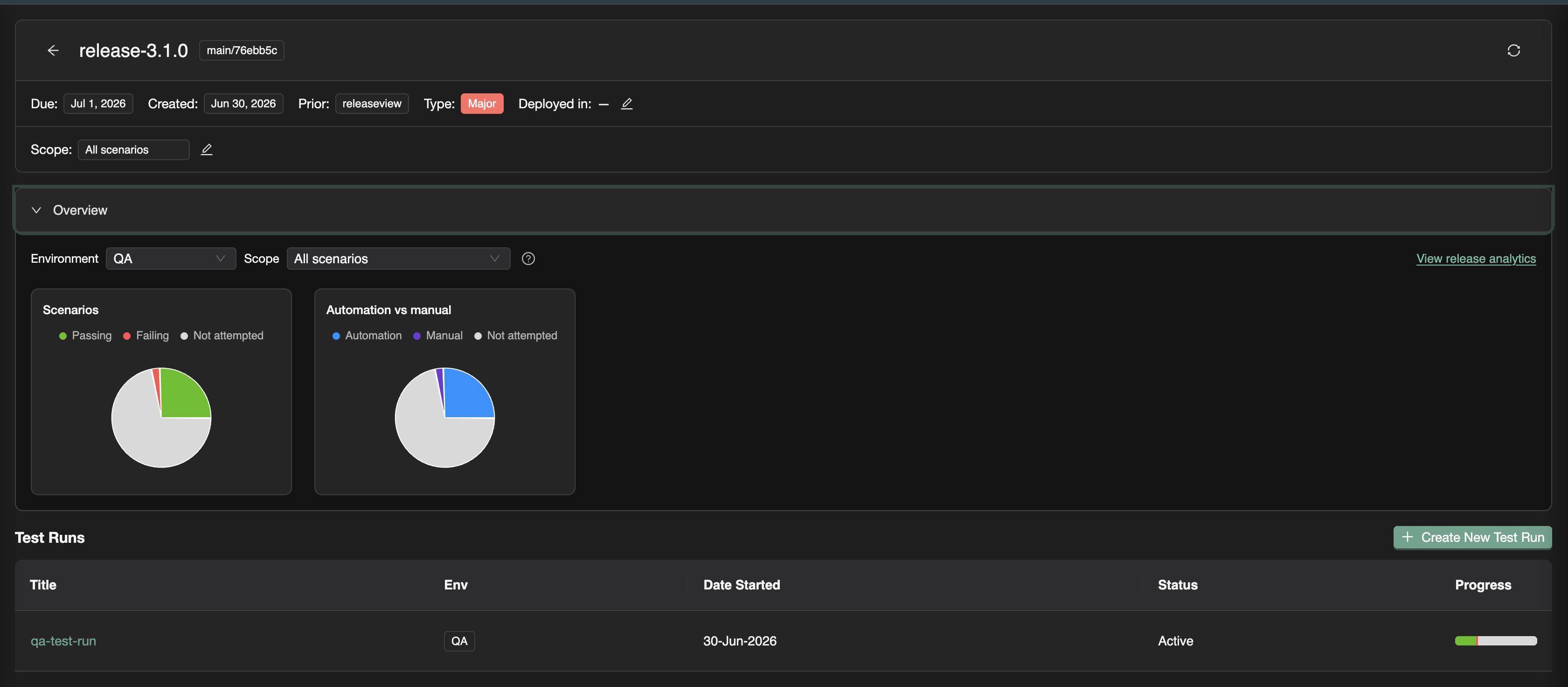
Release detail with overview charts and test runs


The release confidence problem

Shipping fast only works when you can trust what was validated.

Most teams already run plenty of QA. What they lack is a version-level contract:

Failure modeWhat goes wrong
Scattered evidenceManual QA in Slack; CI green in another tab; no single view per version
Checkbox manual testing“Mark as passed” with no steps, screenshots, or tester identity
Automation silosPlaywright batches exist, but nobody ties them to the ship candidate
Unknown scope“We tested checkout”—but not which scenarios or requirements
Blind deploysCode merged without knowing what plans, tests, or RUM events changed

Release governance is not bureaucracy. It is the shortest path to deploy confidence when stakeholders need a shared, auditable answer—not a status emoji in #releases.


What is release governance?

In software delivery, release governance is how a team decides a version is ready to ship: what was in scope, what was tested, what risk remains, and who can prove it.

Industry practice usually spans test planning, requirement traceability, regression campaigns (test runs), security review, and a release gate—a pass/fail policy before production. Traditional tools often split that across a TMS, CI dashboards, a security scanner tab, and a spreadsheet.

Release governance in TestChimp keeps that decision on one surface: the release—a versioned milestone (for example v2.4.0) with git commit context, focus areas from your plan, test runs, checks, and analytics.

Full walkthrough: Release Management.

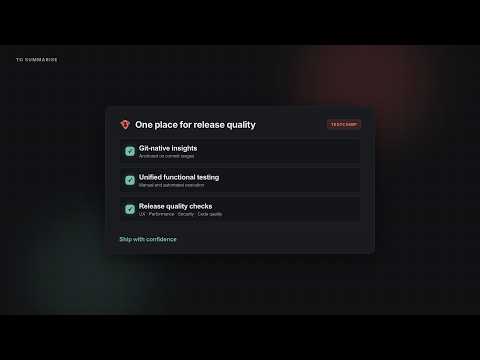
Release Governance with TestChimp — video walkthrough


The TestChimp release model

If you’ve followed us, the pieces already exist as Test Planning as Code, Test Runs, and requirement traceability. Release governance is the campaign layer that binds them to a ship candidate.

ElementPurpose
ReleaseVersion, due date, git commit SHA, prior release, deployments per environment
Focus areasOptional scope on your test plan—which story/scenario folders matter for this version
Test runsNamed validation campaigns (“Smoke on staging”, “Payment sign-off”) attached to the release
Execution evidenceManual sessions + automation batches linked to those runs
Release ChecksUX (ExploreChimp) and security scans scoped to the candidate
Release intelligenceDelta analytics, requirement coverage, ExploreChimp findings, TrueCoverage changes

Open Releases in the sidebar → create a version → create test runs from the release viewer. Progress, checks, and analytics stay anchored to that label and commit range.

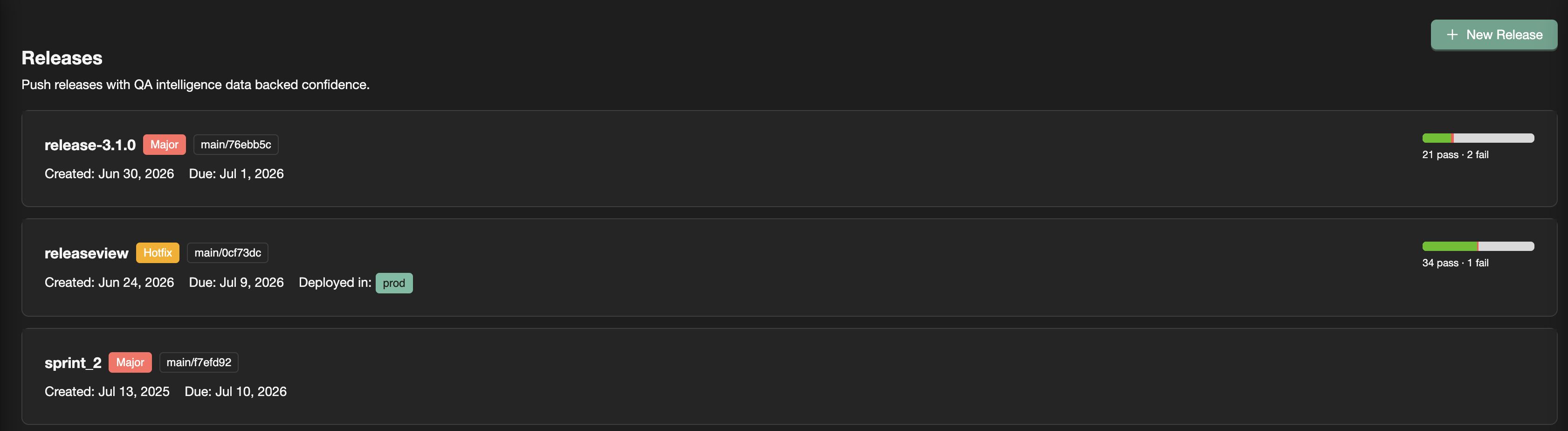
Releases list with progress bars


Evidence that rolls up: manual + automation

Auditable manual testing

Traditional TMS tools record an outcome. Release sign-off usually needs evidence.

With TestChimp, testers:

  1. Capture a session in the Chrome extension (or add a record in the test run viewer)
  2. Pick the active test run on the release
  3. Get steps, screenshots, notes, bugs, and tester identity rolled into release overview and requirement coverage

“QA said pass” becomes a reproducible session tied to the scenario and version. Details: Manual sessions to test runs.

CI that counts toward the release

Automation batches from the Playwright reporter show up under Executions. For release work, link them to a test run—especially from the Candidate Automation Execution Batches panel (batches between prior and current release commits).

Linking answers: Does this CI run count toward our sign-off campaign? Scenario status updates in the same progress view as manual work. Guide: Linking automation batches.

One release. One progress bar. Both execution types.


Release Checks: UX and security on the ship candidate

Test runs answer scenario pass/fail. Release Checks answer the adjacent ship questions—from the same release page:

QuestionCheckEngine
Did UX regress on paths this release touched?UX ChecksExploreChimp on SmartTests
Runtime web vulns on covered flows?DASTOWASP ZAP
Insecure code patterns in this range?SASTSemgrep
Secrets committed since baseline?Secrets scanGitleaks
New dependency CVEs?Dependency scanTrivy

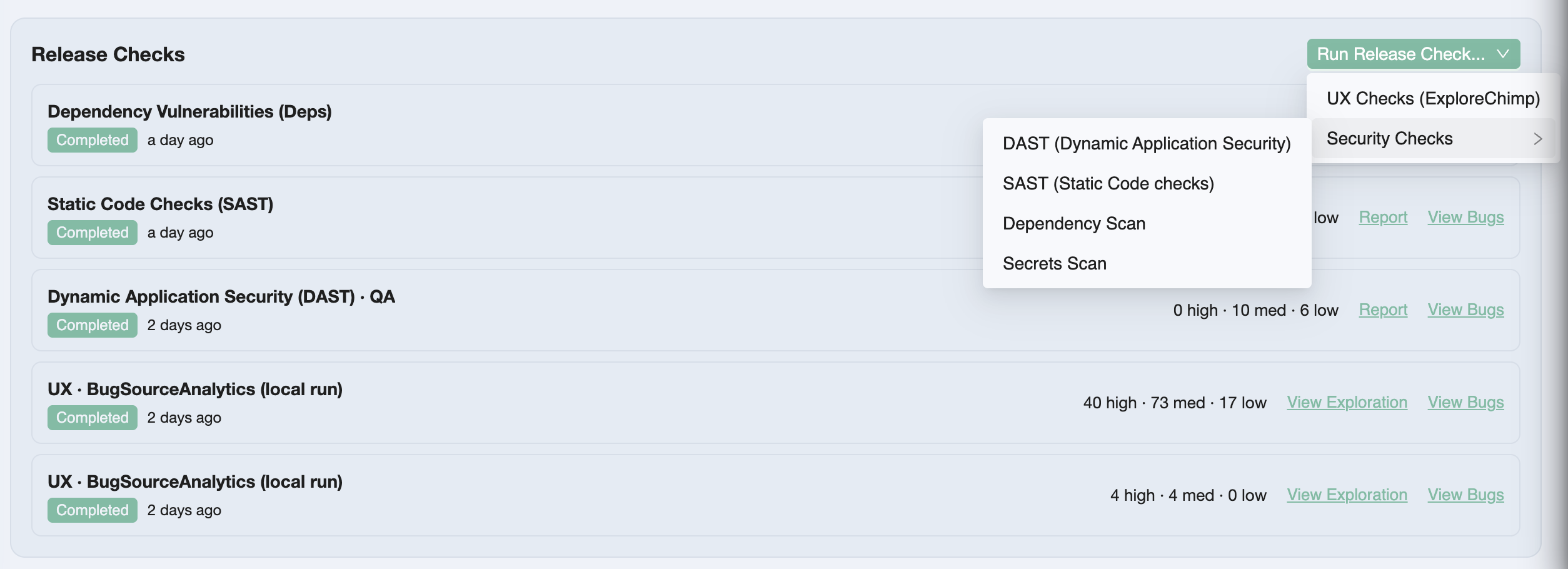
Release Checks list on the release detail page

You queue a check from Run Release Check…, paste the /testchimp run… prompt into a TestChimp-upskilled agent, and triage Report / View Bugs beside test runs—not in a separate security silo.

Overview: Release Checks.


Release intelligence: beyond pass/fail counts

Release intelligence connects what changed since the prior release to what was tested and what exploratory work found.

InsightWhat it shows
OverviewScenario pass / fail / not attempted; automation vs manual mix
Requirement coverageStories and scenarios mapped to linked executions for this candidate
Release delta analyticsTests, stories, scenarios added/updated/deleted + commit graph
ExploreChimp findingsExplorations, new screens/states, bugs in the commit range
TrueCoverageRUM event definitions added/updated—instrumentation drift risk

Use Overview in standups. Drill into analytics when you need requirement-level proof or scope risk (“scenarios added in delta, still not attempted”). Refresh after new commits, linked batches, or manual sessions.

Full detail: Release intelligence.


Programmatic release gating

Governance that only lives in a UI is incomplete for agentic and CI-first teams.

get_release_details returns gate-oriented JSON for a version label: in-scope test aggregations per environment, open-issue stats, release-check summaries, and per-scenario detail. Your pipeline applies your policy—we don’t hard-code “block if any P0 failed.”

testchimp get-release-details --version '1.2.0'

Same data the release page shows—consumable by GitHub Actions, agents, or a custom quality gate. Docs: Programmatic release gating.


How this differs from a classic TMS release

DimensionTestRail-style TMSTestChimp release governance
Plan sourceCases in a TMS databaseMarkdown stories/scenarios in Git
Manual resultPass/fail checkboxCaptured session (or detailed record) with evidence
AutomationImport / plugin / re-entryscenario annotations + batch link to test run
Security / UXSeparate toolsRelease Checks on the version
Release viewMilestone + run summaryRelease viewer + intelligence (delta, ExploreChimp, TrueCoverage)
CI gateOften custom stitchingget_release_details

We are not asking you to maintain a parallel TestRail library forever—import scenarios if you need to migrate, then keep Git as source of truth. Honest comparison: TestChimp vs TestRail.


Why this matters in the agentic era

Agents compress authoring and execution. They do not invent a shared definition of “ready to ship.”

Without release governance, you get faster green CI and louder Slack threads—still no auditable answer for this version. With it, the same agents that run /testchimp test and /testchimp run security scan feed a release surface humans and pipelines can gate on.

Requirements quality (DeFOSPAM governance) hardens the contract upstream. Release governance hardens the ship decision downstream. Together they close the loop we care about: planned reality → tested reality → production reality (boiling the QA lake).


Frequently asked questions

What is release governance in TestChimp?

Release governance is TestChimp’s workflow for validating a specific application version before deploy: create a release (version + git commit + optional plan scope), attach test runs, link manual sessions and CI batches, run release checks (UX and security), review release intelligence, and optionally gate CI with get_release_details.

What is the difference between a release and a test run?

A release is the version milestone (v2.4.0) with metadata, focus areas, checks, and rolled-up intelligence. A test run is a scoped validation campaign inside that release—selected scenario folders, collaborators, due date, and linked executions. One release typically has multiple test runs.

What are release checks?

Release Checks are QA activities launched from the release detail page: ExploreChimp UX Checks plus DAST (ZAP), SAST (Semgrep), secrets (Gitleaks), and dependency scans (Trivy). Reports and bugs stay scoped to the ship candidate next to test runs.

How do I know when a release is ready to ship?

Review overview metrics for the target environment, requirement coverage for focus areas, delta analytics for untested plan changes, release-check reports and bugs, and ExploreChimp / TrueCoverage warnings. When in-scope scenarios meet your bar with evidence attached, complete the test runs and deploy—or enforce the same bar in CI via the gating API.

Does TestChimp enforce a fixed release gate policy?

No. The UI and get_release_details expose the data. Your team (or pipeline) decides thresholds—for example zero failed P0 scenarios, no open critical security issues, or required completed scans.

Do manual results need to be linked to a test run?

For results to count in release overview and requirement coverage, link manual sessions to an active test run on that release—easiest at capture time in the Chrome extension. Unlinked sessions stay in execution history but do not roll up to release progress.


Try it

  1. Open ReleasesNew Release (set version, commit SHA, prior release, focus areas)
  2. Create New Test Run from the release viewer
  3. Capture a manual session or link a Playwright batch
  4. Queue a Release Check and run it with your agent
  5. Open View release analytics—then gate CI with get-release-details when you’re ready

Start here:

Ship when the evidence says so—not when the spreadsheet says “LGTM.”


Further reading

TestChimp

Related posts

Concepts & standards

Your Agents Are Only as Good as Your Requirements

· 6 min read
Nuwan Samarasekera
Founder & CEO, TestChimp

We’ve spent a lot of energy making agents better at writing code and tests.

We’ve spent far less making the inputs to those agents less terrible.

Most modern teams don’t have an “AI coding” problem. They have a requirements problem—and agents make it louder. Give Claude a vague story with “fast,” “easy,” and a missing error path, and it will happily invent behaviour. Give Playwright-authoring agents an untestable scenario, and they will automate the guess. Garbage in doesn’t just produce garbage out anymore. It produces confident garbage—at merge velocity.

That isn’t a new insight in software engineering. It’s just newly expensive.


We’ve known what “good” looks like for decades

Quality requirements aren’t a 2026 invention.

Agile teams have INVEST (Independent, Negotiable, Valuable, Estimable, Small, Testable)—Bill Wake’s checklist for backlog items that don’t sabotage the sprint. The “T” is the one that keeps biting agentic workflows: if you can’t write a test for it in principle, you don’t have a requirement—you have a vibe.

Formal requirements engineering went further. ISO/IEC/IEEE 29148 spells out characteristics like unambiguous, complete, singular, and verifiable—measurable properties of a requirement, not a gut feel in a grooming meeting. Industry write-ups of the standard make the same point in plain language: “user-friendly” isn’t a requirement; a verifiable threshold is (overview of ISO 29148 quality criteria).

And for scenario thinking, Specification by Example and Given-When-Then have been the antidote to “as a user I want stuff so that value” for years.

The gap was never knowing. The gap was doing it continuously, on every story, without a two-day workshop and a whiteboard full of sticky notes.


Enter DeFOSPAM

DeFOSPAM is a seven-lens mnemonic from Paul Gerrard’s Business Story Method (with Jonathon Wright / OpenTest.AI)—popularized recently by OpenRequirements.AI as an agentic requirements-validation approach. The goal is blunt:

A perfect requirement lets the reader predict the behaviour of every feature in all circumstances.

Where that prediction fails, DeFOSPAM tells you why—systematically:

LensWhat it attacks
DefinitionsUndefined terms, synonym collisions, glossary gaps
FeaturesUnclear scope, mixed concerns, incomplete decomposition
OutcomesMissing or unmeasurable “so that…” value
ScenariosHappy-path-only coverage; missing edges and errors
PredictionSteps without verifiable expected results
AmbiguityWeasel words, open-ended “etc.”, unclear actors
MissingActors, data, NFRs, acceptance criteria, cross-cuts

Paul has talked about this as structured appraisal of requirements for years—including how AI can help walk the checklist without replacing human judgment (Analyzing and improving requirements — Richard Seidl podcast). OpenRequirements frames the same idea as specialist analyst agents over living documentation (OpenRequirements.AI; methodology notes on GitHub).

We didn’t invent DeFOSPAM. We operationalized it where our plans already live.


Requirement quality governance in TestChimp

If you’ve been following us, you know the thesis: Test Planning as Code—stories and scenarios as markdown in Git, workflows layered on for humans, context for agents. Traceability without the spreadsheet circus (requirement traceability).

The next piece is governance: not just having plans, but knowing whether those plans are good enough for agents to build and test against.

Requirement quality governance in TestChimp

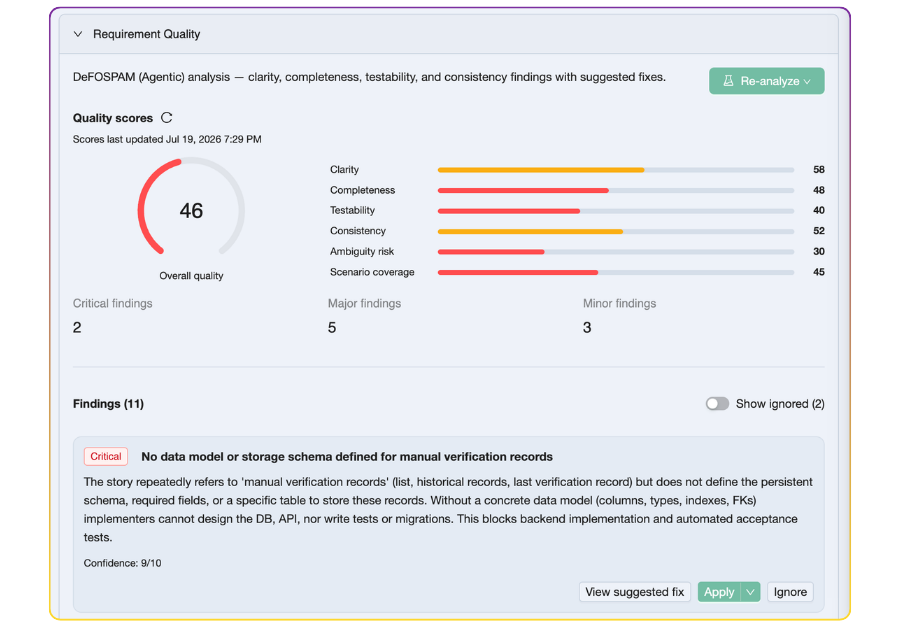
In TestChimp you can run agentic DeFOSPAM-style checks on a story, a scenario, or a plans folder. What you get back isn’t a vague “needs more detail” comment:

  1. Scores across clarity, completeness, testability, consistency, ambiguity risk, and scenario coverage—plus an overall score
  2. Findings with severity (critical / major / minor)
  3. Suggested fixes you can apply or ignore
  4. Tracked state in Plans → Insights → Requirement quality, so quality is a backlog you can govern—not a chat transcript that evaporates

Applied and ignored findings stay out of the penalty box on re-score. The board shows remaining work.

Full walkthrough: Requirement Quality Governance. Agent playbook: /testchimp analyze requirement quality.


Cloud vs local agent: pick for context, not vibes

There are two ways to run the checks.

TestChimp Cloud — one click from the story/scenario editor. Fast. No IDE setup. Costs an AI credit. Great when you want a quality pass without leaving the platform.

Local coding agent (recommended when you can) — install the TestChimp skill and run:

/testchimp analyze requirement quality of US-181
/testchimp analyze requirement quality of plans/stories/billing

Why we recommend local when it fits: the agent can ground findings in your code—fixtures, seed routes, existing scenarios, how “subscription” is actually modelled. Cloud is the simpler path; local is the richer one. Same governance surface either way—results land in Insights.

Authoring fits the same loop. Upskill the agent, then:

/testchimp author story for <objective>

Playbook: Author Plans. Docs: Authoring test scenarios.


Why this matters now

In a human-only world, ambiguous requirements wasted meetings and produced “works as designed” arguments.

In an agentic world, they waste tokens, CI minutes, and PR cycles—and they poison the feedback loop we care about: planned reality → tested reality → production reality (boiling the QA lake).

Agents are extraordinary executors. They are mediocre mind-readers.

If you want high-quality dev output and high-quality test output, start earlier than /testchimp test. Harden the story. Score it. Fix the critical findings. Then let agents implement and automate.

Requirements stop being static tickets. They become governed assets—the same way we already treat code.


Wrapping up

We believe the next leverage in agentic QA isn’t another “generate tests” button. It’s making the contract agents work from clear, detailed, and unambiguous—and keeping that quality visible over time.

DeFOSPAM gives the lenses. INVEST and ISO 29148 gave the vocabulary. TestChimp puts governance on the plans you already sync to Git.

If that resonates, start here:


References and further reading

Test Runs: Turn Testing Into Release Confidence

· 11 min read
Nuwan Samarasekera
Founder & CEO, TestChimp

TL;DR: TestChimp now has Test Runs—named validation campaigns that roll up scenario progress across manual sessions and automation batches. If you have used test runs in TestRail, Qase, or PractiTest, the concept will feel familiar. What is different is that scope, progress, and drill-down inherit the folder structure of your test plan—not a flat, manually curated case list copied into yet another container.

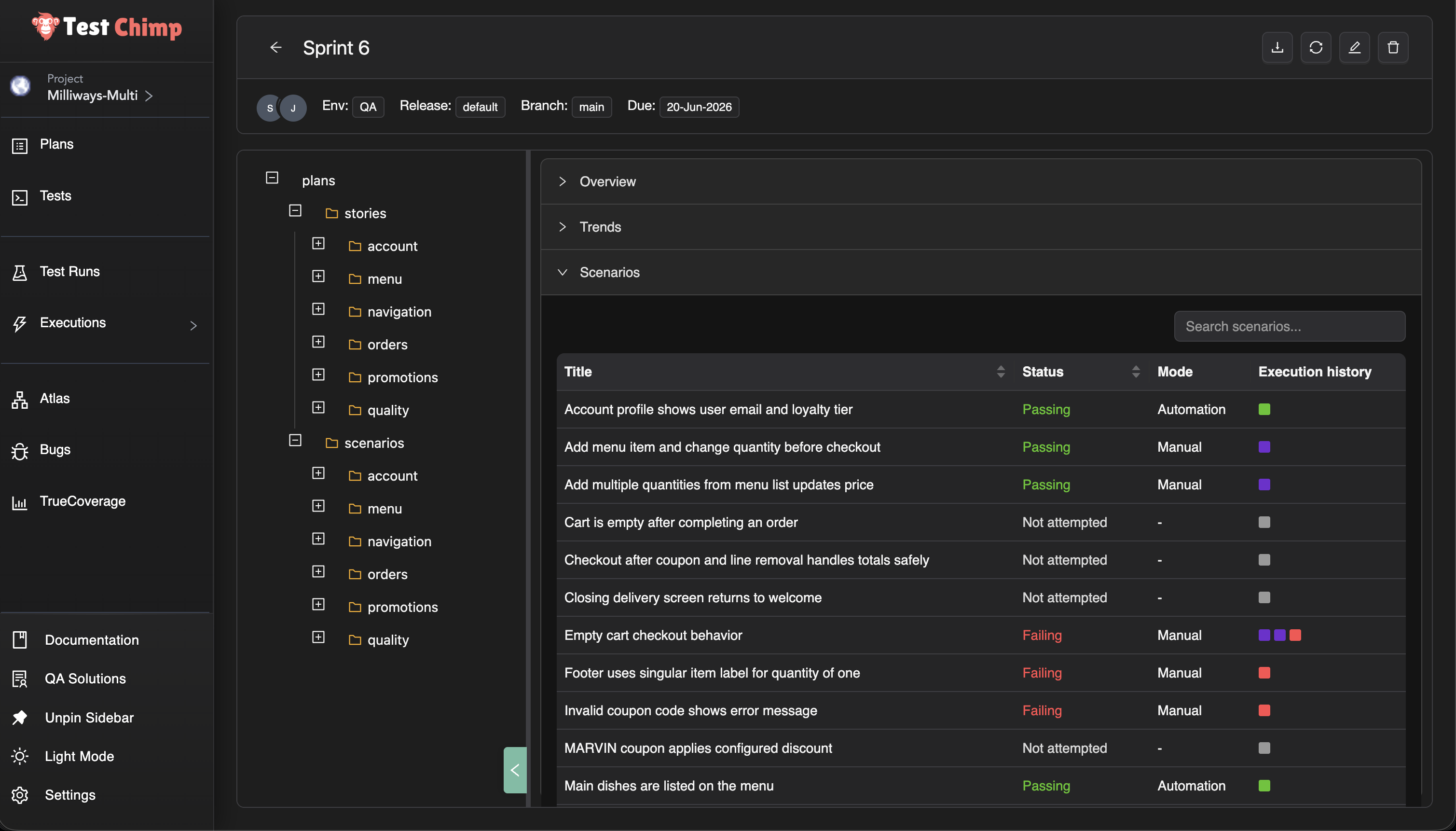
Test Run viewer — overview, trends, and folder-scoped scenario progress


What is a test run?

In software testing, a test run is the execution of a defined set of tests against a specific version or build of the system under test. The ISTQB glossary defines it as “the execution of a test suite on a specific version of the test object.” Test execution—the process of running those tests and recording outcomes—is a core part of the fundamental test process described in ISO/IEC/IEEE 29119.

In practice, teams use test runs to answer a release question: Given the scenarios we committed to validate for this sprint or version, how far along are we—and what is still failing?

Traditional test management systems such as TestRail and Qase model a run as a container: selected test cases, assignees, pass/fail/blocked status, and often milestone or environment context. TestRail’s guidance notes that runs are typically created per sprint or release so managers can track progress in real time.

Test Runs in TestChimp preserve that coordination purpose while changing what sits underneath—the plan, the executions, and how progress rolls up.


The gap test runs are meant to close

Most teams already know the shape of a release cycle:

  • a defined set of scenarios to validate
  • manual testers working through critical paths
  • automation running in CI on every build
  • a lead asking, “Are we done yet?”

Traditional tools answer the last question with a run—but the artifacts rarely stay connected.

User stories often live in Jira or similar issue trackers. Scenarios live in a TMS. Manual evidence sits in screenshots and Slack. Automation results sit in GitHub Actions, Jenkins, or a Playwright CI report. Requirement traceability—linking requirements to verifying tests, as described in ISO/IEC/IEEE 29148—is often maintained in spreadsheets or a test traceability matrix that goes stale.

The run becomes another manually curated list, disconnected from how the product is organized and how work actually happens.

We built Test Runs in TestChimp to close that loop without duplicating your plan in a flat case catalog.


Same concept, different foundation

A Test Run in TestChimp is still a time-bound validation campaign: a title, optional environment and release context, collaborators, a due date, and a scope of scenarios to validate.

What changes is everything underneath.

Traditional TMS test runTestChimp Test Run
Flat list of test cases copied into the run (TestRail add_run)Scope selected from your plans folder tree (stories and scenarios)
Manual results entered in the TMS UIManual sessions linked from the Chrome extension or web UI—with step evidence
Automation results imported via API or re-entered (TestRail result import)Automation batches linked after CI Playwright runs; no duplicate result entry
Progress is case-by-case checkboxesProgress is scenario status (passing / failing / not attempted) from the latest linked execution
Roll-up is a fixed “suite” or “section”Roll-up follows any folder in your plan—checkout today, authentication tomorrow

You are not maintaining a parallel catalog. You are pointing a run at the test plan you already have.


One run, both execution types

The most common fracture in enterprise QA is two parallel tracks:

  • manual validation tracked in a test management tool
  • automated validation tracked in CI or a vendor dashboard

Qase’s own documentation describes the tension: auto-generated CI run names pile up quickly, and teams need runs that “tell a story at a glance” when reviewing overnight failures before a release.

A Test Run in TestChimp is deliberately execution-type agnostic. Link a manual session from exploratory regression. Link tonight’s Playwright batch. Link both to the same run. Scenario status reflects the latest relevant execution—whether a human marked a session passed or CI reported a SmartTest failure.

That is the same unified coverage story we told with manual testing and traceability—now packaged for release-scale questions instead of only folder-level requirement traceability insights.


Folder-based progress, not flat lists

Because TestChimp organizes stories and scenarios as markdown files in folders (Test Planning as Code), a test run inherits something traditional tools struggle to offer: scoped views at any granularity.

Select the root of the run and see overall progress for the whole release. Select checkout/ and see only checkout scenarios. Select a single story file and see exactly what is left on that requirement.

No re-tagging. No re-grouping cases into ad hoc suites every sprint. The folder structure you already use for planning becomes the structure you use for reporting—the same principle as coverage at any folder level in Test Planning.

That matters when:

  • feature teams own folders, not individual case IDs
  • a release spans several modules but not the entire backlog
  • you need a standup answer for one area without re-filtering a 2,000-row grid

Trend charts in the run viewer show how passing, failing, and not-attempted counts move over time—useful for daily readouts without exporting to a spreadsheet.


Why this fits the agentic era

Test runs are not a throwback to heavyweight process. They are a lightweight coordination layer on top of artifacts agents can already read.

Your scenarios are files. Your tests link with scenario annotations (requirement traceability in code). Executions feed the same traceability graph whether they are manual or automated. A test run simply names the campaign—“Sprint 42 regression”, “v2.1 sign-off”—and gives humans a place to see progress while agents keep authoring against the same plan.

We are not replacing CI dashboards or extension manual capture. We are giving product and QA leads a single pane for this validation cycle, grounded in requirements rather than orphaned case records.


See it in action

Using Test Runs in TestChimp — video walkthrough

For step-by-step setup—creating a run, defining scope, linking batches and sessions, reading the viewer—see Test Runs in the docs.


Frequently asked questions

What is a test run in software testing?

A test run is a structured execution of a selected set of tests against a specific build, release, or milestone. The ISTQB glossary defines it as running a test suite on a particular version of the system under test. Teams use runs to track who tested what, record pass/fail outcomes, and report release readiness.

How is a TestChimp Test Run different from a TestRail or Qase test run?

The coordination goal is the same: scope a set of tests, track progress, report status. The foundation is different. Traditional tools copy flat test cases into a run container (TestRail runs, Qase test runs). TestChimp scopes runs from your existing plans folder tree and aggregates results from linked manual sessions and automation batches—without maintaining a duplicate case list.

Can one test run include both manual testing and test automation?

Yes. TestChimp Test Runs are execution-type agnostic. Link manual sessions captured via the Chrome extension and automation batches from Playwright CI to the same run. Each scenario’s status reflects the latest linked execution, whether the outcome came from a human or from CI.

Do I need to duplicate test cases to create a test run?

No. You select scope from folders and files already in Test Planning. Scenarios remain the same markdown artifacts your team authors and version-controls; the run is a pointer and progress lens, not a second catalog.

What is folder-based test run progress?

Because stories and scenarios live in a nested folder structure (Test Planning as Code), the test run viewer lets you drill into any folder or file and see passing, failing, and not-attempted counts for just that subtree. Root shows the full run; authentication/ shows auth only—without re-tagging cases or rebuilding suites each sprint.

How do Test Runs relate to requirement traceability?

Requirement traceability links requirements and scenarios to executions over time—supporting the verification relationships described in standards such as ISO/IEC/IEEE 29148. Test Runs add a named campaign layer: a due date, collaborators, explicit scope, and release-oriented progress for one validation cycle. Traceability is ongoing product health; test runs are this regression or this release sign-off.

When should we use test runs vs Test Planning insights alone?

Use Test Planning insights when you want continuous coverage visibility for a folder, environment, and time range. Use Test Runs when you need a time-bound campaign with assigned collaborators, a due date, and a dedicated dashboard fed by executions you link during that cycle—similar to how teams use TestRail test runs per sprint, but unified across manual and automated work.

Yes. Automation batches can be linked from Executions → Automation Batches (list or batch viewer). Manual sessions can be linked at capture time in the extension or afterward from the manual session viewer. Many-to-many linking is supported—a batch or session can belong to multiple active runs.


Try it

Open Test Runs from the TestChimp sidebar, create a run scoped to the folder your team owns, and link the next manual session or automation batch you execute.

If you are comparing approaches, our requirement traceability post explains the foundation; this feature adds the campaign layer on top when you need to track a specific release or regression cycle end to end.

We are iterating on collaborator workflows, PDF reporting, and deeper agent integration. Feedback welcome—especially from teams migrating off TestRail-style run models.


Further reading

TestChimp

Test management & QA concepts

Automation & CI

Related posts

Test Planning as Code: Your Test Artifacts, Version-Controlled and Agent-Ready

· 5 min read
Nuwan Samarasekera
Founder & CEO, TestChimp

We used to live in forms.

Historically, dropdowns and text fields were the default way we planned and managed work. But in the agentic era, the winning UX isn’t a fancy form. It’s plain, boring text.

We already see it everywhere. We use skills.md for upskilling agents. claude.md for context. Spec-based development in Cursor. But look at your test planning tools. Jira, Linear—they were built in a pre-AI era. They’re database-centric, form-heavy, and fundamentally hostile to agentic workflows.

Research shows test planning activities are still applied inconsistently, and that gap can lead to negative delivery and cost outcomes in software projects (planning activities in software testing process).

Traditionally, a test plan is a structured way to define test objectives, scope, risks, resources, and schedules—so teams can communicate what execution should accomplish (ISTQB on test plan purpose and content).

And modern testing standards treat planning as a continuous process across the lifecycle, not one-and-done documentation (ISO/IEC/IEEE 29119).

Shouldn’t test planning be as modern as coding?

Recent work suggests test artifacts can be managed more like software assets with explicit lifecycle concerns (test artifacts and lifecycle in software evolution).

And established testing guidance emphasizes requirements-based prioritization when deciding what to execute next (ISTQB test case prioritization).

That’s why we’ve reimagined test planning for the agentic era. We call it Test Planning as Code.


Plans as strongly typed markdown

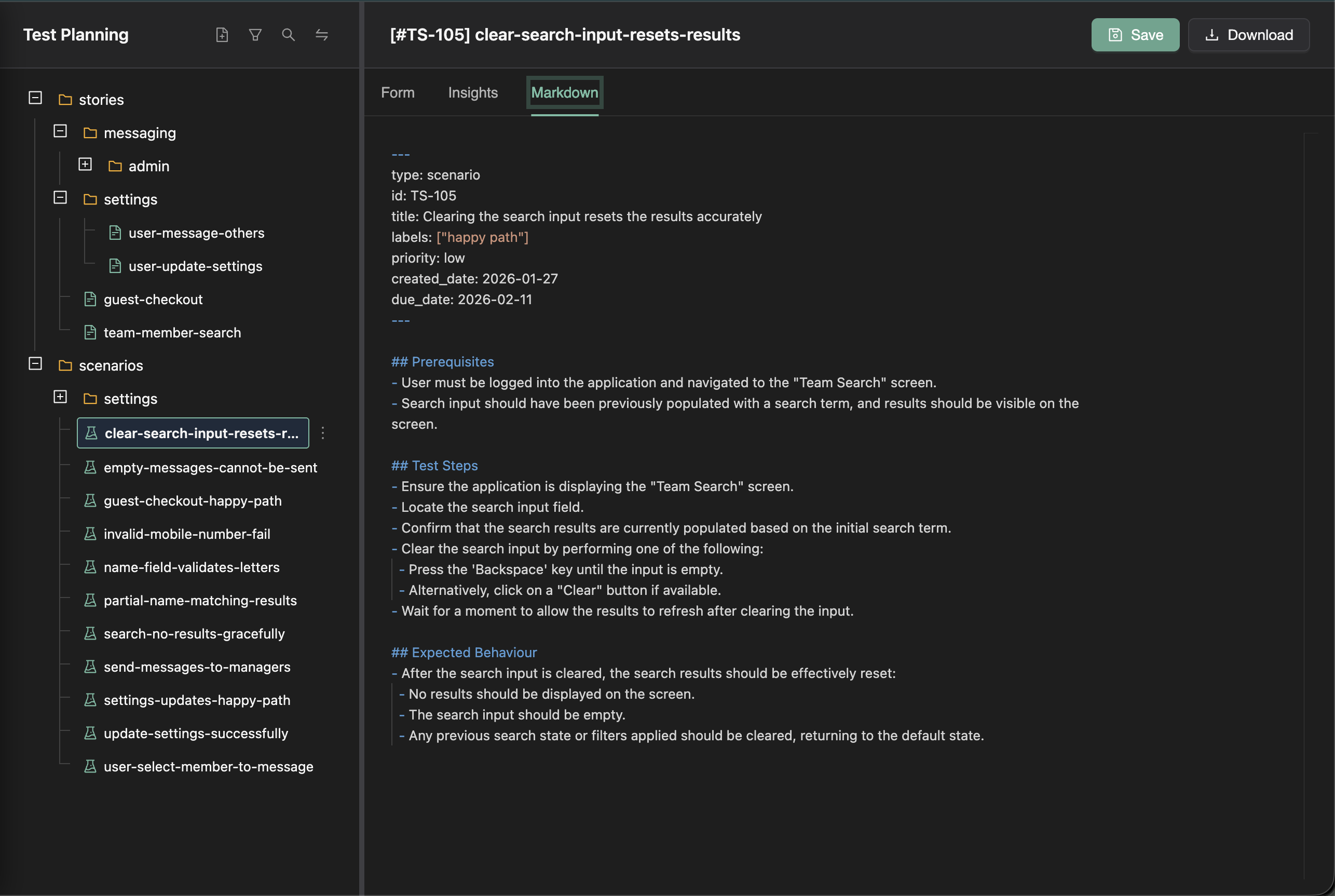
In TestChimp, your plans live as strongly typed markdown files—user stories and test scenarios as .md files with YAML frontmatter, organized in folders and version-controlled alongside your codebase.

Test Scenario as Markdown

There are some pretty significant advantages to maintaining stories and scenarios as simple .md files.

At its core, a test plan defines test objectives, scope, risks, resources, and schedules—so execution stays aligned to what “done” means (ISTQB on test plan purpose and content).

First, they sync to your code repository. That means your coding and testing agents can read them and work on them directly. No proprietary API, no “export for AI”—just the same files your team already uses.

Second, you can organize them in a nested folder structure however you want. By area. By journey. By team. That structure gives agents broader context. They see related stories and linked scenarios, not just isolated tickets floating in a database.

This is what actually gets stored in your repo. No proprietary formats. No lock-in. Just plain markdown.


“I don’t want to manage status in a text editor”

Humans still need workflows. We need priorities, due dates, and assignees.

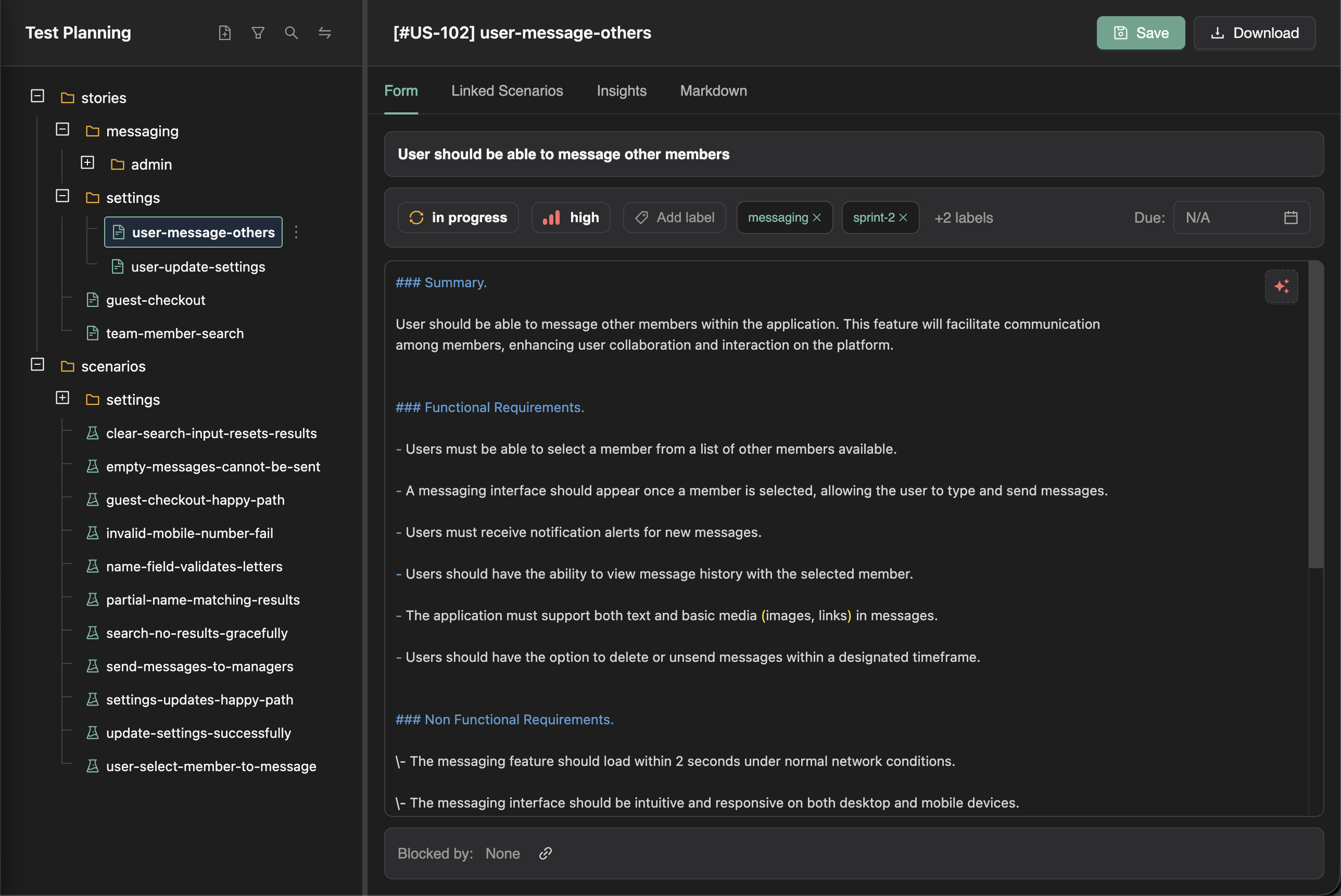
TestChimp layers those workflows on top of the files. You get the familiarity of a structured UI for human workflows—rich forms, status dropdowns, filters—without losing the benefits of file-first planning. The source of truth stays in the files; the platform makes them easier to work with.

User Story Form

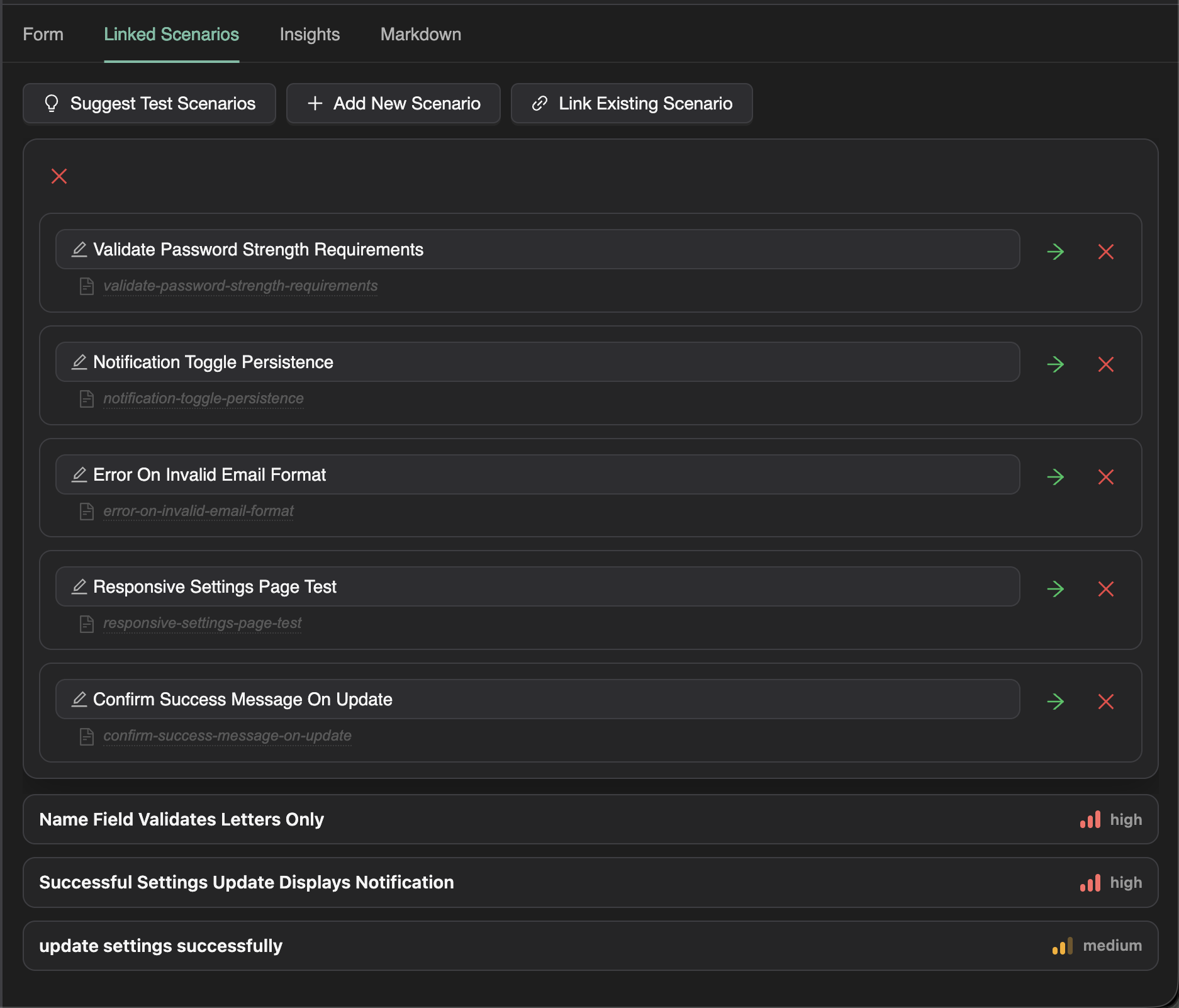
And because TestChimp indexes everything, the AI can actually work with your plan. It can help write or refine a user story more accurately. It can suggest relevant test scenarios. It can even detail them out, grounded in your actual requirements.

Linked Scenarios


Linking tests is trivial

Once you have scenarios, linking tests is trivial. Just add a Playwright annotation in your test code:

test('shows error for invalid credentials', {
annotation: [
{ type: 'scenario', description: '#TS-101' },
],
}, async ({ page }) => {
// ...
});

No spreadsheets. No manual mapping. No juggling multiple tools.

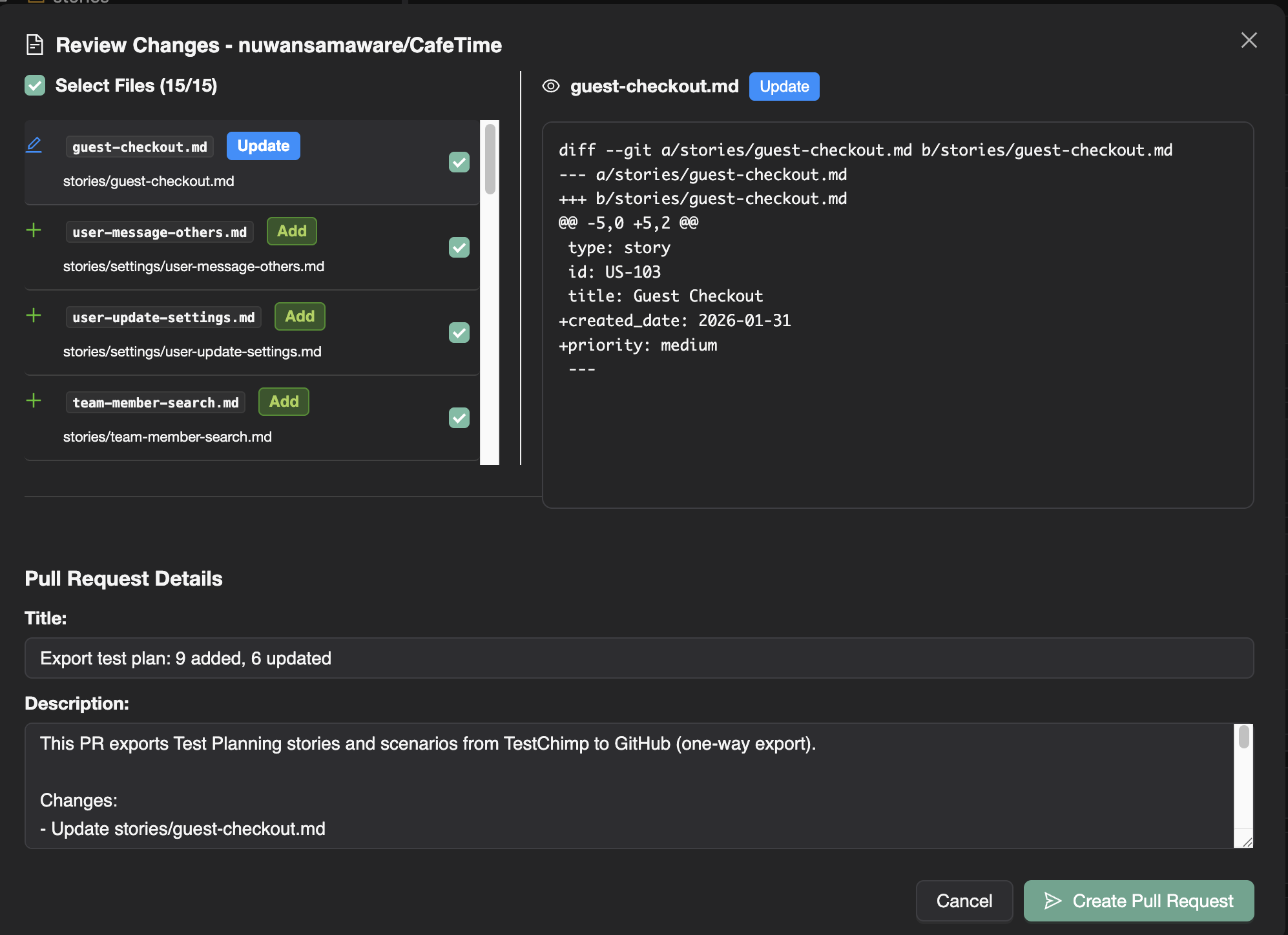
Export to Git keeps your test plan in the repo—stories and scenarios live under a path you choose, with full history and pull-request workflows. Your agents and your CI see the same files.

Export to Git


Coverage at any granularity

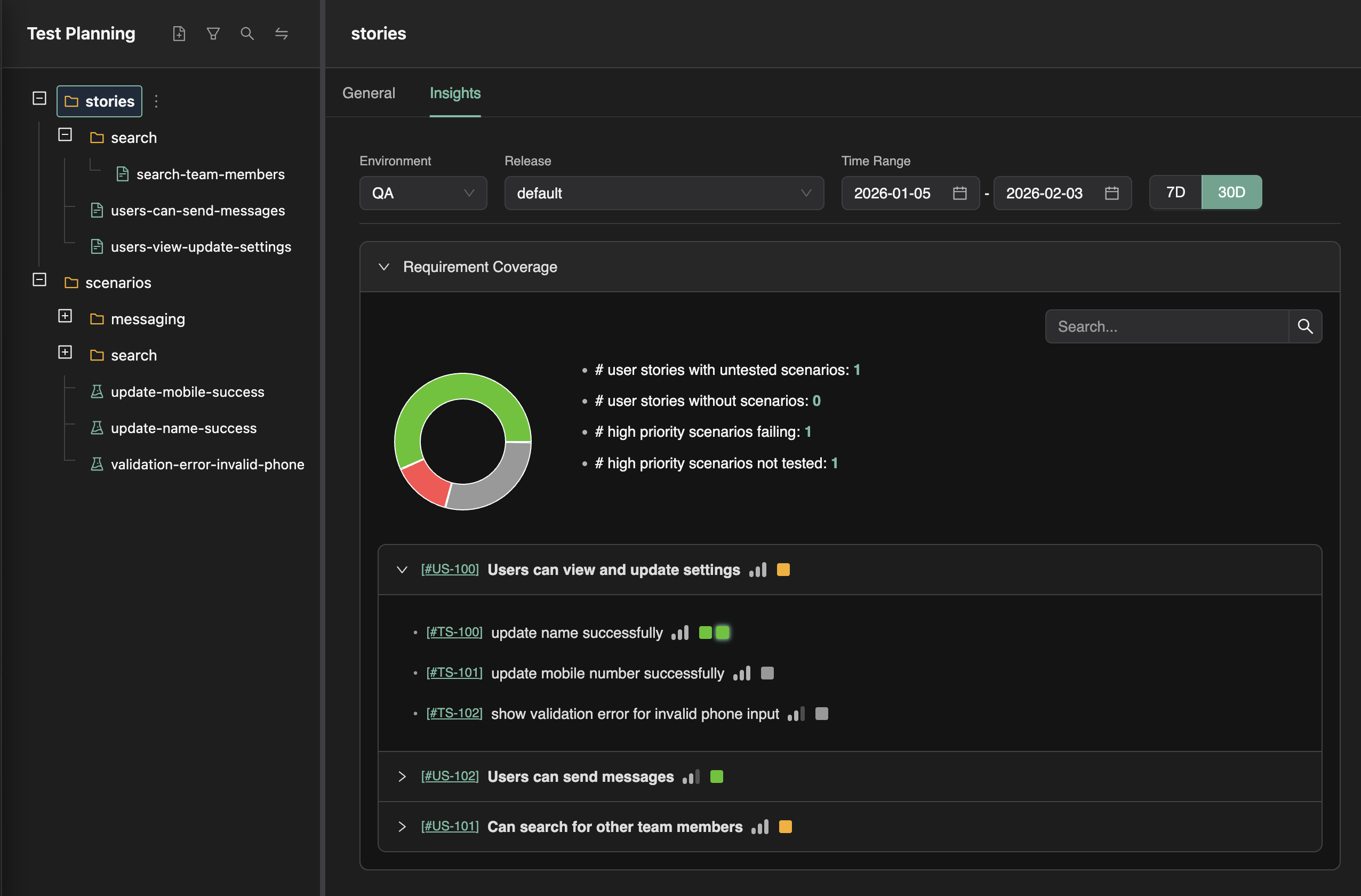
As tests run, coverage insights update automatically. And because your stories are organized in folders, you can see coverage at any granularity—per story, per area, per component.

If you’re working in a team where different groups own different parts of the system, you already know how useful this is.

Requirement Traceability

You can finally answer the question: Which scenarios are due next week, ready for testing, but still missing coverage? No spreadsheet. No manual roll-up. Just select the folder, apply the filters, and look at the Insights tab.


Wrapping up

Test Planning as Code is a different take on where test artifacts should live and who should be able to use them. Files in the repo instead of rows in a database; workflows layered on for humans, and that same file structure giving agents the context they need. If that approach resonates—or you’re just curious how it works in practice—we’ve documented the full workflow in the Test Planning section: authoring user stories, authoring test scenarios, export to Git, and requirement traceability.