Why record-replay falls short in creating repeatable tests
In brief: Record-replay excels at quick captures but rots without traceability and infra; TestChimp converts captures into maintainable SmartTests linked to markdown plans and CI intelligence.
Many teams start automation with record-replay: a recorder captures clicks and typing, then replays those UI interactions as a script. Playwright codegen follows the same pattern at the framework level—fast for a first capture, but often brittle in production CI (Playwright codegen).
Repeatable automation needs more than a mirrored UI path. It needs arrange → act → assert with run-scoped world-state, business context, and assertions that can reach behind the UI (xUnit Test Patterns — test fixture, Object Mother).
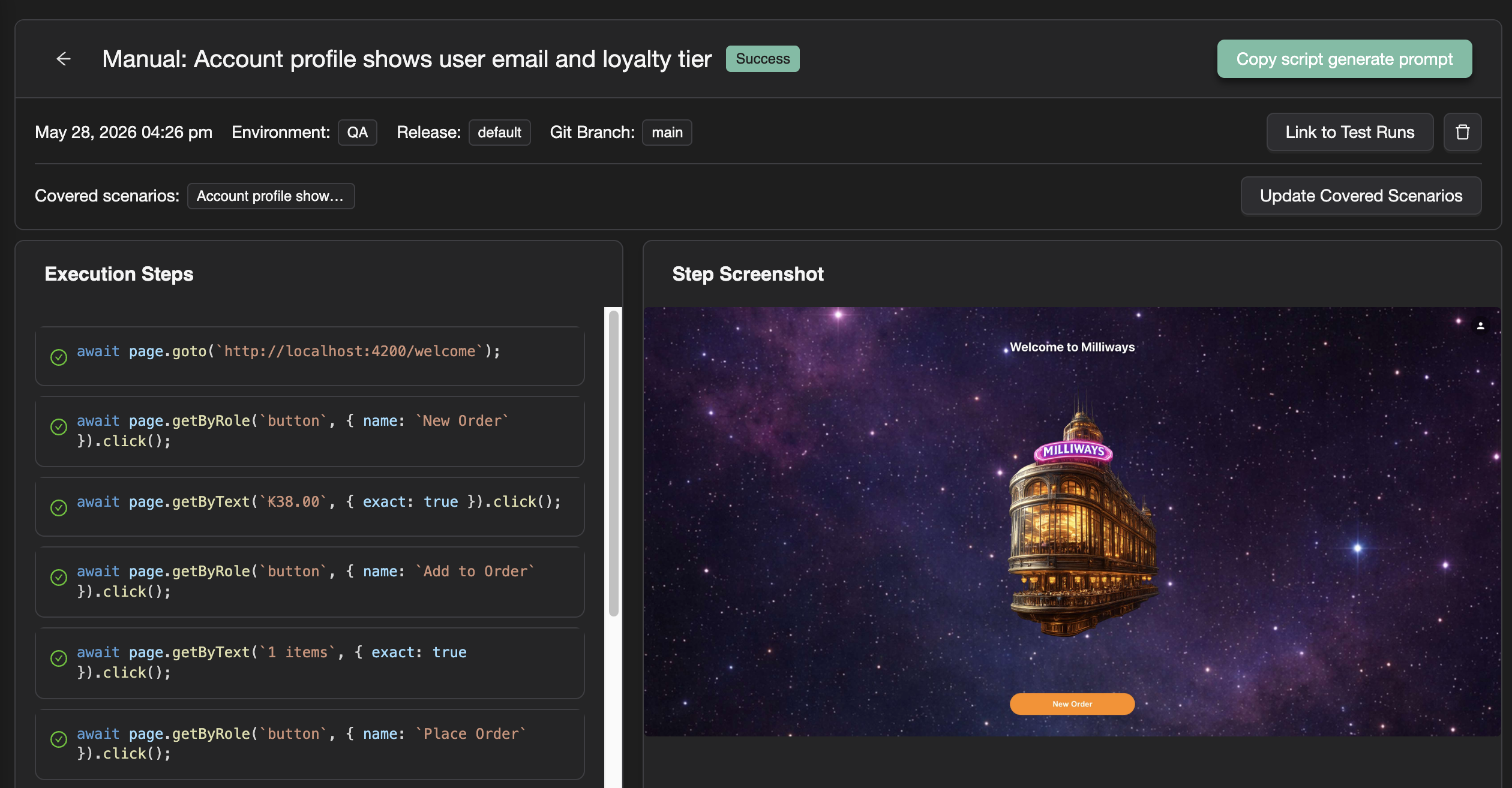
TestChimp takes a different path: manual sessions and linked scenarios as reference material for a coding agent upskilled with the TestChimp skill, which authors SmartTests that fit your existing test infrastructure—fixtures, POMs, seed/probe endpoints, and scenario links—not a blind replay of what was clicked.
What record-replay optimizes for
Record-replay tools (and Playwright codegen) optimize for speed of first capture:
- Click through the app once
- Emit a script that mirrors the UI path
- Run it again later
Commercial record-replay platforms—mabl, Katalon Studio, Testim, and similar—center the same loop: capture interactions in a recorder, store tests in the vendor format, replay on the next run (mabl low-code automation, Katalon Studio, Testim).
That works for demos and one-off flows. It breaks down when you need repeatable, reliable automation in real CI—especially under parallel workers, retries, and shared staging data.
Where record-replay falls short
1) World-state setup is missing
Repeatable automation almost always needs arrange work before the UI journey:
- Test data prep and seeding
- Fixtures that provision run-scoped entities (a user with an expired card, an org on a specific plan)
- Teardown so parallel workers and retries do not collide
Playwright’s fixture model exists precisely so tests can depend on isolated, composable setup rather than implicit shared state (Playwright test fixtures). Record-replay captures what you clicked, not what situation the test assumes. Teams end up with scripts that:
- depend on leftover data from a previous run
- require long UI-only setup chains
- flake when order, timing, or shared state changes
TestChimp agents are steered toward fixtures and seed/probe endpoints already in your repo—and can add them when gaps show up in the coverage loop (fixtures in agent authoring, Workflows).
2) Business context is absent
A recorder does not know which scenario you were exercising or what outcome mattered. You get a sequence of selectors without:
- linked user story / scenario intent
- guidance on which assertions belong in the test
- traceability back to planned coverage
In TestChimp, manual capture is tied to scenario selection (via Test Planning handoff or explicit scenario link). That business context flows into the generate prompt the agent receives—so authored tests include relevant checks, not just replayed clicks (Creating SmartTests — manual session).
3) Backend assertions are out of scope
Many meaningful assertions require backend probing: confirm an order was created, a subscription state changed, or an audit row exists. Pure UI replay cannot express that without custom glue—and record-replay products rarely generate it.
This is a known limitation of UI-layer-only authoring: validation stays on visible elements unless engineers add API checks by hand. TestChimp agents use probe/read endpoints and fixture-backed state the same way your team would in hand-written Playwright—because the output is real Playwright in Git, not a proprietary replay format.
4) Tests do not fit your engineering patterns
Blind replay produces standalone scripts: new selectors, no POM reuse, no shared hooks, no scenario annotation links, no alignment with folder conventions.
TestChimp’s workflow is informed authoring: the agent reads manual session details (steps, screenshots, linked scenarios), navigates the app for grounding, and writes tests that reuse POMs, fixtures, seeds, and probes—addressing infra gaps when needed—so the result is repeatable automation, not a fragile replay artifact.
Side-by-side comparison
| Aspect | Record-replay / codegen | TestChimp (manual session → agent) |
|---|---|---|
| Primary input | UI interaction trace | Manual session + linked scenario + screenshots |
| World-state / fixtures | Usually omitted or UI-only setup | Fixtures, seed/probe APIs, run-scoped entities |
| Business context | Not captured | Scenario-linked intent drives assertions |
| Backend validation | Rare / manual add-on | Probe endpoints and state checks in Playwright |
| Repo fit | New script, often isolated | POMs, hooks, folder layout, scenario annotation links |
| Repeatability in CI | Often poor without rework | Designed for deterministic arrange → act → assert |
| Maintenance model | Re-record or patch selectors | Agent + coverage loop (/testchimp test, /testchimp evolve) |
Playwright codegen is still record-replay
Playwright codegen (npx playwright codegen) is valuable for exploration and selector discovery (Playwright codegen). As a production authoring strategy, it shares the same limits: no scenario link, no fixture orchestration, no backend probes, no coverage feedback loop.
TestChimp does not replace Playwright—it authors Playwright with agent context from plans, manual sessions, TrueCoverage, and your harness (TestChimp vs Playwright).
The TestChimp workflow in brief
- Capture a manual session with the Chrome extension—with scenario linking for traceability.
- Copy test generate prompt from the session (or Test Planning) into your TestChimp-upskilled coding agent.
- The agent fetches manual session details and linked scenarios (
get-manual-session-detailsvia CLI or MCP), uses steps and screenshots as reference, and authors a SmartTest in your repo. - Continuous loop: requirement coverage + TrueCoverage surface gaps;
/testchimp evolveand related workflows keep the suite aligned with intent and real usage (Workflows).
Citations
- Playwright codegen: playwright.dev/docs/codegen
- Playwright test fixtures: playwright.dev/docs/test-fixtures
- xUnit Test Patterns — test fixture: xunitpatterns.com
- Object Mother (Martin Fowler): martinfowler.com/bliki/ObjectMother.html
- mabl low-code automation: mabl.com/low-code-test-automation
- Katalon Studio: katalon.com/katalon-studio
- Tricentis Testim: testim.io
Related reading
FAQ
Does TestChimp offer recording?
Chrome extension capture creates starting points—teams refine in Git with agents and fixtures.
Why do replay suites fail at scale?
Opaque generated steps, no requirement links, no TrueCoverage prioritization, and no /testchimp evolve upkeep.
Can replay tools coexist?
Use capture for speed, TestChimp for orchestration, traceability, ExploreChimp, and production-aligned coverage.