UX Bug Traceability
In brief: UX bugs found in explorations attach to markScreenState checkpoints and Atlas screens so developers see visual, performance, and usability issues in product context—not orphan tickets.
Exploratory findings in TestChimp aren't a floating list of issues — every bug discovered is linked back to two things: where it was found in the app, and why that area was being tested in the first place.
This makes it possible to answer questions like:
- What localization issues exist on the dashboard screen?
- Which performance bugs are slowing down the onboarding flow?
- What bugs are affecting checkout?
Linked to App Structure via Atlas
Every bug found during an exploration is tagged to the screen and screen-state where it was discovered. This metadata is stored in the Atlas SiteMap, which models the structure of your application as a graph of screens and their states.
This means you can query your findings by location:
- View all visual bugs on the checkout screen
- See which API errors appear in the onboarding flow
- Filter localization issues by screen across the entire app
Atlas gives your exploratory results a spatial context — you're not just looking at a list of issues, you're seeing where in your product those issues live.
Linked to Test Plans and User Stories
ExploreChimp doesn't wander randomly — it is guided by SmartTests. SmartTests are linked to scenarios via code comments, and scenarios are organized into user stories and folders within your test plan.
Because exploration follows SmartTest paths, every finding automatically inherits that traceability chain:
Exploration finding → SmartTest → Scenario → User Story → Business Objective
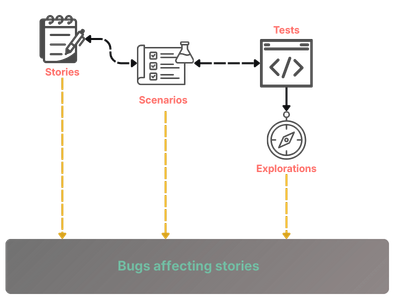
This means you can answer questions at any level of the hierarchy:
- "What performance issues are affecting the onboarding user story?"
- "Are there any accessibility bugs in the checkout epic?"
- "Which bugs are tied to our activation workflows?"
Insights Roll Up Automatically
User stories are organized in nested folders in TestChimp. Exploratory insights roll up through that folder hierarchy automatically, so you get aggregated visibility at whatever level of granularity you need — from a single scenario all the way up to a product area or team.
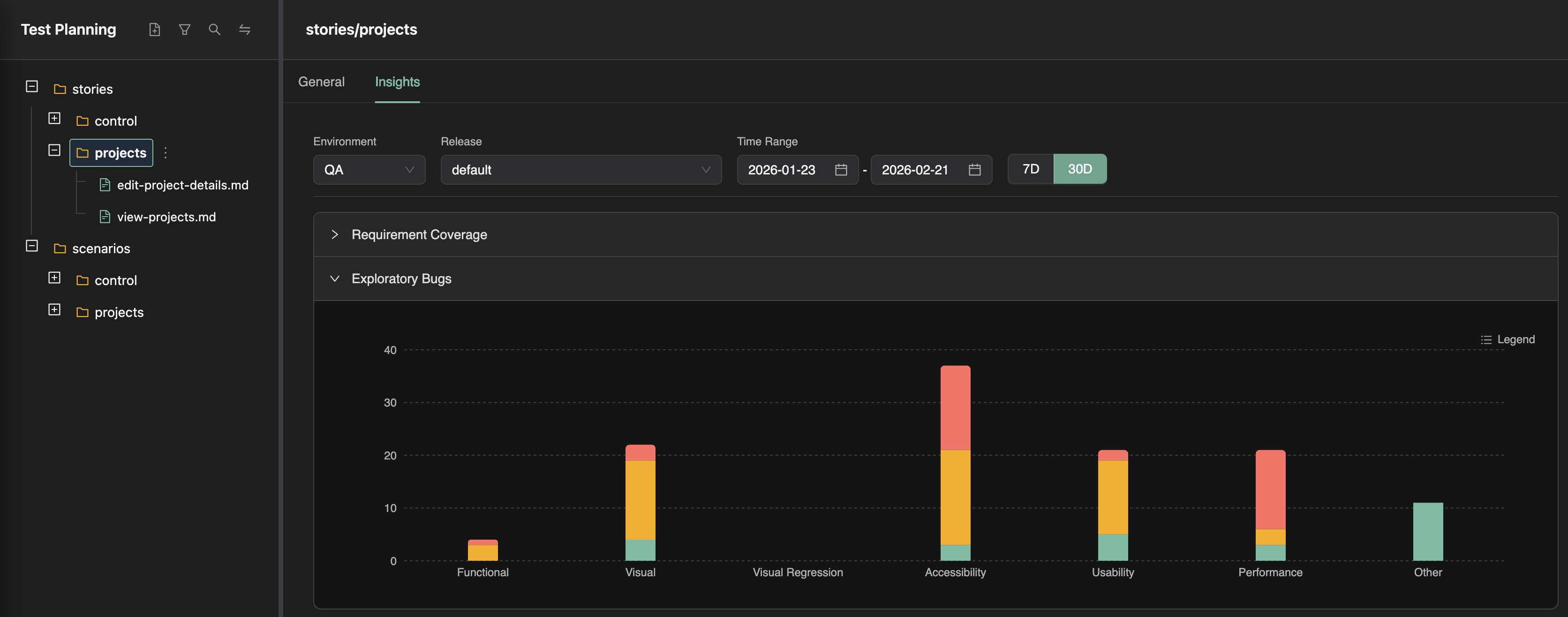
Whether you're a QA engineer triaging a specific test or an engineering manager reviewing the health of a product surface, the same data answers both questions.
What This Enables
Instead of a detached bug list, you get a connected picture:
- By screen: Which bugs exist in the settings screen?
- By workflow: What issues are slowing down the checkout flow?
- By story: What's hurting activation in the onboarding user story?
- By area: Which product surface has the most UX debt?
Exploratory testing stops being a collection of isolated findings and becomes a direct signal about the health of specific parts of your product.
FAQ
Where do exploration bugs appear?
Atlas sitemap, QA Intel bugs view, SmartTests Insights, and linked scenario folders when journeys cover traced flows.
Why screen-state tagging matters?
It routes bugs to the exact UI context—checkout step, settings panel—matching how users experience friction in TrueCoverage.
Can bugs link to Git fixes?
Teams triage in TestChimp and fix in repo; re-run explorations on the branch to verify UX regressions closed.