Bunnyshell integration
In brief: Bunnyshell plus TestChimp provisions preview URLs per branch so shift-left SmartTests and explorations run against real stacks before merge.
Bunnyshell is an Environments-as-a-Service (EaaS) platform: it builds and runs ephemeral, full-stack environments from your repository (containers, dependencies, URLs) so you get a real deployment of your app for a branch or PR—not a single mocked process.
TestChimp can integrate with Bunnyshell so automated QA and agents target fresh environments that match what you are about to merge, instead of only a long-lived staging slot.
Why ephemeral environments per PR
- Isolation: Each change set gets its own URL and data plane, reducing “someone else broke staging” noise.
- Shift-left: Run SmartTests and
/testchimp testagainst a stack built from the current branch before merge—failures map to this PR’s diff. - Fidelity: Exercise real services, migrations, and config together; catch integration issues that local mocks miss.
- Cost control: Environments are created when needed and torn down when the agent or CI workflow finishes (policy depends on your Bunnyshell and TestChimp configuration).
How TestChimp integrates
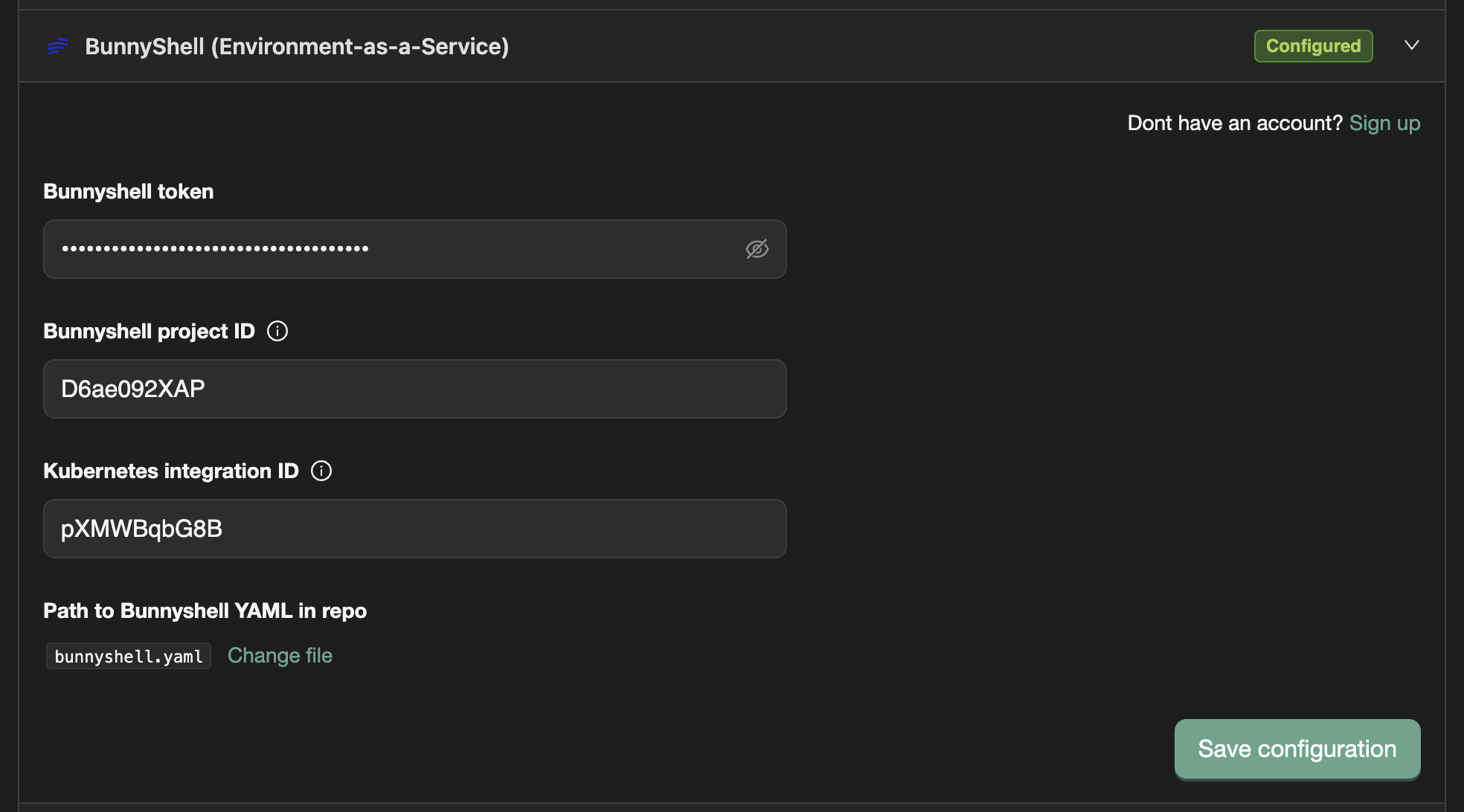
In TestChimp → Project settings → Integrations, configure Bunnyshell (credentials and the environment definition / blueprint Bunnyshell should use for this product). TestChimp stores enough context to request and track environments on behalf of your project.
Once configured, TestChimp’s backend talks to Bunnyshell’s APIs to provision, poll status, surface logs/events when things go wrong, and destroy environments when workflows complete—so agents do not need direct Bunnyshell dashboard access to get a working URL.
How Claude + the TestChimp skill use it (MCP)
When a developer runs /testchimp test (or the agent chooses an ephemeral strategy from plans/knowledge/ai-test-instructions.md), the Claude host calls TestChimp through @testchimp/cli (MCP tools), not by inventing URLs:
- The skill reads your environment strategy (local vs staging vs EaaS / Bunnyshell).
- If Bunnyshell is configured for the project, the agent uses MCP tools such as
provision_ephemeral_environment/provision_ephemeral_environment_and_wait,get_ephemeral_environment_status, anddestroy_ephemeral_environmentso TestChimp requests the environment from Bunnyshell and waits until it is ready. - TestChimp returns the environment URL (and related metadata) so the agent can set
BASE_URL/BACKEND_URL(per your repo conventions) and run Playwright against that stack. - If something fails, MCP helpers like
list_bunnyshell_environment_eventsandget_bunnyshell_workflow_job_logssupport debugging provisioning from the agent session.
If Bunnyshell is not configured, those MCP paths are unavailable for automatic provisioning; the skill falls back to whatever strategy you recorded (for example persistent staging or branch preview URLs).
Practical notes
- Branch / commit: Ephemeral builds usually track Git state; ensure seed endpoints, migrations, and feature flags you expect are on the branch Bunnyshell builds from (the skill’s init docs call this out for backend changes).
- Secrets: API keys for TestChimp and for your app under test should follow your normal CI and MCP hygiene—see
/testchimp init.
DAST ephemeral sandbox
Active DAST (ZAP attack mode) probes your app with payloads derived from the passive crawl. Running that against a shared QA or staging URL can disrupt other testers, mutate data, or trip rate limits.
When you configure a DAST release check with Allow active scan enabled, you can also choose Run in sandbox ephemeral environment. That option:
- Keeps your selected environment tag (for example
QA) as the label/context for the scan. - Asks the agent to provision a Bunnyshell ephemeral instance of that environment (via TestChimp MCP EaaS tools such as
get-eaas-configandprovision-ephemeral-environment-and-wait). - Runs passive + active DAST against the ephemeral URL, then destroys the environment when the scan finishes.
Benefits
- Isolation — Attack traffic and side effects stay off shared stacks.
- Safer active mode — You can enable ZAP attack mode without risking the team’s staging data plane.
- Fidelity — Still a real full-stack deploy from your Bunnyshell blueprint, not a mock.
- Teardown — Environments are torn down after the scan (policy depends on your Bunnyshell and TestChimp configuration).
Requirements
Configure Bunnyshell under Project settings → Integrations with token, Bunnyshell project id, environment YAML path, and Kubernetes integration id, and ensure a GitHub repository is linked for the project (provisioning uses the repo + YAML path). Until those are set, the sandbox checkbox stays disabled in the DAST config modal.
The agent follows the same EaaS workflow documented above (and in the TestChimp skill’s environment-management playbook). If Bunnyshell is not configured, the agent will not invent a URL for sandbox mode.
See also
- DAST Release Check — Full DAST knobs, report, and how to run from Release Checks.
- Release Checks — UX and security scans on the ship candidate.
/testchimp init— Persisting environment provision strategy inai-test-instructions.md./testchimp test— Provision in Setup, destroy in Cleanup.- Code Repository — Overview — Repo + two-folder mapping required before environments and sync behave consistently.
External reference: Bunnyshell (vendor site).
FAQ
Why pair Bunnyshell with TestChimp?
Preview envs give Playwright and ExploreChimp stable branch URLs—critical for startup PR-gated QA.
Does /testchimp init configure Bunnyshell?
Init can wire environment strategy when your stack uses Bunnyshell; see qa-solutions bootstrap guides.
Git branch explorations?
Point explorations at Bunnyshell preview URLs tied to open PR branches.