Code Repository — Overview
In brief: Code repository integrations map tests/ and plans/ folders, webhooks, and OAuth so TestChimp, CI, and Claude share one Git-backed QA source of truth.
Code repository integration connects your source repository to a TestChimp project so test plans and automation stay versioned with your code. Agents using the TestChimp skill and @testchimp/cli can then resolve coverage, paths, and sync merge requests predictably.
TestChimp supports GitHub and GitLab (including self-managed GitLab). Each project connects to one repository through one provider at a time. Provider-specific setup guides:
- GitHub — GitHub App installation and repository mapping
- GitLab — project access token, webhooks, and repository mapping
What you configure
For each project you:
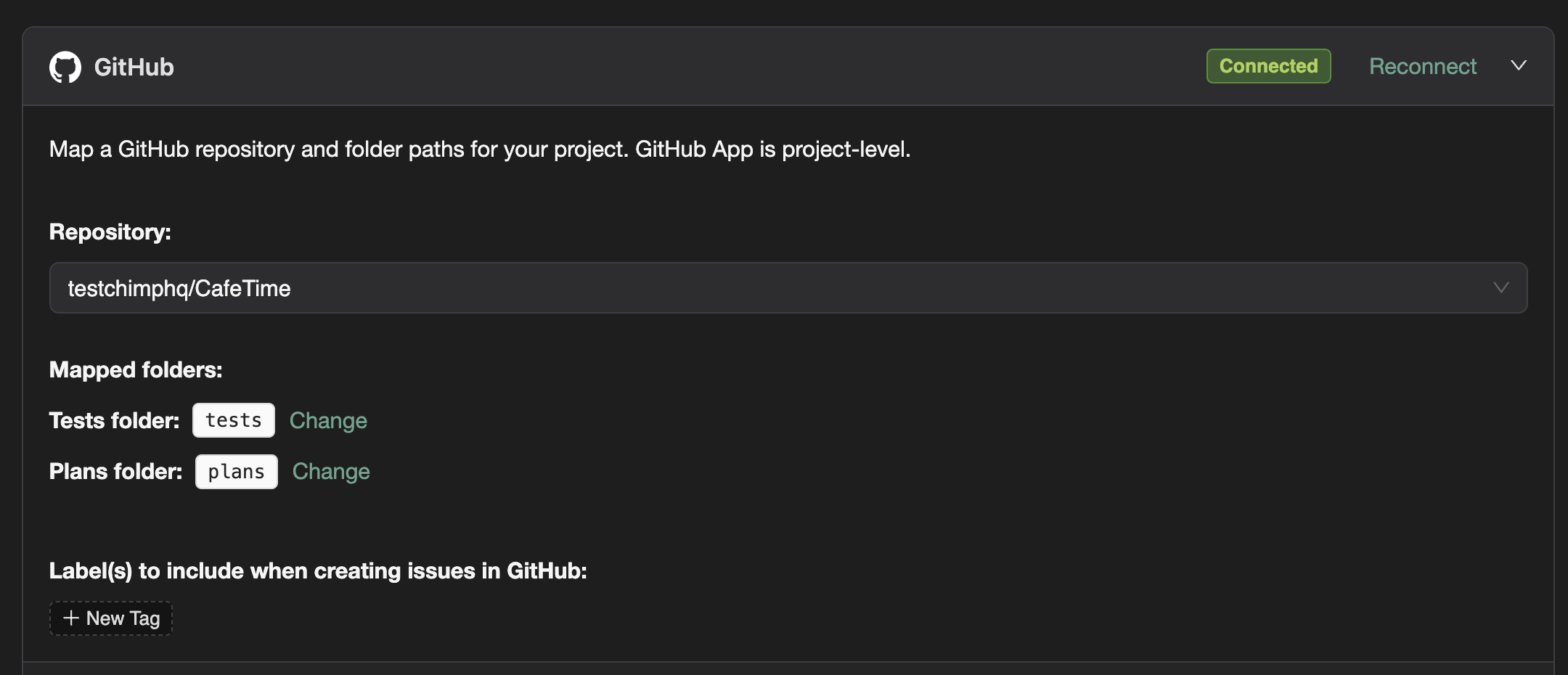
- Connect a provider — install the TestChimp GitHub App, or connect GitLab with a project access token and webhook.
- Select the repository that contains (or will contain) your SmartTests and markdown test plans.
- Map two folders in that repository to TestChimp’s logical tests and plans roots.
On disk the folder names can be anything your team prefers (for example ui/tests and docs/plans). TestChimp still treats them as the platform tests and plans trees for APIs, coverage scope, and MCP path rules.
Folder 1: Tests (tests/ mapping)
This folder is the SmartTests root — the place you run npx playwright test (web) or npx mobilewright test (native mobile) from, and where @testchimp/playwright is wired in your test config.
Role
- Holds Playwright / Mobilewright automation (SmartTests): UI and API tests, fixtures, helpers, and CI config.
- Receives
.testchimp-tests(marker file) after sync so agents and tooling can unambiguously find the SmartTests root. - Is where scenario annotations (and similar) scenario annotations live so requirement coverage and execution history roll up correctly.
- Syncs bidirectionally with TestChimp on a branch-aware basis — you choose which branch to work against in the SmartTests IDE.
Use this mapping for everything that executes in a browser, on device, or against your APIs in the TestChimp workflow.
Folder 2: Plans (plans/ mapping)
This folder is the markdown test-planning root: user stories, test scenarios, knowledge files, and optional event specs used for TrueCoverage and planning.
Role
- Holds agent-readable markdown (with frontmatter) organized in
stories/,scenarios/,knowledge/, etc., so/testchimp testand/testchimp evolvecan scope work from the same files you see in the web app. - Syncs from TestChimp → Git via merge requests so plans live next to code for review and diffs. Inbound changes under the mapped plans folder are applied when your provider sends the appropriate webhook events (see provider guides).
- Receives
.testchimp-plans(marker file) after sync so the plans root is explicit for agents and MCPplans/...paths. - Represents product-level scope and is kept aligned with the repository’s default branch (for example
main), not feature branches. See Test planning and the default branch.
Use this mapping for intent: what to validate, priorities, and structured context — not for Playwright execution itself.
What repository integration drives
| Capability | Driven by |
|---|---|
| SmartTests sync (push/pull, conflicts, merge requests) | Tests folder mapping + provider connection |
| Test plan export to Git | Plans folder mapping + provider connection |
/testchimp init and agent path resolution | Both folders + marker files |
| Requirement traceability (scenario annotations, coverage rollups) | Tests folder + Plans content |
| Branch-aware authoring and runs | Tests sync + branch-specific endpoints |
| Exploratory runs on feature branches | Tests branch context + deployment URL config |
| Inbound updates from Git (commits on mapped paths) | Provider webhooks (automatic for GitHub App; project webhook for GitLab) |
| CI / local test execution from repo | Tests folder layout after sync |
Why two folders matter
- Separation of concerns: Plans = what we intend to verify; tests = how we automate verification.
- Skill + MCP contract: Coverage scope, plan queries, and “run from SmartTests root” assume both roots exist and are mapped; markers make them discoverable even in monorepos.
- Shift-left: The same merge request can change product code, plans, and tests together — reviewers see the full story in one diff.
Where to set it up
In TestChimp → your project → Project settings → Integrations, open the GitHub or GitLab panel, complete connection, then map both folders. Use the product sync flow so marker files and initial structure land in the repo (see also /testchimp init).
Merge-request branch naming
When TestChimp raises merge requests from sync or export flows, head branches use a testchimp- prefix (for example testchimp-test-sync-…, testchimp-plan-export-…). If your repository enforces branch naming rules, allow testchimp-* so automated sync is not blocked.
See also
- Quick intro — connect Git and map two folders
- GitHub Sync (SmartTests workflow)
- Export plans to Git
- SmartTests in your codebase
- Bunnyshell integration — optional ephemeral environments per PR when you use EaaS
FAQ
Which providers are supported?
GitHub and GitLab are first-class; see provider pages for OAuth, webhooks, and folder mapping steps.
What syncs bi-directionally?
Markdown plans and SmartTests between TestChimp and your mapped Git folders on connected branches.
Do I need integration for MCP agents?
Agents read repo files directly; integration keeps TestChimp platform state aligned with Git for insights and UI.