Issue Management
Short answer
TestChimp issue management is where findings from exploration, release checks, and human triage become actionable work—not orphan tickets in a separate tracker. Open Issues in the sidebar to browse in list or kanban, filter deeply, and open a full-page issue view with metadata, rich description, activity (comments and replies), links to stories/scenarios/tests, attachments, and an artifact viewer for ExploreChimp evidence. For many product teams, that is enough to use TestChimp as a drop-in replacement for Jira or Linear for day-to-day issue tracking around quality.
Why issue management belongs in your QA platform
Most teams file defects in Jira or Linear, then paste links back into test tools, Slack, and PRs. Context gets lost: the screenshot lives in one place, the failing journey in another, the story in a third.
| Failure mode | What goes wrong | TestChimp response |
|---|---|---|
| Orphan tickets | Bugs filed without screen, journey, or scenario context | ExploreChimp and release scans create issues with evidence and links already attached |
| Tracker silos | Engineers jump between TMS, CI, and issue tracker | Issues live next to test plans, releases, and Atlas |
| Weak triage UX | Flat backlogs with labels that nobody maintains | List + kanban with advanced filters (severity, assignee, release, due date, …) |
| Evidence drift | Attachments outdated; “see Slack” for repro | Issue page holds description, attachments, and artifact reference in one place |
| No collaboration on findings | Commenting only in the external tracker | Activity tab: comments, one-level replies, metadata change timeline |
Issue management in TestChimp is not a lightweight “bug list”—it is the workflow layer for defects and quality observations that originate from (or feed into) your QA process.
What you can manage
| Capability | What it covers |
|---|---|
| Issue types | Bug, Suggestion, Observation—not only defects |
| Lifecycle status | Open, In Progress, Fixed, Ignored, Duplicate, Archived |
| Metadata | Severity, category, assignee, release, due date, reported by / on |
| Triage surfaces | Table list and status kanban with advanced filtering |
| Collaboration | Activity timeline, comments, replies |
| Traceability | Links to stories, scenarios, tests, other issues, and external URLs |
| Evidence | Attachments + ExploreChimp artifact viewer |
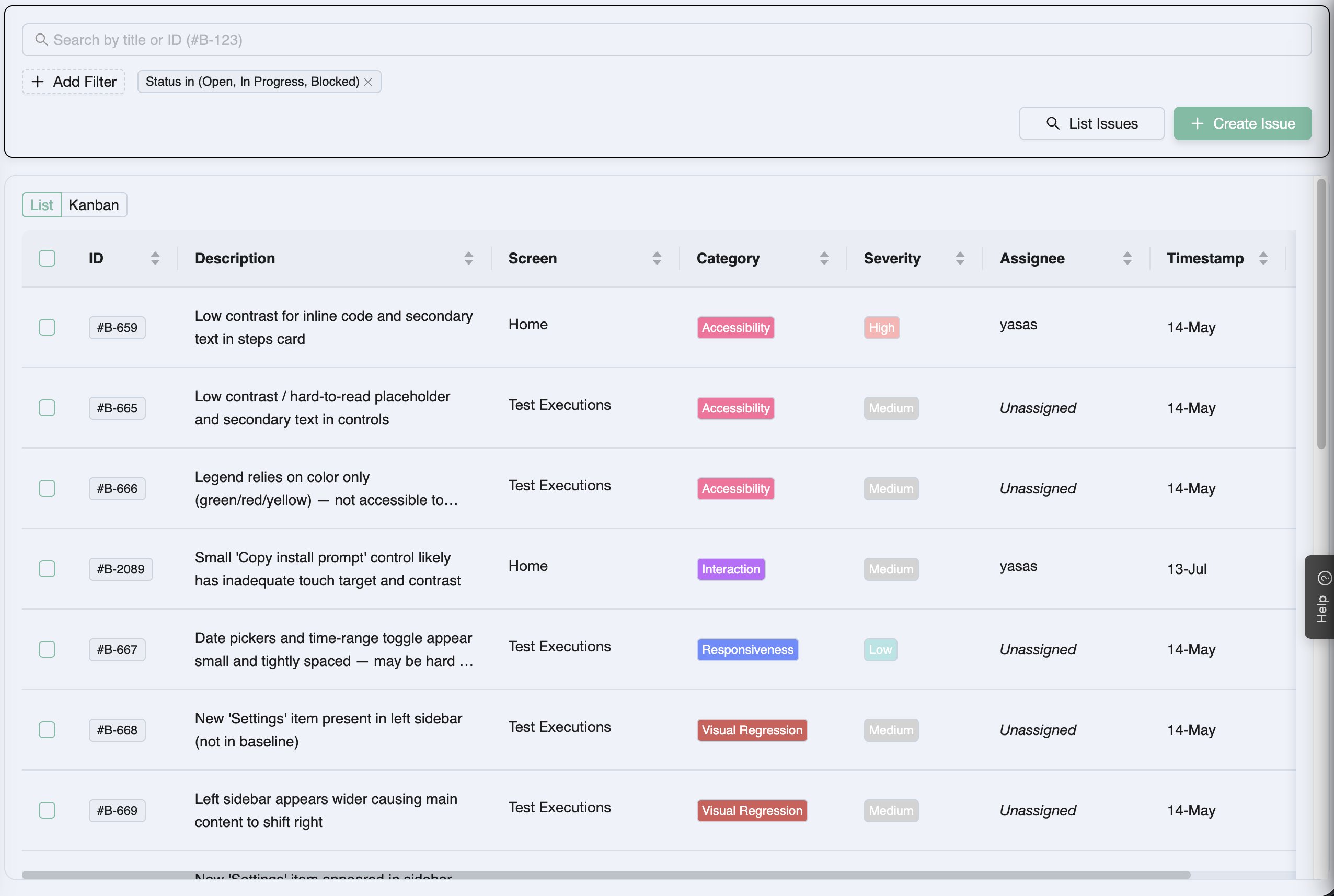
Open Issues from the main sidebar. The list loads first; switch to kanban when you want a status board. Click any row or card to open the full issue page.
How issues get created
Issues enter TestChimp from agents, release checks, and humans:
| Source | How it works |
|---|---|
| ExploreChimp | Explorations analyze DOM, screenshots, network, console, and metrics along SmartTest journeys and file issues with screen-state tags and artifact references |
| Release checks | Release management Release Checks—UX checks (ExploreChimp) and security scans—create or surface issues scoped to the release |
| Humans (manual) | Create Issue on the Issues list (title → opens the full page to fill details), or bugs filed during manual session capture |
Details and workflows: How issues get created.
Browse, filter, and triage
The Issues list supports:
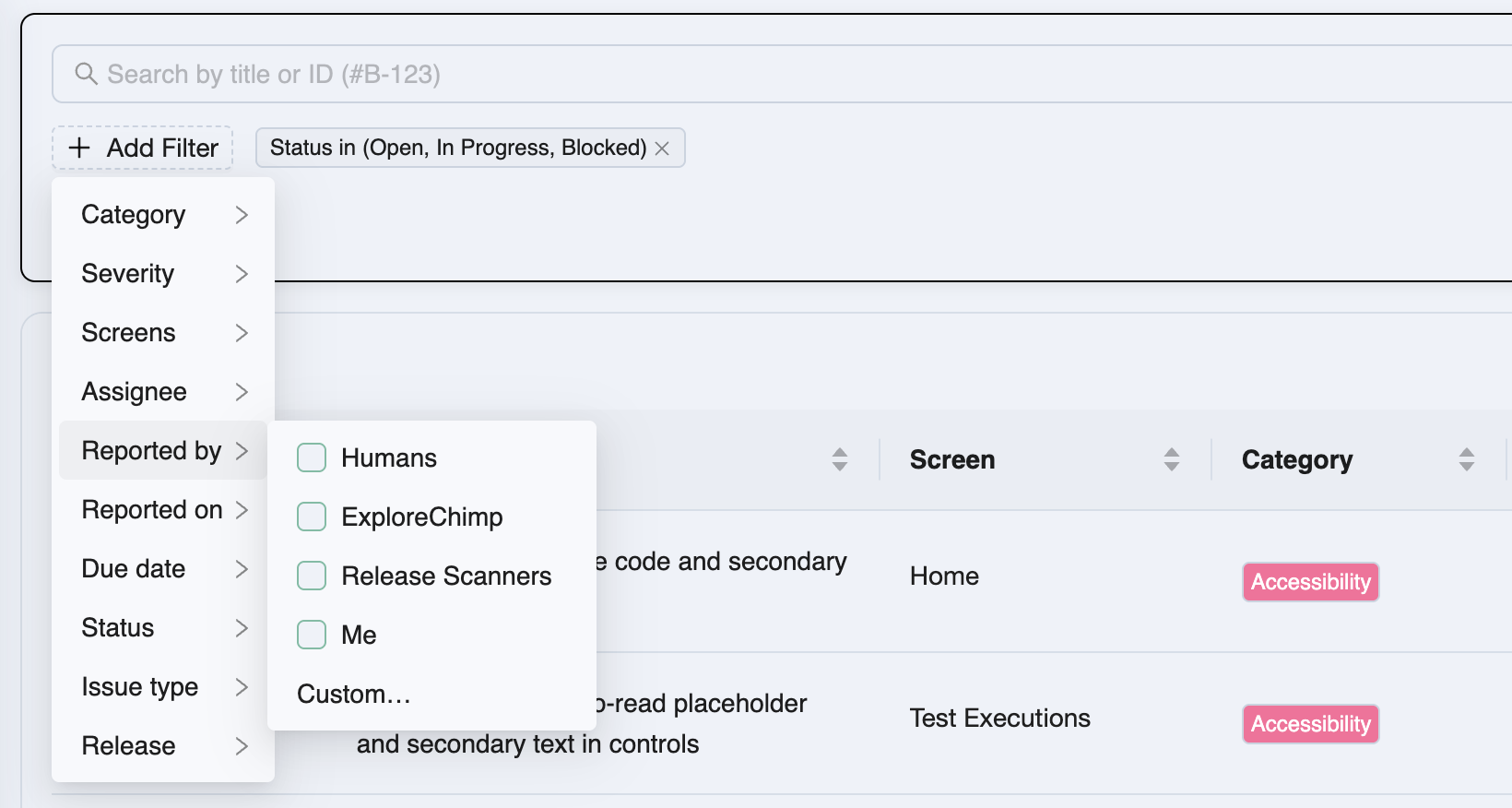
- Title search and an Add Filter pane (category, severity, screens, assignee, reported by, dates, status, release, …)
- Applied filters as closable tags; List Issues applies the selection
- Flip between List and Kanban (columns by status; severity color bars on cards)
Full guide: List view and kanban.
Work an issue end-to-end
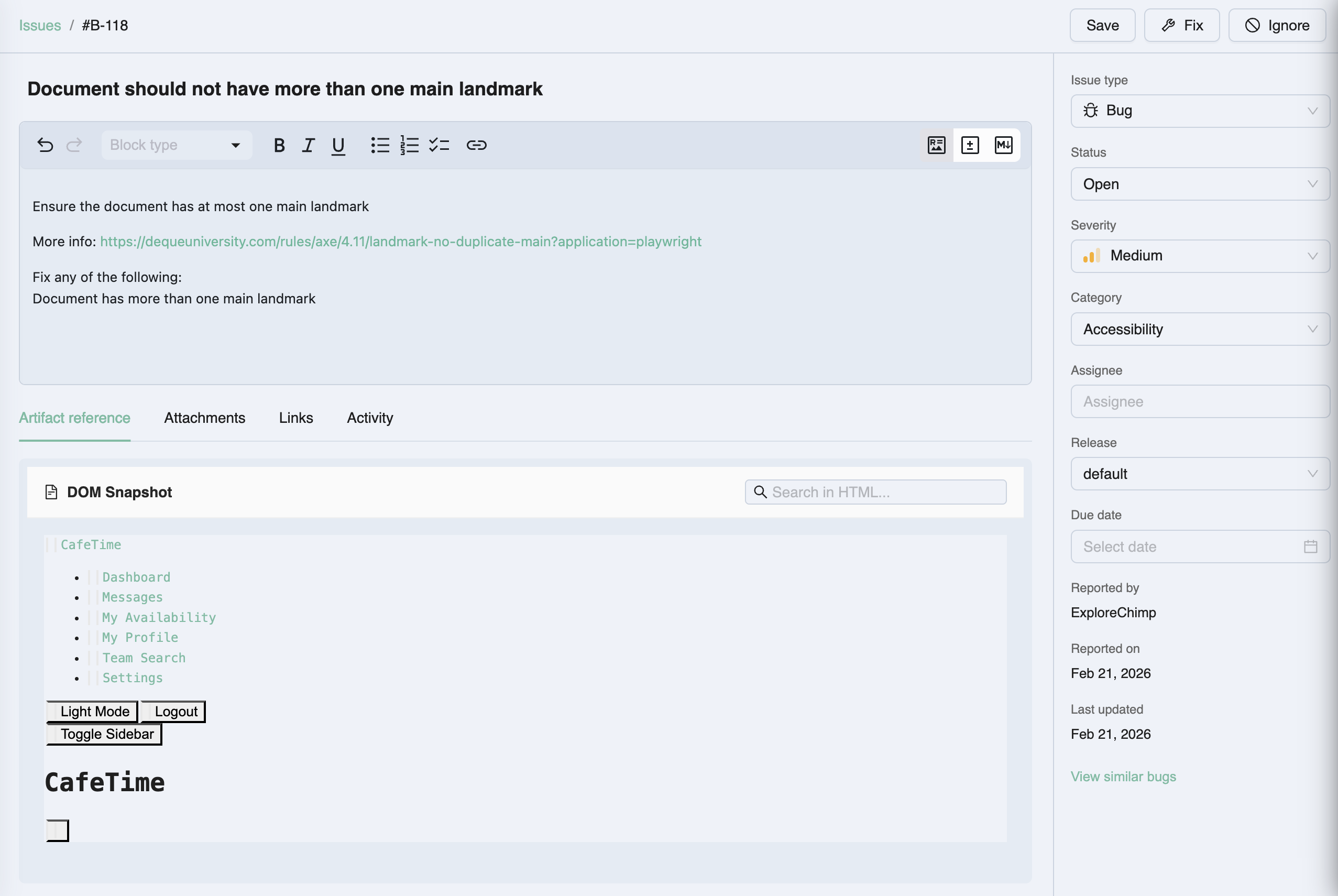
The full-page issue view is the home for description, sidebar metadata (autosave), and tabs:
- Artifact reference — ExploreChimp evidence (default when an agent artifact exists)
- Attachments — screenshots, logs, and files you add
- Links — stories, scenarios, tests, other issues, external URLs
- Activity — comments, replies, and metadata change history
Full guide: Issue page.
TestChimp vs Jira and Linear
Jira and Linear are excellent general work trackers. TestChimp issue management is built for quality work that already lives in your testing loop.
| Dimension | Jira / Linear | TestChimp issue management |
|---|---|---|
| Primary job | Cross-team project and product work | QA findings, defects, and quality observations |
| Creation | Humans (and integrations you build) | ExploreChimp, release scans, manual create, session capture—evidence-first |
| Context | Description + attachments you upload | Artifact viewer, journey/screen-state, links to plans and SmartTests |
| Planning link | Backlink tickets or custom fields | Native links to stories, scenarios, and tests in the same product |
| Triage | Boards, filters, cycles | List + kanban + QA-oriented filters (release, screens, severity, reported by agent) |
| Collab | Comments, mentions, notifications | Activity with comments/replies + metadata timeline on the issue |
| Release | Versions / cycles as separate constructs | Issues assignable to a TestChimp release |
When TestChimp is a drop-in replacement
Use TestChimp as your primary issue tracker for quality when:
- Most tickets you care about are bugs and findings from testing, not roadmap epics
- You want agents and humans filing into the same backlog engineers already open for repro
- You are tired of copying ExploreChimp or scan context into Jira fields
- A kanban of Open → In Progress → Fixed, plus due dates and assignees, covers your process
Teams still use Jira/Linear for roadmap, okrs, or company-wide IT tickets—and keep QA issues in TestChimp so evidence never leaves the product.
When to keep Jira or Linear as system of record
Enterprise change-control that mandates Jira IDs, multi-department workflows beyond engineering/QA, or heavy marketplace apps may still need the general tracker. In that case, TestChimp issues remain the evidence and triage surface; export or sync externally only when process requires it.
How it fits the rest of TestChimp
Findings become issues → you triage and collaborate → links keep requirements and automation in the loop → release assignment ties defects to ship candidates.
Related documentation
- How issues get created
- List view and kanban
- Issue page
- ExploreChimp
- Release management
- QA Intel / Atlas bugs context
- Issue trackers vs test planning as code
Frequently asked questions
What is issue management in TestChimp?
Issue management is TestChimp’s built-in tracker for bugs, suggestions, and observations. You triage in list or kanban with advanced filters, then work each issue on a full page with metadata, activity, links, attachments, and an artifact viewer for ExploreChimp evidence.
Can TestChimp replace Jira or Linear for bugs?
For quality-focused workflows—agent-reported findings, release-scan issues, and human triage with assignees, due dates, and kanban—yes. Many teams use TestChimp as the drop-in issue tracker for QA and keep Jira/Linear only for broader company work. Enterprise mandates that require Jira as system of record are an exception.
How do issues get created?
Automatically from ExploreChimp explorations and release checks (UX and security scans), and manually via Create Issue on the Issues list or when filing bugs during Chrome extension manual session capture.
What is the difference between Issues and Atlas / QA Intel bugs?
Issues is the project-wide management surface—list, kanban, full-page workflow. Atlas and QA Intel views place findings in app/screen structure and exploration analytics; both operate on the same underlying issues.
What can I link to an issue?
Stories, scenarios, SmartTests, other issues, and arbitrary external URLs—so traceability stays inside TestChimp instead of paste-only ticket comments.
Triage findings where the evidence already lives
Open Issues, filter or flip to kanban, and work agent-reported and human-filed items on one full-page view—without jumping to a separate tracker.