/testchimp cleanup — Deduplicate your SmartTest suite
In brief: /testchimp cleanup uses the Semantic Graph to surface duplicate and near-duplicate SmartTests, lets you mark distinct pairs, and prunes true redundancy after explicit approval.
Use /testchimp cleanup when your SmartTest suite has grown through agent authoring, PR-by-PR additions, or long-running evolve cycles—and you want to audit semantic overlap, mark legitimately different tests, and remove true duplicates without guessing from filenames or titles alone.
Not part of /testchimp evolve. Evolve closes coverage and behaviour gaps (requirements, TrueCoverage, execution history). Cleanup solves a different problem: intra-suite redundancy—tests that say the same thing twice. Run cleanup on a cadence (for example monthly or quarterly) or after a burst of agent-authored tests.
The problem cleanup solves
When agents can author dozens of Playwright specs in a single session, suites often accumulate:
- Duplicate tests that assert the same behaviour under different titles
- Near-duplicates that differ only in fixture data or selector phrasing
- Clustered redundancy where several tests all exercise the same edge case
- Invisible overlap across folders, because no one holds the entire suite in working memory
Duplicate tests inflate CI time, confuse failure triage, and create a false sense of depth—your line count grows while behavioural breadth stalls. Cleanup answers:
Are we writing useful, distinct tests—or just duplicative ones?
That needs a semantic answer, not a filename diff.
How semantic clustering works
TestChimp builds a Semantic Graph for your SmartTests using the same core library as the open-source @testchimp/semantic-graph CLI. The platform keeps embeddings in sync as tests change in Git.
1. Parse tests into embedding-ready text
For each SmartTest, TestChimp builds canonical text from:
- Suite path and test title
- Intent comments and
// @Scenario:annotations - Test body (steps and assertions)
Two tests with different selectors but the same intent land close together in embedding space.
2. Embed and score similarity
Each test's text is embedded with a vector model. TestChimp stores embeddings and queries cosine similarity between tests (via pgvector). Default thresholds mirror human judgement:
| Signal | Threshold | Meaning |
|---|---|---|
| Graph edge | ≥ 0.75 | Tests are semantically related |
| Similar | ≥ 0.80 | Worth reviewing together |
| Potential duplicate | ≥ 0.92 | Strong dedup candidate |
3. Cluster with DBSCAN
Similar embeddings are grouped with DBSCAN density clustering—no need to pick k clusters upfront. Clusters get LLM-generated labels (for example "checkout", "auth", "settings") so the legend is readable in the UI.
4. Visualize with UMAP
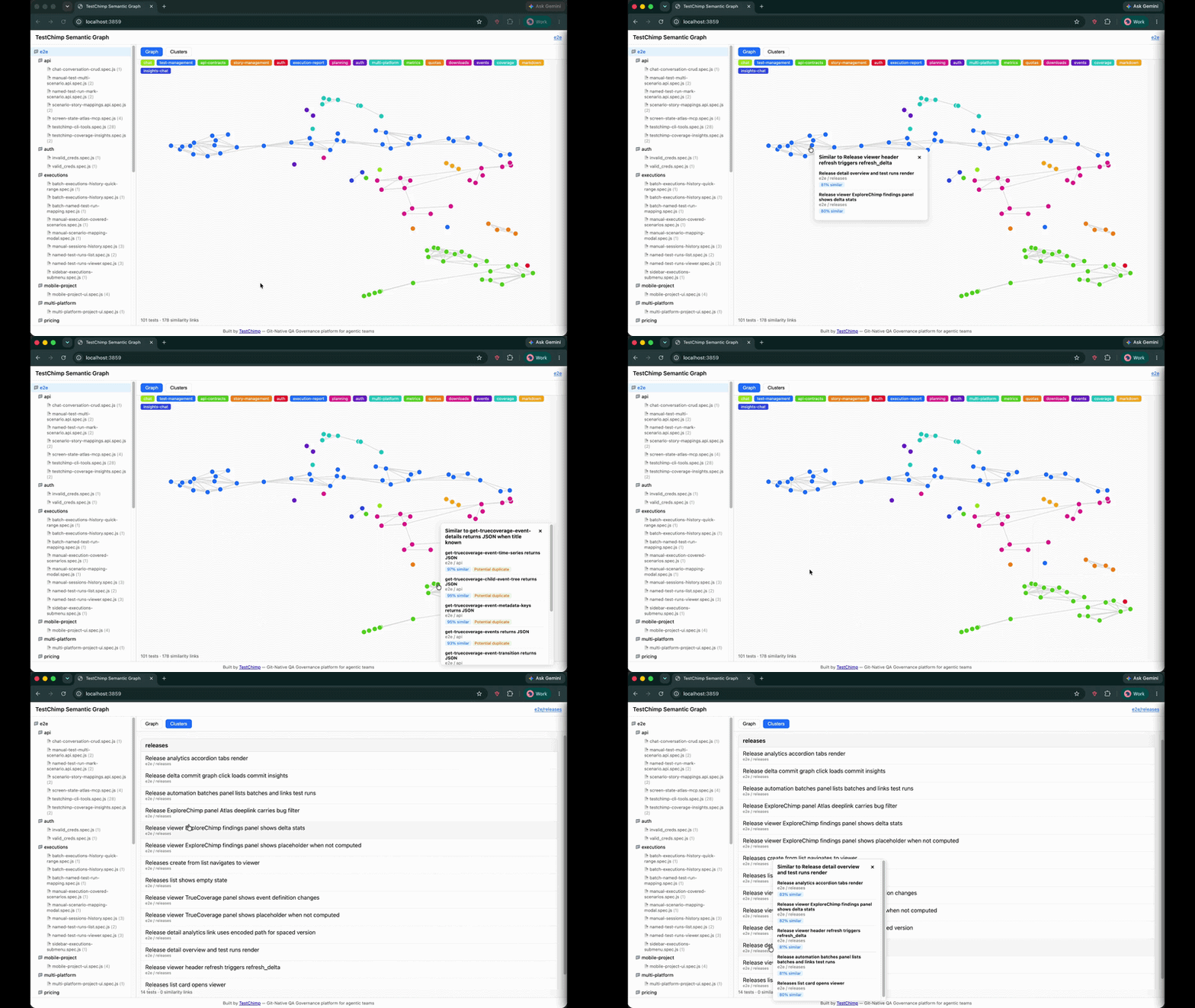
A UMAP projection maps high-dimensional embeddings to 2D coordinates. In the TestChimp app (and the standalone CLI), you see:
- Graph view — nodes as tests, edges as similarity links; click a node for nearest neighbours and duplicate flags
- Clusters view — tests bucketed with named themes
- Folder tree — scope the graph to a directory or single file
The animation above shows the full workflow: scope a folder, inspect the force-directed graph, switch to cluster list view, and drill into similar neighbours.
What the Semantic Graph helps you spot
| Pattern | What you see | Typical action |
|---|---|---|
| Potential duplicate (≥ 0.92) | Two nodes with a strong similarity link or duplicate badge | Compare bodies; delete one copy after approval |
| Similar cluster (≥ 0.80) | A tight group in graph or cluster view | Merge overlapping assertions or split distinct failure modes |
| Cross-folder overlap | Semantically close tests in different directories | Consolidate into one canonical spec or mark distinct if scopes differ |
| Post-agent spike | New nodes snapping onto existing clusters after a PR | Review before merge; run cleanup on the branch |
Semantic Graph complements TrueCoverage and requirement traceability:
- TrueCoverage tells you what behaviours users need tested
- Requirement links tell you which scenarios lack automation
- Semantic Graph tells you whether your existing tests are saying the same thing twice
All three matter for a suite that is broad and lean.
Mark tests as distinct
Not every high-similarity pair is a duplicate. Legitimate reasons to keep both tests include:
- Different roles or permissions on the same screen
- Different environments or feature-flag states
- Different failure modes (happy path vs edge case) that look similar in embedding space
- One test is API-level, the other UI-level, with overlapping scenario text
When you confirm a pair is intentionally different, mark it distinct. TestChimp records the decision and excludes that pair from future cleanup candidate lists—so you do not re-litigate the same comparison every run.
Agents call mark-semantic-tests-distinct (MCP) or the CLI equivalent with TestLocators (folder path, file name, suite, test name)—not opaque internal IDs:
testchimp mark-semantic-tests-distinct --json-input '{
  "focusTest": { "folderPath": ["auth"], "fileName": "login.spec.ts", "testName": "user can log in" },
  "distinctTest": { "folderPath": ["auth"], "fileName": "signin.spec.ts", "testName": "login flow" }
}'
Humans can also mark pairs distinct from the Semantic Graph panel in the TestChimp app when reviewing similar tests on a file or folder.
The cleanup workflow
/testchimp cleanup follows the same Analyze → Plan → Execute gating as /testchimp test and /testchimp evolve: complete each phase before continuing; get explicit user approval before any deletions.
Phase 1 — Analyze (read-only)
- Call
list-semantic-similar-testsfor the project root or a user-specified scope (for exampletests/checkout/). - Prioritize
POTENTIAL_DUPLICATEpairs (similarity ≥ 0.92); noteSIMILAR(≥ 0.80) for context. - For each candidate pair, read both tests (file content, suite path, intent comments). No deletions yet.
Pairs are deduped: focus test A lists similar B only when A.testId < B.testId (lexicographic). Pairs already marked distinct are excluded from the default list.
Phase 2 — Plan
The agent persists a plan under:
<MAPPED_PLANS_ROOT>/knowledge/cleanup_plans/plan_<YYYY-MM-DD>_<nn>.md
Required sections:
- Analysis summary — pair counts, top duplicate candidates
- Mark distinct — pairs to mark as legitimately different (TestLocators + rationale)
- Proposed deletions — pairs judged truly duplicative (which copy to keep/remove + rationale)
Gate: stop and request explicit user approval before Phase 3. Paste a short summary and the plan file path.
Phase 3 — Execute
Mark distinct — for each pair in plan section 2, call mark-semantic-tests-distinct and inform the user of each decision.
Delete duplicates (strict guardrails):
- Only pairs listed in the approved plan section 3
- Max 10 test deletions per cleanup run — defer overflow to a future
/testchimp cleanup - Never bulk-delete without named TestLocators in the approved plan
- Re-run affected specs after deletions
When to run cleanup vs evolve
| Situation | Prefer |
|---|---|
| Close requirement or TrueCoverage gaps after a deploy | /testchimp evolve |
| Suite feels bloated, CI is slow, or agents just added many tests | /testchimp cleanup |
| Retire tests for removed product features (usage dropped in prod) | /testchimp evolve (hygiene step) or manual review with TrueCoverage signals |
| Two tests look alike but exercise different failure modes | /testchimp cleanup → mark distinct |
Run both on complementary cadences: evolve after releases to expand coverage; cleanup periodically to keep the suite distinct and fast.
Standalone Semantic Graph CLI
For a local, account-free audit of any Playwright repo, use the open-source CLI:
npx @testchimp/semantic-graph visualize --tests-dir ./tests
See the blog post How to Find Duplicate Tests in a Playwright Suite for prerequisites, provider options, and FAQ. Continuous duplicate detection inside your TestChimp project uses the platform Semantic Graph and /testchimp cleanup workflow above.
See also
/testchimp evolve— Portfolio-level coverage and behaviour gap closure (orthogonal to cleanup)/testchimp test— Per-PR workflow; Phase 6 is environment teardown, not suite deduplication- TrueCoverage intro — Production-informed test prioritization
- Requirement traceability — Scenario links in SmartTests
- Semantic Graph on GitHub — Open-source CLI and core library
FAQ
How is cleanup different from evolve?
Evolve expands requirement and TrueCoverage coverage; cleanup finds semantically similar or duplicate tests and prunes redundancy—orthogonal problems.
What similarity scores trigger review?
SIMILAR at ≥ 0.80 warrants review; POTENTIAL_DUPLICATE at ≥ 0.92 is a strong dedup candidate. Pairs marked distinct are excluded from future lists.
Can cleanup delete tests without approval?
No—Phase 3 requires an approved plan, named TestLocators, and a max of 10 deletions per run.