Workflows
In brief: TestChimp Workflows are modular agent playbooks plus project policies—so teams get repeatable QA behaviour, auditability, and room to optimize with alternate policies.
Workflows are how agents (Claude Code, Cursor, and cloud agents) run QA with TestChimp: each workflow has a skill playbook (battle-tested steps) and an optional project policy (your team’s decisions). The platform Workflows catalog mirrors the skill so local and cloud runs stay aligned.
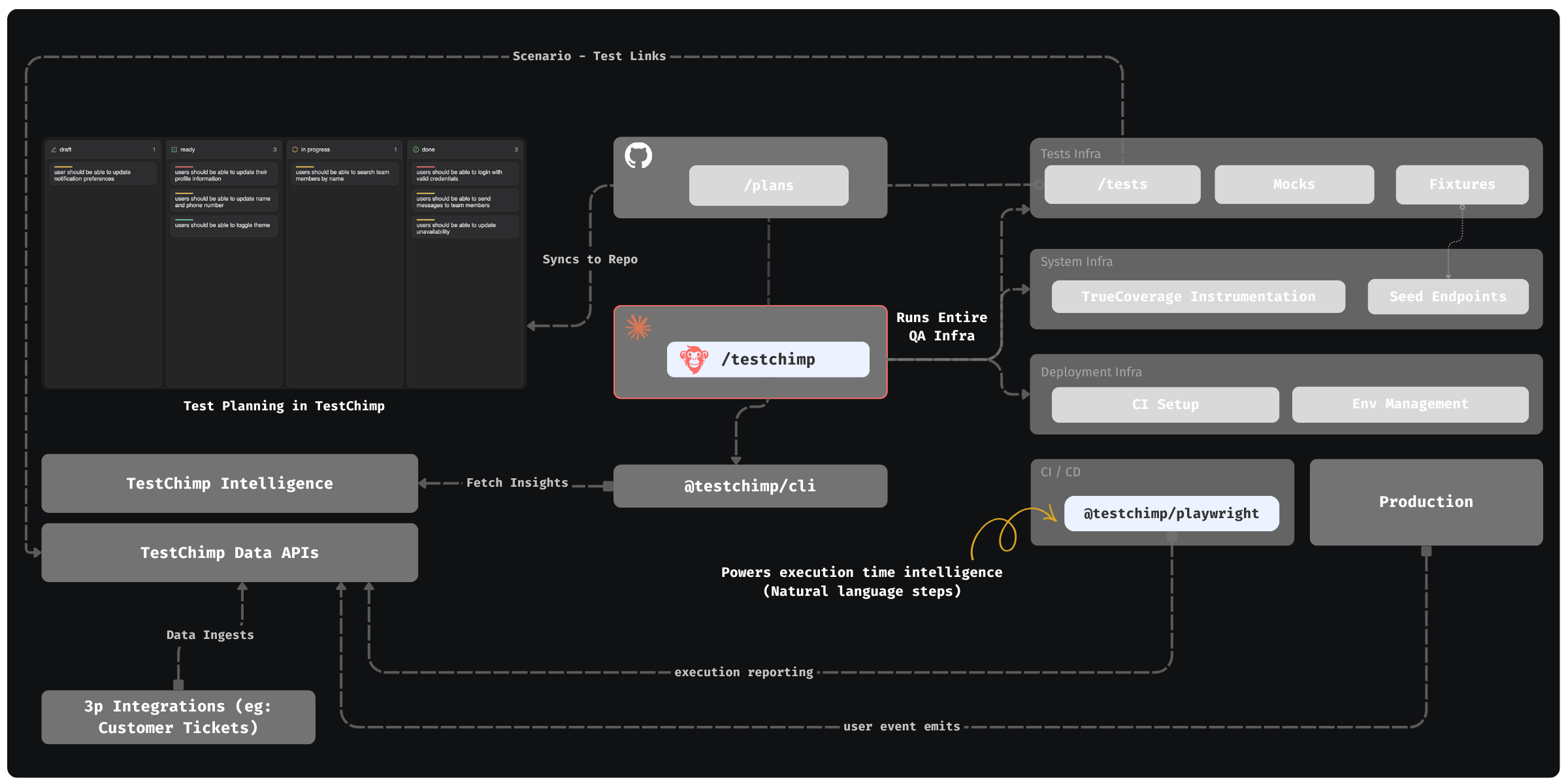
What workflows are
| Kind | Examples | Role |
|---|---|---|
| One-Off | Init, Import, Init performance testing, Import performance tests | Bootstrap workspace or migrate an existing E2E/perf suite; playbook-driven, not recurring PR loops |
| Composite | Run QA, Upkeep | One approved plan that chains subflows end-to-end |
| Atomic | Implement Requirement, Create tests, Cleanup, … | Single job you invoke on its own or as a composite subflow |
| Meta | Create policy, Skill upgrade | Author policies and keep the skill current |
Playbooks live in the TestChimp skill. Policies live in your repo under plans/knowledge/policies/*.policy.md and sync to TestChimp.
Why it matters
- Repeatable team behaviour — Policies capture env strategy, scoping, quality bars, and which composite steps to skip—so agents do not re-negotiate the same choices every PR.
- Auditability — Every mutative agent action can report the policy file + version and a stable
workflow_execution_id, visible on the Workflows execution timeline. - Optimization — Keep a default policy and try variants (
--policy run-qa-smoke.policy.md) for smoke vs full, staging vs ephemeral, or stricter quality gates without forking the skill. - Project and team overrides — Same playbooks, different policies per project (or alternate files for special runs).
Set up a local workspace
- Project-local MCP — Add MCP config for
@testchimp/cliunder the project (for example Cursor:<project>/.cursor/mcp.json), withTESTCHIMP_API_KEYfor that TestChimp project—not only a global user config. - Install the skill — Clone testchimp-skills into your agent skills directory (for example
~/.cursor/skills/testchimpor.cursor/skills/testchimp). Keep.gitso you cangit pullor run/testchimp skill upgrade. - Map Git folders — In TestChimp → Project settings → Integrations → Git, map plans and tests folders and sync markers (
.testchimp-plans,.testchimp-tests). See Code repository overview. - Bootstrap — Run
/testchimp initonce to wire Playwright/reporter, fixtures, seeds, CI, default policies, and environment strategy.
The in-product Workflows list also walks through MCP + install + init for the current project.
Invoking workflows
Use a slash command or natural language. The skill routes to the matching playbook.
Examples:
/testchimp init
/testchimp import existing tests e2e
/testchimp import-perf-tests locust
/testchimp run QA
/testchimp test plans/stories/billing
/testchimp implement US-181
/testchimp upkeep
/testchimp evolve --policy upkeep-weekly.policy.md
/testchimp create tests for checkout
/testchimp init-perf
/testchimp run performance tests for release 1.2.0
/testchimp connect to test environment
Synonyms (same catalog workflow):
| You say | Catalog id |
|---|---|
/testchimp test, /testchimp run QA | run-qa |
/testchimp evolve, /testchimp upkeep, legacy audit | upkeep |
/testchimp explore, /testchimp run explorechimp | run-explorechimp |
/testchimp implement, /testchimp implement <story/scenario id> | implement |
/testchimp import, /testchimp import existing tests <folder> | import |
/testchimp import-perf-tests, /testchimp import perf tests <folder> | import-perf-tests |
/testchimp init-perf | init-perf |
/testchimp create-perf-tests, /testchimp create performance tests | create-perf-tests |
/testchimp run-perf-tests, /testchimp run perf, /testchimp run performance tests for release <label> | run-perf-tests |
/testchimp upkeep-perf, /testchimp maintain performance tests | upkeep-perf |
Prefer MCP tools when available; CLI is the fallback after the skill preamble.
Policies
A policy answers: how should this workflow run for us? Playbooks stay generic; policies hold project choices (scoping, env, subflow order, quality bar, exclusions).
Location: plans/knowledge/policies/*.policy.md
Required frontmatter:
---
workflow-id: run-qa
version: 1.0.0
---
Bump version whenever guidance changes so report-agent-action stays meaningful.
Resolution order:
- Explicit
--policy/POLICY_FILE <workflow-id>.policy.md- Other
*.policy.mdwith matchingworkflow-id - Fallback: decisions in
plans/knowledge/ai-test-instructions.md
Init seeds default run-qa.policy.md and upkeep.policy.md when missing. connect-to-test-env requires its own policy (not auto-seeded)—many automation workflows stay Missing config until it exists.
Author or update policies with /testchimp create policy <workflow-id>, then upsert-policy so the platform has them immediately (git push also syncs later).
Policy use cases
- Team-specific overrides — Skip ExploreChimp in run-qa, pin staging URLs, forbid certain refactors while fixing flakes.
- Trying alternate policies — Smoke vs full composites, weekly upkeep with broader cleanup, staging-only connect policy via
--policy …. - Environment gate — Encode feature-branch / default-branch / CI connect rules so every dependent workflow reuses one source of truth.
Traceability
For Plan → approve → Execute runs:
- During Plan, mint one ULID as
workflow_execution_idand keep it for the whole run. - After mutative actions, call
report-agent-actionwithworkflow_id,workflow_execution_id,policy_file/policy_version,git_sha, actor, branch, and entity identity. - End with
ACTION_COMPLETEDorACTION_FAILED.
The Workflows UI shows policy file + version on the execution timeline. That is how you compare runs when optimizing policies or debugging unexpected agent behaviour.
Scope when unspecified
Applies to all optional-scope workflows (composites share one scope for the whole run):
- Explicit scope in the prompt → use it.
- Else feature / PR branch → changes vs merge base / default branch.
- Else default branch → changes since the last run of that workflow (
get-last-run-workflow-detail); if missing or ambiguous → ask for a history window.
Policy ### Scoping Rules may narrow scope, not contradict this rule.
Requires explicit identity (no auto-scope): requirement quality checks, fix test execution, fix issue, run release check, create policy (needs a workflow id).
Init-perf and import-perf-tests are One-Off (no auto-scope). Create / run / upkeep-perf follow the optional-scope rule above; a named release on run-perf-tests overrides branch tip with that release’s git range.
Performance testing workflows
k6 performance testing has its own catalog workflows. They do not run inside /testchimp test. Keep functional smoke fast; invoke perf on purpose—after a PR, when a release is cut, or on an upkeep cadence.
Requires org capability PERFORMANCE_TESTING (Growth plan / free trial). Without it, these workflows are N/A and do not scaffold a suite you cannot run. Product background: Performance Testing.
When to use which
| Situation | Workflow | Why |
|---|---|---|
| First time enabling k6 in this repo | init-perf | Scaffolds k6/, Playwright testIgnore, reporter, and policies. Smoke inspect only—no load until you approve capacity. |
| You already have Locust / JMeter / Gatling / Artillery / k6 elsewhere | import-perf-tests | Moves or translates into k6/ with scenario links and tags. Nested under init-perf when that suite is discovered. |
| A PR (or last-run delta) needs new journey files | create-perf-tests | Authors scenario-linked journeys. Composite membership is an explicit prompt. |
| Run related journeys for this change, or for a release | run-perf-tests | Script-first execute + ingest. Release prompt uses prior SHA → cut SHA and may nest create if coverage is insufficient. |
| Suite drifted (stale links, composites, thresholds, mocks) | upkeep-perf | Maintain the k6 catalog. Does not silently raise VUs or weaken SLOs. |
How to use them (typical sequences)
First enablement
/testchimp init-perf
Approve the plan. If the agent finds an existing perf suite outside k6/, it offers nested import-perf-tests in the same approval. Fill capacity placeholders in run-perf-tests.policy.md before any non-smoke run. You still need connect-to-test-env.
After a PR — author then run (or run only)
/testchimp create-perf-tests
/testchimp run-perf-tests
- Create when the diff has no matching journey (new checkout path, new operation tags). Scope is optional: feature branch → the diff; or name
for checkout. - Run when journeys already exist and you want related k6 executed and compared. Omit scope to use the branch change set. Results land in Executions.
You can run without create. You can create without immediately running load (smoke-first is the default while authoring).
When a release is cut
/testchimp run performance tests for release 1.2.0
Copied from the release page Run performance tests CTA. The agent uses prior release SHA → cut SHA (not your working-tree branch), stamps TESTCHIMP_RELEASE, and asks before nesting create-perf-tests if the cut is uncovered. Automation recipe.
Periodic maintenance
/testchimp upkeep-perf
Analogous to /testchimp upkeep for SmartTests. Use it when APIs, scenarios, or composite mixes have moved—not as a substitute for a PR-related run.
What they will not do
- Fold k6 into Run QA or Smart Smoke.
- Copy production RPS / TrueCoverage rates into absolute VUs, duration, or dataset size.
- Add a journey to a composite without an explicit membership/weight approval.
- Treat a missing baseline as a pass, or weaken thresholds to make compare green.
Each workflow’s playbook page below is the operational reference (prompts, policy files, prerequisites). The product section explains k6 layout and reading comparisons.
Platform scope (web / iOS / Android) is deduced separately when multi-platform; ask if ambiguous.
Catalog (by platform section)
Same sections and order as the in-product Workflows catalog (Composite → … → Test Environment Management → One-Off → Meta).
Composite
Requirement Planning
Development
- Implement Requirement —
/testchimp implement <story / scenario id>
Functional Testing
UX / Security Testing
Performance Testing
See Performance testing workflows for when and how. Catalog:
- Create performance tests —
/testchimp create-perf-tests - Run performance tests —
/testchimp run-perf-tests/run performance tests for release <label> - Upkeep performance tests —
/testchimp upkeep-perf
Issue Management
TrueCoverage
Test Environment Management
One-Off
- Init —
/testchimp init - Import existing tests —
/testchimp import existing tests <folder> - Init performance testing —
/testchimp init-perf - Import performance tests —
/testchimp import-perf-tests <folder>
Meta
Supporting docs
/testchimp init— Bootstrap infra and default policies/testchimp import— Migrate an existing E2E suite into SmartTests/testchimp import-perf-tests— Migrate existing Locust/k6/JMeter suites intok6/- Performance Testing — k6 journeys, authoring workflows, and comparable runs
- TestChimp approach to test automation — Hybrid Playwright + agentic strategy
- Playwright runtime plugin —
@testchimp/playwrightreporter and AI steps - Automations — Event-driven cloud agent runs of the same catalog workflows
FAQ
What is the TestChimp skill?
The TestChimp skill teaches Claude /testchimp init, test, evolve, explore, and audit workflows plus MCP access to TestChimp APIs for plans, coverage, and bugs.
What does /testchimp test do on a PR?
It scopes QA to the PR, updates seeds and fixtures, authors or fixes SmartTests, links scenarios, optionally runs ExploreChimp, and prepares CI-ready Playwright assets.
Does /testchimp test run performance tests?
No. k6 has its own catalog: init-perf, import-perf-tests, create-perf-tests, run-perf-tests, and upkeep-perf. Use run-perf-tests after a PR or for a named release.
Which performance workflow should I run after a PR vs a release?
After a PR, create-perf-tests if journeys are missing, then run-perf-tests for related k6. For a cut, run performance tests for release <label>—prior SHA to cut SHA, with an ask to author if coverage is insufficient.
How does TrueCoverage fit the autopilot loop?
Production and test-run user events share one taxonomy so agents prioritize high-demand, high-drop-off paths that lack automated coverage.
Can humans stay in control?
Yes—teams own intent via markdown plans and review PRs; agents handle execution, infra upkeep, and gap analysis.