Playwright TestChimp runtime (@testchimp/playwright)
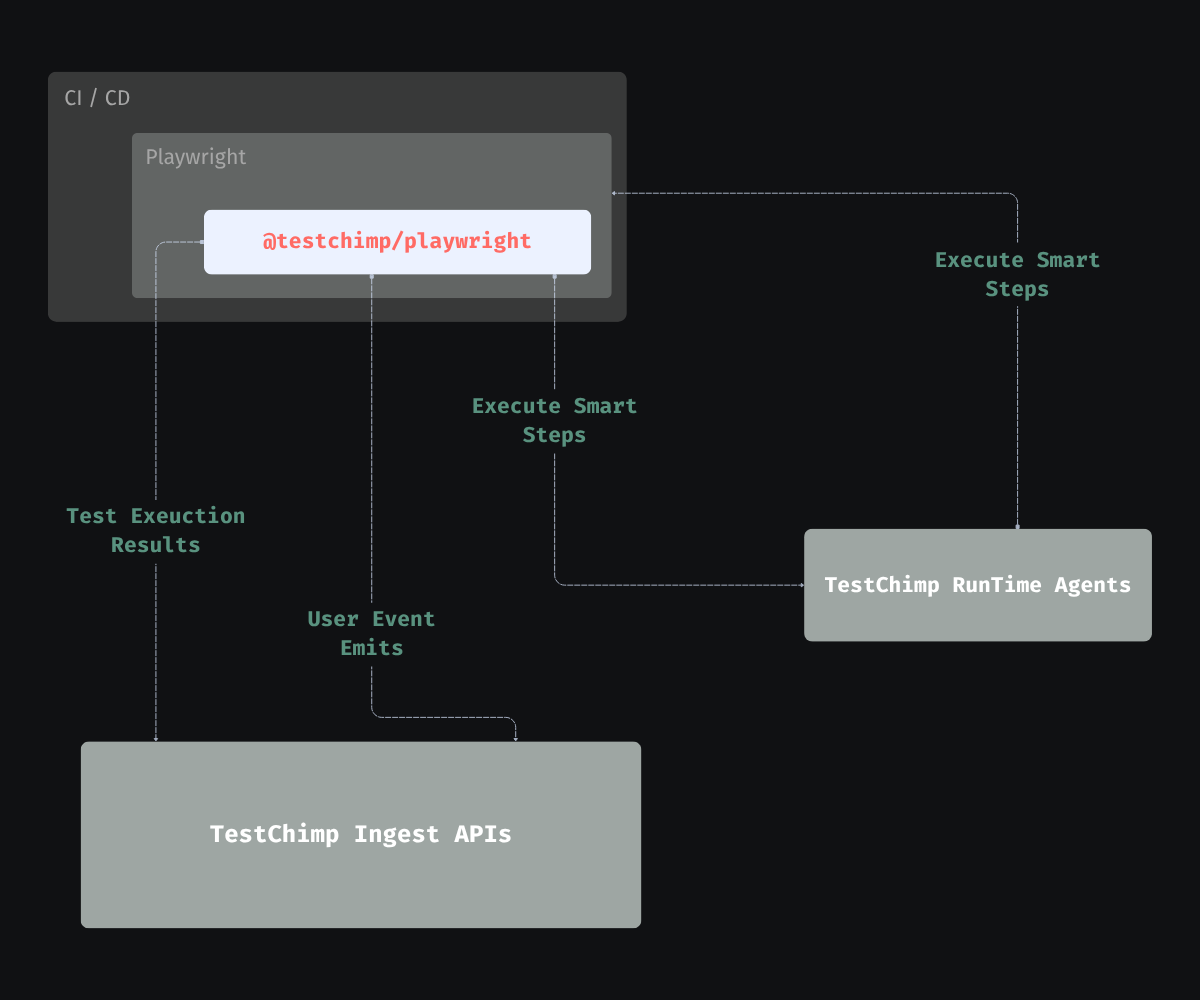
The @testchimp/playwright package is the Playwright-side bridge between your SmartTests (normal npx playwright test runs) and TestChimp. Install it during /testchimp init and keep it enabled in CI so every run feeds the same feedback loop as /testchimp test and /testchimp evolve.
What it does
1. Report test execution to TestChimp
The reporter collects pass/fail, steps, errors, timing, and (when configured) screenshots for failing steps. That data powers execution history, QA intelligence dashboards, and traceability between runs, files, and scenarios—without replacing the Playwright CLI or your CI runner.
See the published package: @testchimp/playwright on npm.
2. Augment user events with test identity (TrueCoverage)
If your app emits RUM events (web: @testchimp/rum-js; iOS / Android: testchimp-rum-ios, testchimp-rum-android), the runtime ensures events produced during automated runs carry test / run context—page injection on web and automation deep links on native when TESTCHIMP_PROJECT_TYPE is ios or android—so TestChimp can correlate them with production traffic on the same event taxonomy. Setup: Instrumenting your app.
That alignment is what makes TrueCoverage useful: you compare what users do to what tests exercise, not just “did this test file pass.”
3. Execute natural-language steps in the runner
SmartTests can include AI-native steps (ai.act, ai.verify, ai.extract, …). The reporter coordinates those steps with TestChimp backends so they execute wherever you run Playwright (local, CI, preview)—execution-time intelligence in the script, not only at authoring time.
For authoring patterns, see Smart Tests and /testchimp test.
4. ExploreChimp (optional UX analytics)
When EXPLORECHIMP_ENABLED is set and the batch id / API key are present, the runtime sends checkpointed UX telemetry (DOM, screenshots, console, optional network and metrics) keyed off the markScreenState Playwright fixture—so analysis runs along the same pathways as your UI SmartTests. Pure API tests (no browser journey) are out of scope.
Use /testchimp explore for a dedicated exploration pass, or /testchimp test / /testchimp evolve when the written plan opts in. See /testchimp explore and Screen-State Annotations.
Configuration (minimal)
In playwright.config.ts (or .js), register the reporter and import the runtime module so TrueCoverage tagging and step plumbing apply:
import { defineConfig } from '@playwright/test';

// Enables runtime behaviour (e.g. test info for RUM / TrueCoverage)
import '@testchimp/playwright/runtime';

export default defineConfig({
  reporter: [
    ['list'],
    ['@testchimp/playwright/reporter', { verbose: true, reportOnlyFinalAttempt: true, captureScreenshots: true }],
  ],
});
Set TESTCHIMP_API_KEY (and any project-specific env your repo documents) in CI and local shells so the reporter can authenticate. See your repo’s @testchimp/playwright README or the npm package page for the full option list.
How this feeds TrueCoverage and evolve
- Production vs test — TrueCoverage compares real-user event streams to automation-tagged streams (often scoped so manual traffic does not inflate “covered”). The runtime’s role is to make test-origin events comparable to prod: same events, metadata, and scopes your team defined in
plans/events/and instrumentation. - Gap signals — When production stops emitting an event (or it drops sharply) but tests still drive that event, that can indicate deprecated product surface still covered by automation—a candidate for suite cleanup (always confirm with product intent before deleting tests).
- Prioritization — TrueCoverage surfaces event-level metrics (for example Demand, Depth, Duration, Drop-off) so you can prioritize where users spend time, where they abandon, and which journeys deserve new tests or exploration. You do not need to duplicate those definitions here: see How TrueCoverage metrics work and the dashboard overview.
Where this sits in the agent workflow
/testchimp init— Adds@testchimp/playwright, wires reporter + runtime import, and aligns CI env withTESTCHIMP_API_KEY./testchimp test— Authors and runs SmartTests with the reporter so results and behaviour land in TestChimp for the current PR; optional ExploreChimp in a later phase when the plan opts in./testchimp explore— Runs ExploreChimp as the primary task on selected UI specs.- This page — What the runner contributes continuously (including outside agent sessions).
/testchimp evolve— Consumes the accumulated run + RUM + plan signals to improve the whole portfolio; may include targeted ExploreChimp on high-signal UI journeys.
See also
/testchimp test— PR-scoped QA phases (optional ExploreChimp as Phase 5)./testchimp explore— Targeted ExploreChimp on chosen UI SmartTests./testchimp evolve— Scheduled or post-deploy gap closure (optional TrueCoverage-driven ExploreChimp).- TrueCoverage intro — Behaviour-aligned coverage concepts.
- Instrumenting your app — Web, iOS, and Android SDK + Playwright wiring.