DAST (Dynamic Application Security)
Short answer
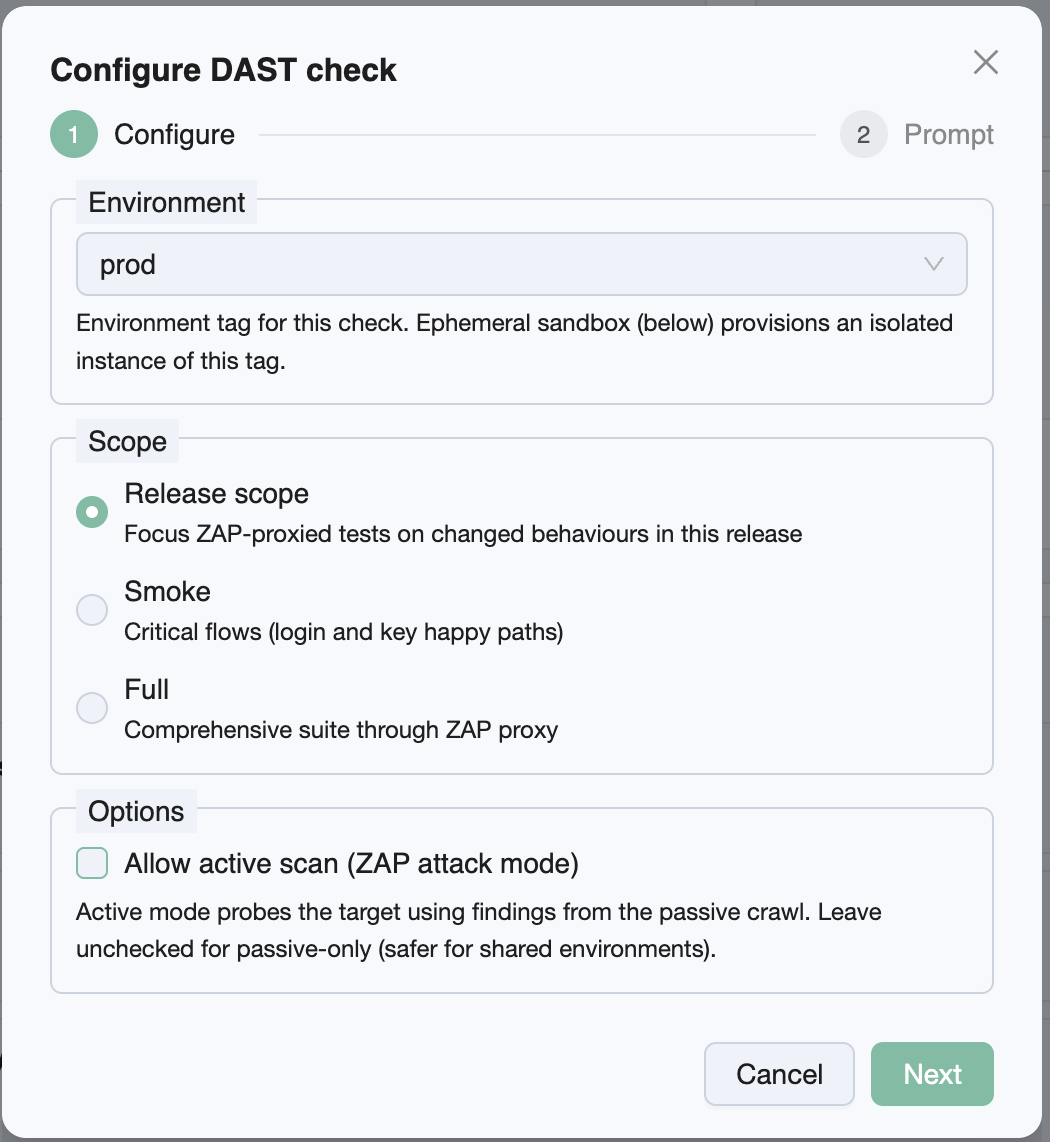
The DAST release check runs OWASP ZAP against a live environment for your release: SmartTests (or a guided walk) go through the ZAP proxy so ZAP observes real HTTP traffic. Configure environment, scope, optional active scan, and optional ephemeral sandbox. Results appear as a DAST report and issues on the release’s Release Checks list.
Why run DAST on a release
Static analysis misses issues that only appear at runtime—misconfigured headers, XSS on real responses, auth/cookie problems on live endpoints. Release-scoped DAST ties that evidence to the ship candidate: you see which environment was scanned, which automation scope drove the crawl, and which bugs belong to this version—not a free-floating CI artifact.
Use it when you want a dynamic security gate next to functional test runs on the same release page.
How it works
- From Release Checks → Run Release Check… → DAST, set configuration and submit.
- TestChimp creates a queued scan and copies a prompt such as
/testchimp run security scan for <scan_id>. - Your agent resolves the target URL (environment
.env*or Bunnyshell ephemeral), starts ZAP, runs in-scope UI automation through the proxy (passive listening; active only if you allowed it), exports Traditional JSON, and uploads viareport-dast-findings. - Open Report for ZAP alerts or View Bugs for filed issues (informational alerts are not filed as bugs).
Configuration knobs
| Knob | Options | Default | Notes |
|---|---|---|---|
| Environment | Project environment tag (e.g. QA) | Required | Used to resolve BASE_URL / suite env files when not using a sandbox |
| Scope | Release scope · Smoke · Full | Release scope | Which SmartTests / walk drive the ZAP crawl |
| Allow active scan | On / off | Off | Off = passive-only (safer). On = ZAP attack mode after passive |
| Ephemeral sandbox | On / off | Off | Only when active scan is on; requires Bunnyshell + GitHub |
Scope explained
| Scope | Behavior |
|---|---|
| Release scope | Prefer tests authored/updated in the release, or UI tests covering code changes; otherwise a guided walk of focus areas |
| Smoke | Critical happy paths only (login, primary journeys)—faster, narrower attack surface coverage |
| Full | Broader SmartTest / UI suite through the proxy—longer run |
Active scan and sandbox
Active ZAP sends attack payloads. Running that against shared QA/staging can disrupt other testers or mutate data. Prefer:
- Passive-only on shared environments, or
- Allow active scan + ephemeral sandbox so ZAP hits a short-lived Bunnyshell URL that is destroyed when the scan finishes
Until Bunnyshell and GitHub are configured for the project, the sandbox checkbox stays disabled. See DAST ephemeral sandbox.
Report and bugs
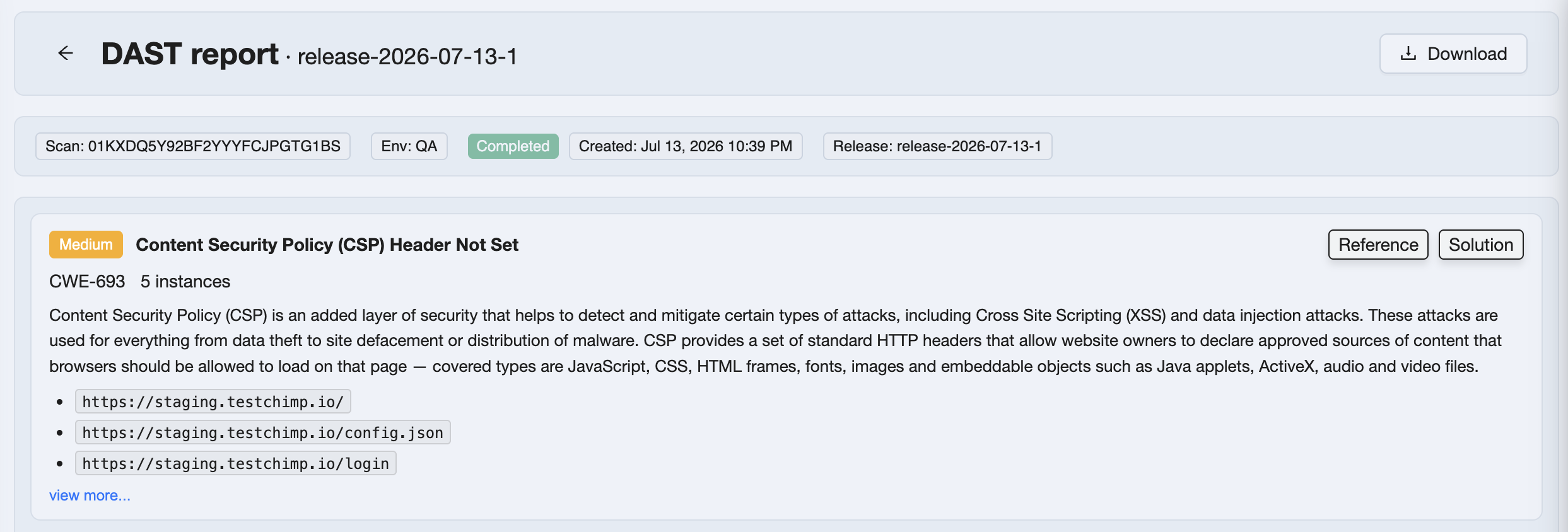
The report viewer shows ZAP alerts (risk, CWE, instance URIs, solution/reference). Non-informational findings become bugs scoped to the scan; duplicate hashes already present project-wide are skipped, but the raw report is still stored for audit.
From the Release Checks row: Report opens this viewer; View Bugs opens Issues filtered to the scan.
Prerequisites
- Release Checks access on a release with enough context for your chosen scope
- Agent with TestChimp skill/CLI and OWASP ZAP (local install or Docker daemon)
- Environment URL resolveable for the chosen tag (or sandbox configured for active+ephemeral)
@testchimp/clirecent enough for security scan helpers (get-security-scan-config,report-dast-findings, etc.)
Related documentation
- Release Checks overview
- SAST · Secrets · Dependency scan · UX Checks
- Bunnyshell integration
- How issues get created
- Release management
Frequently asked questions
What is the DAST release check in TestChimp?
It is a Release Check that runs OWASP ZAP against a live environment for a ship candidate. UI automation is proxied through ZAP so the scanner observes real traffic. Findings appear as a DAST report and bugs on the release detail page.
What is the difference between passive and active DAST?
Passive mode only observes traffic generated by your SmartTests or walk—safer on shared environments. Active mode additionally probes discovered URLs with attack payloads. Active scan is off by default; use it with an ephemeral Bunnyshell sandbox when possible.
What DAST scope should I choose?
Release scope focuses crawls on tests and areas related to the release delta. Smoke limits to critical paths for a faster gate. Full runs a broader UI suite through ZAP for deeper coverage at the cost of runtime.
When should I use the DAST ephemeral sandbox?
Enable it with Allow active scan when you want attack-mode ZAP without hitting shared QA or staging. TestChimp provisions a Bunnyshell environment for the scan and destroys it afterward. Requires Bunnyshell and GitHub integration.
How do I start a DAST scan from a release?
Open Release Checks, choose DAST, set environment, scope, and active/sandbox options, then paste the copied /testchimp run security scan for scan_id prompt into your agent. When complete, open Report or View Bugs from the list row.
Are informational ZAP alerts turned into bugs?
No. Informational alerts can appear in the stored report for audit, but TestChimp does not file them as issues. Non-informational alerts become bugs unless a duplicate hash already exists project-wide.
Add a dynamic security gate to every release
Queue DAST from Release Checks, run ZAP with your agent, and triage the report next to functional evidence on the same ship candidate.