Dependency Scan
Short answer
The Dependency release check runs Trivy filesystem vulnerability scanning for your release. Default scope is release dependencies—new CVEs relative to a baseline—or scan the full dependency tree. Tune security profile and ignore unfixed vulns. Results appear on Release Checks with a report and issues.
Why run dependency scans on a release
Package upgrades can introduce known CVEs without changing your application code. A release-scoped dependency check answers: which new vulnerable packages did this candidate add? Full-tree mode is useful for periodic inventory. Putting Trivy on the release page keeps supply-chain risk next to functional and other security gates.
How it works
- Release Checks → Run Release Check… → Dependency Scan → set scope, profile, ignore-unfixed, and baseline when needed.
- Agent runs
trivy fs --scanners vuln --format jsonon relevant directories. For release mode, it focuses on changed manifest/lockfile paths and diffs findings against a baseline snapshot so only new vulns are kept for the gate. - Server re-applies profile and ignore-unfixed filters when filing bugs. The Report viewer may still list more findings than became issues.
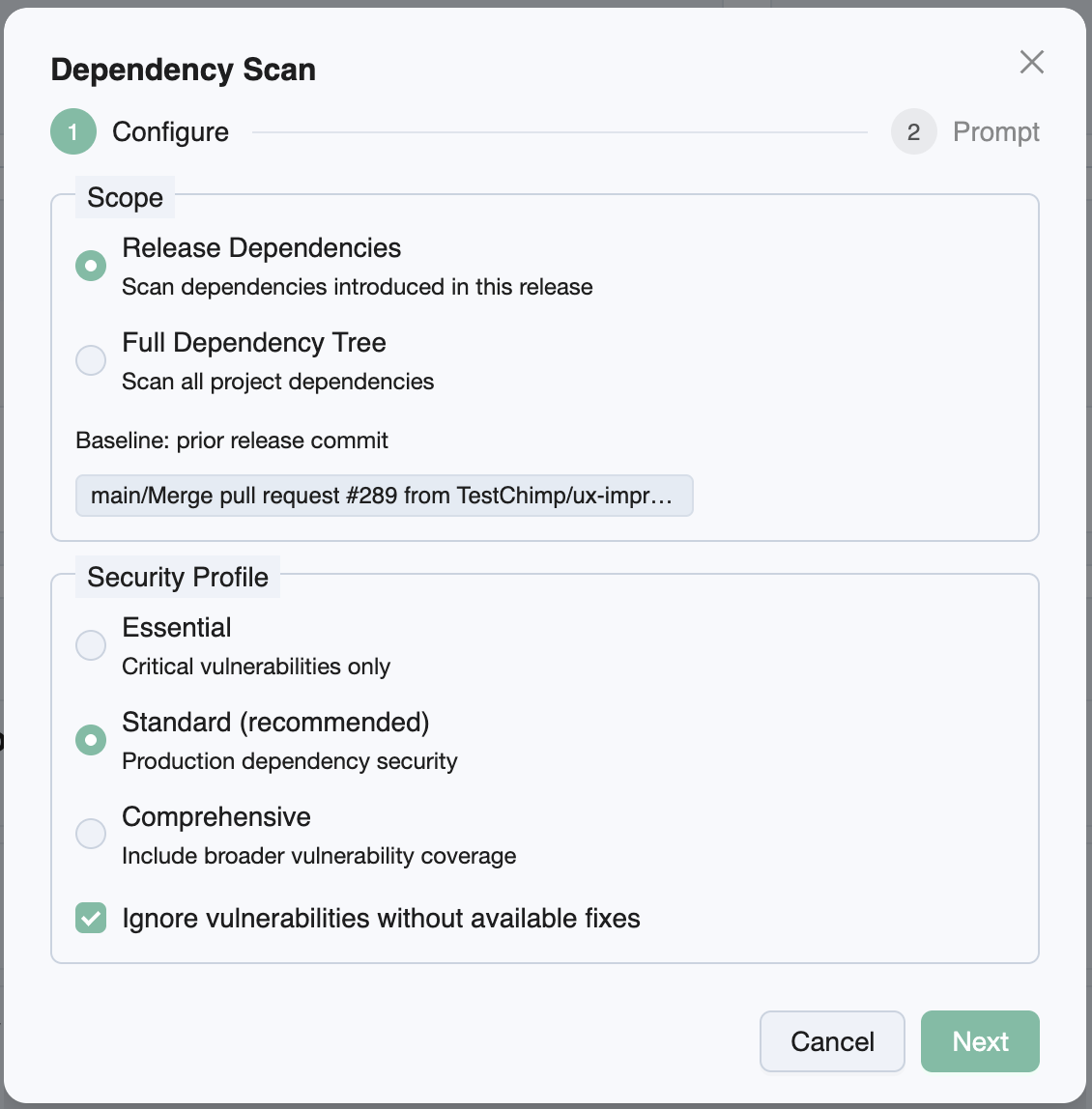
Configuration knobs
| Knob | Options | Default | Notes |
|---|---|---|---|
| Scope | Release dependencies · Full dependency tree | Release dependencies | Release mode needs a baseline |
| Security profile | Essential · Standard · Comprehensive | Standard | Severity bands for bugs / Trivy |
| Ignore vulnerabilities without available fixes | On / off | On | Maps to Trivy --ignore-unfixed |
| Baseline commit | Prior release SHA or picker | Prior release when available | Required for release dependencies |
Security profiles
| Profile | Severities included |
|---|---|
| Essential | Critical |
| Standard | High + Critical |
| Comprehensive | Low + Medium + High + Critical (+ unknown where applicable) |
Release vs full tree
| Scope | Behavior |
|---|---|
| Release dependencies | Watch changed manifests/lockfiles since baseline (npm/yarn/pnpm, Maven, Gradle, Python, Go, Cargo, Gem, Composer, .NET, and similar). Diff vs baseline so only newly introduced vulns drive the gate. No matching changes → empty report, still Completed. |
| Full dependency tree | Scan the project tree without the release diff filter |
Report and bugs
The report shows CVE id, package, installed/fixed versions, and scan target. View Bugs opens Issues for the scan. Prefer treating the filed bugs (profile-filtered) as the ship gate; use the full report for audit depth.
Trivy findings with exit code 1 are still reported successfully by the agent playbook.
Prerequisites
- Baseline commit available for release-scoped mode
- Trivy on the agent machine
- TestChimp skill/CLI with dependency report helpers
- Lockfiles/manifests present for ecosystems you use
Related documentation
Frequently asked questions
What is the dependency release check in TestChimp?
It runs Trivy vulnerability scanning on dependency manifests and lockfiles from the release detail page. You can focus on new CVEs since a baseline or scan the full dependency tree, with severity profiles and an option to ignore vulns that have no fix.
What does release dependencies scope mean?
Release dependencies examines dependency files changed since the baseline, then keeps findings that are new relative to that baseline—so the gate highlights supply-chain risk introduced by this ship candidate. If no manifests changed, an empty completed report is valid.
What is the Standard security profile?
Standard includes High and Critical severities (the default). Essential is Critical-only. Comprehensive includes Low through Critical (and unknown where applicable). Profiles filter bugs on ingest; the report may still show a wider set.
Why ignore vulnerabilities without available fixes?
When enabled (default), Trivy uses --ignore-unfixed so findings without a known fixed version are deprioritized for the ship gate. Turn it off when you want visibility into unfixed CVEs for tracking or compensating controls.
Why might the dependency report show more than View Bugs?
Server ingest re-filters by your security profile and ignore-unfixed setting when filing issues. The stored Trivy JSON can include additional findings for audit while bugs reflect the configured gate.
How do I run a dependency scan from a release?
Open Release Checks, choose Dependency Scan, set knobs, then paste /testchimp run security scan for scan_id into your agent. When Completed, open Report or View Bugs from the row.
Catch supply-chain CVEs on the ship candidate
Queue Trivy from Release Checks, run it with your agent, and review new dependency vulns next to your other release gates.