Release Intelligence
Short answer
Release intelligence is TestChimp's analytics layer on top of a release: not just how many tests passed, but what changed, what requirements are covered, what ExploreChimp found, and whether TrueCoverage instrumentation shifted. It compares the current release commit range to the prior release on the same branch lineage and respects your selected environment for execution-scoped panels.
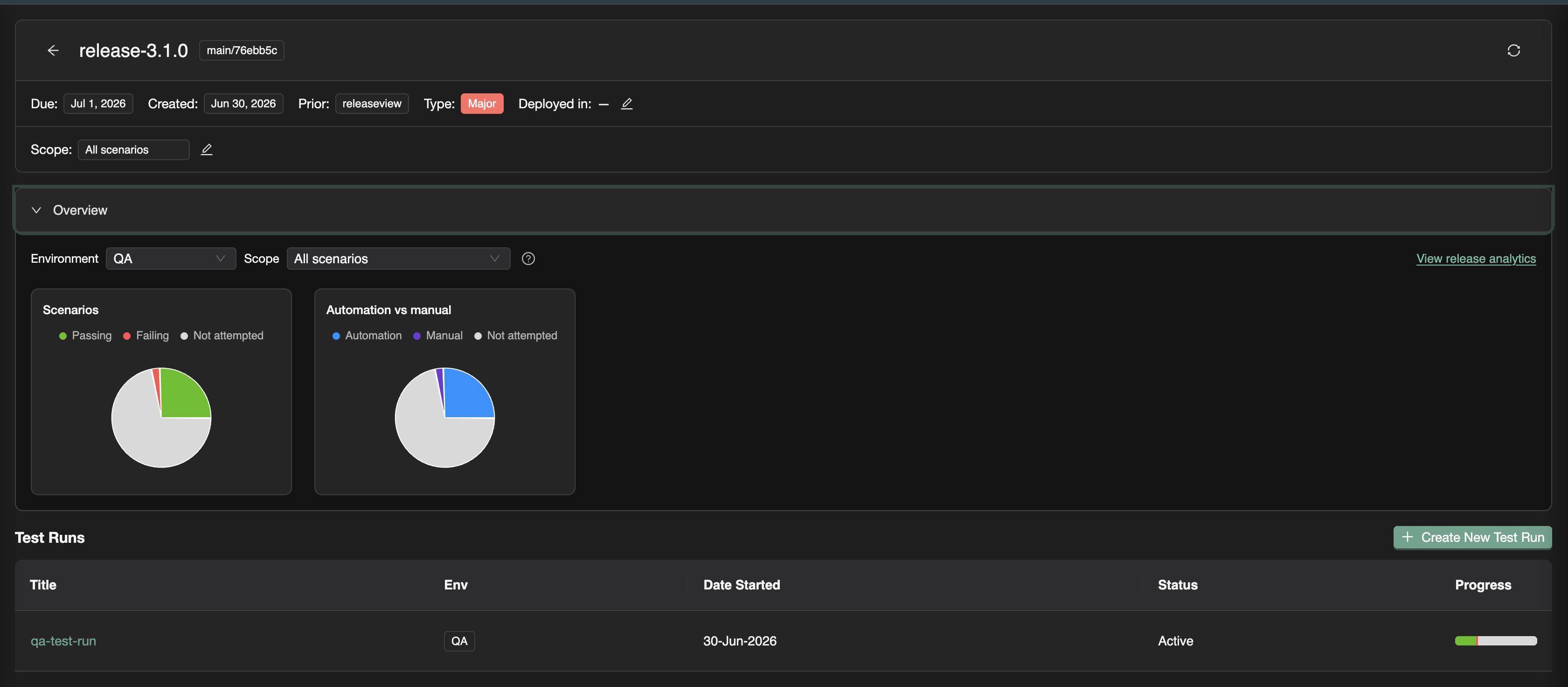
Open a release and choose View release analytics from the overview panel, or navigate to the release analytics route for that version. Intelligence panels live in an accordion; use Refresh release data in the header to recompute delta stats after new commits, linked batches, or manual sessions.
Environment scoping
Most execution-backed panels filter by environment (QA, Staging, Production, and so on). Stats and coverage reflect test runs and automation executions for this release in the selected environment.
Manual results count when linked to a named test run on this release. Automation batches count when their release tag matches this version, or when linked to a test run on this release (linking also updates the batch release tag). Last execution wins per scenario when aggregating pass/fail status.
Set the environment selector before interpreting overview or coverage numbers—comparing staging progress to production-tagged batches leads to false gaps.
Overview (release viewer)
The Overview collapse on the main release viewer (not the analytics page) gives a fast readiness pulse:
| Chart | Meaning |
|---|---|
| Scenarios | Passing / failing / not attempted for in-scope scenarios |
| Automation vs manual | How much evidence came from CI vs captured manual sessions |
Scope toggle:
| Mode | When to use |
|---|---|
| All scenarios | Full regression readout across the plan |
| Limit to new scenarios | Focus on scenarios tied to SmartTests added in this release |
| All scenarios in release scope | Respect release focus areas—only folders you marked in scope for this version |
Use Overview in standups and release channel updates. Drill into analytics when you need requirement-level detail or commit-scoped deltas.
Requirement coverage
The Requirement coverage panel maps user stories and test scenarios to linked executions on this release.
| Feature | Purpose |
|---|---|
| Plan folder explorer | Same stories/scenarios tree as Test Planning—drill into a module |
| Story and scenario lists | Coverage squares per scenario; click to open execution history |
| Limit to release scope | Checkbox to filter to release focus areas only |
When to use it: answering "are the requirements we promised for this release actually validated?"—especially for compliance, customer commitments, or feature-flagged launches.
Coverage status uses executions linked to test runs on this release, plus automation batches stamped with this release version. This is stricter than global traceability over all time—it reflects what was tested for this candidate.
Release delta analytics
Release delta analytics summarizes what changed in the repository between the prior release commit and the current release commit.
Summary strip
Counts use added (+), updated (~), and deleted (−) badges:
| Row | Tracks |
|---|---|
| Tests | SmartTest files changed in the commit range |
| Stories | User story markdown files changed |
| Scenarios | Test scenario markdown files changed |
A large scenarios added count with low coverage in Overview signals plan work that may not yet be validated.
Commit graph
An interactive commit graph shows commits between releases. Click a commit node to open commit insights—per-commit deltas for tests, stories, and scenarios. Use this to ask: "Which commit introduced plan changes we have not regression-tested?"
Delta analytics are persisted on the release payload after Refresh release data. If the panel is empty, refresh from the release header and ensure both current and prior releases have git commit SHAs set.
When to use it: release managers and tech leads assessing scope risk—code and plan churn without matching test evidence.
ExploreChimp findings
The ExploreChimp findings panel surfaces exploratory QA activity in the release commit range.
Activity stats
| Stat | Meaning |
|---|---|
| Explorations | ExploreChimp exploration runs started in the commit range |
| Journey executions | Journey runs executed in the range |
Activity counts include all environments for commits in the range.
Discovery stats
| Stat | Meaning |
|---|---|
| New screens | Atlas screens first seen in this range |
| New screen states | New states discovered on existing screens |
| New bugs | Bugs filed from exploratory work in the range |
Links open Atlas filtered to the release environment and commit range—inspect new UI surface area or triage bugs before ship.
Bugs by category
A chart breaks down bugs found in the range by category (severity/type grouping from your bug taxonomy). Complements functional test-run pass rates with UX and exploratory risk.
When to use it: after feature-heavy releases where automated scenarios pass but new UI or edge-path exploration may have found issues CI did not cover.
TrueCoverage
The TrueCoverage panel tracks changes to RUM event definitions (plans/events/*.event.md) between the prior and current release commits.
| Element | Purpose |
|---|---|
| Events added / updated counts | How much instrumentation changed |
| Event table | Each changed definition with path and change type |
| Metadata preview | Hover a row to preview metadata keys and values defined for prod vs test alignment |
When to use it: before deploy when engineers added or renamed analytics events. If event slices shift without updated SmartTests or scenarios, TrueCoverage prod-vs-test comparisons may show false gaps—or miss real ones.
TrueCoverage stats are computed together with delta refresh (compared to the prior release). No separate sync step.
Refresh release data
Click Refresh release data in the release header to:
- Recompute release delta (summary, commit graph, ExploreChimp stats, TrueCoverage stats)
- Reload test runs on the release
- Bump internal refresh keys so coverage and batch panels reload
Run refresh after:
- Linking new automation batches or manual sessions
- Updating the release git commit SHA
- Merging plan or test changes you expect to appear in delta analytics
How panels work together
| If you see… | Investigate… |
|---|---|
| Scenarios added in delta, high not attempted in Overview | Add scenarios to a test run; run manual or CI coverage |
| Coverage gaps in focus areas | Manual capture or link CI batches |
| New screens/states in ExploreChimp | Atlas review; add scenarios or SmartTests for new paths |
| TrueCoverage events updated | Align tests and evolve from prod gaps |
| Failing scenarios with linked evidence | Open execution history; fix or waive with documented reason |
| p95 or 5xx worse than the prior cut | Open the release Performance Tests panel; overlay the last comparable run (regression testing) |
Related documentation
- Release management overview
- Release Checks — UX and security scanners on the ship candidate
- UX Checks — ExploreChimp targeted to a release
- Test runs
- Requirement traceability
- ExploreChimp
- TrueCoverage
- Performance testing · Compare load runs across releases
Frequently asked questions
What is release intelligence in TestChimp?
Release intelligence is the analytics layer on a release: overview pass/fail metrics, requirement coverage tied to linked executions, release delta analytics (plan and test file changes plus a commit graph), ExploreChimp exploratory findings, and TrueCoverage event definition changes—all scoped between the prior and current release commits.
How do I refresh release analytics?
Click Refresh release data in the release header. This recomputes delta analytics, ExploreChimp and TrueCoverage stats, and reloads test runs and dependent panels. Run it after linking new batches, capturing manual sessions, or updating the release commit SHA.
Why does requirement coverage on a release differ from Test Planning traceability?
Release requirement coverage counts executions linked to test runs on this release (or automation batches tagged with this version). Test Planning traceability can show broader historical coverage. Release coverage answers what was validated for this specific ship candidate.
What does the release commit graph show?
It visualizes commits between the prior release SHA and the current release SHA. Click a commit to see per-commit deltas for tests, stories, and scenarios—useful for finding plan or test changes that landed without matching validation.
When should I check TrueCoverage on a release?
Check when engineers changed plans/events/*.event.md files in the release range. Updated metadata slices affect prod-vs-test alignment. Catch instrumentation drift before deploy so coverage intelligence stays trustworthy.
See what changed—and what was tested
Open a release, refresh delta analytics, and review coverage and ExploreChimp findings before you ship.