SAST (Static Code Checks)
Short answer
The SAST release check runs Semgrep on source for your release. Choose release-scoped (only new findings since a baseline commit) or full repository, pick a rules pack and severities, then run via /testchimp run security scan for <scan_id>. Results land as a SAST report and issues on Release Checks.
Why run SAST on a release
Runtime tests and DAST cover behavior; SAST catches insecure patterns in code before or alongside those runs—injection sinks, weak crypto, dangerous APIs, OWASP-aligned rules. Release-scoped mode answers: what security findings did this candidate introduce? Full-repo mode is useful for a deeper baseline or audit pass.
How it works
- Release Checks → Run Release Check… → SAST → configure scope, rules, severities (and baseline if needed).
- Agent runs
semgrep scan --jsonwith the selected configs (and--baseline-commitwhen release-scoped), then uploads withreport-sast-findings. - Server maps Semgrep severity to bug severity and keeps only selected severities when filing issues. The full JSON remains in the report.
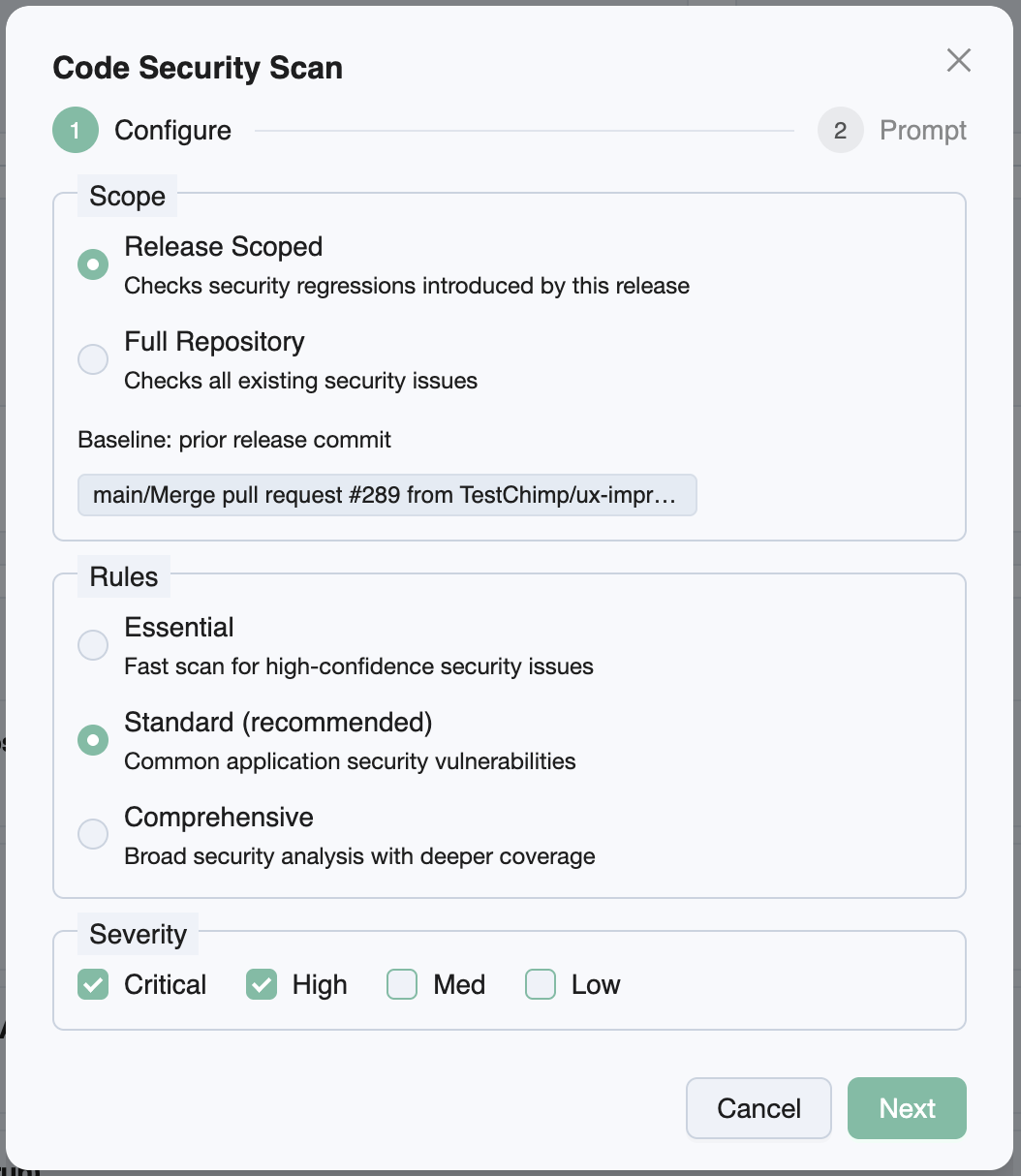
Configuration knobs
| Knob | Options | Default | Notes |
|---|---|---|---|
| Scope | Release scoped · Full repository | Release scoped | Release scoped needs a baseline commit |
| Rules | Essential · Standard · Comprehensive | Standard | Semgrep registry pack sets |
| Severities | Critical / High / Medium / Low | Critical + High | Controls which findings become bugs |
| Baseline commit | Prior release SHA or picker | Prior release when available | Required for release-scoped; UI picks if prior SHA is missing |
Rules packs
| Rules | Semgrep configs |
|---|---|
| Essential | p/default |
| Standard | p/default + p/owasp-top-ten |
| Comprehensive | Standard packs + p/security-audit + p/cwe-top-25 |
Scope and baseline
Release scoped uses Semgrep --baseline-commit so only findings new relative to the baseline are emphasized for the ship gate. If the prior release has no linked commit SHA, pick a baseline in the wizard before submit.
Full repository omits the baseline and reports against the whole tree (subject to severity filters on ingest).
Report and bugs
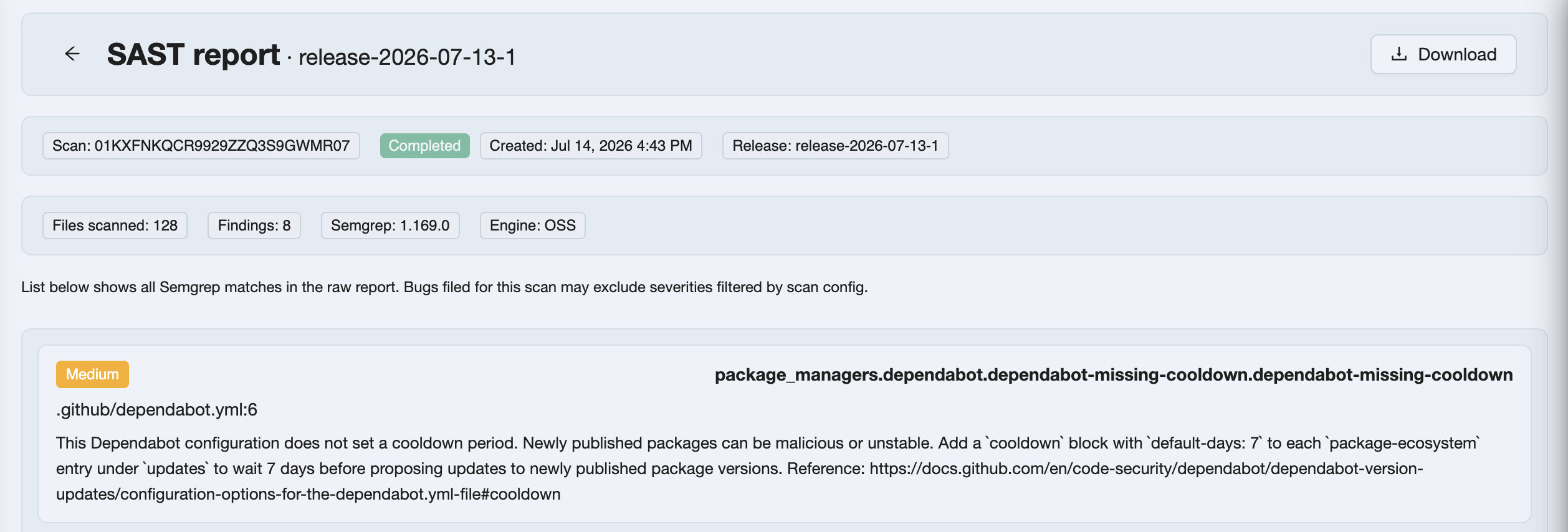
The report lists findings (check id, path, line, severity) plus scan stats. View Bugs opens Issues for the scan. Findings below your selected severities may still appear in the raw report but are filtered when filing bugs (skipped_filtered).
Semgrep exit code 1 when findings exist is treated as success for the check—the agent still uploads the report and marks the scan Completed.
Prerequisites
- Git history deep enough for the baseline commit (agents may deepen/fetch as needed)
- Semgrep on the agent machine (
brew/pipx/pip) - TestChimp skill/CLI with SAST report helpers
Related documentation
- Release Checks overview
- DAST · Secrets · Dependency scan · UX Checks
- How issues get created
- Release management
Frequently asked questions
What is the SAST release check in TestChimp?
It runs Semgrep static analysis for a ship candidate from the release detail page. You choose release-scoped or full-repository scope, a rules pack, and severities. Findings upload as a Semgrep report and filtered bugs on Release Checks.
What does release-scoped SAST mean?
Release-scoped SAST uses Semgrep --baseline-commit so the check focuses on findings new since the baseline (typically the prior release commit). Full repository scans the tree without that baseline filter.
Which Semgrep rules does TestChimp use?
Essential uses p/default. Standard adds p/owasp-top-ten. Comprehensive adds p/security-audit and p/cwe-top-25. Standard is the default for release checks.
Why are some Semgrep findings in the report but not filed as bugs?
Severity checkboxes on the SAST config control which severities become issues. The stored report can still include the broader Semgrep JSON; ingest filters by your selection. Duplicate bug hashes already in the project are also skipped.
Do I need a baseline commit for SAST?
Yes when scope is release-scoped. TestChimp uses the prior release SHA when available; otherwise the config wizard asks you to pick a commit. Full-repository scope does not require a baseline.
How do I run SAST from a release?
Open Release Checks, choose SAST, set knobs, then paste /testchimp run security scan for scan_id into your agent. When Completed, open Report or View Bugs from the row.
Catch insecure code patterns before you ship
Queue Semgrep from Release Checks, run it with your agent, and review the SAST report beside functional and DAST evidence on the same release.