Introduction to Smart Smoke Runs
In brief: Smart Smoke Runs pick the optimal SmartTest subset for a change within a time, count, or suite-% budget—maximizing semantic coverage without running the full suite.
The problem
Agent-authored SmartTests close coverage gaps fast. Suites that used to take weeks to grow now add dozens of specs per PR. That is good for quality—and hard on CI.
Running everything on every change stops scaling: PR merges stretch to hours, feedback loops die, and teams either abandon smoke gates or invent brittle grep filters that miss the riskiest paths.
What Smart Smoke is
Smart Smoke is TestChimp’s budget-aware test selection for Playwright SmartTests. You set a sizing constraint (for example “about 20 minutes” or “20% of the suite”). Smart Smoke returns the highest-ROI subset for the current change—tests related to impacted scenarios, tagged smoke tests, newly authored branch tests, and (in budgeted mode) additional tests packed for maximum semantic coverage.
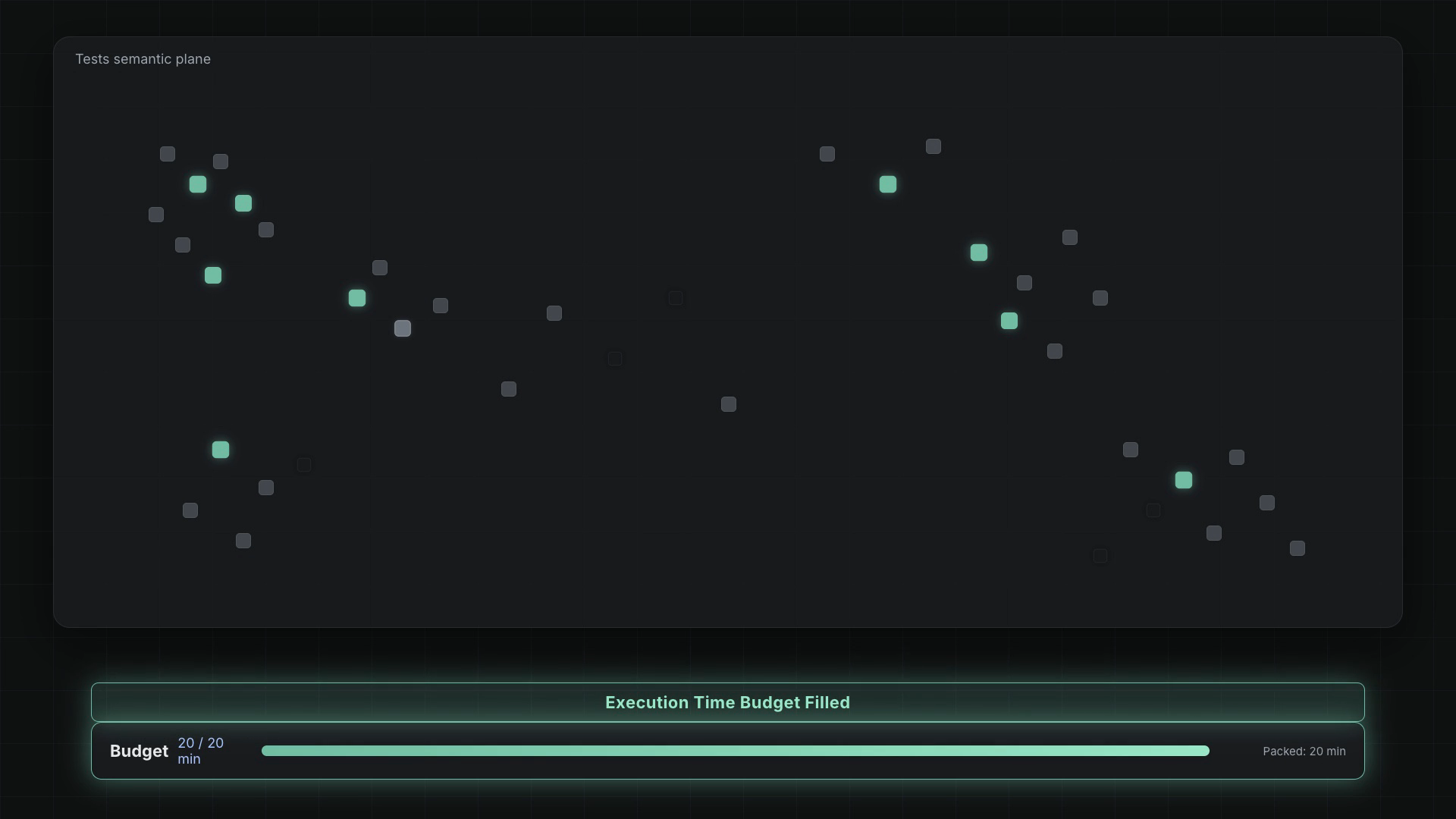
It is not a new test runner. You keep the same npx playwright test command. Selection is opt-in per run via environment variables and the @testchimp/playwright plugin (≥ 0.2.20). Tests outside the selected set are skipped with skip-reason smart-smoke (distinct from an explicit test.skip).
When to use Smart Smoke
| Situation | Use Smart Smoke? |
|---|---|
| PR / feature-branch confidence after authoring or validating SmartTests | Yes — default Phase 5 inside /testchimp test |
| Standalone “smoke this change” after connect-to-test-env | Yes — /testchimp run smart smoke |
| Nightly / release full regression | Usually no — run the full suite (or a dedicated regression tag) |
| Greenfield repo with no existing scenarios / linked tests | N/A — document rationale on the plan |
| Docs-only or non-product change | N/A — skip with rationale |
Prefer related-tests-only when you want tight PR confidence without expanding the suite. Use budgeted smoke when you want broader ROI within a time/count/% cap.
How it fits the TestChimp stack
- Plans — stories and scenarios in
plans/give semantic meaning to what a change might break. - Scenario annotations — SmartTests link to
#TS-…ids so impact analysis resolves to concrete tests. - Related-tests file — agents write
plans/smart-smoke/<branch>/related-tests.jsonfor the change scope. - Plugin + selection API — with
TESTCHIMP_SMART_SMOKE_ENABLED=true,@testchimp/playwrightloads related tests and (unless related-only) asks TestChimp to pack the budgeted set. - Same Playwright run — selected tests execute; others skip as
smart-smoke. - Review on Semantic Canvas — from the batch execution viewer, View in Semantic Canvas paints each test’s status from that invocation on the Semantic Canvas map.
Modes at a glance
| Mode | Env | Effect |
|---|---|---|
| Related-tests-only (safe default) | TESTCHIMP_SMART_SMOKE_RELATED_TESTS_ONLY=true | Runs only locators from related-tests.json (no selection API packing). |
| Budgeted smoke | Enabled without related-only | Selects related ∪ tagged ∪ newly authored ∪ semantically packed tests within the budget. |
Budget knobs (env overrides playwright.config use.testchimpSmartSmoke):
TESTCHIMP_SMART_SMOKE_MAX_TIME_BUDGET_MINSTESTCHIMP_SMART_SMOKE_MAX_TESTSTESTCHIMP_SMART_SMOKE_SUITE_PERCENTAGE(default 20 if no size constraint is set)TESTCHIMP_SMART_SMOKE_INCLUDE_TAGS(e.g.smoke)
Full reference: Configuration. Algorithm detail: How it works.
Prerequisites
- Playwright SmartTests with
@testchimp/playwright≥ 0.2.20 TESTCHIMP_API_KEYon the runner process (and backend/ingress URLs when not on SaaS prod)- Scenario-linked tests (Playwright
annotationwithtype: 'scenario') for meaningful related sets - Optional but recommended: suite tags such as
@smokefromglobal.policy.md
Next steps
- How it works — impact → weighting → semantic packing → budget fill → review batch coverage
- Configuration — env vars,
playwright.config,related-tests.json, CI - Run Smart Smoke workflow — agent playbook (
/testchimp run smart smoke) - Run SmartTests in CI — base Playwright CI setup
- Semantic Canvas — inspect what a smoke batch covered on the similarity map
FAQ
What is Smart Smoke?
Budget-aware Playwright SmartTest selection: related tests for the change, tagged smoke seeds, newly authored branch tests, and optional semantic packing within a time, count, or suite-% cap.
When should I use Smart Smoke vs the full suite?
Use Smart Smoke for PR / feature-branch confidence gates. Keep full regression for nightlies and release trains.
Do I need a new test runner?
No—enable with TESTCHIMP_SMART_SMOKE_ENABLED=true and run the same npx playwright test. Non-selected tests skip with reason smart-smoke.
Related-tests-only vs budgeted smoke?
Related-tests-only runs only locators from related-tests.json (safe PR default). Budgeted mode packs additional semantic coverage within your size constraint.