Branch Specific Test Execution
In brief: Branch-aware SmartTest execution ties CI and explorations to feature branches so startup teams catch regressions on preview environments before production.
SmartTests and exploratory runs can execute against branch-specific deployment URLs—such as PR preview or deployment preview environments—so you can validate feature branches before they reach the default branch. This page describes how to configure branch-specific endpoints in your project.
Overview
When you work with branch-aware GitHub Sync, you often want tests and explorations to run against the deployment for that branch (e.g. a Vercel/Netlify PR preview URL) rather than a single QA URL. TestChimp lets you define how the base URL is derived per branch via template strings and manual overrides in the project configuration.
Configuring Branch-Specific Endpoints
Branch-specific endpoints are configured in the Project settings (Project config page) under branch management. You can:
- Use a template string so that the base URL is derived from branch and project context (e.g.
https://{BRANCH_SLUG}.preview.myapp.com). See Template string: system variables for all supported variables. - Add manual overrides for specific branches when the template does not apply or you need a fixed URL for a given branch.
When you run SmartTests or exploratory runs with a branch selected, TestChimp uses the configured URL for that branch as the deployment target (e.g. as BASE_URL or the runner’s base URL).
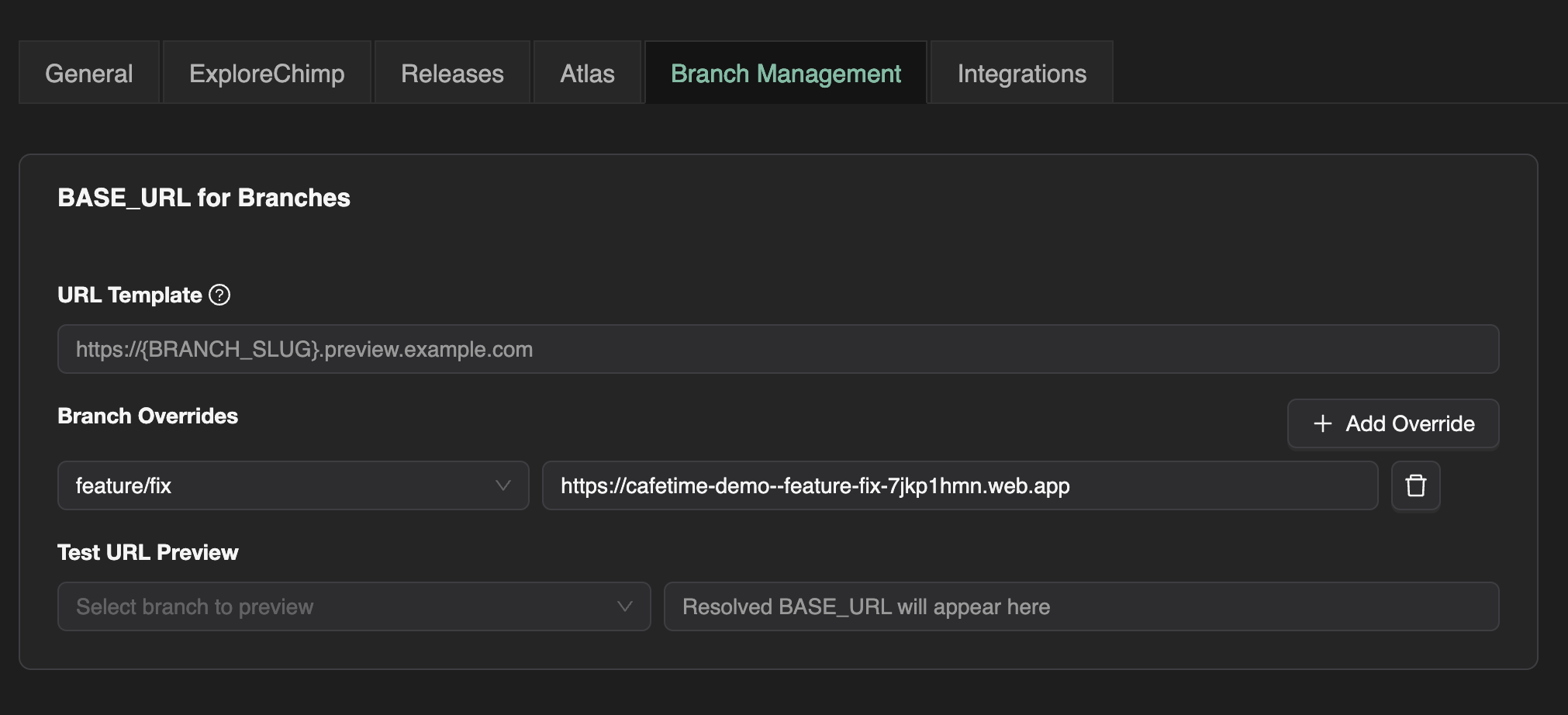
Branch Management in Project Config
Branch management and endpoint configuration are done in the project’s Project settings (Project config) page. The following screenshot shows where branch-specific endpoints are configured:
Template strings for branch URLs
You can define a URL template using the supported system variables (e.g. {BRANCH_NAME}, {BRANCH_SLUG}). Many hosting providers use a slugified branch name in preview URLs (lowercase, special characters replaced with hyphens); use {BRANCH_SLUG} for that. Configure the template in the Branch management section of Project settings.
Example templates:
https://{BRANCH_SLUG}.preview.myapp.com→ e.g.https://feature-login.preview.myapp.com(for branchfeature/login)https://preview-{GIT_REPO_NAME}-{BRANCH_SLUG}.vercel.app→ uses repo name and slugified branchhttps://{BRANCH_NAME}.preview.myapp.com→ uses raw branch name (e.g.feature/login; may need encoding for some hosts)
Manual Overrides for Branches
For branches where the template does not apply (e.g. main or staging), or where the preview URL is known and fixed, you can add manual overrides:
- Branch name: e.g.
main,develop,staging - Base URL: The exact base URL to use when this branch is selected (e.g.
https://app.myapp.comorhttps://staging.myapp.com)
When a branch has a manual override, that URL is used instead of the template. This is useful for default/staging branches that have fixed deployment URLs (e.g. main → production, staging → staging URL) or when your host’s URL pattern cannot be expressed with the template.
How the deployment URL is wired when running in the platform
When you run SmartTests or exploratory runs inside TestChimp (from the Web IDE or Explorations), the platform wires the branch-specific deployment URL so your scripts automatically target the right deployment.
Resolution
- Branch-specific endpoint: For the currently selected branch, TestChimp resolves the deployment URL from the project config:
- If the branch has a manual override (branch name + base URL), that URL is used.
- Otherwise, the template string is evaluated with the available system variables (see below), and the result is used as the deployment URL.
- Exposed as
BASE_URL: The resolved URL is set as theBASE_URLenvironment variable for the test run. If you have a value forBASE_URLin your environment file (e.g..env-QAfrom Multi-Environment Test Execution), the platform-overriddenBASE_URLtakes precedence for that run. So the runner always uses the branch’s deployment URL when one is configured. - In your scripts: Your test scripts should refer to
process.env.BASE_URL(e.g. forpage.goto(process.env.BASE_URL)or Playwright’sbaseURL). No code changes are needed per branch—the same script runs against the feature branch deployment because the platform injects the correctBASE_URLfor the selected branch.
Template string: system variables
In the URL template you can use these placeholders. Use single curly braces and the exact variable name (e.g. {BRANCH_SLUG}).
| Variable | Description |
|---|---|
{BRANCH_NAME} | The current branch name as in Git (e.g. feature/login, main). Use when your host accepts the raw branch name. |
{BRANCH_SLUG} | Branch name slugified for URLs: lowercase, non-alphanumeric characters replaced with a single hyphen, leading/trailing hyphens removed (e.g. feature/login → feature-login). Use for hosts that require URL-safe subdomains or path segments. |
{GIT_REPO_NAME} | The repository name part of the connected Git repo (e.g. from org/my-app the value is my-app). Useful when preview URLs include the repo name. |
{PROJECT_NAME} | The TestChimp project identifier. Useful when one template serves multiple projects or when preview URLs include a project/app name. |
If your hosting provider uses a different pattern (e.g. a build or deployment ID), use manual overrides for those branches.
Manual overrides
Use manual overrides when:
- The template cannot capture the URL (e.g. your host uses a different pattern or token).
- Special branches like
mainorstaginghave fixed, known URLs (e.g. production or staging) that you want to use instead of a templated preview URL.
Configure one override per branch: branch name and the exact base URL. For any branch that has an override, that URL is used and the template is not applied.
How it’s used
- SmartTests (Web IDE): Select a branch, then run tests. The platform resolves the branch’s deployment URL (template or override), sets it as
BASE_URL(overriding.env-Xif present), and your scripts usingprocess.env.BASE_URLrun against that branch’s deployment. - Exploratory runs: With a branch selected, ExploreChimp uses the same resolved
BASE_URL, so explorations target the PR preview (or override URL) for that branch. - CI: In CI, you set
BASE_URLyourself (e.g. to the PR preview URL); the Playwright runner and TestChimp reporter use it. See Run SmartTests in CI with Playwright Runner — Branch-specific runs.
Together with GitHub Sync (branch-aware sync and PRs per branch) and Multi-Environment Test Execution (per-environment variables), branch-specific endpoints let you run the same tests and explorations against the right deployment for each branch, with scripts that simply use process.env.BASE_URL.
FAQ
How does TestChimp know my branch?
Git integration and CI env vars pass branch metadata to executions and optional preview URL configs.
Can ExploreChimp run on a PR branch?
Yes—git-branch exploratory runs use the same branch deployment SmartTests target in CI.
Why branch-specific beats main-only CI?
You validate the exact diff merging soon, reducing integration surprises for fast-moving startup repos.