Playwright TestChimp runtime (@testchimp/playwright)
In brief: The @testchimp/playwright plugin reports runs to TestChimp, correlates user events during tests for TrueCoverage, and enables resilient ai.act/ai.verify execution in CI.
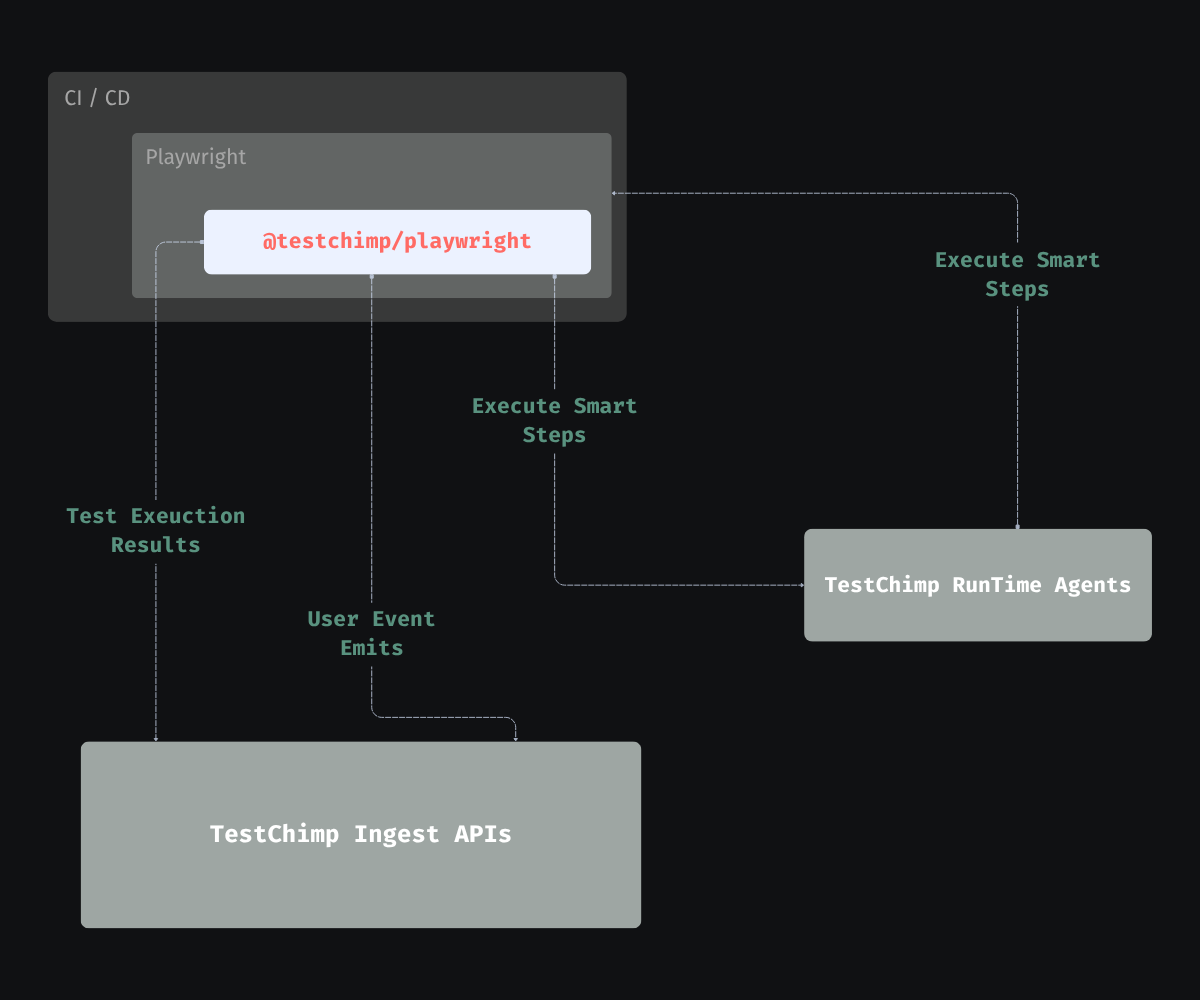
The @testchimp/playwright package is the Playwright-side bridge between your SmartTests (normal npx playwright test runs) and TestChimp. Install it during /testchimp init and keep it enabled in CI so every run feeds the same feedback loop as Run QA and Upkeep.
What it does
1. Report test execution to TestChimp
The reporter collects pass/fail, steps, errors, timing, and (when configured) screenshots for failing steps. That data powers execution history, QA intelligence dashboards, and traceability between runs, files, and scenarios—without replacing the Playwright CLI or your CI runner.
See the published package: @testchimp/playwright on npm.
2. Augment user events with test identity (TrueCoverage)
If your app emits RUM events (web: @testchimp/rum-js; iOS / Android: testchimp-rum-ios, testchimp-rum-android), the runtime ensures events produced during automated runs carry test / run context—page injection on web and automation deep links on native when TESTCHIMP_PROJECT_TYPE is ios or android—so TestChimp can correlate them with production traffic on the same event taxonomy. Setup: Instrumenting your app.
That alignment is what makes TrueCoverage useful: you compare what users do to what tests exercise, not just “did this test file pass.”
3. Execute natural-language steps in the runner
SmartTests can include AI-native steps (ai.act, ai.verify, ai.extract, …). The reporter coordinates those steps with TestChimp backends so they execute wherever you run Playwright (local, CI, preview)—execution-time intelligence in the script, not only at authoring time.
For authoring patterns, see Smart Tests and Run QA.
4. ExploreChimp (optional UX analytics)
When EXPLORECHIMP_ENABLED is set and the batch id / API key are present, the runtime sends checkpointed UX telemetry (DOM, screenshots, console, optional network and metrics) keyed off the markScreenState Playwright fixture—so analysis runs along the same pathways as your UI SmartTests. Pure API tests (no browser journey) are out of scope.
Use Run ExploreChimp for a dedicated exploration pass, or enable ExploreChimp inside Run QA / Upkeep when the policy or plan opts in. See Screen-State Annotations.
5. API operation capture (optional, opt-in)
For API / Operations coverage (which HTTP endpoints your UI SmartTests exercised), set TESTCHIMP_ENABLE_API_CAPTURE=1. This is off by default: the plugin does not attach page network listeners or ingest payloads unless you opt in, so ordinary runs stay as light as possible.
When enabled (requires installTestChimp on the web page fixture), the runtime records matching HTTP interactions during the test and the reporter uploads them after each test. Server-side coverage denorm runs on batch completion and an hourly sweep—not on the hot ingest path.
Optional tuning:
| Variable | Default | Purpose |
|---|---|---|
TESTCHIMP_ENABLE_API_CAPTURE | off | Master switch for capture + payload ingest (1 / true / yes) |
TESTCHIMP_API_COVERAGE_URL_REGEX | (none) | Client-side allow-list; only matching request URLs are captured |
TESTCHIMP_API_COVERAGE_BODY_TIMEOUT_MS | 1500 | Cap per-response body read (never blocks teardown unboundedly) |
TESTCHIMP_API_COVERAGE_DRAIN_TIMEOUT_MS | 5000 | Cap for draining in-flight captures at page fixture teardown |
Project APIs / Operations settings can further filter ingest (e.g. URL capture regex) and disable payload storage. Full product guide: API contract governance (setup, list, and detail views).
Configuration (minimal)
In playwright.config.ts (or .js), register the reporter and import the runtime module so TrueCoverage tagging and step plumbing apply:
import { defineConfig } from '@playwright/test';

// Enables runtime behaviour (e.g. test info for RUM / TrueCoverage)
import '@testchimp/playwright/runtime';

export default defineConfig({
  reporter: [
    ['list'],
    ['@testchimp/playwright/reporter', { verbose: true, reportOnlyFinalAttempt: true, captureScreenshots: true }],
  ],
});
Set TESTCHIMP_API_KEY (and any project-specific env your repo documents) in CI and local shells so the reporter can authenticate. For API operation coverage, also set TESTCHIMP_ENABLE_API_CAPTURE=1. See the @testchimp/playwright README or the npm package page for the full option list.
How this feeds TrueCoverage and upkeep
- Production vs test — TrueCoverage compares real-user event streams to automation-tagged streams (often scoped so manual traffic does not inflate “covered”). The runtime’s role is to make test-origin events comparable to prod: same events, metadata, and scopes your team defined in
plans/events/and instrumentation. - Gap signals — When production stops emitting an event (or it drops sharply) but tests still drive that event, that can indicate deprecated product surface still covered by automation—a candidate for suite cleanup (always confirm with product intent before deleting tests).
- Prioritization — TrueCoverage surfaces event-level metrics (for example Demand, Depth, Duration, Drop-off) so you can prioritize where users spend time, where they abandon, and which journeys deserve new tests or exploration. You do not need to duplicate those definitions here: see How TrueCoverage metrics work and the dashboard overview.
Where this sits in the agent workflow
/testchimp init— Adds@testchimp/playwright, wires reporter + runtime import, and aligns CI env withTESTCHIMP_API_KEY.- Run QA — Authors and runs SmartTests with the reporter so results and behaviour land in TestChimp; optional ExploreChimp when the policy/plan opts in.
- Run ExploreChimp — Runs ExploreChimp as the primary task on selected UI specs.
- This page — What the runner contributes continuously (including outside agent sessions).
- Upkeep — Consumes accumulated run + RUM + plan signals to improve the portfolio; may include targeted ExploreChimp.
See also
- Workflows intro — Catalog, policies, and scope rules.
- Run QA — Composite PR / change-scoped QA.
- Run ExploreChimp — Dedicated ExploreChimp passes.
- Upkeep — Coverage and hygiene maintenance.
- TrueCoverage intro — Behaviour-aligned coverage concepts.
- Instrumenting your app — Web, iOS, and Android SDK + Playwright wiring.
FAQ
Is this a custom test runner?
No—you use the standard Playwright runner; the plugin is a reporter and runtime hook added during /testchimp init.
Why tag events during test runs?
Same event taxonomy as production RUM lets TrueCoverage show which real user pathways your CI executions actually cover.
When do ai.act steps run agentically?
At execution time in CI or locally when a SmartTest calls ai.act, ai.verify, or ai.extract instead of brittle selectors.