Requirement Quality Governance
In brief: TestChimp requirement quality governance runs DeFOSPAM agentic checks, scores requirements across six categories plus overall, and tracks suggested fixes in Plans → Insights.
Why requirement quality matters in the agentic era
Coding and testing agents produce high-quality output only when the specs they follow are clear, detailed, and unambiguous. Underspecified, ambiguous, or untestable requirements push agents toward guesswork—sub-optimal implementations, brittle tests, and wasted automation cycles.
Requirement quality governance closes that gap. Before you spend agent time on implementation or SmartTests, you harden the story or scenario itself so both dev and test processes start from a solid contract.
The DeFOSPAM framework
TestChimp analyzes requirements with DeFOSPAM lenses (methodology from OpenRequirements.AI / Business Story Method):
| Lens | Focus |
|---|---|
| Definitions | Undefined or colliding terms, missing business rules in terminology |
| Features | Unclear scope, mixed concerns, incomplete decomposition |
| Outcomes | Missing or unmeasurable business value (“so that…”) |
| Scenarios | Happy-path-only coverage, missing edge/error cases, story mismatch |
| Prediction | Missing expected results, unverifiable checks, missing preconditions |
| Ambiguity | Vague qualifiers (“fast”, “easy”), open-ended “etc.”, unclear actors |
| Missing | Actors, data, constraints, NFRs, error handling, acceptance criteria |
Findings are severity-tagged (Critical, Major, Minor) so teams triage what blocks understanding or testability first.
What TestChimp enables
When you run requirement quality analysis on a story, scenario, or plans folder scope, TestChimp:
- Runs agentic DeFOSPAM checks on the selected requirement content
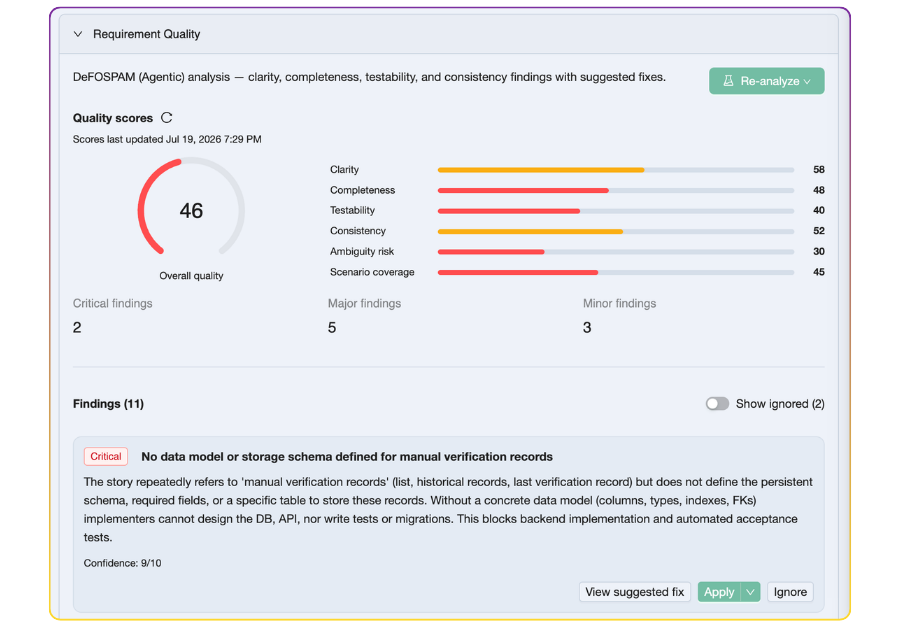
- Scores across six categories plus an overall score (0–100):
- Clarity
- Completeness
- Testability
- Consistency
- Ambiguity risk
- Scenario coverage (stories — linked scenarios vs implied behaviors)
- Identifies issues as structured findings with severity and confidence
- Suggests fixes for each finding (text replacements or structured edits)
- Tracks governance in the platform so quality improves over time—not a one-off review comment
Where to review: Insights → Requirement quality
Open a story or scenario in Test Planning (Plans), go to the Insights tab, and expand Requirement quality. There you can:
- See overall and per-category scores
- Browse active findings and suggested fixes
- Apply a suggested fix: TestChimp builds a dry-run preview (including create/update/delete across related plan files), you review diffs in a merge-style modal (edit or unselect files), then confirm Apply. The cloud Apply agent plans those ops as structured JSON (
RequirementApplyToolPlaninrequirement_quality.proto), not free-form text. - Ignore findings that are not relevant for your context
- Re-analyze or re-score after content changes so governance stays current
Applied and ignored findings are not re-penalized on re-score, so the board reflects remaining work rather than noise you already handled.
When Apply creates new stories/scenarios for review, they are held in a transient suggested state (hidden from the plans file list) until you accept them (promoted to draft) or reject them (archived).
How to run the checks
There are two approaches:
1. Local coding agent (recommended)
Install the TestChimp skill, then run:
/testchimp analyze requirement quality of <story / scenario / plans path>
Examples and scope rules: Run Requirement Quality Checks.
Pros
- Can use local code context (implementation, fixtures, related modules) for richer, more grounded findings
- No TestChimp AI credits consumed for the analysis itself
- Fits the same agent loop you already use for
/testchimp authorand/testchimp test
Cons
- Requires a configured local agent + skill
- Involves a short back-and-forth (copy prompt / run in IDE) versus one click in the UI
2. TestChimp Cloud (one-click)
From the story or scenario editor (or the Requirement quality pane), choose Analyze → Run on TestChimp Cloud.
Pros
- Fastest path—no local agent setup
- Results land directly in Insights with scores and suggested fixes
Cons
- Uses 1 AI credit per analysis
- Cloud analysis does not see your full local codebase the way a repo-aware coding agent can
Recommendation
Prefer local agentic runs when the agent has the TestChimp skill and repo access—especially for complex domains where code and existing fixtures clarify what “complete” and “testable” mean. Use cloud when you want a quick quality pass without leaving the platform.
Best practices
- Govern early — Run checks when a story is drafted, before heavy automation or implementation spend
- Apply or ignore deliberately — Keep the open-finding set meaningful for the team
- Re-analyze after material edits — Stale reports are flagged when requirement content changes
- Pair with authoring — Use Author Plans to draft, then quality checks to harden
- Feed SmartTests from clean specs — Clear scenarios produce better scenario annotations-linked automation
Next steps
- Author User Stories / Author Test Scenarios — Capture requirements as markdown
- Run Requirement Quality Checks — Agent workflow details
- Requirement Traceability — Link SmartTests once specs are solid
- Export to Git — Keep governed plans in the repo for agents
FAQ
What is DeFOSPAM requirement quality analysis?
DeFOSPAM is a multi-lens framework (Definitions, Features, Outcomes, Scenarios, Prediction, Ambiguity, Missing) that finds gaps, ambiguity, and untestable specs before you spend automation or agent cycles.
What scores does TestChimp show for requirement quality?
Overall quality plus clarity, completeness, testability, consistency, ambiguity risk, and scenario coverage (for stories)—each 0–100—alongside critical, major, and minor finding counts.
Where do I review and apply suggested fixes?
In Test Planning, open a story or scenario, go to Insights → Requirement quality. Apply suggested fixes, ignore irrelevant findings, and re-analyze when content changes.
Should I run requirement quality checks in the cloud or with a local agent?
Local agent (TestChimp skill + /testchimp analyze requirement quality) is recommended because it can use repo code context and avoids AI credits. Cloud analyze is the one-click option when you want speed without leaving the platform.
Why does requirement quality matter for AI coding agents?
Underspecified or ambiguous requirements cause agents to guess—weak implementations and brittle tests. Clear, detailed, unambiguous specs are the contract agents need for high-quality dev and test output.
How do I run DeFOSPAM checks with my coding agent?
Install the TestChimp skill, then run /testchimp analyze requirement quality of <story, scenario, or plans path>. Scope must be explicit—see the Run Requirement Quality Checks workflow.