Dashboard
In brief: The TrueCoverage dashboard visualizes which production events and pathways lack test coverage— with drill-downs into funnels, sample sessions, and metadata variants.
Scope: The TrueCoverage dashboard applies to projects that emit RUM events from web, iOS, or Android and run tests with @testchimp/playwright so coverage scopes can include test-tagged emits. See Instrumenting your app for setup and Mobile testing for Mobilewright SmartTests.
The TrueCoverage experience is built around two execution scopes and two main views: the Overview (funnel-style event chips) and the Event page (per-event summary, funnel, sample sessions, and metadata slicing).
Execution Scopes

You configure two scopes when using TrueCoverage:
| Scope | Purpose |
|---|---|
| Base execution scope | Environment + release + time range used for event funnel construction and all behavioural stats (relative frequencies, histograms, transitions). This is “what real users do.” |
| Coverage execution scope | Environment + release + time range used to determine which events and paths are covered by tests. TrueCoverage overlays this on the base behaviour to show coverage gaps. |
The base scope drives the funnel and metrics; the coverage scope drives the “covered vs not covered” indicators (e.g. on event chips and in metadata slicing).
Overview Page
The Overview is the main TrueCoverage landing view. It visualizes your event funnel and relative activity so you can see the shape of user behaviour at a glance.
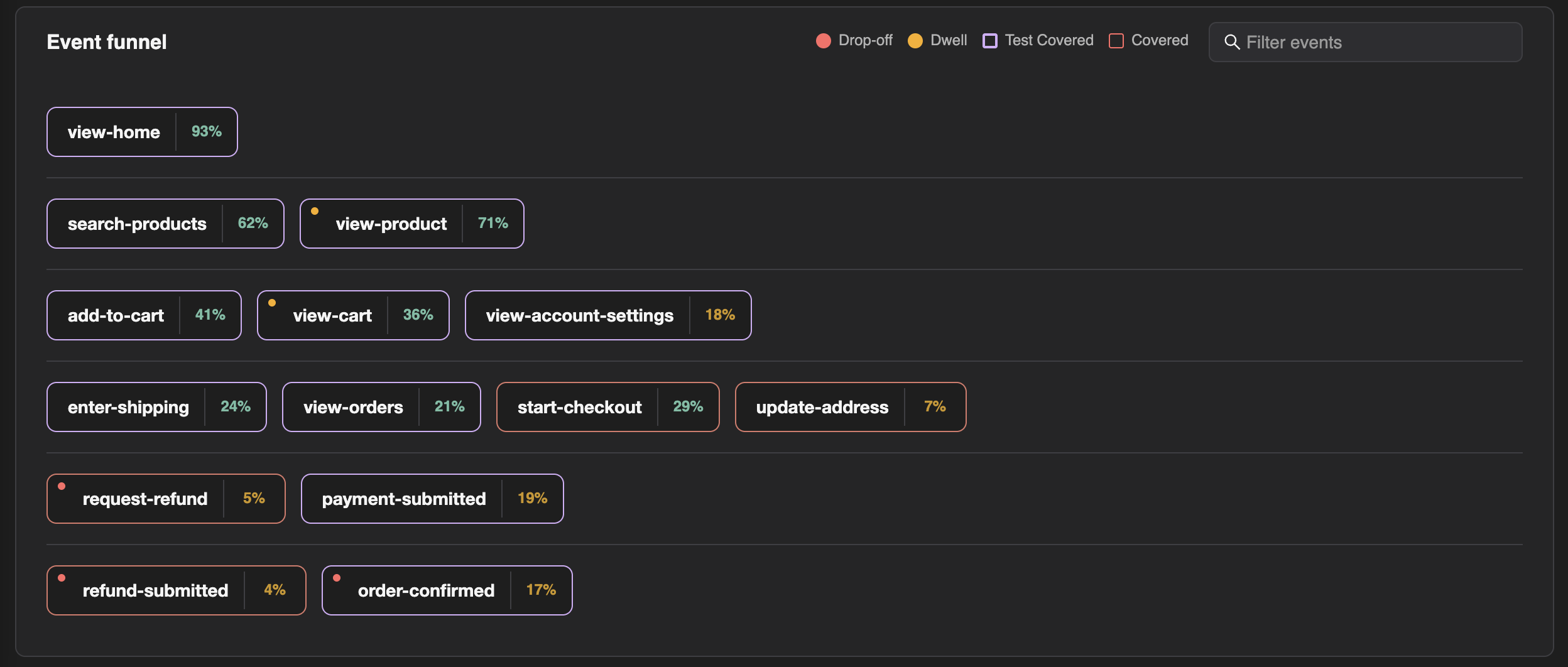
Event Chips
- Relative frequency: Each event chip reflects how often that event occurs relative to others (e.g. size or intensity), so you can see which actions dominate user behaviour.
- Stacking (funnel UX): Chips are stacked to form a funnel. Stacking uses:
- p50 position in session (median position) — we group events by a “typical” position band (e.g. floor of p50) so events that tend to occur at similar points in the session appear together.
- Within each group, p75 position is used for sorting so the funnel reads in a natural order (early → late in session).
- Indicators: Chips can show small markers for:
- Dwell — users often wait a long time before the next action.
- Drop-off — the event often occurs near the end of the session (reverse index).
- Discovery friction — long time to first occurrence of this event in the session.
Clicking an event chip opens the Event page for that event.
Event Page
You reach the Event page by clicking an event chip in the Overview funnel. It provides summary stats, funnel next steps, sample sessions, and metadata slicing.
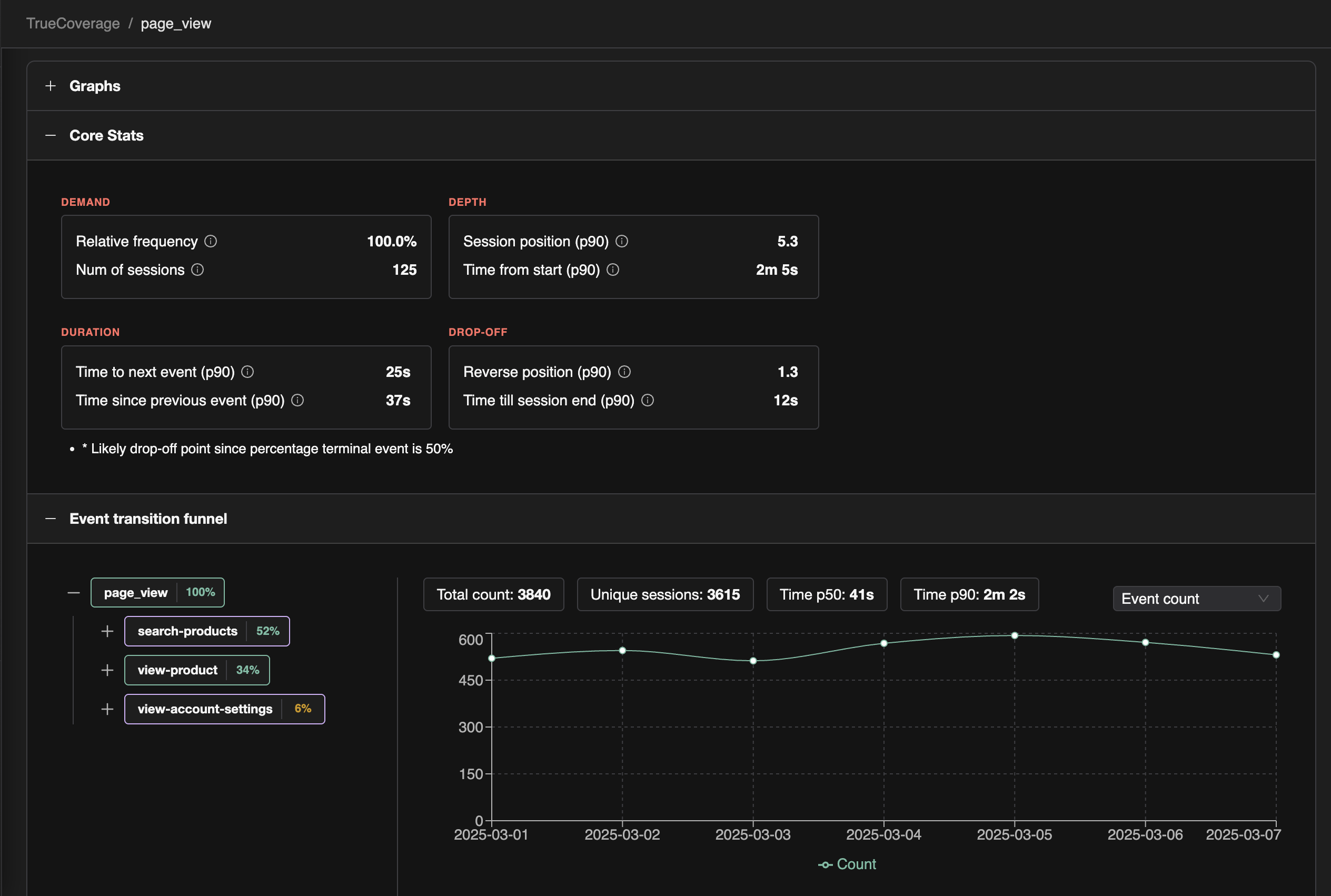
Summary
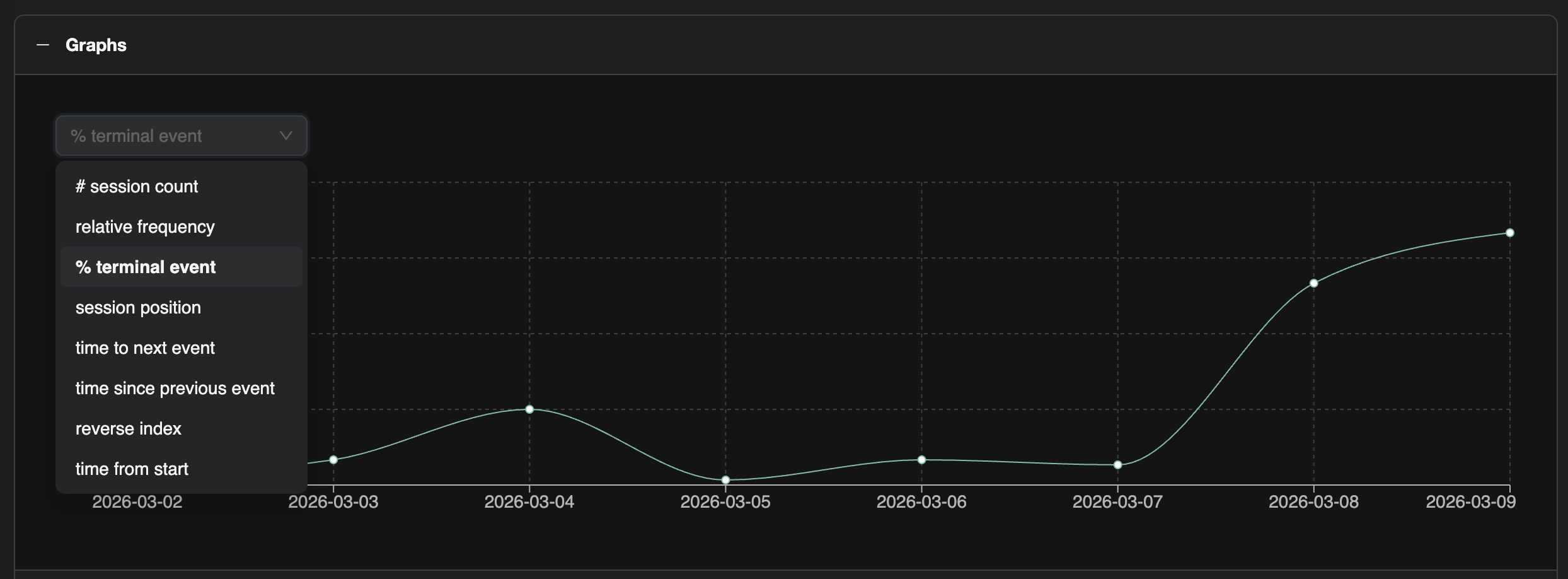
- Graph over time: Emits of this event over time in the base environment/scope.
- Core stats (by 4D): Occurrences and unique sessions (Demand); position in session and time to first occurrence (Depth); time to next event, time since previous (Duration); percentage terminal event and reverse index, time till session end (Drop-off). These let you quickly see dwell, drop-off, and discovery behaviour for this event.
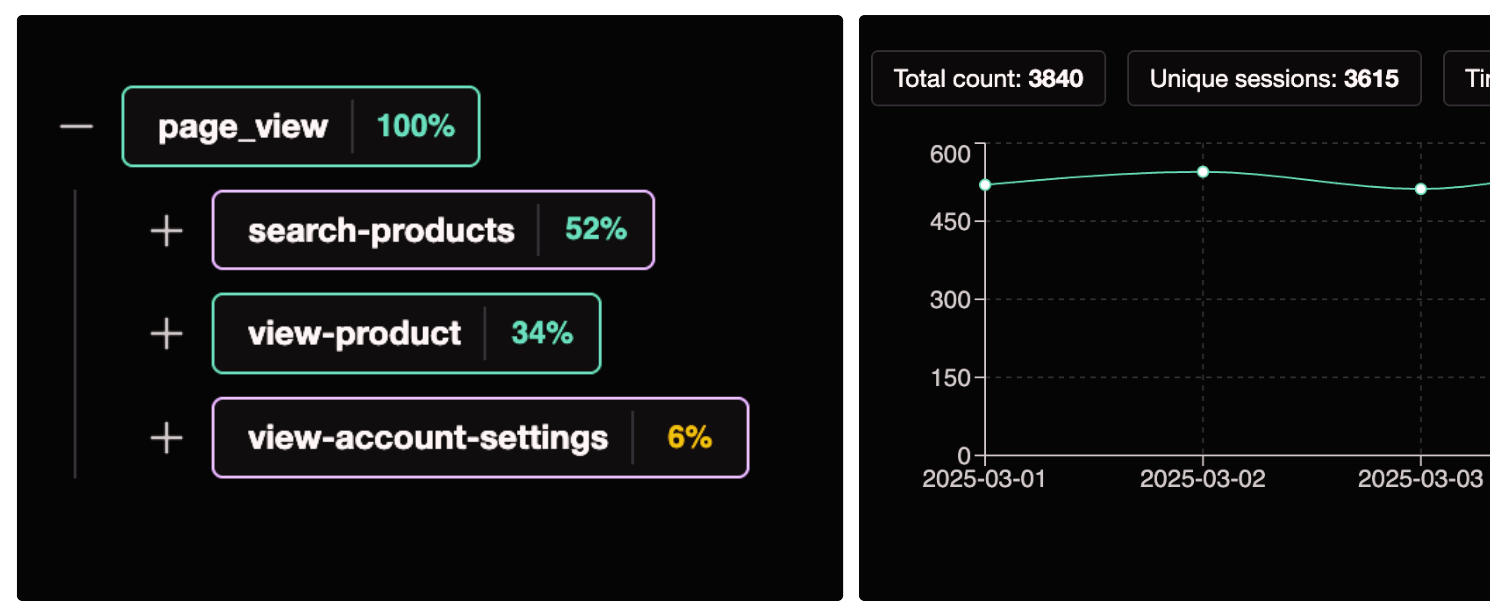
Funnel
- Child events tree: A tree of child events—what users do after this event—with their relative distribution (e.g. “after checkout, 60% go to payment-success, 30% to payment-retry, 10% to cart-abandon”).
- Selecting a child: When you select a child event, the view shows:
- A graph for that transition over time (event A → event B).
- Core stats for the transition (occurrences, unique sessions, time-to-transition histogram).
Sample Sessions
- We show sample sessions from the last 14 days (in the base scope) that emitted this event.
- Clicking a session opens the session timeline: the ordered list of events in that session with timestamps, so you can inspect real user journeys that include this event.
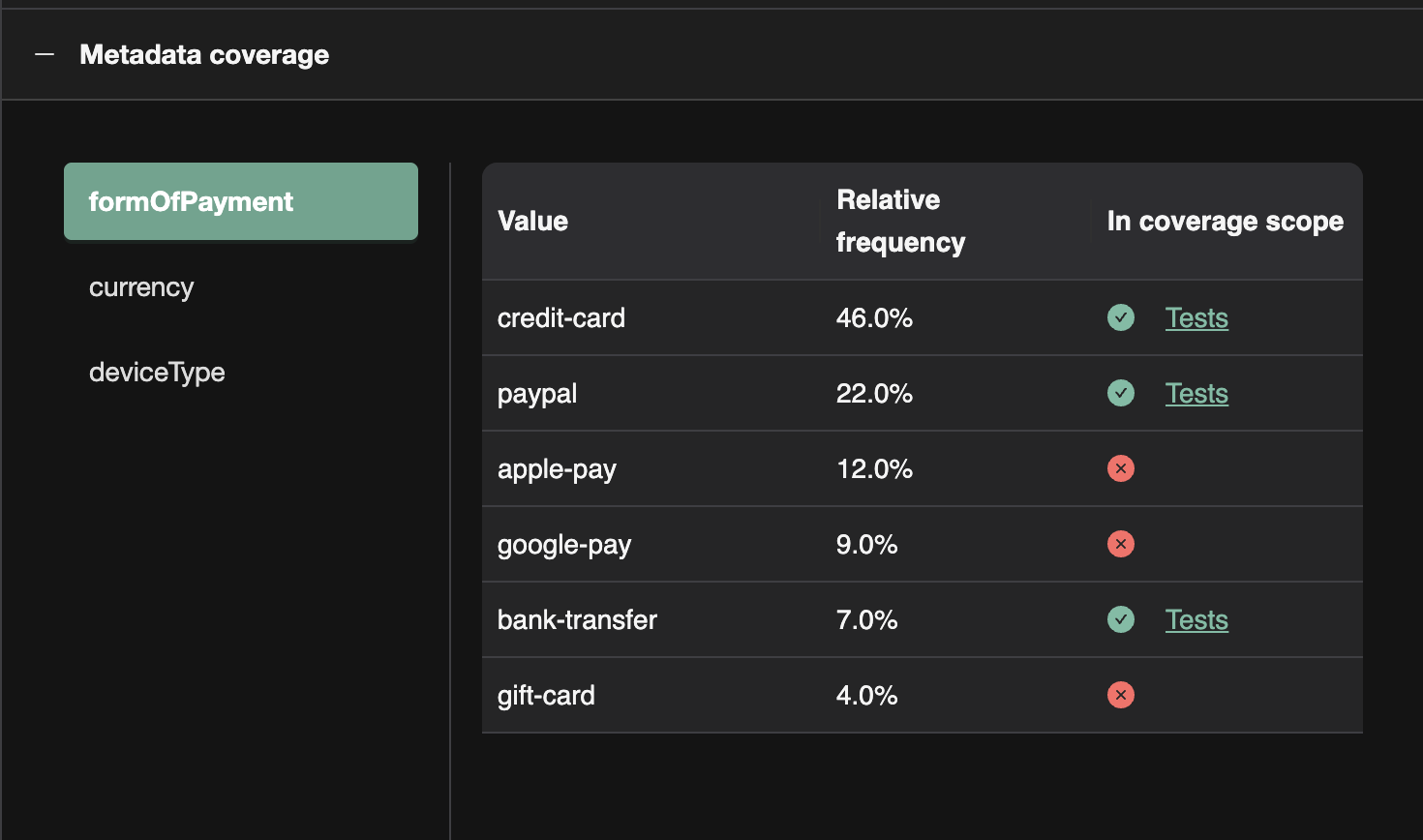
Metadata Slicing
- List of metadata keys: For this event type, we list the metadata keys that were sent (e.g.
form_of_payment,checkout_step). - Selecting a key: Shows a metadata value breakdown:
- Frequency of each value (e.g. card: 70%, PayPal: 20%, bank: 10%).
- Coverage: Which values are covered in the coverage execution scope (e.g. tests that emitted this event with that metadata) and which are not.
This lets you see which variants of the event (e.g. payment method) are exercised by tests and which are high-frequency in production but uncovered—so you can prioritize adding tests for those variants.
Putting It Together
- Use the Overview to see the overall funnel, relative frequencies, and dwell/drop-off/discovery at a glance.
- Use the Event page to go deep on one event: trends, what users do next (funnel), sample sessions, and which metadata variants are covered by tests.
- Use base scope for “what users do” and coverage scope for “what tests cover”—so you can prioritize tests where users are active but coverage is missing.
FAQ
Where is TrueCoverage in the app?
Access from QA Intel → TrueCoverage or the dedicated TrueCoverage section depending on your navigation layout.
How do I act on a gap?
Scope /testchimp test or evolve to the funnel, author SmartTests emitting matching events, and re-check coverage scope.
Can I compare releases?
Filter execution and base scopes by environment and release to see coverage evolve across deployments.