OpenHands Integration
In brief: OpenHands integration fits teams running coding agents in parallel with TestChimp—same Git-backed SmartTests and plans with TestChimp skill/MCP as the QA control plane.
TestChimp integrates with OpenHands to enable automated bug fixing with cloud agents. Once configured, you can trigger cloud agents to automatically fix bugs with a single click, with fixes delivered as pull requests.
Rich Context for Precise Fixes
When you trigger a bug fix, TestChimp provides the cloud agent with comprehensive context about the bug, enabling precise, targeted fixes rather than generic solutions. This context includes:
- Screenshots with bounding boxes: Visual indicators showing exactly where the bug occurs on the screen
- API payloads: Relevant network requests and responses that triggered or are related to the bug
- Console logs: JavaScript errors, warnings, and other console output captured when the bug was identified
- DOM context: Element selectors and structure information
- Screen-state information: The specific screen and state where the bug occurs
- Artifact references: All captured artifacts that provide context about the bug
The cloud agent can fetch artifact URLs on-demand to access additional context such as bounding boxes, API payloads, console logs, and other detailed information captured during bug identification.
Configuring OpenHands Integration
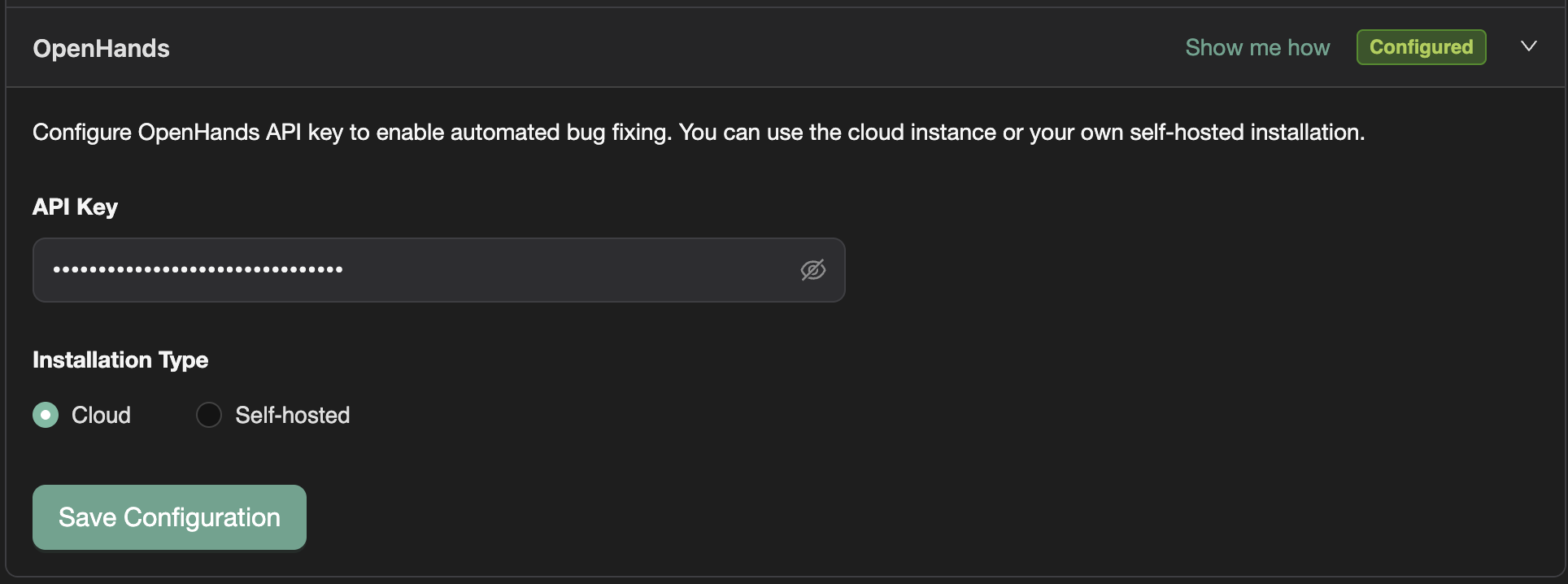
- Navigate to Project Settings → Integrations tab
- Goto the OpenHands section
- Configure:
- API Key: Enter your OpenHands API key
- Installation Type: Choose between:
- Cloud: Use OpenHands cloud instance (default:
https://app.all-hands.dev) - Self-hosted: Provide your self-hosted installation URL
- Cloud: Use OpenHands cloud instance (default:
- Click "Save Configuration"
Note: OpenHands integration is available in TestChimp Teams tier subscription.
For event-driven runs (issue created, batch failed, story ready, …), configure OpenHands as an automation invocation strategy under Project Settings → Automations. See Cloud agents for automations and Setting up cloud agents → OpenHands (skill + MCP + API key).
Setting Up OpenHands Account and Repository Connection
Before configuring OpenHands in TestChimp, you need to set up your OpenHands account and connect your GitHub repository:
1. Create OpenHands Account
- Go to https://app.all-hands.dev
- Create an account or sign in
- Complete the initial setup
2. Connect GitHub Repository
- In OpenHands, navigate to repository settings
- Connect your GitHub repository that contains the codebase for this TestChimp project
- Ensure the repository is accessible and properly configured
3. Get API Key
- In OpenHands, navigate to API settings or account settings
- Generate or copy your API key
- Keep this key secure - you'll need it for TestChimp configuration
Important: The GitHub repository connected in OpenHands must match the repository configured in TestChimp's GitHub integration. TestChimp uses the repository information from the GitHub integration to send bug fix requests to OpenHands.
Triggering Bug Fixes from TestChimp
Once OpenHands is configured, you can trigger bug fixes directly from TestChimp:
- Select a bug or multiple bugs (use checkboxes for multiple selection)
- Click the "Fix" button (tool icon) next to the bug(s)
- TestChimp will:
- Validate your OpenHands and GitHub configurations
- Send the bug context to OpenHands (including screenshot URL for screenshot-based bugs in single bug fixes)
- Display a success modal with a link to track the OpenHands conversation
Context Provided to Cloud Agent
For Single Bug Fixes:
- Screenshot URL (if the bug source is screenshot-based)
- Screen-state information
- Artifact URLs for on-demand access to detailed context
- Bug title, description (truncated to 200 characters), category, severity
- Artifact references with bounding boxes, API payloads, console logs, etc.
For Multiple Bug Fixes:
- Screen-state details for each bug
- Artifact URLs for on-demand access (cloud agent can fetch to get bounding boxes, payloads, console logs)
- Bug information for all selected bugs
- Instructions to analyze, identify common issues, group related bugs, and address them together
The cloud agent can fetch artifact URLs on-demand to access additional context such as:
- Bounding boxes showing exact bug locations on screenshots
- API request/response payloads
- Console log entries
- DOM element details
- Other captured artifacts
What Happens Next
After triggering a bug fix:
- OpenHands Conversation: A conversation is created in OpenHands with all the bug context
- Success Modal: TestChimp displays a modal with:
- Confirmation that OpenHands is working on the fix
- A clickable link to the OpenHands conversation (format:
<installationUrl>/conversations/<conversation_id>) - For cloud installations:
https://app.all-hands.dev/conversations/<conversation_id>
- Cloud Agent Analysis: The OpenHands cloud agent:
- Analyzes the bug context provided by TestChimp
- Fetches additional artifacts on-demand if needed (screenshots, API payloads, console logs)
- Reads your codebase to understand the issue
- Creates a fix for the bug
- Raises a pull request with the fix
- Pull Request: Once the agent completes the fix, a pull request is created in your GitHub repository
- Review and Merge: Review the pull request and merge it when ready
Tracking Progress
- Click the conversation link in the success modal to open the OpenHands conversation in a new tab
- Monitor the agent's progress in real-time
- See the agent's analysis, code changes, and reasoning
- Review the pull request once it's created
Error Handling
If OpenHands encounters an error (e.g., repository access issues, API errors), TestChimp will display the specific error message from OpenHands, helping you troubleshoot the issue.
The OpenHands integration streamlines your bug fixing workflow by leveraging cloud agents to automatically analyze, understand, and fix bugs with the rich context captured by TestChimp.
FAQ
Does OpenHands replace TestChimp agents?
OpenHands builds app code; TestChimp orchestrates QA infra, SmartTests, TrueCoverage, and ExploreChimp via its skill and MCP.
Shared repository layout?
Use standard tests/ and plans/ mappings so both agent stacks read identical markdown and Playwright assets.
Which commands should QA agents run?
Prefer /testchimp init, test, evolve, explore, and audit on hosts where the TestChimp skill is installed.