What is TestChimp?
In brief: TestChimp is a QA workflow layer that connects test plans, Playwright SmartTests, CI, and TrueCoverage so AI agents and teams ship the right tests and keep them aligned with product reality.
TestChimp is a QA workflow layer for agents. It orchestrates a tight feedback loop so tools like Claude continuously understand product risk, coverage gaps, and where users actually spend time—then act. It supports web (Playwright) and native mobile (iOS and Android via Mobilewright); see Mobile testing for platform-specific capabilities.
- Update test suite to cover under-tested areas of the app, informed by real user behaviour and requirement documentations
- Handle QA infra updates necessary (seed / probe endpoints, authoring fixtures that emulate real world scenarios)
- Run exploratory tests on high impact areas
- Instrument code to understand real user behaviour - to help inform future QA infra updates
Humans stay in control of intent (what the product should do). Agents do the heavy lifting of execution and upkeep against that intent and real user behaviour - continuously learning, identifying gaps and addressing them.
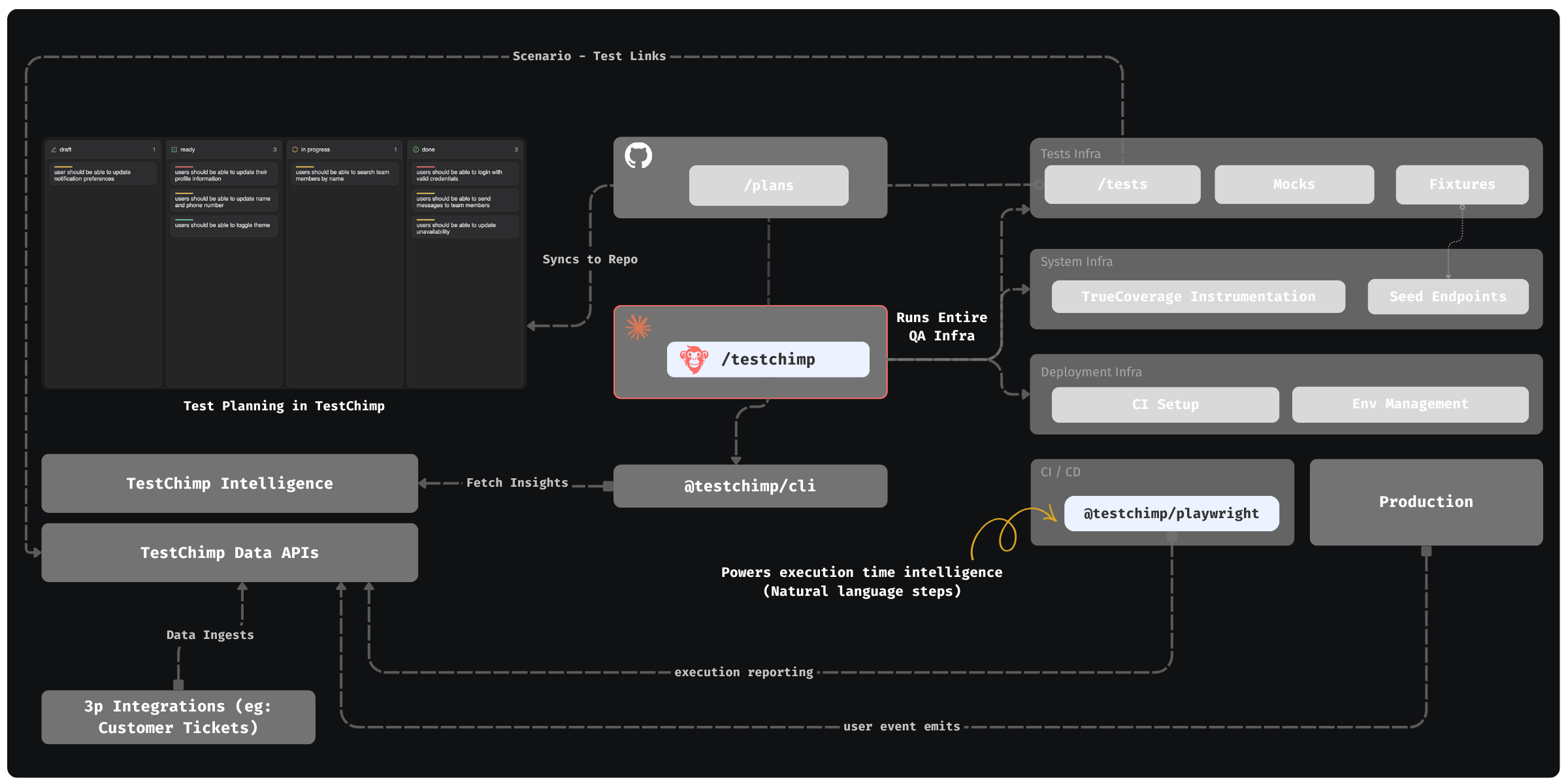
How the loop fits together
- Planned reality — Teams maintain test plans in the TestChimp web app (kanban, forms, priorities). Plans are stored as Markdown in a mapped
plans/folder and synced to your Git repo, so agents read the same source of truth as the platform. - One-time setup — Install the TestChimp skill on Claude (or Cursor, and other hosts that load skills). Run
/testchimp initto wire MCP (@testchimp/cli), SmartTests layout, CI, seed / teardown / read endpoints, fixtures, mocking strategy, TrueCoverage instrumentation, environment strategy, and default workflow policies—see Workflows. - Per PR — Run QA — After development, run
/testchimp run QA(synonym/testchimp test). This composite workflow chains modular subflows (plans, env, SmartTests, smart smoke, optional ExploreChimp / TrueCoverage) under one policy and scope. If you are not on a PR, pass a focus area (story, folder, or scenario scope). Details: Run QA. - In CI — Run tests using standard playwright runner (with the
@testchimp/playwrightruntime plugin installed - this is done by the skill automatically for you) : it reports runs and traces, tags user events with test identity for TrueCoverage, and loops in AI during runtime to execute natural-language steps enabling more resilient scripts—see Playwright runtime plugin. - Periodically — Upkeep — Run
/testchimp upkeep(synonym/testchimp evolve) on a cadence or after deploys: close coverage gaps from requirements and TrueCoverage, explore high-signal UX paths, cleanup, and keep instrumentation current—see Upkeep. Atomic workflows (create tests, fix gaps, explore alone, …) are available when you need a single job.
The TestChimp web app is the control plane: test planning, bugs found from explorations, test coverage gaps aligned with requirements, TrueCoverage drill-downs, and Workflows execution visibility—while Plans → Git → Claude + MCP → CI stays the operational spine. TestChimp Studio is that same control plane as a desktop app, with a local OpenCode agent so you can plan, run QA, and govern the release from one workspace. Download: Download TestChimp Studio.
Quick start (recommended)
- Connect your Git repo in TestChimp and map two folders: one for tests (SmartTests root) and one for plans (markdown test plans).
- Install the TestChimp skill on your agent host (e.g. Claude Code / Cursor) and register MCP.
- Run
/testchimp initonce per repository to establish QA infra, integration, and default policies. - Run
/testchimp run QAwhen a PR is ready; run/testchimp upkeepon a cadence.
Then follow the Quick Start for step-by-step setup and Onboarding to TestChimp for org and project admin. For composites, atomic workflows, and policies, see Workflows.
Why not “just use Claude”?
Claude can write tests. TestChimp tells which tests to write and why, bringing in requirement traceability (planned reality) and real user behaviour (product reality), compared against tested reality (through CI reported test executions and user event emits during test runs).
Claude can explore the app. TestChimp tells which areas to probe first—aligned to risk, coverage gaps, and how users actually move through the product.
Claude can tackle individual QA tasks. TestChimp orchestrates them into composite workflows (Run QA, Upkeep) and reusable atomic playbooks—plans in repo, policies, data-backed intelligence, seed/probe endpoints, fixtures, mocks, environment provisioning, and event instrumentation—so the suite and infra stay aligned with the product in a continuous loop instead of drifting after the first green run.
Execution time intelligence. Claude outputs test scripts - which are by default plain Playwright scripts. They are UI-selector bound, which means the same brittleness of standard Playwright scripts still remains. TestChimp enables adding "natural language steps" in scripts - so that the step is executed intelligently at run time. This allows Claude to "defer intelligent translation of intent -> Playwright command" to runtime, making the scripts more resilient to slight product variances.
In short: we help Claude (and your team)
- Ship the right automated QA
- Keep it updated against plans, production behaviour, and what runs in CI.
- Make tests resilient by enabling intelligence during execution time
Deep dive
- Workflows — Autonomous QA workflow, commands, and how the web app fits in.
- Requirement Planning — Markdown plans, quality governance, traceability, and Git sync.
- SmartTests — Functional testing: Playwright on web; natural language steps
ai.act/ai.verify/ai.extract(web today). - Performance Testing — k6 load and volume journeys, related PR/release runs, and comparable Executions.
- Mobile testing — Native iOS/Android with Mobilewright, CI, and traceability.
- TrueCoverage — Behaviour-aligned coverage from user events in prod and tests (web, iOS, Android — instrumentation guide).
Compare, alternatives, and guides
- Vendor comparisons — TestChimp vs Selenium, Cypress, Playwright, and more.
- Alternatives hub — Switching from legacy QA tools.
- Testing guides — Industry and built-with (Cursor, Lovable, Claude Code) QA workflows.
- QA in the Age of AI — How AI changes test creation and maintenance.
Get started
- Quick Start — Get running in a few steps.
- Onboarding to TestChimp — Team and project setup.
- TestChimp Studio — Desktop IDE for software delivery; download for macOS, Windows, Linux, or
npx @testchimp/studio.
FAQ
What does TestChimp do that Claude alone cannot?
TestChimp tells agents which tests to write and why—using requirement traceability, TrueCoverage gaps, and orchestrated /testchimp init, test, evolve, and explore commands—not just script generation.
Our team doesn't have QA — can we use TestChimp?
Yes—that is a core use case. TestChimp is a dev-friendly QA platform for lean teams: install the TestChimp skill, run `/testchimp init`, and use `/testchimp test` on every PR so agents write and repair Playwright SmartTests against markdown scenarios. Requirement coverage rolls up from scenario annotations, and `/testchimp evolve` expands coverage after deploy using TrueCoverage—so you ship reliable software without building a large QA org first.
What platforms does TestChimp support?
Web via Playwright SmartTests and native iOS/Android via Mobilewright, with TrueCoverage on web, iOS, and Android when instrumented.
How do I get started quickly?
Connect Git, map plans/ and tests/ folders, install the TestChimp skill, then run /testchimp init once and /testchimp test on each PR.