Test Planning as Code
In brief: TestChimp treats test plans as version-controlled markdown files—not locked database records—so Claude, CI, and your team share one agent-friendly source of truth.
Designed for the Agentic Era
TestChimp takes a fundamentally different approach to test planning. Instead of treating test artifacts as database records locked inside a proprietary system, we treat them as code — plain markdown files organized in folders, version-controlled alongside your codebase.
This file-first approach is purpose-built for the agentic era, where AI coding assistants and testing agents need direct access to your test planning artifacts to work effectively.
The Philosophy: Files Over Database Records
Traditional test management tools store your user stories and test scenarios as database records, accessible only through their UI or proprietary APIs. This creates several problems:
- Siloed knowledge: Test plans live separately from your codebase
- Limited tooling: You can only interact with artifacts through the vendor's interface
- Agent-unfriendly: AI tools can't easily read or understand your test strategy
- Vendor lock-in: Migrating to another tool means complex data exports
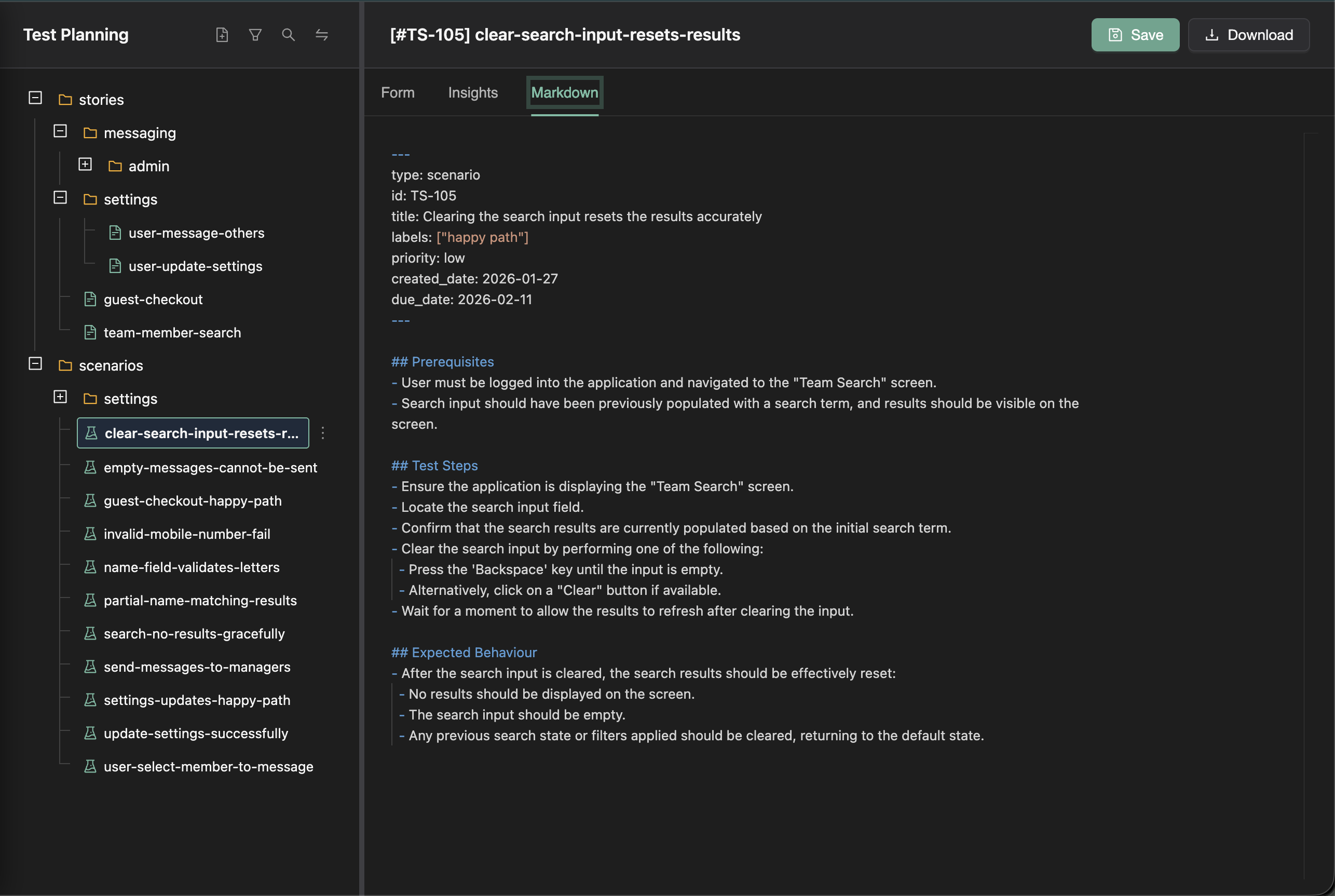
TestChimp inverts this model. Your user stories and test scenarios are markdown files with frontmatter — human-readable, version-controllable, and instantly accessible to any tool that can read files.
Why Markdown Files with Frontmatter?
Human-Readable, Machine-Parseable
Each test artifact is a .md file with YAML frontmatter for structured metadata:
---
title: User Login with Email
priority: high
status: draft
labels:
  - authentication
  - core-flow
---

## Description

As a registered user, I want to log in with my email and password...

## Acceptance Criteria

- User can enter email and password
- Invalid credentials show clear error message
- Successful login redirects to dashboard
This format is:
- Readable by humans: Open in any text editor or IDE
- Parseable by machines: Structured frontmatter enables automated processing
- Diffable: Standard git diffs show exactly what changed
- Searchable: grep, ripgrep, or any code search tool works perfectly
Folder Organization Provides Context
Stories and scenarios are organized in a folder hierarchy that mirrors your application's structure:
stories/
├── authentication/
│   ├── login.md
│   ├── registration.md
│   └── password-reset.md
├── checkout/
│   ├── cart-management.md
│   └── payment-processing.md
└── user-profile/
    ├── settings.md
    └── preferences.md

scenarios/
├── authentication/
│   ├── login-happy-path.md
│   ├── login-invalid-credentials.md
│   └── registration-validation.md
└── checkout/
    ├── add-to-cart.md
    └── complete-purchase.md
This structure:
- Groups related artifacts: Authentication stories and scenarios live together
- Enables scoped analysis: Get insights for just the checkout module
- Provides AI context: Agents understand relationships through folder proximity
- Scales naturally: Add new folders as your application grows
Perfect for AI Coding and Testing Agents
The file-first approach unlocks powerful capabilities for AI agents:
Direct Repository Access
AI coding assistants like Cursor, GitHub Copilot, and others can directly read your test planning files because they're in your repository. When an agent is working on the login feature, it can:
- Read
stories/authentication/login.mdto understand requirements - Browse related scenarios in
scenarios/authentication/ - Understand the broader context from sibling stories
- Generate code that aligns with your documented expectations
Folder Context for Better Understanding
When an AI agent reads a scenario file, the folder structure provides implicit context:
- Parent folder: What feature area is this scenario in?
- Sibling files: What related scenarios exist?
- Story references: Which user stories does this scenario validate?
This contextual information helps agents make better decisions without explicit prompting.
Plain Text for Universal Compatibility
Markdown is the lingua franca of developer tools. Your test artifacts work with:
- IDEs: VSCode, IntelliJ, Cursor all render markdown beautifully
- Git platforms: GitHub, GitLab render markdown with full formatting
- Documentation tools: Docusaurus, MkDocs can include your test plans
- AI tools: Any LLM can read and understand markdown
Workflow Management Layered on Top
While the files are the source of truth, TestChimp layers enterprise-grade workflow capabilities on top:
Collaborative Editing
The TestChimp platform provides:
- Rich form-based editing: Edit with structured forms, not just raw markdown
- Real-time collaboration: Multiple team members can work simultaneously
- AI-assisted authoring: Generate stories and scenarios with context-aware AI
- Status tracking: Manage workflow states (draft, in-review, approved)
Insights at Any Granularity
Because artifacts are organized in folders, TestChimp can roll up insights at any level:
- Folder-level metrics: Coverage gaps for the entire authentication module
- Filtered views: High-priority stories due next sprint
- Cross-cutting analysis: All failing scenarios across the application
Workflow Without Lock-in
The platform enhances your workflow without trapping your data:
- Files remain readable outside TestChimp
- Export to Git keeps everything in your repository
- No proprietary formats to decode
Key Benefits Summary
| Benefit | Description |
|---|---|
| Version Controllable | Sync to your Git repo so test plans live alongside your codebase, with full history and branching support |
| Agent-Ready | Plain markdown files with folder organization provide perfect context for AI coding and testing agents |
| Workflow Management | Full enterprise workflow capabilities layered on top via the TestChimp platform |
| Granular Insights | Coverage gaps, failing scenarios, and metrics rolled up to any folder level for actionable reporting |
| No Lock-in | Standard markdown files mean you're never trapped in a proprietary format |
| Universal Tooling | Works with any text editor, IDE, git tool, or AI assistant |
Test planning and the default branch
Test planning in TestChimp is intentionally kept in sync with the default branch of the connected repository (e.g. main or master), and is not branch-specific. User stories, scenarios, and the test plan structure represent product-level scope and are shared across the team. Keeping the plan on the default branch ensures a single source of truth for what the product is expected to do, while SmartTests and exploratory runs can still be branch-aware for authoring and running tests on feature branches. So: test planning = product scope (default branch); test execution and exploration = can be branch-specific (feature branches, PR previews).
Getting Started
Ready to embrace requirement planning as code?
- Author User Stories — Learn how to create detailed user stories with AI assistance
- Author Test Scenarios — Create and link test scenarios (platform, coding agent, or direct create)
- Requirement Quality Governance — Harden specs with DeFOSPAM scores, findings, and suggested fixes
- Export to Git — Sync your test plan to your repository
- Requirement Traceability — Track coverage at any folder level
- Test Runs — Plan scoped validation cycles and track progress across manual and automation executions
- Release Management — Group test runs on a version, link CI and manual evidence, and use release intelligence before deploy
Requirement planning as code is the natural evolution for teams working with AI-assisted development. Your requirement artifacts become first-class citizens of your codebase, accessible to both humans and agents.
FAQ
Why markdown instead of a test management database?
Files in Git are readable by humans and agents, diff in PRs, and avoid vendor lock-in while supporting kanban workflows in the TestChimp app.
Can I import existing plans from Jira?
Yes—import from Jira or other sources, then export/sync to Git for agent-driven authoring and traceability.
How do plans connect to SmartTests?
Tests link via scenario annotations to scenario markdown files, rolling up coverage at folder and release scope.
Who edits plans—web app or IDE?
Both—teams use TestChimp kanban and forms, while agents and developers edit the same markdown in Git.