Introduction
In brief: QA intelligence unifies test planning, SmartTest executions, ExploreChimp findings, and TrueCoverage in one model—linked by scenarios, folders, environments, and releases.
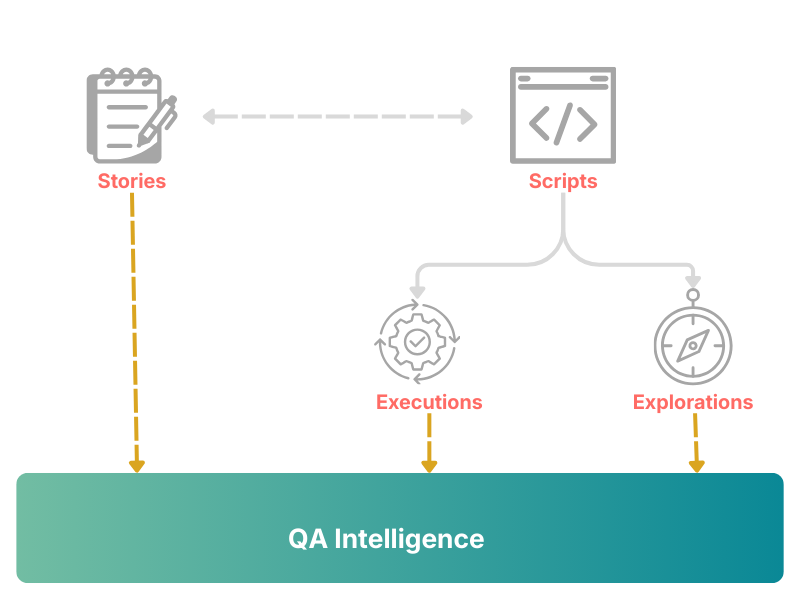
TestChimp consolidates test plans, tests, executions, and explorations into a single platform. Test plans are linked to tests via simple code comments in your SmartTests; explorations are run using those same tests, extending the linking to exploratory findings. This unified model unlocks rich QA intelligence insights across planning, automation, and exploratory testing - without the need of manually maintained spreadsheets, and juggling through multiple tools.
We also connect real user behaviour to your test efforts. Event emits collected by @testchimp/rum-js in production (and other environments) are tracked using the same event taxonomy during test executions. That lets TestChimp report test coverage over real user behaviours and deliver deeper QA intelligence: you can identify user frictions, dwell, and discovery issues, see which tests cover those pathways, and prioritize high-priority test gaps. Frequency metrics help you plan and prioritize test efforts. For a full picture of this capability, see TrueCoverage.
Organization in folders
Test plans and tests are organized in folders. This lets you organize your plans however you want - without being restricted by an arbitrary structure enforced by a SaaS, and get rolled up insights at any granularity. This lets different stakeholders get actionable insights that matter to them, without being drowned in noise.
Executions and exploratory runs
All insights are driven by test executions and exploratory runs. Each execution / exploration is tied to a specific environment and release. By default, TestChimp creates a QA environment and a default release; you can create additional environments and releases and, when running tests or explorations, specify which env and release to use.
Tests can also be run in your CI pipeline with the standard Playwright runner. You only need to install the Playwright TestChimp reporter plugin; it sends execution reports to the platform, and those executions are included in QA intelligence insights.
Execution scope
When viewing insights, you choose an Execution scope: environment + release + time range. Insights use only the executions and exploratory runs that fall within that scope.
Where to find QA intelligence
QA intelligence is surfaced across the platform:
| Surface | Description |
|---|---|
| Dashboard | Homepage (click the logo). High-level metrics and trends for test planning, test automation, and exploratory testing. |
| Atlas | App-structure view: screens and states, bugs in context, visual regression workflows. |
| InfiniTrace | QA Brain link explorer: walk stories, scenarios, tests, executions, events, releases, and explorations board by board. |
| Semantic Canvas | QA Brain similarity map: cluster stories, scenarios, SmartTests, issues, and events by meaning; link gaps and spot duplicates. |
| TrueCoverage | Test coverage over real user behaviour: event funnels, drop-off/dwell/discovery, and coverage gaps. |
| Test Planning → Insights tab | Insights for the plans in the selected folder/file: functional coverage and exploratory findings. |
| SmartTests → Insights tab | Insights for the tests in the selected folder/test file: execution history, plan coverage, exploratory bug summary. |
See the dedicated pages linked above for details on each surface.
FAQ
What drives QA Intel metrics?
Test executions, exploratory runs, linked scenario annotations, and instrumented user events within your chosen execution scope.
Where are insights surfaced?
Dashboard, Atlas, InfiniTrace and Semantic Canvas (QA Brain), TrueCoverage, Test Planning Insights, SmartTests Insights, and Bugs views.
Why folder organization matters?
Roll up metrics at any folder granularity so squads see signal without noise from unrelated product areas.
Does CI feed insights automatically?
Yes—@testchimp/playwright reports Playwright runs without a separate upload step when configured.