What is TestChimp?
TestChimp is an Agent-native QA platform that uses Test Plans, SmartTests, Exploratory Testing, and Atlas to deliver value across every phase of quality assurance — optimized for agentic involvement.
Core Components: Test Plans, SmartTests, Exploratory Testing, and Atlas
TestChimp consists of four interconnected components:
-
Test Plans: User stories and test scenarios maintained as plain markdown files in folders. Git versionable, agent-readable, with workflow management layered on top. Enables requirement traceability at any folder granularity.
-
SmartTests: Playwright scripts with AI-native steps (
ai.act,ai.verify,ai.extract) for agent-assisted execution when needed. Link tests to scenarios with simple comments for contextual insights. Serve as the foundation for both functional testing and guided exploratory testing. -
Exploratory Testing: AI-driven journeys through your application that identify bugs by analyzing DOM, screenshots, network activity, console logs, and browser metrics. Deterministically guided by SmartTests to catch visual, performance, security, usability, localization, accessibility and other UX issues that churn users.
-
Atlas: The knowledge base TestChimp builds during exploratory testing. Captures your application's structure (screens and states in the SiteMap) and behavior (navigation pathways in the Behaviour Map). Atlas provides context for insights keyed by screens — bugs found, visual regressions, performance metrics.
How they work together: Test Plans define what to test → SmartTests execute and guide exploration → Exploratory Testing builds Atlas and finds UX bugs → Atlas powers contextual insights across coverage, traceability, and screen-level analytics. This creates a continuous learning cycle that improves over time.
Value at Each Phase
| Phase | Component | Value |
|---|---|---|
| Planning | Test Plans | Agent-friendly requirements, Git versionable, folder-level insights |
| Execution | SmartTests | Deterministic scripts + agentic steps, linked to scenarios |
| Exploration | Exploratory Testing | Catch UX bugs that scripts miss, guided by functional tests |
| Insights | Atlas + Traceability | Coverage at any granularity, UX bug traceability, screen-keyed analytics |
Test Plans: Files + Workflow
Test Plans treat user stories and test scenarios as plain markdown files with frontmatter, organized in folders:
- Agent-readable: Dev and test agents can read and work on plans directly; folder structure gives proximity context.
- Git versionable: Sync to your repo so plans live alongside code; diff and review like any other file.
- Workflow on top: Status, priority, labels, and collaboration are layered on the platform without locking you into a proprietary format.
- Insights at any granularity: Requirement traceability rolls up coverage, gaps, and failures to any folder level; filters let you narrow (e.g., high-priority stories due next week).
You author stories and scenarios in Test Planning, optionally export to Git, and use the same artifacts for traceability and reporting.
SmartTests: Scripts + Agents
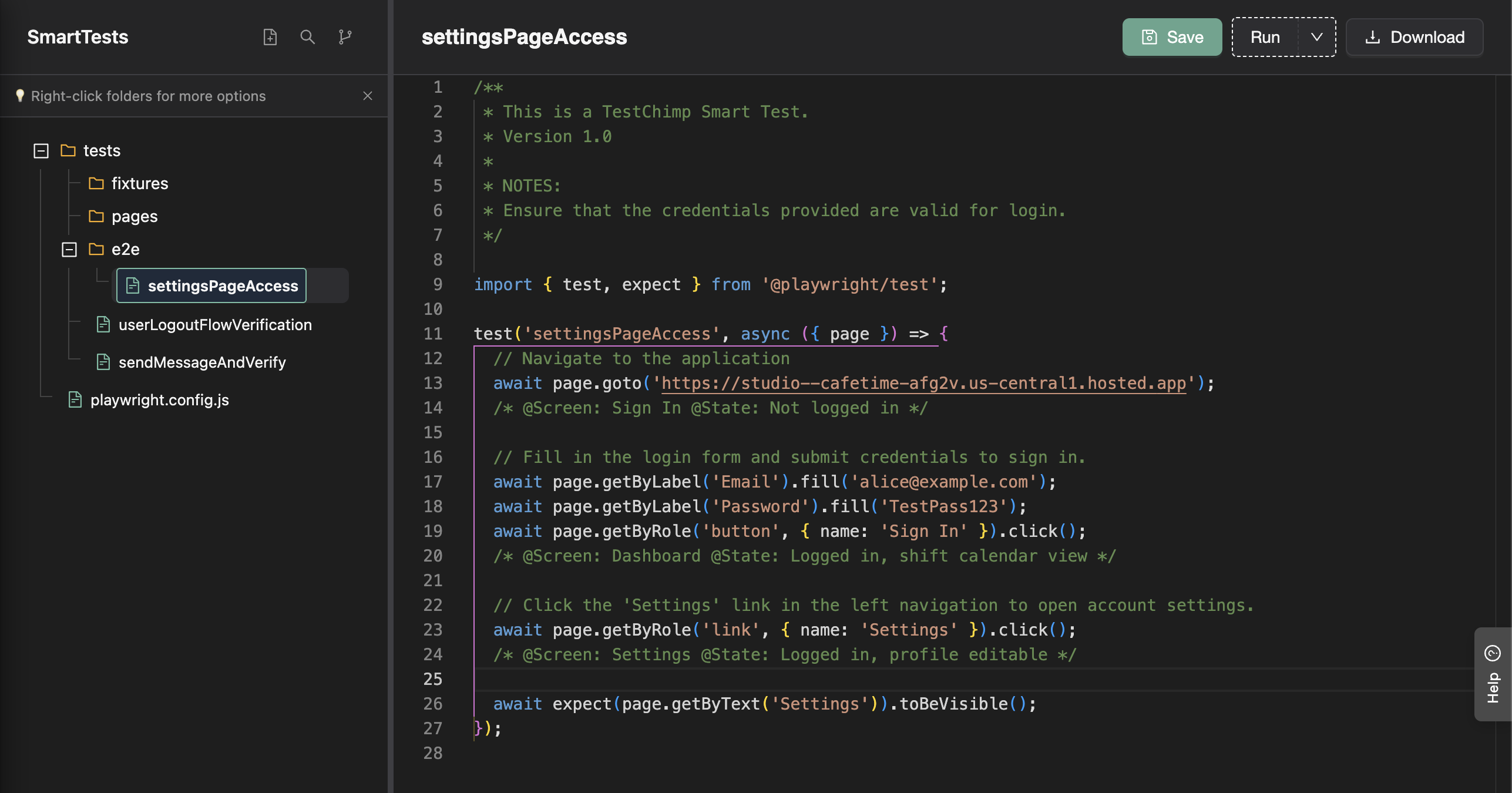
SmartTests are Playwright scripts optionally enhanced with:
- AI-native steps:
ai.act,ai.verify,ai.extractfor natural language actions and verifications - Intent comments: Human-readable descriptions for agentic fallback execution
- Screen-state annotations: Tags that identify where bugs occur in your application
They combine the speed and determinism of traditional test scripts with the adaptability of AI while guiding exploratory agents through your application.
Exploratory Testing: Guided by SmartTests
Exploratory Testing uses AI agents (ExploreChimp) to find UX bugs that automated scripts miss:
- Guided by SmartTests: Agents follow your test pathways instead of wandering; you get methodical coverage plus intelligent branching when issues appear.
- Multi-source analysis: DOM, screenshots, network, console, and browser metrics are analyzed to catch visual, performance, usability, accessibility, localization, and security issues.
- Bugs at screen-state: Every finding is tagged to the specific screen/state in Atlas, so you know exactly where to fix.
- Recipes: Choose a strategy (e.g., Bug Source Analytics, Theme Tester, Form Validation Tester) to focus the agent on the kind of issues you care about.
Exploratory testing bridges the gap between “scripts don’t see the screen” and “manual doesn’t scale.”
Atlas: Structure and Behavior
TestChimp builds knowledge in two key areas:
- Structure: The distinct screens and states of your application, captured in the Atlas
- Behavior: The navigational pathways through your app, captured in the Behaviour Map

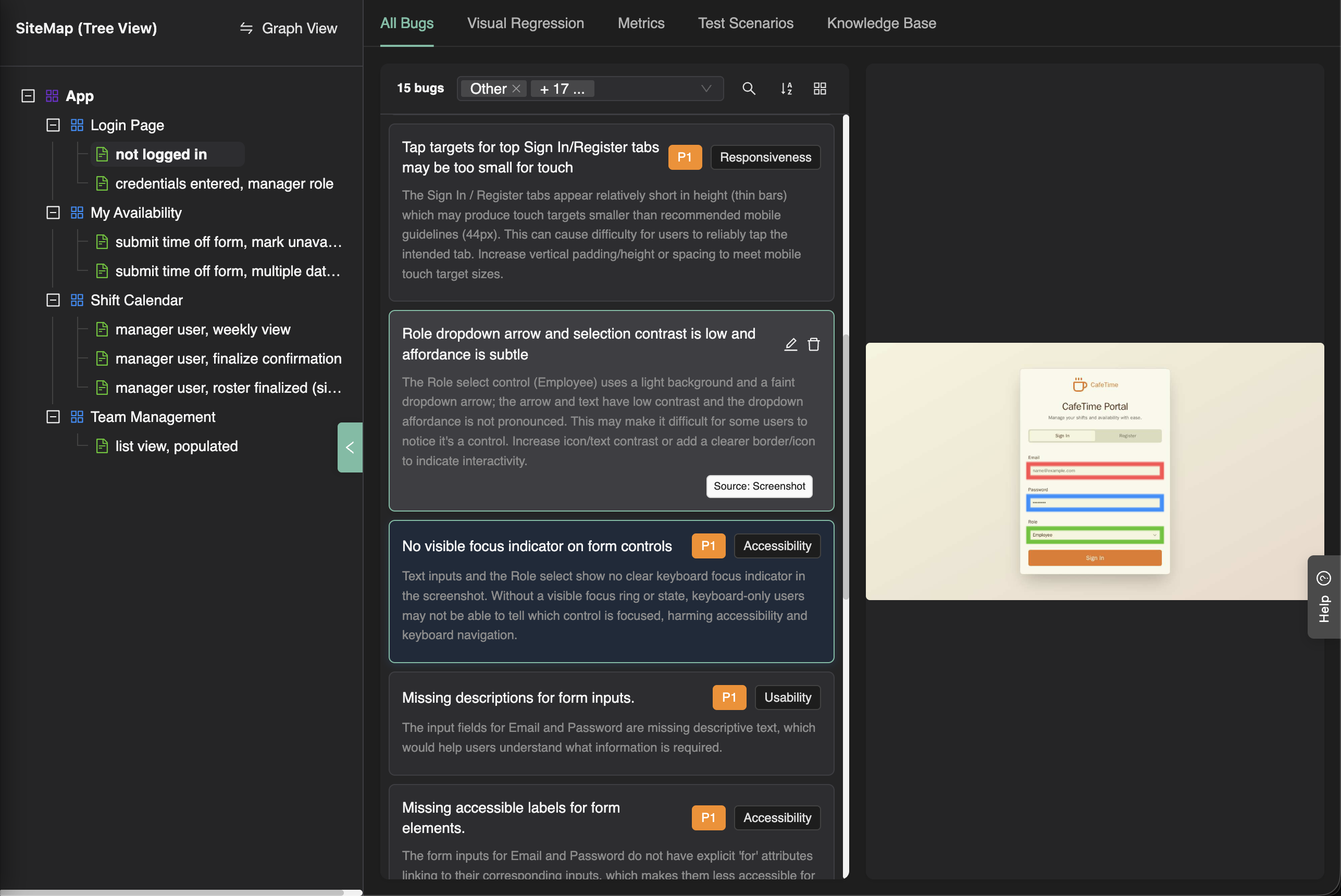
Collectively, this knowledge enables TestChimp to provide intelligent assistance and contextual insights across your QA workflow.