Theme Tester Recipe
In brief: The Theme Tester recipe repeats guided journeys under different themes to catch layout breaks, missing assets, and inconsistent styling startups ship with design systems.
The Theme Tester recipe is a specialized recipe that tests your application across different themes (e.g., light/dark mode) to identify visual inconsistencies and theme-specific issues.
Overview
This recipe guides ExploreChimp through your SmartTests while systematically testing different theme configurations. The agent analyzes visual appearance, layout, and functionality across themes to ensure consistency and identify theme-specific problems.
What This Recipe Does
During explorations using this recipe, ExploreChimp:
- Iterates through theme configurations (e.g., light mode, dark mode) for each selected SmartTest
- Navigates along paths defined by SmartTests for each theme variant
- Analyzes visual consistency across themes
- Identifies theme-specific issues such as:
- Color contrast problems
- Text visibility issues
- Missing theme-specific styling
- Layout breakages in specific themes
- Visual elements that don't adapt properly to theme changes
- Tags bugs at screen-state level with theme context
- Builds and updates the Atlas with theme-specific information
Configuration
When using the Theme Tester recipe, you can configure:
- SmartTest selection: Choose a specific test or test folder to guide the exploration
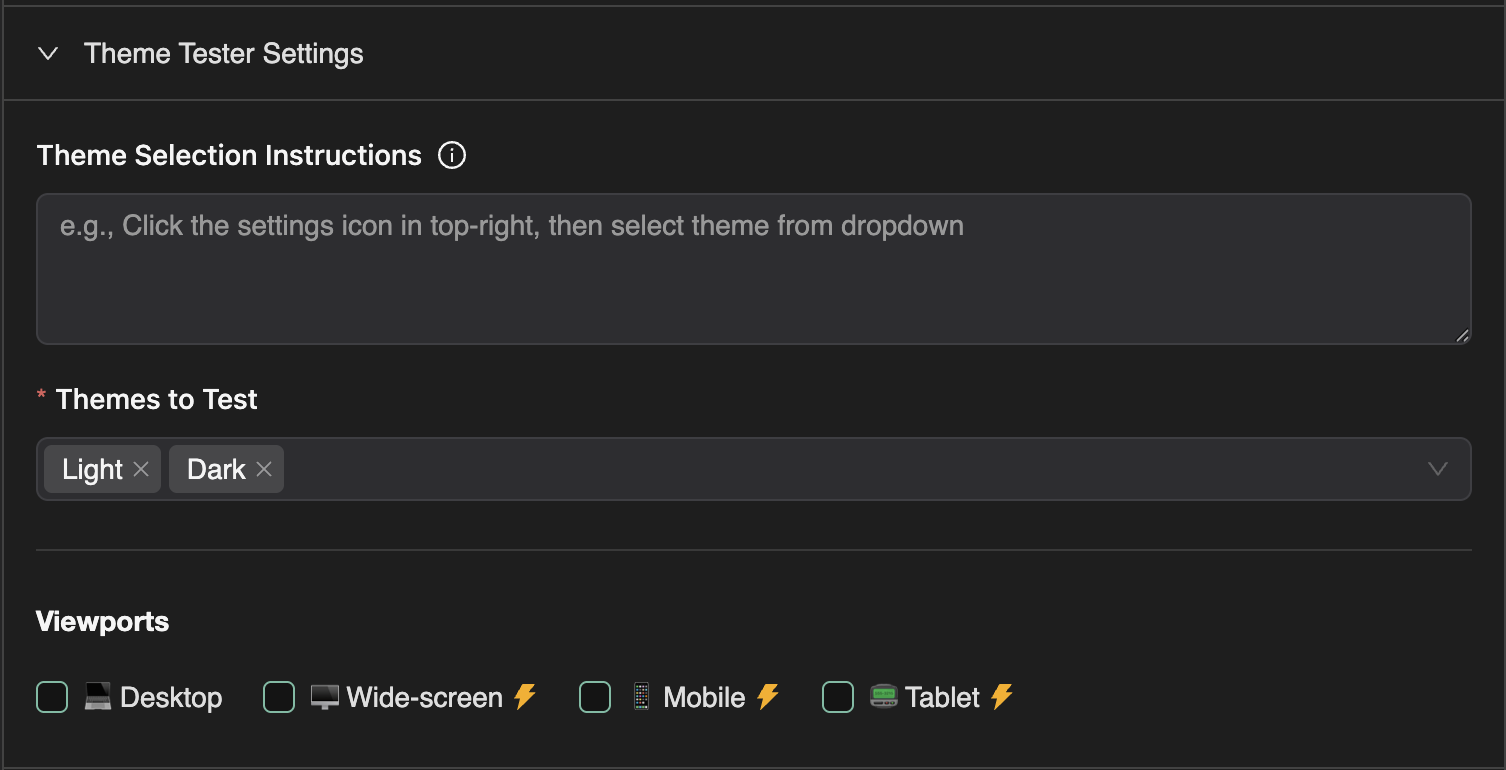
- Theme configurations: Select which themes to test (e.g., light, dark, high contrast)
- Theme Set Strategy: Choose how themes are applied to your application:
- Custom Action (default): The agent navigates to your app's settings and changes the theme agentically during the test execution
- Cookie: Set the theme via a cookie before the test starts
- Local Storage: Set the theme via localStorage after navigation
- Cookie Configuration (for Cookie strategy):
- Cookie Name: The name of the cookie that stores the theme preference
- Cookie Domain: The domain for the cookie (optional)
- Local Storage Key (for Local Storage strategy): The localStorage key that stores the theme preference
- Theme Selection Instructions (for Custom Action strategy): Optional instructions to help the agent locate and change theme settings in your app
- Default Viewports: Select which viewport sizes to test across
- Visual analysis settings: Configure screenshot analysis and visual regression testing
- Max credits: Set the maximum number of explorer credits to consume
- Max journeys: Set the maximum number of journeys to execute (each theme/test combination counts as a journey)
How It Works
- Test Selection: You select a SmartTest or test folder to guide the exploration
- Theme Iteration: For each selected test, ExploreChimp runs the test across each configured theme
- Theme Application: The theme is applied based on your selected strategy:
- Custom Action: The agent navigates to your app's settings, changes the theme using context-aware navigation, then returns to the original screen state
- Cookie: The theme cookie is set when the browser context is created, before the journey starts
- Local Storage: The theme value is set in localStorage after the initial page navigation
- Visual Analysis: At each screen-state, the agent captures screenshots and analyzes visual appearance
- Comparison: Visual elements are compared across themes to identify inconsistencies
- Bug Reporting: Theme-specific issues are flagged and tagged at the appropriate screen-states
When to Use This Recipe
Use the Theme Tester recipe when:
- Your application supports multiple themes (light/dark mode, high contrast, etc.)
- You want to ensure visual consistency across themes
- You need to identify theme-specific styling issues
- You want to verify that all UI elements adapt properly to theme changes
- You're preparing for a theme-related release or update
This recipe is particularly useful for applications with theme switching capabilities, ensuring that users have a consistent and visually appropriate experience regardless of their theme preference.
FAQ
How does Theme Tester switch themes?
It follows your SmartTest path while applying theme variations configured in exploration settings or app theme toggles.
Do I need separate SmartTests per theme?
No—one journey can be analyzed under multiple themes; the recipe focuses comparison analysis at screen-states.
What bugs are common?
Illegible contrast, icon visibility, overflow layouts, and components that ignore dark-mode tokens.