Localization Tester Recipe
In brief: The Localization Tester recipe exercises journeys across locales to surface dangling template strings, awkward translations, and locale-specific visual issues automated asserts miss.
The Localization Tester recipe is a specialized recipe that tests your application across different locales to identify visual and content issues specific to internationalization (i18n).
Overview
This recipe guides ExploreChimp through your SmartTests while systematically testing different locale configurations. The agent analyzes visual appearance, content, and functionality across locales to identify localization-specific problems such as broken translations, RTL layout issues, and text overflow.
What This Recipe Does
During explorations using this recipe, ExploreChimp:
- Iterates through locale configurations for each selected SmartTest
- Navigates along paths defined by SmartTests for each locale variant
- Changes locale using either browser settings or custom actions (navigating to settings)
- Analyzes screenshots for locale-specific issues at each screen-state
- Tags bugs at screen-state level with locale context
- Builds and updates the Atlas with locale-specific information
Types of Bugs Detected
The Localization Tester recipe identifies the following locale-specific issues:
- Broken Translations - Missing text, untranslated strings, or English text appearing in non-English locales
- Dangling Template Strings - Visible placeholders like
{{variable}},{0},%s, etc. that weren't replaced with actual translations - RTL (Right-to-Left) Issues - For Arabic/Hebrew locales: incorrect text direction, misaligned elements, icons positioned on the wrong side
- Text Overflow - Labels, buttons, or containers that are too small for translated text
- Date/Time/Number Format Issues - Incorrect format for locale (e.g., DD/MM vs MM/DD, wrong decimal separators)
- Currency Format Issues - Wrong currency symbol or format for the target locale
- Cultural Appropriateness - Content that may be inappropriate for the target culture
- Character Encoding Issues - Garbled text, boxes, or question marks instead of proper characters
- Text Truncation - Improperly truncated text with ellipsis where full text should be displayed
- Text Alignment Issues - Misaligned text or inconsistent alignment in the localized version
Configuration
When using the Localization Tester recipe, you can configure:
- SmartTest selection: Choose a specific test or test folder to guide the exploration
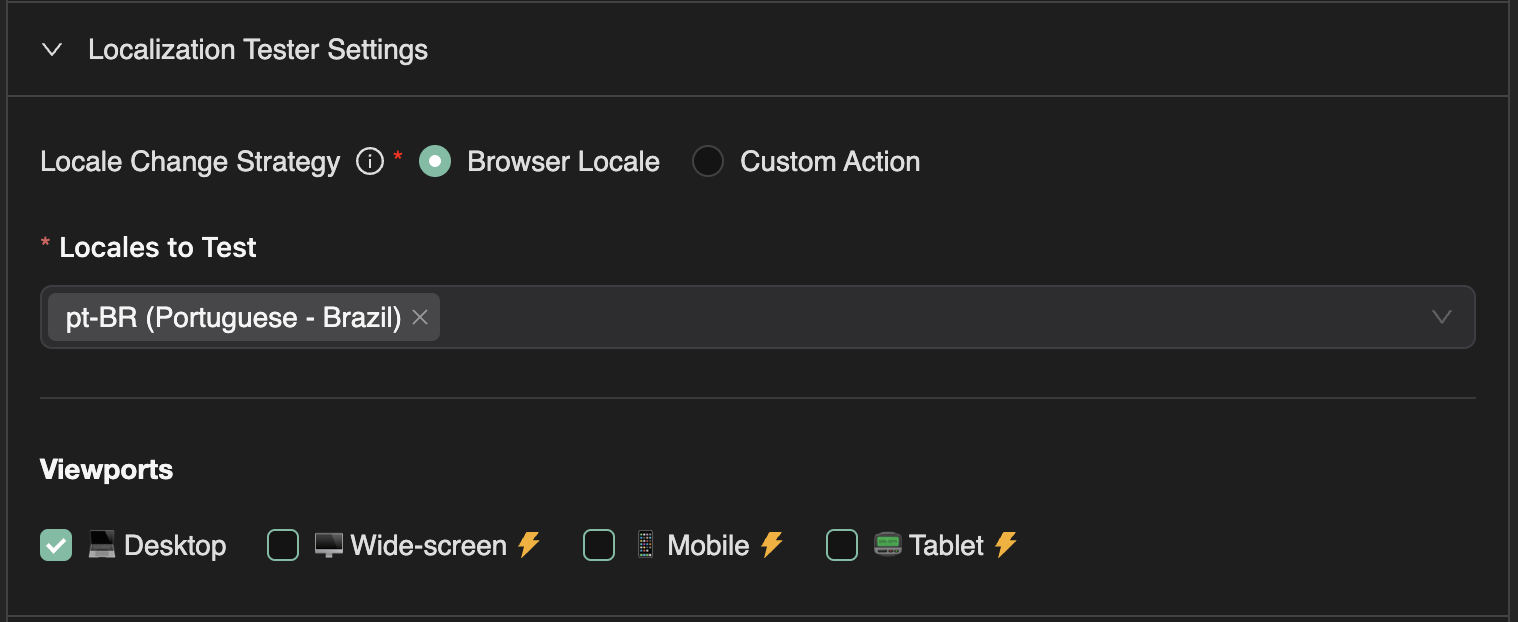
- Locales to test: Enter locale codes (e.g., en-US, es-ES, fr-FR, ar-SA) - you can use any valid locale string
- Locale Set Strategy: Choose how the locale is applied to your application:
- Browser Locale (default): The locale is set via Playwright browser settings before the test starts (no agentic intervention)
- Custom Action: The agent navigates to your app's settings and changes the locale agentically during the test execution
- Cookie: Set the locale via a cookie before the test starts
- Local Storage: Set the locale via localStorage after navigation
- Cookie Configuration (for Cookie strategy):
- Cookie Name: The name of the cookie that stores the locale preference
- Cookie Domain: The domain for the cookie (optional)
- Local Storage Key (for Local Storage strategy): The localStorage key that stores the locale preference
- Locale Change Instructions (for Custom Action strategy): Optional instructions to help the agent locate and change locale settings in your app
- Default Viewports: Select which viewport sizes to test across
- Max credits: Set the maximum number of explorer credits to consume
- Max journeys: Set the maximum number of journeys to execute (each locale/test combination counts as a journey)
How It Works
- Test Selection: You select a SmartTest or test folder to guide the exploration
- Locale Iteration: For each selected test, ExploreChimp runs the test across each configured locale
- Locale Application: The locale is applied based on your selected strategy:
- Browser Locale: The locale is set when the browser context is created, before the journey starts
- Custom Action: The agent navigates to your app's settings, changes the locale, then returns to the original screen state using context-aware navigation
- Cookie: The locale cookie is set when the browser context is created, before the journey starts
- Local Storage: The locale value is set in localStorage after the initial page navigation
- Screenshot Analysis: At each screen-state, the agent captures screenshots and analyzes them for all 10 types of locale-specific issues listed above
- Bug Reporting: Localization-specific issues are flagged and tagged at the appropriate screen-states with locale context
When to Use This Recipe
Use the Localization Tester recipe when:
- Your application supports multiple locales/languages
- You want to ensure content is properly translated and displayed
- You need to identify missing translations or template string issues
- You want to verify that UI layouts work correctly across different languages
- You're preparing for a localization release or update
- You need to test RTL (right-to-left) language support
This recipe is essential for applications with international users, ensuring that all locales are properly supported and that content displays correctly regardless of language.
FAQ
Which locales can I test?
Configure target locales supported by your app; journeys reuse SmartTests with locale switching at stable checkpoints.
Does this replace linguistic review?
It flags UX and engineering i18n defects fast; copy quality still benefits from native speaker review.
How are issues reported?
Bugs tag to screen-states with screenshot and DOM evidence in Atlas and QA Intel bugs views.